1. ഉൽപ്പന്നം കഴിഞ്ഞുview
The SKY TOPPOWER RT-937B is a 50W soldering station designed for various electronic work, repairs, and DIY projects. It features rapid heating, stable temperature control, and ESD (Electrostatic Discharge) safety measures for reliable operation.

Figure 1: Complete SKY TOPPOWER 50W Soldering Station RT-937B with included accessories.
2. സുരക്ഷാ നിർദ്ദേശങ്ങൾ
Please read and understand all safety instructions before operating the soldering station to prevent injury or damage to the equipment.
- ഉയർന്ന താപനില അപകടം: The soldering iron tip can reach temperatures between 200°C and 480°C. Avoid direct contact with the tip or heated components. Always place the iron in its stand when not in use.
- നേത്ര സംരക്ഷണം: Always wear safety glasses or goggles to protect your eyes from solder splashes and fumes.
- വെൻ്റിലേഷൻ: Use the soldering station in a well-ventilated area or with a fume extractor to avoid inhaling harmful solder fumes.
- ഇലക്ട്രിക്കൽ സുരക്ഷ: Ensure the power cord is undamaged and properly connected to a grounded outlet. Do not operate the station with wet hands or in damp വ്യവസ്ഥകൾ.
- ESD സംരക്ഷണം: The station features ESD-safe design. Handle static-sensitive components with appropriate precautions (e.g., anti-static wrist strap).
- കത്തുന്ന വസ്തുക്കൾ: Keep flammable materials away from the soldering area.
- കുട്ടികളും വളർത്തുമൃഗങ്ങളും: Keep the soldering station and all related tools out of reach of children and pets.
3. പാക്കേജ് ഉള്ളടക്കം
താഴെ ലിസ്റ്റ് ചെയ്തിരിക്കുന്ന എല്ലാ ഇനങ്ങളും നിങ്ങളുടെ പാക്കേജിൽ ഉൾപ്പെടുത്തിയിട്ടുണ്ടെന്ന് ഉറപ്പാക്കുക:
- 50W Soldering Station Unit
- സോൾഡറിംഗ് അയൺ ഹാൻഡിൽ
- സോൾഡറിംഗ് ഇരുമ്പ് സ്റ്റാൻഡ്
- 5 x Soldering Iron Tips (various shapes)
- Wet Sponge for tip cleaning
- Power Cord (Japanese standard plug)
4. സജ്ജീകരണം
- Place the Soldering Station: Position the main unit on a stable, heat-resistant surface in a well-ventilated area.
- Connect the Soldering Iron Handle: Insert the connector of the soldering iron handle firmly into the designated port on the front of the soldering station. Ensure it is securely fastened to prevent loosening during operation.
- Assemble the Soldering Iron Stand: Place the soldering iron stand in a convenient location near the station. Ensure the wet sponge is moistened and placed in its tray.
- പവർ ബന്ധിപ്പിക്കുക: Plug the power cord into the power input on the back of the soldering station, then connect the other end to a standard 110V AC, 60Hz power outlet.

Figure 2: Securely connect the soldering iron handle to the station's front port.
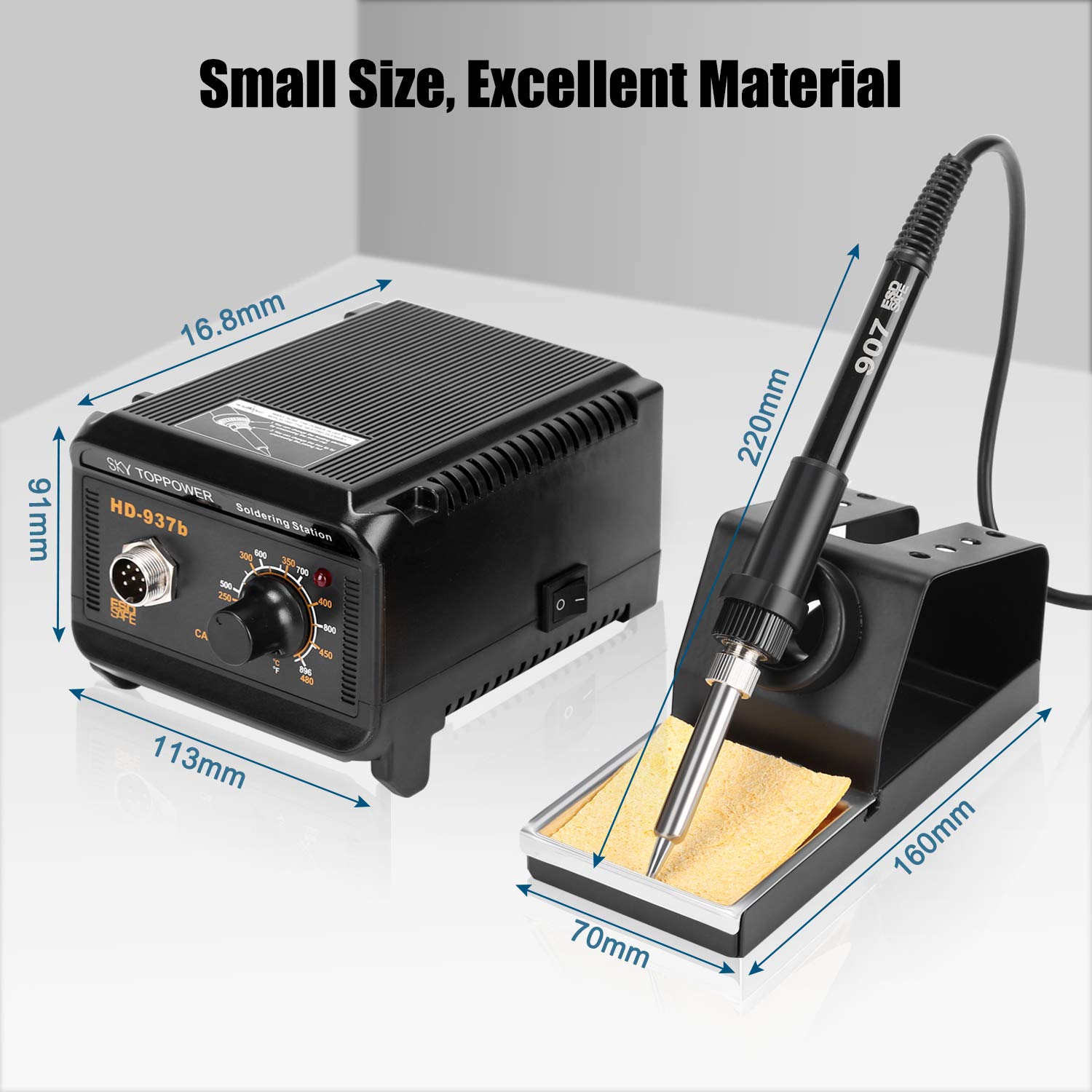
Figure 3: Connect the power cable to the station and a suitable power outlet.
5. പ്രവർത്തന നിർദ്ദേശങ്ങൾ
- പവർ ഓൺ: Flip the power switch located on the front or side of the main unit to the 'ON' position. The power constant temperature indicator will illuminate.
- താപനില സജ്ജമാക്കുക: Use the temperature adjustment knob on the front panel to set the desired temperature. The station supports a temperature range of 200°C to 480°C. The rapid heating technology allows the iron to reach 350°C (662°F) within 60 seconds.
- സോൾഡറിംഗ്: Once the desired temperature is reached and stable, you can begin soldering. The soldering iron handle is designed for comfortable long-term operation.
- ടിപ്പ് ക്ലീനിംഗ്: Regularly clean the soldering iron tip using the wet sponge provided in the stand. This helps maintain tip performance and longevity.
- ESD Safety: The separated ESD-safe main unit and iron stand allow for flexible placement on your workbench while providing protection against electrostatic discharge.
- വിശാലമായ ആപ്ലിക്കേഷനുകൾ: This soldering station is suitable for various tasks including circuit board assembly, electronic component work, switch soldering, electrical wiring, machine maintenance, repairs, automotive electronics, musical instrument wiring, jewelry making, and general DIY projects.

Figure 4: Adjust the temperature using the rotary knob on the front panel.

Figure 5: The soldering iron features a high-temperature resistant tip for efficient work.

Figure 6: The soldering station is versatile for a wide range of electronic and repair tasks.
6. പരിപാലനം
- Soldering Tip Care: Always tin the tip with a small amount of solder before storing it. This prevents oxidation and extends tip life. Replace tips when they become excessively worn or corroded.
- Sponge Maintenance: Keep the wet sponge clean and moist during use. Replace it if it becomes hardened or excessively dirty.
- പൊതുവായ ശുചീകരണം: Ensure the soldering station and iron handle are clean and free of solder debris. Use a dry cloth to wipe down the unit. Do not use abrasive cleaners or solvents.
7. പ്രശ്നപരിഹാരം
| പ്രശ്നം | സാധ്യമായ കാരണം | പരിഹാരം |
|---|---|---|
| Soldering iron not heating up | Power switch off, loose connection, faulty heating element/tip | Check power switch. Ensure all cables are securely connected. Replace soldering tip if damaged. If problem persists, contact support. |
| Temperature unstable or inaccurate | Improper tip seating, worn tip, environmental factors | Ensure tip is correctly installed. Clean or replace the tip. Allow the station to stabilize for a few minutes after setting temperature. |
| Solder not melting easily | Temperature too low, oxidized tip, incorrect solder type | Increase temperature setting. Clean and re-tin the soldering tip. Ensure you are using appropriate solder for the task. |
8 സ്പെസിഫിക്കേഷനുകൾ
| ഫീച്ചർ | സ്പെസിഫിക്കേഷൻ |
|---|---|
| നിർമ്മാതാവ് | സ്കൈ ടോപ്പവർ |
| മോഡൽ നമ്പർ | RT-937B (STP-937b-JP) |
| വാട്ട്tage | 50 W |
| വാല്യംtage | 110 വോൾട്ട് |
| താപനില പരിധി | 200°C - 480°C (392°F - 896°F) |
| പരമാവധി താപനില റേറ്റിംഗ് | 450°C |
| ഇനത്തിൻ്റെ ഭാരം | 1.72 കിലോഗ്രാം |
| പാക്കേജ് അളവുകൾ | 25.2 x 21.5 x 13.5 സെ.മീ |
| യു.പി.സി | 631112712620 |
9. വാറൻ്റിയും പിന്തുണയും
SKY TOPPOWER provides specialized technical support for its products. If you have any questions or encounter issues regarding the use of this product, please do not hesitate to contact SKY TOPPOWER customer service.
For warranty information, please refer to the specific terms and conditions provided at the time of purchase or contact the seller directly. Keep your purchase receipt as proof of purchase.


