1. ആമുഖം
വാങ്ങിയതിന് നന്ദി.asing the WIKICO 4K Digital Camera W02. This camera is designed for both photography and video recording, offering 4K video capabilities and 56MP photos. It features a 3-inch 180° flip screen, 16X digital zoom, and built-in Wi-Fi. This manual provides essential information for setting up, operating, and maintaining your camera to ensure optimal performance.
2 സുരക്ഷാ വിവരങ്ങൾ
- ക്യാമറ വെള്ളത്തിലോ ഈർപ്പത്തിലോ തുറന്നുകാട്ടരുത്.
- ക്യാമറ താഴെയിടുകയോ ശക്തമായ ആഘാതങ്ങൾക്ക് വിധേയമാക്കുകയോ ചെയ്യരുത്.
- ശക്തമായ കാന്തികക്ഷേത്രങ്ങളിൽ നിന്ന് ക്യാമറ അകറ്റി നിർത്തുക.
- Use only WIKICO-approved accessories and batteries.
- ക്യാമറ ഡിസ്അസംബ്ലിംഗ് ചെയ്യാനോ പരിഷ്കരിക്കാനോ ശ്രമിക്കരുത്.
- ഉപയോഗത്തിലില്ലാത്തപ്പോൾ തണുത്തതും വരണ്ടതുമായ സ്ഥലത്ത് ക്യാമറ സൂക്ഷിക്കുക.
3. പാക്കേജ് ഉള്ളടക്കം
താഴെ ലിസ്റ്റ് ചെയ്തിരിക്കുന്ന എല്ലാ ഇനങ്ങളും നിങ്ങളുടെ പാക്കേജിൽ ഉൾപ്പെടുത്തിയിട്ടുണ്ടെന്ന് ഉറപ്പാക്കുക:
- WIKICO 4K Digital Camera W02
- 52mm Wide Angle Lens
- മാക്രോ ലെൻസ്
- 32 ജിബി ടിഎഫ് കാർഡ്
- 2 x 1500mAh റീചാർജ് ചെയ്യാവുന്ന ബാറ്ററികൾ
- ബാറ്ററി ചാർജർ
- USB 2.0 ഡാറ്റ കേബിൾ
- ലെൻസ് ക്യാപ്
- ഉപയോക്തൃ മാനുവൽ

Figure 3.1: Included accessories with the WIKICO 4K Digital Camera W02.
4. ക്യാമറ ഓവർview
Familiarize yourself with the main components and controls of your camera.

ചിത്രം 4.1: മുൻഭാഗം view of the WIKICO 4K Digital Camera W02 with wide-angle lens attached.

ചിത്രം 4.2: പിൻഭാഗം view of the WIKICO 4K Digital Camera W02 showing the 180° flip screen.
4.1. നിയന്ത്രണങ്ങളും പോർട്ടുകളും
- പവർ ബട്ടൺ: ക്യാമറ ഓൺ/ഓഫ് ചെയ്യുന്നു.
- ഷട്ടർ ബട്ടൺ: Press halfway to focus, fully to capture photo/start video.
- മോഡ് ഡയൽ: Selects between photo, video, time-lapse, continuous shooting, and other modes.
- സൂം ബട്ടണുകൾ (T/W): ഡിജിറ്റൽ സൂം നിയന്ത്രിക്കുന്നു.
- ശരി ബട്ടൺ: മെനുകളിലെ തിരഞ്ഞെടുപ്പുകൾ സ്ഥിരീകരിക്കുന്നു.
- മെനു ബട്ടൺ: ക്യാമറ ക്രമീകരണങ്ങൾ ആക്സസ് ചെയ്യുന്നു.
- പ്ലേബാക്ക് ബട്ടൺ: പ്ലേബാക്ക് മോഡിലേക്ക് പ്രവേശിക്കുന്നു view പിടിച്ചെടുത്ത മാധ്യമങ്ങൾ.
- LED ഫിൽ ലൈറ്റ്: കുറഞ്ഞ വെളിച്ചത്തിൽ പ്രകാശം നൽകുന്നു.
- ഹോട്ട് ഷൂ: For external accessories like microphones.
- USB പോർട്ട്: ഡാറ്റ കൈമാറ്റത്തിനും ചാർജിംഗിനും.
- മൈക്രോഫോൺ ഇൻപുട്ട്: ബാഹ്യ മൈക്രോഫോണിനുള്ള 3.5 എംഎം ജാക്ക്.
- ട്രൈപോഡ് ത്രെഡ്: Standard ¼ inch thread for tripod mounting.
5. സജ്ജീകരണം
5.1. ബാറ്ററി ഇൻസ്റ്റാളേഷനും ചാർജിംഗും
- ക്യാമറയുടെ അടിയിൽ സ്ഥിതിചെയ്യുന്ന ബാറ്ററി കമ്പാർട്ട്മെന്റ് കവർ തുറക്കുക.
- Insert a fully charged 1500mAh battery, ensuring correct polarity.
- ബാറ്ററി കമ്പാർട്ട്മെൻ്റ് കവർ സുരക്ഷിതമായി അടയ്ക്കുക.
- To charge the battery, insert it into the provided battery charger. Connect the charger to a power source using the USB cable and wall adapter. The indicator light will show charging status.
- The camera supports recording while charging via AC power or a power bank.
5.2. മെമ്മറി കാർഡ് ഇൻസ്റ്റാളേഷൻ
- ക്യാമറയുടെ വശത്ത് TF കാർഡ് സ്ലോട്ട് കണ്ടെത്തുക.
- Insert the 32GB TF card (or another compatible Micro SD card, up to 128GB, Class 10 recommended) into the slot until it clicks into place.
- To remove, gently press the card inward until it pops out.
5.3. ലെൻസ് അറ്റാച്ച്മെന്റ്
- The camera comes with a standard mount lens. For wide-angle or macro photography, attach the included 52mm wide angle and macro lenses.
- Align the threads of the accessory lens with the camera's main lens.
- Gently screw the lens clockwise until it is securely attached.
- Ensure the lens cap is removed before use.

Figure 5.1: WIKICO 4K Digital Camera W02 with detachable wide angle and macro lenses.
6. ക്യാമറ പ്രവർത്തിപ്പിക്കുക
6.1. പവർ ഓൺ/ഓഫ്
Press and hold the Power Button to turn the camera on or off.
6.2. മോഡ് തിരഞ്ഞെടുക്കൽ
Rotate the Mode Dial on the top of the camera to select your desired shooting mode (e.g., Photo, Video, Time-lapse, Continuous Shooting, Silent Mode, Self-timer).

Figure 6.1: The mode dial on the WIKICO 4K Digital Camera W02 for selecting various functions.
6.3. ഫോട്ടോ എടുക്കൽ
- Select Photo mode using the Mode Dial.
- Frame your shot using the 3-inch flip screen.
- Press the Shutter Button halfway to focus, then fully press to capture the 56MP photo.
6.4. വീഡിയോകൾ റെക്കോർഡുചെയ്യുന്നു
- Select Video mode using the Mode Dial.
- Press the Shutter Button to start recording 4K (2160p) video at 30 frames per second.
- Press the Shutter Button again to stop recording.
- The camera supports a pause function during video recording.
6.5. സൂം ഫംഗ്ഷൻ
Use the T (telephoto) and W (wide) buttons to adjust the 16X digital zoom. Note that digital zoom may affect image quality.

Figure 6.2: Illustration of the 16X digital zoom capability.
6.6. Flash/Fill Light
The camera features a built-in LED fill light for improved illumination in dark environments. Activate it as needed through the camera settings or dedicated button.

Figure 6.3: The camera's LED fill light providing illumination in a low-light setting.
6.7. Webക്യാമറ മോഡ്
Connect the camera to your computer via the USB cable and select 'Webcam Mode' from the camera's menu. This allows you to use the camera for live streaming, video calls, or online meetings.
Figure 6.4: The WIKICO 4K Digital Camera W02 being used as a webcam for online communication.
6.8. വൈഫൈ പ്രവർത്തനം
Activate the built-in Wi-Fi function in the camera's settings to connect to your mobile phone. This enables instant sharing of photos and videos online.
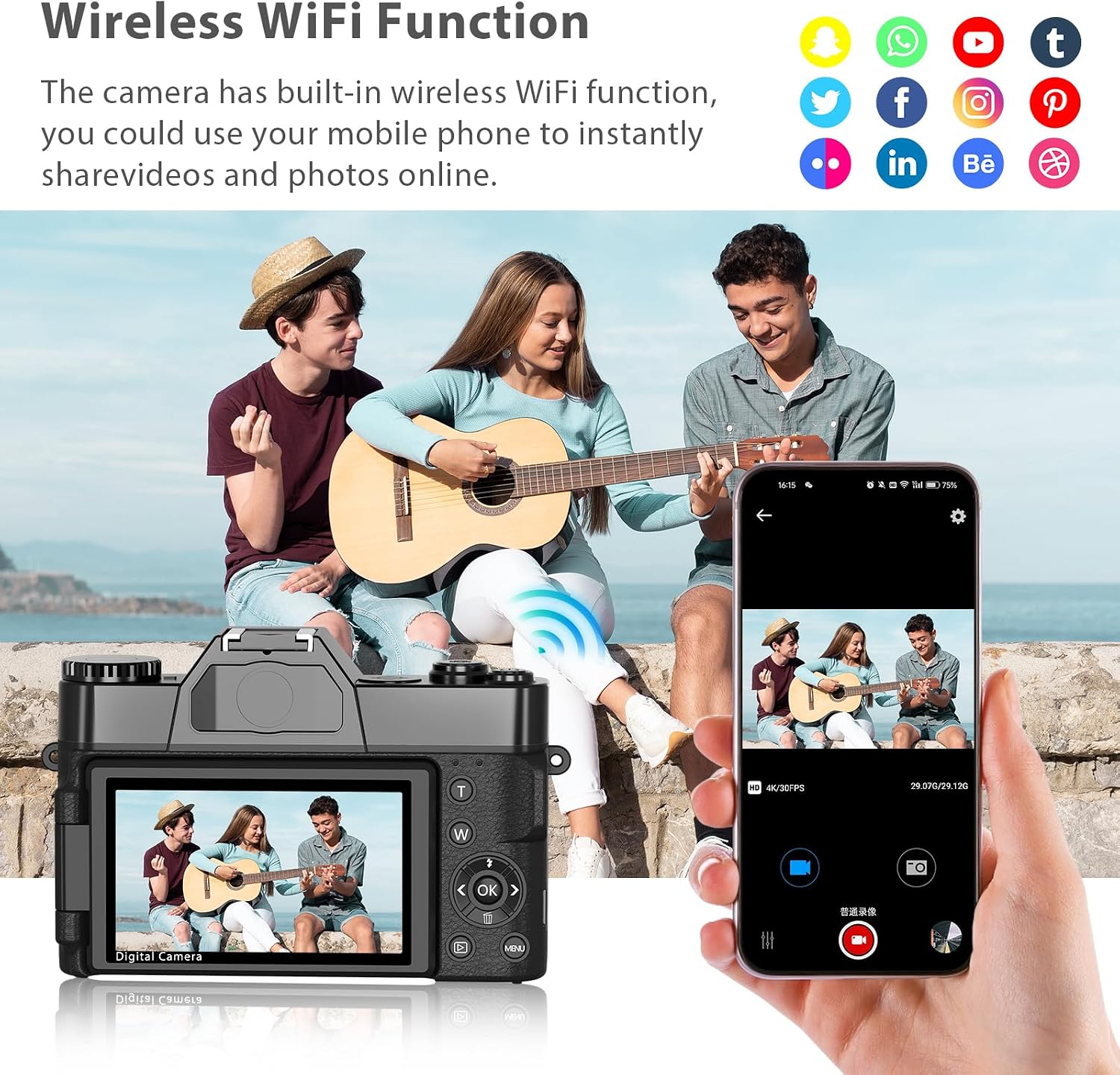
Figure 6.5: Demonstrating the wireless Wi-Fi function for sharing content to a mobile device.
6.9. Built-in Filters
Explore the variety of fun and artistic filters available in the camera's settings to add style and personality to your photos and videos.

ചിത്രം 6.6: ഉദാamples of various photography styles and filter effects available on the camera.
6.10. പ്ലേബാക്ക്
വീണ്ടും പ്ലേബാക്ക് ബട്ടൺ അമർത്തുകview your captured photos and videos on the camera's screen. Use the directional buttons to navigate through your media.
7. പരിപാലനം
7.1. വൃത്തിയാക്കൽ
- ക്യാമറ ബോഡി വൃത്തിയാക്കാൻ മൃദുവായതും ഉണങ്ങിയതുമായ തുണി ഉപയോഗിക്കുക.
- ലെൻസിന്, ഒരു പ്രത്യേക ലെൻസ് ക്ലീനിംഗ് തുണിയും ലായനിയും ഉപയോഗിക്കുക. നിങ്ങളുടെ വിരലുകൾ കൊണ്ട് ലെൻസ് പ്രതലത്തിൽ സ്പർശിക്കുന്നത് ഒഴിവാക്കുക.
- കഠിനമായ രാസവസ്തുക്കളോ ഉരച്ചിലുകളോ ഉപയോഗിക്കരുത്.
7.2. ബാറ്ററി പരിചരണം
- ആദ്യ ഉപയോഗത്തിന് മുമ്പ് ബാറ്ററികൾ പൂർണ്ണമായും ചാർജ് ചെയ്യുക.
- ക്യാമറ കൂടുതൽ നേരം ഉപയോഗിക്കുന്നില്ലെങ്കിൽ ബാറ്ററികൾ നീക്കം ചെയ്യുക.
- തണുത്തതും വരണ്ടതുമായ സ്ഥലത്ത് ബാറ്ററികൾ സൂക്ഷിക്കുക.
7.3. സംഭരണം
When storing the camera, ensure it is powered off, batteries are removed, and the lens cap is on. Store in a protective case to prevent dust and scratches.
8. പ്രശ്നപരിഹാരം
| പ്രശ്നം | സാധ്യമായ കാരണം | പരിഹാരം |
|---|---|---|
| ക്യാമറ പവർ ഓൺ ചെയ്യുന്നില്ല. | കുറഞ്ഞ അല്ലെങ്കിൽ ക്ഷയിച്ച ബാറ്ററി | Charge the battery or replace with a fully charged one. |
| ഫോട്ടോകൾ/വീഡിയോകൾ എടുക്കാൻ കഴിയില്ല | Memory card full or not inserted correctly | Insert a new/empty memory card or reinsert the existing one. Format the card if necessary (this will erase all data). |
| മോശം ഇമേജ്/വീഡിയോ നിലവാരം | Low light, digital zoom, dirty lens | Use the LED fill light, avoid excessive digital zoom, clean the lens. |
| Wi-Fi കണക്ഷൻ പ്രശ്നങ്ങൾ | Incorrect settings, interference | Ensure Wi-Fi is enabled on both camera and mobile device. Check for interference. |
9 സ്പെസിഫിക്കേഷനുകൾ
| ഫീച്ചർ | വിശദാംശങ്ങൾ |
|---|---|
| ബ്രാൻഡ് | വിക്കികോ |
| മോഡലിൻ്റെ പേര് | W02 |
| ഫലപ്രദമായ സ്റ്റിൽ റെസല്യൂഷൻ | 56 എം.പി |
| വീഡിയോ റെസല്യൂഷൻ | 4K (2160p) |
| ഫ്രെയിം റേറ്റ് | 30fps |
| ഡിജിറ്റൽ സൂം | 16 x |
| സ്ക്രീൻ വലിപ്പം | 3 Inches (180° Flip Screen) |
| ലെൻസ് തരം | Macro, Wide Angle (52mm) |
| കണക്റ്റിവിറ്റി ടെക്നോളജി | USB, Wi-Fi, HDMI |
| ഫ്ലാഷ് മെമ്മറി തരം | Micro SD (up to 128 GB, Class 10) |
| ബാറ്ററികൾ | 2 x 1500mAh Lithium Ion |
| ഇനത്തിൻ്റെ ഭാരം | 230 ഗ്രാം |
| പ്രത്യേക സവിശേഷതകൾ | Time-lapse, Continuous Shooting, Video Pause, Loop Recording, Silent Mode, Self-timer, Webcam Function, Built-in Filters |
10. വാറൻ്റിയും പിന്തുണയും
WIKICO is committed to providing high-quality products and customer satisfaction. For any inquiries or support needs, please contact our customer service team. We offer:
- Lifetime 24-hour Responsive Customer Support.
- Free accessory replacement within one year of purchase.
- Online consultation and support for any issues you may encounter.
വാറൻ്റി ക്ലെയിമുകൾക്കായി നിങ്ങളുടെ വാങ്ങിയതിൻ്റെ തെളിവ് സൂക്ഷിക്കുക.
Video 10.1: Official WIKICO video demonstrating the 4K Vlogging Camera features and capabilities.


