ആമുഖം
This manual provides detailed instructions for the safe and efficient operation of your Fosmon 7 Day Digital Outlet Timer. This device is designed to automate the power supply to various indoor electrical appliances, offering programmable on/off cycles over a 7-day period, including a random function for enhanced security. Please read this manual thoroughly before use and retain it for future reference.

Image: Two Fosmon 7 Day Digital Outlet Timers, showcasing their compact design and digital interface.
സുരക്ഷാ വിവരങ്ങൾ
- ഇൻഡോർ ഉപയോഗത്തിന് മാത്രം. ഈർപ്പമോ തീവ്രമായ താപനിലയോ ഏൽക്കരുത്.
- പരമാവധി ലോഡ് കപ്പാസിറ്റി 15A/1875W കവിയരുത്.
- ടൈമർ ഒരു ഗ്രൗണ്ടഡ് ഔട്ട്ലെറ്റിൽ സുരക്ഷിതമായി പ്ലഗ് ചെയ്തിട്ടുണ്ടെന്ന് ഉറപ്പാക്കുക.
- ഉപകരണം വേർപെടുത്തുകയോ നന്നാക്കാൻ ശ്രമിക്കുകയോ ചെയ്യരുത്. സഹായത്തിനായി ഉപഭോക്തൃ പിന്തുണയുമായി ബന്ധപ്പെടുക.
- കുട്ടികൾക്ക് ലഭ്യമാകാതെ സൂക്ഷിക്കുക.
- വൃത്തിയാക്കുന്നതിന് മുമ്പ് വാൾ ഔട്ട്ലെറ്റിൽ നിന്ന് ടൈമർ അൺപ്ലഗ് ചെയ്യുക.
ഉൽപ്പന്നം കഴിഞ്ഞുview
The Fosmon 7 Day Digital Outlet Timer features a clear digital display and intuitive buttons for programming. It includes two grounded outlets, allowing control of two devices simultaneously. A built-in battery backup retains settings during power outages.
പ്രധാന സവിശേഷതകൾ:
- 8 Individual Programs: Set up to 8 distinct ON/OFF cycles daily or weekly.
- Random Function: Activates lights or devices at random intervals to simulate occupancy.
- ഡ്യുവൽ ഗ്രൗണ്ടഡ് ഔട്ട്ലെറ്റുകൾ: Control two devices from a single timer.
- ബാറ്ററി ബാക്കപ്പ്: Retains programmed settings during power interruptions.
- കോംപാക്റ്റ് ഡിസൈൻ: Minimizes obstruction of adjacent outlets.

Image: The timer's compact design and key features such as automatic operation and battery backup.

Image: The timer in a kitchen setting, demonstrating its user-friendly interface and application with common appliances.
സജ്ജമാക്കുക
- പ്രാരംഭ ചാർജ്: Plug the timer into a live electrical outlet for at least 30 minutes to charge the internal battery. The display will activate.
- ടൈമർ പുനഃസജ്ജമാക്കുന്നു: If the display is erratic or unresponsive, use a pointed object (like a pen tip) to press the recessed പുനഃസജ്ജമാക്കുക button located on the front panel. This will clear all previous settings.
- നിലവിലെ സമയം ക്രമീകരിക്കുക:
- അമർത്തിപ്പിടിക്കുക ക്ലോക്ക് ബട്ടൺ.
- പിടിക്കുമ്പോൾ ക്ലോക്ക്, അമർത്തുക ആഴ്ച ആഴ്ചയിലെ നിലവിലെ ദിവസം സജ്ജീകരിക്കാൻ.
- പിടിക്കുമ്പോൾ ക്ലോക്ക്, അമർത്തുക മണിക്കൂർ to set the current hour (AM/PM will adjust automatically).
- പിടിക്കുമ്പോൾ ക്ലോക്ക്, അമർത്തുക MIN നിലവിലെ മിനിറ്റ് സജ്ജമാക്കാൻ.
- റിലീസ് ചെയ്യുക ക്ലോക്ക് button. The current time is now set.
ചിത്രം: വിശദമായ ഒരു ചിത്രം view of the timer's digital display and programming buttons.
പ്രവർത്തന നിർദ്ദേശങ്ങൾ
Programming ON/OFF Cycles (Up to 8 Programs):
- അമർത്തുക PROG button once. The display will show "1 ON". This is your first ON program.
- അമർത്തുക ആഴ്ച to select the day(s) for this program. Options include individual days, weekdays, weekends, or all 7 days.
- അമർത്തുക മണിക്കൂർ ഒപ്പം MIN to set the desired ON time.
- അമർത്തുക PROG again. The display will show "1 OFF". This is your first OFF program.
- അമർത്തുക ആഴ്ച to select the day(s) for this OFF program (usually matching the ON program).
- അമർത്തുക മണിക്കൂർ ഒപ്പം MIN to set the desired OFF time.
- Repeat steps 1-6 for additional programs (2 ON/OFF through 8 ON/OFF). Press PROG to cycle through programs.
- ആവശ്യമുള്ള എല്ലാ പ്രോഗ്രാമുകളും സജ്ജീകരിച്ച ശേഷം, അമർത്തുക ക്ലോക്ക് നിലവിലെ സമയ പ്രദർശനത്തിലേക്ക് മടങ്ങാൻ ബട്ടൺ.

ചിത്രം: ഉദാamples of setting multiple ON/OFF programs for various days of the week.

Image: User interaction with the timer's buttons during programming.
Manual Override Modes:
അമർത്തുക മാനുവൽ ഇനിപ്പറയുന്ന മോഡുകളിലൂടെ സൈക്കിൾ ചെയ്യാനുള്ള ബട്ടൺ:
- ഓൺ: The connected device will remain ON indefinitely.
- ഓഫാണ്: The connected device will remain OFF indefinitely.
- സ്വയമേവ: The timer will operate according to the programmed ON/OFF cycles. This is the standard operating mode.
Random Function:
The random function is designed to deter potential intruders by turning connected lights or devices ON and OFF at irregular intervals. This function only works when the timer is in ഓട്ടോ മോഡ്.
- To activate the random function, press the R button. An "R" will appear on the display.
- നിർജ്ജീവമാക്കാൻ, അമർത്തുക R button again. The "R" will disappear.
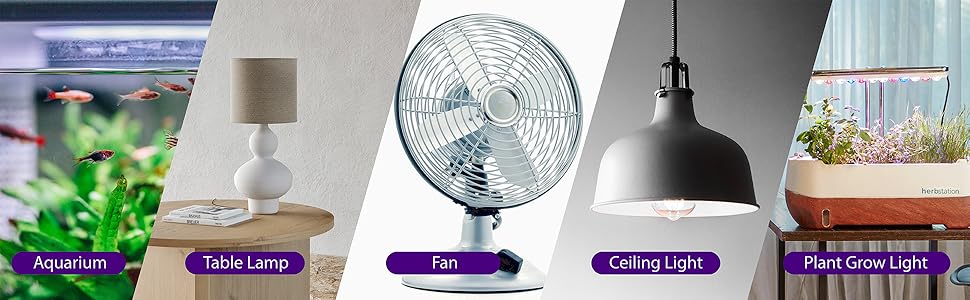
Image: The random function helps enhance home security by simulating occupancy.
മെയിൻ്റനൻസ്
- Clean the timer with a dry, soft cloth. Do not use liquid cleaners or aerosols.
- Ensure the timer is unplugged before cleaning.
- ഉപയോഗത്തിലില്ലാത്തപ്പോൾ തണുത്തതും ഉണങ്ങിയതുമായ സ്ഥലത്ത് സൂക്ഷിക്കുക.
ട്രബിൾഷൂട്ടിംഗ്
| പ്രശ്നം | സാധ്യമായ കാരണം | പരിഹാരം |
|---|---|---|
| ഡിസ്പ്ലേ ശൂന്യമാണ് അല്ലെങ്കിൽ ക്രമരഹിതമാണ്. | Internal battery is low or needs reset. | Plug the timer into a live outlet for 30 minutes to charge. Press the പുനഃസജ്ജമാക്കുക ബട്ടൺ. |
| പ്രോഗ്രാം ചെയ്ത സമയങ്ങളിൽ ഉപകരണം ഓൺ/ഓഫ് ആകുന്നില്ല. | Timer is not in ഓട്ടോ mode, or program is incorrect. | അമർത്തുക മാനുവൽ until "AUTO" is displayed. Verify program settings (ON/OFF times, days). |
| Random function is not working. | Timer is not in ഓട്ടോ mode, or random function is not activated. | Ensure timer is in ഓട്ടോ മോഡ്. അമർത്തുക R button to activate (an "R" should appear). |
| Connected device is not receiving power. | Timer is OFF, or device is faulty. | ടൈമർ ഓണാണോ എന്ന് പരിശോധിക്കുക ON or ഓട്ടോ mode with an active ON program. Test the connected device in a different outlet. |
സ്പെസിഫിക്കേഷനുകൾ
- മോഡൽ നമ്പർ: C-10800FCUS
- വാല്യംtage: 125V എസി
- നിലവിലുള്ളത്: 15എ
- വാട്ട്tage: 1875W
- ഔട്ട്ലെറ്റുകൾ: 2 ഗ്രൗണ്ടഡ് ഔട്ട്ലെറ്റുകൾ
- പ്രോഗ്രാമുകൾ: 8 ഓൺ/ഓഫ് പ്രോഗ്രാമുകൾ
- ബാറ്ററി: Nonstandard Battery (included, non-replaceable)
- അളവുകൾ: ഏകദേശം 3.5 x 3.5 x 1.7 ഇഞ്ച് (88.9 x 88.9 x 43.5 മിമി)
- സർട്ടിഫിക്കേഷനുകൾ: ETL ലിസ്റ്റുചെയ്തിരിക്കുന്നു

Image: Physical dimensions and ETL certification details of the timer.
വാറൻ്റിയും പിന്തുണയും
Fosmon provides a പരിമിതമായ ആജീവനാന്ത വാറൻ്റി for this product. This warranty covers defects in materials and workmanship under normal use. For warranty claims or technical support, please contact Fosmon customer service.
ഉപഭോക്തൃ പിന്തുണ: Refer to the official Fosmon website or product packaging for contact information.


