1. ആമുഖം
This manual provides essential information for setting up, operating, and maintaining your TRIGKEY S5 5850U Mini PC. Please read it thoroughly before using the device to ensure optimal performance and longevity.
Video: TRIGKEY 5850U Mini PC Overview. ഈ വീഡിയോയിൽ ഒരു പൊതുവായ വിവരണം നൽകുന്നു.view of the TRIGKEY S5 5850U Mini PC's features and design.
2. ഉൽപ്പന്നം കഴിഞ്ഞുview
The TRIGKEY S5 5850U Mini PC is a compact desktop computer designed for various applications, including office work, multimedia, and light gaming. It features an AMD Ryzen 7 Pro 5850U processor, DDR4 RAM, and M.2 NVMe SSD storage.
2.1 പ്രധാന സവിശേഷതകൾ
- പ്രോസസ്സർ: AMD Ryzen™ 7 Pro 5850U (8 Cores, 16 Threads, up to 4.4GHz)
- ഗ്രാഫിക്സ്: Integrated AMD Radeon™ Graphics (2000MHz)
- മെമ്മറി: 16GB DDR4 RAM (expandable up to 64GB via SO-DIMM slots)
- സംഭരണം: 500GB M.2 2280 NVMe SSD (expandable up to 2TB)
- ഓപ്പറേറ്റിംഗ് സിസ്റ്റം: വിൻഡോസ് 11 പ്രോ
- കണക്റ്റിവിറ്റി: Wi-Fi 6 (802.11ax), Bluetooth 5.2, Gigabit Ethernet
- ഡിസ്പ്ലേ ഔട്ട്പുട്ട്: Triple display support via DP, HDMI, and Type-C (4K@60Hz)
- അളവുകൾ: 126mm x 113mm x 42mm (4.96 x 4.45 x 1.57 ഇഞ്ച്)
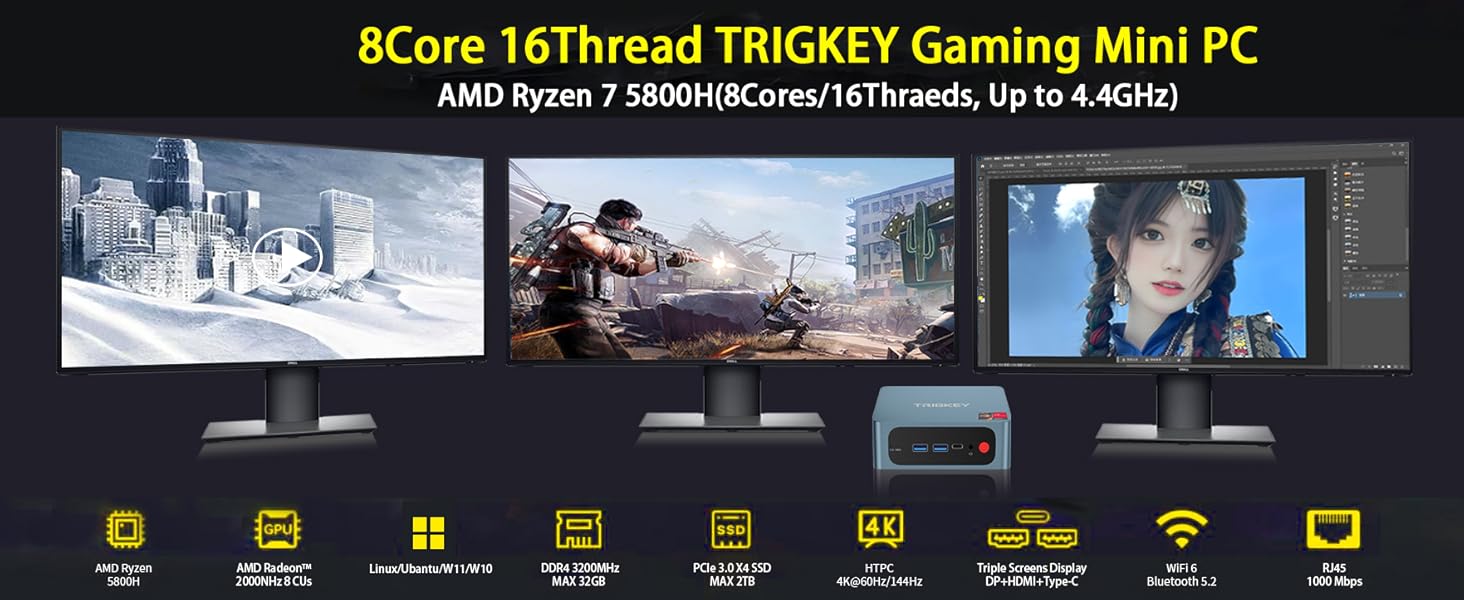
Image: The TRIGKEY S5 Mini PC connected to three external monitors, demonstrating its multi-screen display capability for various tasks like office work, design, and gaming.
2.2 പോർട്ടുകളും ഇന്റർഫേസുകളും

ചിത്രം: വിശദമായത് view of the TRIGKEY S5 Mini PC's front and rear ports. Front ports include RTC Key, USB 3.2 Gen 2, Type-C, Earphone jack, and Power button. Rear ports include LAN (1000M), USB 2.0, USB 3.2 Gen 2, DP 1.4, HDMI (4K HD), and DC power adapter input.
- ഫ്രണ്ട് പോർട്ടുകൾ:
- 1x CLR CMOS (RTC Key)
- 2x USB 3.2 Gen 2
- 1x Type-C (Data & Video)
- 1x Earphone Jack (HP&MIC)
- 1x പവർ ബട്ടൺ
- പിൻ തുറമുഖങ്ങൾ:
- 1x LAN (1000M)
- 2x USB 3.2 Gen 2
- 1x USB 2.0
- 1x ഡിസ്പ്ലേ പോർട്ട് 1.4
- 1x HDMI (4K HD)
- 1x DC Power Input
3. സജ്ജീകരണം
3.1 പ്രാരംഭ പവർ ഓൺ
- Connect the power adapter to the DC input port on the rear of the Mini PC.
- Connect your monitor(s) to the HDMI, DisplayPort, or Type-C video output ports.
- ലഭ്യമായ യുഎസ്ബി പോർട്ടുകളിലേക്ക് നിങ്ങളുടെ കീബോർഡും മൗസും ബന്ധിപ്പിക്കുക.
- Press the power button on the front of the Mini PC. The device will boot up and display the operating system.
3.2 BIOS Configuration
To access the BIOS settings, power on the computer and repeatedly press the 'Delete' key during startup. This allows you to configure boot options, system settings, and other advanced features.
Video: How to Update the BIOS System. This video demonstrates how to enter the BIOS, navigate through settings, and save changes. It is useful for configuring boot order or other system parameters.
4. Hardware Installation and Upgrades
The TRIGKEY S5 Mini PC supports storage and memory upgrades. Always power off and unplug the device before performing any internal hardware changes.
4.1 Installing a 2.5-inch HDD/SSD
The Mini PC includes a bracket for installing a 2.5-inch SATA HDD or SSD.
- Unscrew the bottom plate of the Mini PC.
- Carefully detach the bottom plate, which includes the HDD/SSD mounting bracket.
- Mount your 2.5-inch SATA drive onto the bracket using the provided screws.
- Connect the SATA data and power cable from the Mini PC to your newly installed drive.
- Reattach the bottom plate and secure it with screws.
Video: How to Install HDD. This video demonstrates the step-by-step process of installing a 2.5-inch HDD into the TRIGKEY Mini PC.
4.2 Upgrading M.2 NVMe SSD
The Mini PC comes with a pre-installed M.2 2280 NVMe SSD and supports expansion up to 2TB. An additional M.2 2242 SATA slot is also available.
- Unscrew the bottom plate of the Mini PC.
- മദർബോർഡിൽ M.2 സ്ലോട്ട് കണ്ടെത്തുക.
- Carefully insert the new M.2 NVMe SSD into the slot at an angle and secure it with the retaining screw.
- Reattach the bottom plate and secure it with screws.

ചിത്രം: ഒരു ക്ലോസ്-അപ്പ് view of an M.2 NVMe SSD installed within the Mini PC, highlighting its compact form factor and direct connection to the motherboard.
4.3 റാം അപ്ഗ്രേഡ്
The Mini PC has two SO-DIMM DDR4 slots, supporting dual-channel memory and expandable up to 64GB (e.g., 2x 32GB modules).
- Unscrew the bottom plate of the Mini PC.
- മദർബോർഡിൽ SO-DIMM സ്ലോട്ടുകൾ കണ്ടെത്തുക.
- Gently push the retaining clips outwards to release the existing RAM module (if any).
- Insert the new DDR4 SO-DIMM module(s) into the slot(s) at an angle and push down until the clips snap into place.
- Reattach the bottom plate and secure it with screws.

Image: Two DDR4 SO-DIMM RAM modules, illustrating the type of memory compatible with the Mini PC for upgrades.
5. പ്രവർത്തന നിർദ്ദേശങ്ങൾ
5.1 അടിസ്ഥാന പ്രവർത്തനം
- പവർ ഓൺ/ഓഫ്: Press the red power button on the front panel.
- പുനരാരംഭിക്കുക: Use the operating system's restart option.
- സ്ലീപ്പ് മോഡ്: Use the operating system's sleep option.
5.2 Multi-Screen Display
The Mini PC supports connecting up to three displays simultaneously using the HDMI, DisplayPort, and Type-C outputs. This allows for extended desktop environments, enhancing productivity or entertainment.
- Connect your monitors to the available video output ports (HDMI, DP, Type-C).
- Power on the Mini PC and monitors.
- Once Windows 11 Pro loads, right-click on the desktop and select 'Display settings' to configure your multi-monitor setup (e.g., extend, duplicate).

Image: The TRIGKEY S5 Mini PC powering a triple-monitor setup, showcasing its capability for multi-screen display in an office environment.
6 സ്പെസിഫിക്കേഷനുകൾ
| ഫീച്ചർ | സ്പെസിഫിക്കേഷൻ |
|---|---|
| ബ്രാൻഡ് | ട്രിക്കി |
| മോഡൽ നമ്പർ | AMD Ryzen R7 Pro S5 5850U 16G+500G |
| ഓപ്പറേറ്റിംഗ് സിസ്റ്റം | വിൻഡോസ് 11 പ്രോ |
| സിപിയു മോഡൽ | AMD Ryzen 7 Pro 5850U (8 Cores, 16 Threads) |
| സിപിയു വേഗത | 3.2 GHz (Base), 4.4 GHz (Max Turbo) |
| ഗ്രാഫിക്സ് കോപ്രൊസസർ | എഎംഡി റേഡിയൻ ഗ്രാഫിക്സ് (ഇന്റഗ്രേറ്റഡ്) |
| റാം മെമ്മറി ഇൻസ്റ്റാൾ ചെയ്തു | 16 GB DDR4 |
| റാം മെമ്മറി പരമാവധി വലുപ്പം | 64 ജിബി |
| മെമ്മറി സ്പീഡ് | 3200 MHz |
| മെമ്മറി സ്ലോട്ടുകൾ ലഭ്യമാണ് | 2 (SO-DIMM) |
| മെമ്മറി സ്റ്റോറേജ് കപ്പാസിറ്റി | 500 GB M.2 NVMe SSD |
| ഹാർഡ് ഡിസ്ക് ഇന്റർഫേസ് | Solid State (M.2 NVMe, M.2 SATA) |
| വയർലെസ് ടെക്നോളജി | വൈ-ഫൈ 6 (802.11ax), ബ്ലൂടൂത്ത് 5.2 |
| വീഡിയോ ഔട്ട്പുട്ട് | HDMI, DisplayPort, Type-C |
| ഡിസ്പ്ലേ റെസല്യൂഷൻ പരമാവധി | 3840x2160 (4K) |
| മൊത്തം USB പോർട്ടുകൾ | 4 (3x USB 3.2 Gen 2, 1x USB 2.0) |
| ലാൻ | 1000M Gigabit Ethernet |
| ഇനത്തിൻ്റെ അളവുകൾ | 126 x 113 x 42 മിമി (4.96 x 4.45 x 1.57 ഇഞ്ച്) |
| തണുപ്പിക്കൽ രീതി | എയർ കൂളിംഗ് |
7. പരിപാലനം
7.1 വൃത്തിയാക്കൽ
- Regularly clean the exterior of the Mini PC with a soft, dry cloth.
- Use compressed air to clear dust from ventilation grilles and ports to maintain optimal airflow.
- വൃത്തിയാക്കുന്നതിന് മുമ്പ് ഉപകരണം ഓഫാണെന്നും അൺപ്ലഗ് ചെയ്തിട്ടുണ്ടെന്നും ഉറപ്പാക്കുക.
7.2 ഹീറ്റ് മാനേജ്മെൻ്റ്
To prevent overheating and ensure stable performance, especially during prolonged use or demanding tasks:
- നന്നായി വായുസഞ്ചാരമുള്ള സ്ഥലത്ത് മിനി പിസി സ്ഥാപിക്കുക.
- എയർ വെൻ്റുകൾ തടയുന്നത് ഒഴിവാക്കുക.
- Consider using a cooling pad if operating in high ambient temperatures or under heavy load.
8. പ്രശ്നപരിഹാരം
If you encounter issues with your TRIGKEY Mini PC, please refer to the following general troubleshooting steps:
- ശക്തിയില്ല: പവർ അഡാപ്റ്റർ മിനി പിസിയിലേക്കും പ്രവർത്തിക്കുന്ന ഒരു പവർ ഔട്ട്ലെറ്റിലേക്കും സുരക്ഷിതമായി ബന്ധിപ്പിച്ചിട്ടുണ്ടെന്ന് ഉറപ്പാക്കുക.
- ഡിസ്പ്ലേ ഇല്ല: Verify that the monitor cables are correctly connected and the monitor is powered on and set to the correct input source. Try a different cable or port.
- പെരിഫറൽ കണ്ടെത്തിയില്ല: Check the connection of your keyboard, mouse, or other peripherals. Try connecting them to a different USB port.
- സിസ്റ്റം മന്ദഗതി: Close unnecessary applications, check for background processes, or consider upgrading RAM/SSD if performance issues persist.
- ഓപ്പറേറ്റിംഗ് സിസ്റ്റം പ്രശ്നങ്ങൾ: Use Windows troubleshooting tools or consider reinstalling the operating system if severe software problems occur.
For more complex issues, please contact TRIGKEY customer support.
9. വാറൻ്റിയും പിന്തുണയും
TRIGKEY is committed to providing excellent customer service and product support.
- പെട്ടെന്നുള്ള മറുപടി: 24-hour response time for inquiries.
- തിരികെ നൽകൽ നയം: 30 ദിവസത്തെ കാരണമില്ലാത്ത റിട്ടേൺ പോളിസി.
- മാറ്റിസ്ഥാപിക്കൽ: 12-month replacement available for eligible products.
- സാങ്കേതിക സഹായം: ആജീവനാന്ത വിൽപ്പനാനന്തര സേവനവും സാങ്കേതിക പിന്തുണയും.
For support, please visit the official TRIGKEY webഅവരുടെ ഉപഭോക്തൃ സേവന ചാനലുകൾ സൈറ്റ് ചെയ്യുകയോ ബന്ധപ്പെടുകയോ ചെയ്യുക.


