ENERLITES 1-Hour Countdown Timer Switch
Model: HET06-J6-W
ഉപയോക്തൃ മാനുവൽ
ആമുഖം
The ENERLITES HET06-J6-W is a 1-hour countdown timer switch designed to automatically turn off connected loads after a selected time interval. This device is suitable for controlling various electrical appliances such as bathroom fans, heaters, and lights, helping to conserve energy and prevent devices from being left on unintentionally. It features multiple countdown options and an LED indicator for operational feedback.
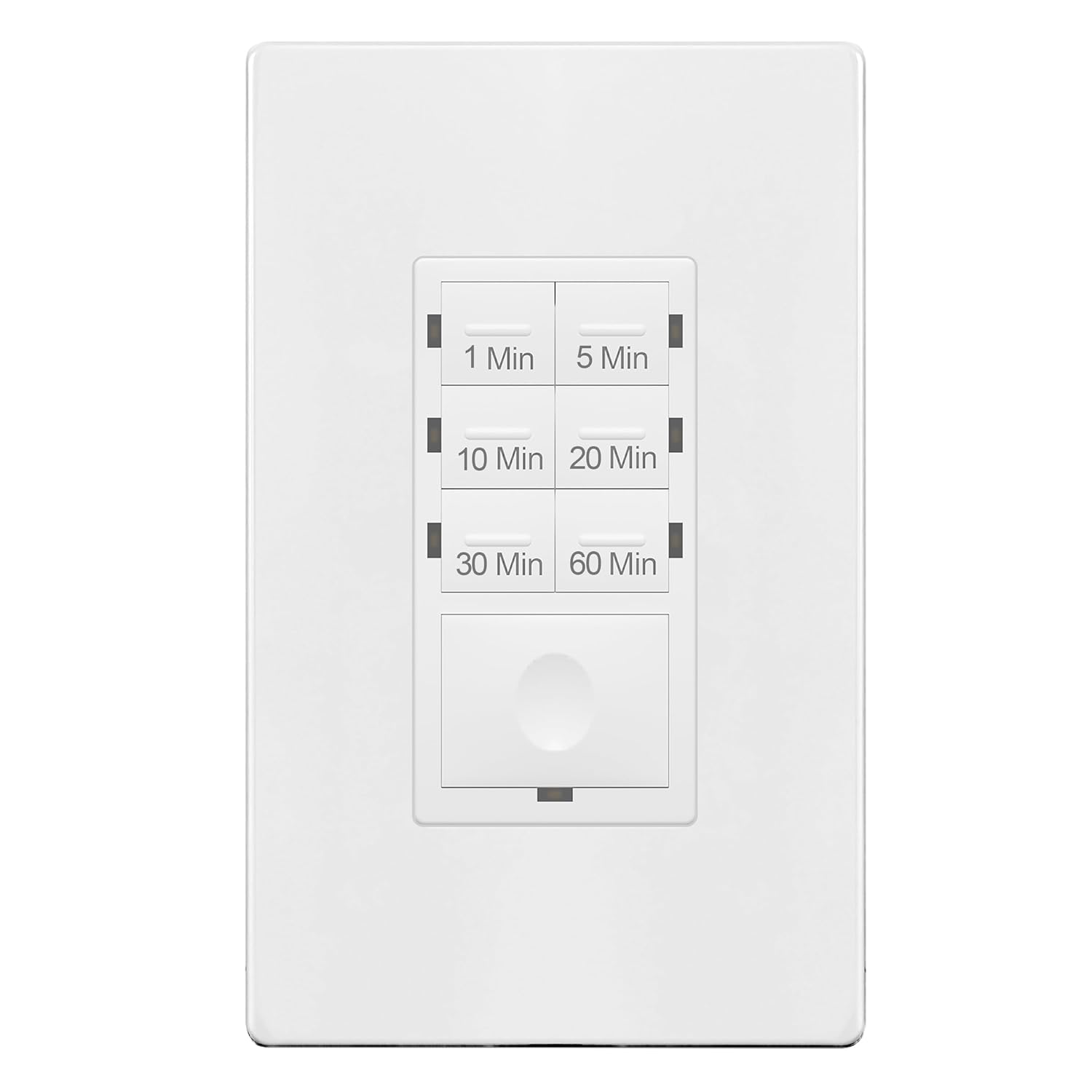
ചിത്രം: മുൻഭാഗം view of the ENERLITES HET06-J6-W 1-Hour Countdown Timer Switch, showing the six timer buttons and the main ON/OFF button.
സുരക്ഷാ വിവരങ്ങൾ
മുന്നറിയിപ്പ്: To avoid fire, shock, or death; turn off power at the circuit breaker or fuse and test that the power is off before wiring. This device is intended for installation in accordance with the National Electrical Code and local regulations. It is UL Listed, ensuring compliance with safety standards.
- Always turn off power at the service panel before beginning installation.
- Use only copper wire for connections.
- എല്ലാ വയർ കണക്ഷനുകളും സുരക്ഷിതമാണെന്ന് ഉറപ്പാക്കുക.
- This device requires a ground wire connection. A neutral wire is NOT required.
- ഇൻസ്റ്റലേഷൻ പ്രക്രിയയുടെ ഏതെങ്കിലും ഭാഗത്തെക്കുറിച്ച് നിങ്ങൾക്ക് ഉറപ്പില്ലെങ്കിൽ, യോഗ്യതയുള്ള ഒരു ഇലക്ട്രീഷ്യനെ സമീപിക്കുക.
പാക്കേജ് ഉള്ളടക്കം
- ENERLITES HET06-J6-W 1-Hour Countdown Timer Switch
- സ്ക്രൂയില്ലാത്ത വാൾ പ്ലേറ്റ്
- വയർ പരിപ്പ്
- മൗണ്ടിംഗ് സ്ക്രൂകൾ
സ്പെസിഫിക്കേഷനുകൾ
| മോഡൽ നമ്പർ | HET06-J6-W |
| ഇൻപുട്ട് വോളിയംtage | 120VAC, 60Hz |
| Incandescent/Halogen Load | 800W |
| LED/CFL Load | 150W |
| മോട്ടോർ ലോഡ് | 1/4 എച്ച്പി |
| ടൈമർ ഓപ്ഷനുകൾ | 1 മിനിറ്റ്, 5 മിനിറ്റ്, 10 മിനിറ്റ്, 20 മിനിറ്റ്, 30 മിനിറ്റ്, 60 മിനിറ്റ് |
| പ്രവർത്തന താപനില | 32°F മുതൽ 131°F വരെ (0°C മുതൽ 55°C വരെ) |
| ജ്വലനക്ഷമത റേറ്റിംഗ് | UL 94 V2 |
| സർട്ടിഫിക്കേഷനുകൾ | UL ലിസ്റ്റുചെയ്തു |
| അളവുകൾ | 4.05 x 1.73 x 1.7 ഇഞ്ച് |
| മെറ്റീരിയൽ | ചെമ്പ് (ആന്തരിക ഘടകങ്ങൾ) |
സജ്ജീകരണവും ഇൻസ്റ്റാളേഷനും
Follow these steps for proper installation of your timer switch. If you are unfamiliar with electrical wiring, please consult a qualified electrician.
- പവർ ഓഫ് ചെയ്യുക: Locate the circuit breaker or fuse that controls the power to the switch box. Turn it OFF. Verify power is off using a voltagഇ ടെസ്റ്റർ.
- പഴയ സ്വിച്ച് നീക്കം ചെയ്യുക: Carefully remove the existing wall plate and switch from the wall box. Disconnect the wires from the old switch.
- വയറുകൾ തിരിച്ചറിയുക: You will typically find a Line (hot) wire, a Load wire, and a Ground wire. This timer switch does NOT require a neutral wire.

ചിത്രം: പിൻഭാഗം view of the ENERLITES HET06-J6-W timer switch, illustrating the wiring terminals for Line, Load, and Ground connections.
- ടൈമർ സ്വിച്ച് വയർ ചെയ്യുക:
- ബന്ധിപ്പിക്കുക ലൈൻ (ചൂട്) wire from the wall box to the terminal labeled 'LINE' on the timer switch.
- ബന്ധിപ്പിക്കുക ലോഡ് ചെയ്യുക wire (to the appliance/light) from the wall box to the terminal labeled 'LOAD' on the timer switch.
- ബന്ധിപ്പിക്കുക ഗ്രൗണ്ട് wire from the wall box to the 'GROUND' terminal on the timer switch. Ensure all connections are tight using wire nuts.

Image: A person carefully installing a wall switch into an electrical box, demonstrating the typical installation process.
- സ്വിച്ച് മൌണ്ട് ചെയ്യുക: Gently push the wired switch into the wall box. Secure it with the provided mounting screws.
- വാൾ പ്ലേറ്റ് ഘടിപ്പിക്കുക: Install the screwless wall plate over the switch.
- പവർ പുന ore സ്ഥാപിക്കുക: സർക്യൂട്ട് ബ്രേക്കറിൽ വീണ്ടും പവർ ഓൺ ചെയ്യുക.
- പ്രാരംഭ സന്നാഹം: After restoring power, the device requires a warm-up period of 1-2 minutes to function correctly. During this time, the switch may not respond immediately or predictably. Allow this period to complete before testing operation.
പ്രവർത്തന നിർദ്ദേശങ്ങൾ
The ENERLITES HET06-J6-W timer switch offers six preset countdown options and a manual ON/OFF function.

Image: A diagram highlighting the timer buttons (1, 5, 10, 20, 30, 60 minutes), the LED indicator, and the main ON/OFF button on the ENERLITES timer switch.
- Selecting a Countdown Time: Press and release one of the six timer buttons (1 Min, 5 Min, 10 Min, 20 Min, 30 Min, or 60 Min) to activate the countdown. The connected load will turn ON and remain on for the selected duration, then automatically turn OFF.
- LED സൂചകം: When a time delay is selected, the blue LED indicator will flash twice to confirm the setting. After flashing, the LED will turn OFF. This design is intended to minimize light disturbance, particularly in bedrooms.
- മാനുവൽ ഓൺ/ഓഫ്: The large button at the bottom serves as a manual override.
- Pressing this button while a countdown is active will turn the load OFF immediately.
- Pressing this button when the load is OFF will turn the load ON for the last selected timer duration.
- To turn the load ON indefinitely (until manually turned off), press and hold the large button for approximately 8 seconds.

Image: A detailed close-up of the timer buttons on the ENERLITES HET06-J6-W switch, showing the 1, 5, 10, 20, 30, and 60-minute options.
മെയിൻ്റനൻസ്
The ENERLITES HET06-J6-W timer switch requires minimal maintenance. To clean the device, ensure power is turned off at the circuit breaker. Use a soft, damp cloth to wipe the surface. Avoid using harsh chemicals or abrasive cleaners, as these can damage the finish or internal components.
ട്രബിൾഷൂട്ടിംഗ്
- Device Not Responding After Installation:
- Ensure power is fully restored at the circuit breaker.
- Allow 1-2 minutes for the device to warm up after initial power restoration. The switch may not function immediately during this period.
- Verify all wiring connections are secure and correct (Line, Load, Ground).
- Load Does Not Turn ON:
- സർക്യൂട്ട് ബ്രേക്കർ ഓണാണോ എന്ന് പരിശോധിക്കുക.
- Ensure the connected load (light, fan, heater) is functional.
- Confirm the wiring is correct.
- Load Does Not Turn OFF:
- Verify that a timer duration was selected.
- If the load was turned on indefinitely (by holding the manual ON/OFF button for 8 seconds), press the manual ON/OFF button once to turn it off.
- LED Indicator Not Flashing:
- The LED flashes only twice upon selection and then turns off. This is normal operation.
വാറൻ്റിയും പിന്തുണയും
The ENERLITES HET06-J6-W 1-Hour Countdown Timer Switch comes with a 1-year limited warranty from the date of purchase. This warranty covers defects in materials and workmanship under normal use. For technical support, warranty claims, or further assistance, please contact ENERLITES customer service or visit the official ENERLITES store online.


