ALFORDSON Marc Series Gaming Chair User Manual
Model: Marc Series
1. ആമുഖം
Thank you for choosing the ALFORDSON Marc Series Gaming Chair. This ergonomic chair is designed to provide comfort and support during extended periods of use, whether for gaming, work, or relaxation. It features customizable RGB LED lighting, an 8-point massage system, a retractable footrest, and adjustable components to enhance your experience.
2 സുരക്ഷാ വിവരങ്ങൾ
- അസംബ്ലിക്കും ഉപയോഗത്തിനും മുമ്പ് എല്ലാ നിർദ്ദേശങ്ങളും ശ്രദ്ധാപൂർവ്വം വായിക്കുക.
- Ensure all components are securely fastened before sitting on the chair.
- കസേരയിൽ നിൽക്കുകയോ സ്റ്റെപ്പ് സ്റ്റൂൾ ആയി ഉപയോഗിക്കുകയോ ചെയ്യരുത്.
- Avoid placing heavy objects on the chair that exceed its weight capacity of 180 kg.
- ക്രമീകരിക്കുമ്പോൾ കൈകളും വിരലുകളും ചലിക്കുന്ന ഭാഗങ്ങളിൽ നിന്ന് അകറ്റി നിർത്തുക.
- കസേര ചരിഞ്ഞുപോകാതിരിക്കാൻ പരന്നതും സ്ഥിരതയുള്ളതുമായ പ്രതലത്തിൽ ഉപയോഗിക്കുക.
- Keep the chair away from open flames or excessive heat sources.
- Disconnect the USB cable for the LED and massage functions when not in use or during cleaning.
3. പാക്കേജ് ഉള്ളടക്കം
അസംബ്ലി ആരംഭിക്കുന്നതിന് മുമ്പ് എല്ലാ ഭാഗങ്ങളും ലഭ്യമാണെന്ന് ദയവായി പരിശോധിക്കുക:
- ബാക്ക്റെസ്റ്റ്
- Seat Base with Armrests
- Heavy-Duty Nylon Base (5-star base)
- കാസ്റ്റർ വീലുകൾ (5x)
- ഗ്യാസ് ലിഫ്റ്റ് സിലിണ്ടർ
- ഗ്യാസ് ലിഫ്റ്റ് കവർ
- മെക്കാനിസം പ്ലേറ്റ്
- ഹെഡ്റെസ്റ്റ് കുഷ്യൻ
- ലംബർ സപ്പോർട്ട് കുഷ്യൻ
- പിൻവലിക്കാവുന്ന ഫുട്റെസ്റ്റ്
- RGB LED Remote Control
- Assembly Hardware (screws, washers, Allen key)
- ഉപയോക്തൃ മാനുവൽ
4. അസംബ്ലി നിർദ്ദേശങ്ങൾ
Follow these steps to assemble your ALFORDSON Marc Series Gaming Chair:
- Attach Caster Wheels to Base: Insert the five caster wheels into the holes on the heavy-duty nylon base. Push firmly until they click into place.

Figure 1: Heavy-duty nylon base with caster wheels.
- ഗ്യാസ് ലിഫ്റ്റ് ചേർക്കുക: Place the gas lift cylinder into the center hole of the assembled base. Cover it with the gas lift cover.

Figure 2: SGS certified gas lift cylinder.
- സീറ്റിൽ മെക്കാനിസം പ്ലേറ്റ് ഘടിപ്പിക്കുക: Secure the mechanism plate to the underside of the seat base using the provided screws. Ensure the front of the mechanism faces the front of the seat.
- ബാക്ക്റെസ്റ്റ് സീറ്റുമായി ബന്ധിപ്പിക്കുക: Align the backrest with the seat base and secure it using the appropriate screws. Ensure all connections are tight.
- ഫുട്റെസ്റ്റ് ഇൻസ്റ്റാൾ ചെയ്യുക: Attach the retractable footrest assembly to the designated slots under the seat.
- ഗ്യാസ് ലിഫ്റ്റിൽ സീറ്റ് അസംബ്ലി സ്ഥാപിക്കുക: Carefully place the assembled seat onto the gas lift cylinder. The tapered end of the gas lift should fit securely into the mechanism plate.
- തലയണകൾ ഘടിപ്പിക്കുക: Secure the headrest cushion and lumbar support cushion to the backrest using their integrated straps. These cushions are removable for personalized comfort.

Figure 3: Removable headrest and lumbar cushions.
- USB കേബിൾ ബന്ധിപ്പിക്കുക: Locate the USB cable for the RGB LED and massage functions. Connect it to a compatible USB power source (e.g., PC, USB adapter).
5. പ്രവർത്തന നിർദ്ദേശങ്ങൾ
5.1 ഉയരം ക്രമീകരിക്കൽ
To adjust the chair height, pull the lever located on the right side of the seat upwards while applying or releasing body weight. Release the lever at the desired height.
5.2. Backrest Recline
To recline the backrest, pull the lever on the left side of the seat upwards and lean back. Release the lever to lock the backrest at an angle between 90° and 150°.
Figure 4: Backrest recline mechanism.
5.3. പിൻവലിക്കാവുന്ന ഫുട്റെസ്റ്റ്
Pull the footrest out from under the seat when desired. Push it back in when not in use. The footrest provides additional support for your legs and feet.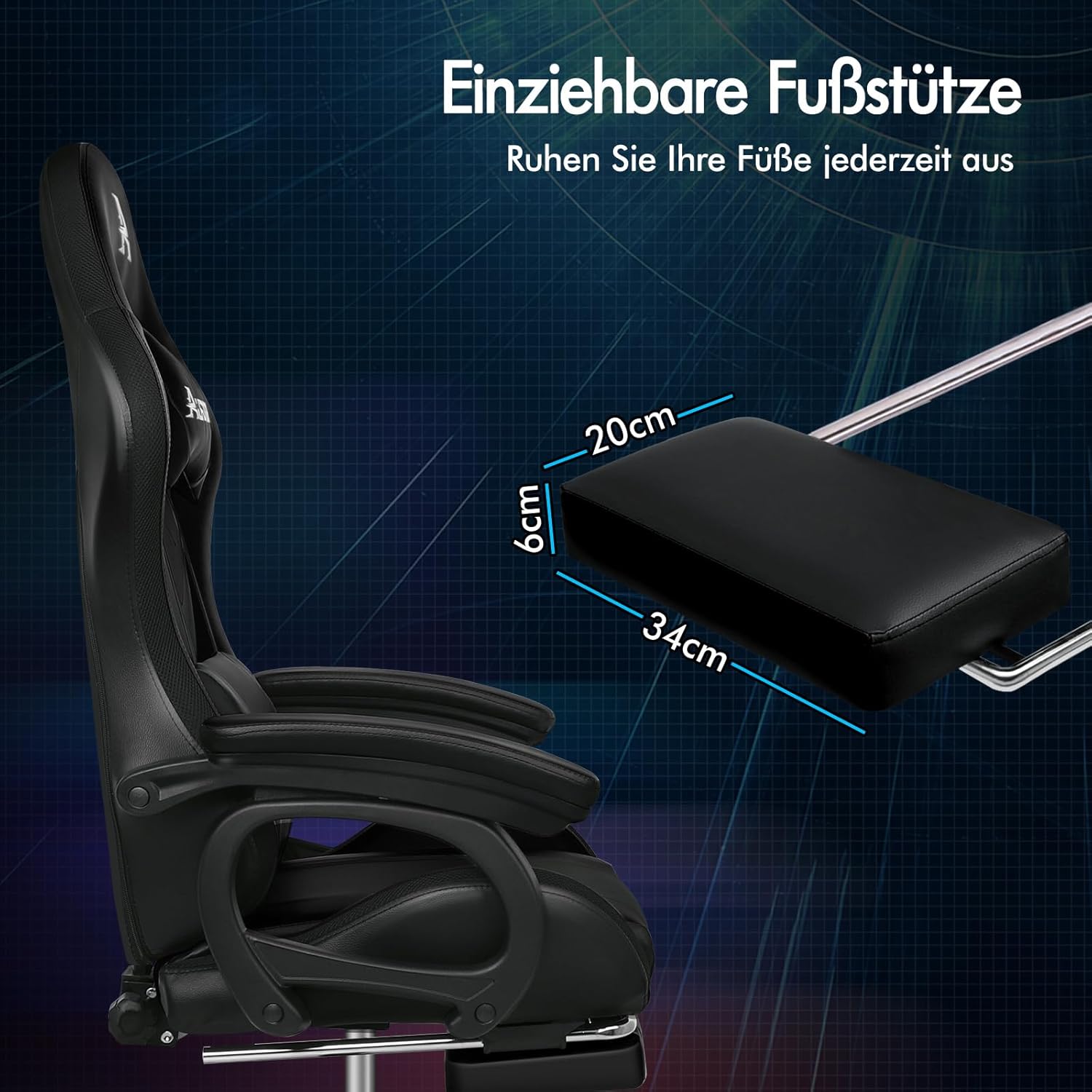
ചിത്രം 5: പിൻവലിക്കാവുന്ന ഫുട്റെസ്റ്റ്.
5.4. ആംറെസ്റ്റ് ക്രമീകരണം
The armrests feature an innovative slide rail design, allowing for horizontal adjustment to suit your preference.
Figure 6: Slide rail armrests.
5.5. RGB LED ലൈറ്റിംഗ്
Connect the chair's USB cable to a power source. Use the provided wireless remote control to select from 12 customized RGB LED colors and up to 367 lighting modes. Adjust brightness and speed as desired.
Figure 7: RGB LED lighting and remote control.
5.6. 8-Point Massage Function
Ensure the USB cable is connected to a power source. Use the massage controller to activate the 8-point massage system. Select from 6 massage modes to target the upper back, lower back, lumbar area, and thighs.
Figure 8: 8-point massage system.
6. പരിപാലനം
- വൃത്തിയാക്കൽ: Wipe the chair's PU leather surfaces with a soft, damp തുണി. മെറ്റീരിയലിന് കേടുവരുത്തുന്ന കഠിനമായ രാസവസ്തുക്കളോ ഉരച്ചിലുകളുള്ള ക്ലീനറുകളോ ഒഴിവാക്കുക.
- തലയണകൾ: The headrest and lumbar cushions are removable for easier cleaning. Follow care instructions on their labels if applicable.
- ചലിക്കുന്ന ഭാഗങ്ങൾ: Periodically check all screws and bolts to ensure they are tight. Lubricate moving parts like the gas lift or wheels if they become stiff.
- LED/Massage System: Ensure the USB cable is not kinked or damaged. Disconnect when not in use.
7. പ്രശ്നപരിഹാരം
| പ്രശ്നം | സാധ്യമായ കാരണം | പരിഹാരം |
|---|---|---|
| Chair height does not adjust. | Gas lift lever not fully engaged or gas lift cylinder faulty. | Ensure the lever is pulled completely. If the issue persists, the gas lift may need replacement. |
| ബാക്ക്റെസ്റ്റ് ചാരിയിരിക്കുകയോ ലോക്ക് ചെയ്യുകയോ ചെയ്യുന്നില്ല. | Recline lever not fully engaged or mechanism jammed. | Check for obstructions. Ensure the lever is pulled firmly. |
| RGB LED ലൈറ്റുകൾ പ്രവർത്തിക്കുന്നില്ല. | USB cable disconnected, power source issue, or remote battery low. | Verify USB connection to a working power source. Check remote battery and replace if necessary. |
| Massage function is not working. | USB cable disconnected or massage controller issue. | Ensure USB cable is connected. Check the massage controller for damage. |
| കസേര അസ്ഥിരമാണ് അല്ലെങ്കിൽ ഇളകിയിരിക്കുന്നു. | അയഞ്ഞ സ്ക്രൂകൾ അല്ലെങ്കിൽ അസമമായ തറ. | Tighten all assembly screws. Ensure the chair is on a level surface. |
8 സ്പെസിഫിക്കേഷനുകൾ
| ഫീച്ചർ | വിശദാംശങ്ങൾ |
|---|---|
| ബ്രാൻഡ് | ALFORDSON |
| മോഡൽ | Marc Series |
| നിറം | കറുപ്പ് |
| മെറ്റീരിയൽ | High-quality PU Leather |
| അളവുകൾ (L x W x H) | 88 x 68 x 127 സെ.മീ (ഏകദേശം 34.6 x 26.8 x 50 ഇഞ്ച്) |
| ഭാരം | 18.5 കിലോഗ്രാം (ഏകദേശം 40.8 പൗണ്ട്) |
| പരമാവധി ലോഡ് കപ്പാസിറ്റി | 180 കി.ഗ്രാം (ഏകദേശം. 397 പൗണ്ട്) |
| ചരിഞ്ഞ ആംഗിൾ | 90° മുതൽ 150° വരെ |
| മസാജ് പോയിൻ്റുകൾ | 8 പോയിൻ്റ് |
| മസാജ് മോഡുകൾ | 6 മോഡുകൾ |
| LED നിറങ്ങൾ | 12 customizable colors, 367 modes |
| സർട്ടിഫിക്കേഷനുകൾ | TUV (wheels), SGS (gas lift), Intertek (PU leather) |
Note: All dimensions and weights are approximate and may vary slightly.
9. വാറൻ്റിയും പിന്തുണയും
The ALFORDSON Marc Series Gaming Chair comes with a 2 വർഷത്തെ വാറൻ്റി നിർമ്മാണ വൈകല്യങ്ങൾ ഉൾക്കൊള്ളുന്നു. വാറന്റി ക്ലെയിമുകൾക്കായി നിങ്ങളുടെ വാങ്ങിയതിന്റെ തെളിവ് സൂക്ഷിക്കുക.
For technical support, missing parts, or warranty inquiries, please contact the seller or ALFORDSON customer service through the platform where you purchased the product. Provide your model number (Marc Series) and purchase details for efficient assistance.


