1. ആമുഖം
This manual provides comprehensive instructions for the Maxcom Fit FW55 Aurum Pro Smartwatch. It covers essential information regarding product setup, operation, maintenance, and troubleshooting to ensure optimal performance and user experience. Please read this manual carefully before using your device.
2. പാക്കേജ് ഉള്ളടക്കം
താഴെ ലിസ്റ്റ് ചെയ്തിരിക്കുന്ന എല്ലാ ഇനങ്ങളും നിങ്ങളുടെ ഉൽപ്പന്ന പാക്കേജിൽ ഉണ്ടെന്ന് ദയവായി പരിശോധിക്കുക:
- Maxcom Fit FW55 Aurum Pro Smartwatch
- ചാർജിംഗ് കേബിൾ
- ഉപയോക്തൃ മാനുവൽ (ഈ പ്രമാണം)
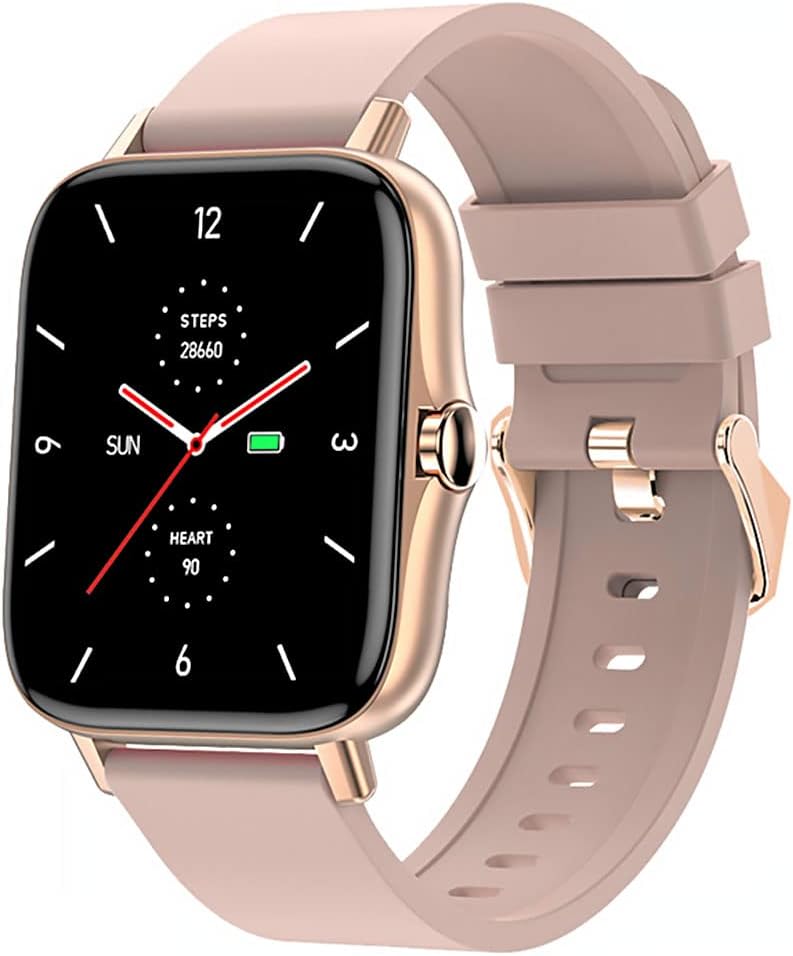
Image 1: Maxcom Fit FW55 Aurum Pro Smartwatch with a pink silicone band. The watch face displays steps, heart rate, and time.
3. സജ്ജീകരണം
3.1. സ്മാർട്ട് വാച്ച് ചാർജ് ചെയ്യുന്നു
Before initial use, fully charge your Maxcom Fit FW55 Aurum Pro Smartwatch. Connect the provided charging cable to the charging port on the back of the smartwatch and plug the other end into a standard USB power adapter (not included) or a computer's USB port. The watch display will indicate charging status.
- Ensure the charging pins are clean and properly aligned with the watch's charging contacts.
- ഒരു പൂർണ്ണ ചാർജ് സാധാരണയായി ഏകദേശം 2 മണിക്കൂർ എടുക്കും.
3.2. നിങ്ങളുടെ സ്മാർട്ട്ഫോണുമായി ജോടിയാക്കൽ
To unlock the full functionality of your smartwatch, you need to pair it with your smartphone via Bluetooth.
- ആപ്പ് ഡൗൺലോഡ് ചെയ്യുക: ഇതിനായി തിരയുക the official Maxcom Fit application in your smartphone's app store (iOS App Store or Google Play Store) and install it.
- ബ്ലൂടൂത്ത് പ്രവർത്തനക്ഷമമാക്കുക: നിങ്ങളുടെ സ്മാർട്ട്ഫോണിൽ ബ്ലൂടൂത്ത് പ്രവർത്തനക്ഷമമാക്കിയിട്ടുണ്ടെന്ന് ഉറപ്പാക്കുക.
- ആപ്പ് തുറക്കുക: Launch the Maxcom Fit application on your smartphone.
- ഉപകരണം ചേർക്കുക: Follow the in-app instructions to add a new device. Select "FW55 Aurum Pro" from the list of available devices.
- ജോടിയാക്കൽ സ്ഥിരീകരിക്കുക: A pairing request may appear on both your smartphone and the smartwatch. Confirm the pairing on both devices.
Once successfully paired, the smartwatch will synchronize data with your phone, and you can customize settings through the app.
4. സ്മാർട്ട് വാച്ച് പ്രവർത്തിപ്പിക്കൽ
4.1. പവർ ഓൺ/ഓഫ്
- പവർ ഓൺ: Press and hold the side button for a few seconds until the Maxcom logo appears.
- പവർ ഓഫ്: From the watch face, swipe down to access quick settings, or navigate to the 'Settings' menu. Select 'Power Off' and confirm. Alternatively, press and hold the side button and select 'Power Off'.
4.2. അടിസ്ഥാന നാവിഗേഷൻ
- ടച്ച് സ്ക്രീൻ: The FW55 Aurum Pro features a 1.7-inch touch screen for intuitive interaction.
- മുകളിലേക്കും താഴേക്കും സ്വൈപ്പ് ചെയ്യുക: Scroll through notifications, menus, or quick settings.
- ഇടത്തേക്ക്/വലത്തേക്ക് സ്വൈപ്പ് ചെയ്യുക: Access different widgets or main functions (e.g., heart rate, activity data).
- ടാപ്പ് ചെയ്യുക: ഒരു ഇനം തിരഞ്ഞെടുക്കുക അല്ലെങ്കിൽ ഒരു പ്രവർത്തനം സ്ഥിരീകരിക്കുക.
- സൈഡ് ബട്ടൺ: Press to return to the watch face or wake the screen. A long press may access power options.
4.3 പ്രധാന സവിശേഷതകൾ
The Maxcom Fit FW55 Aurum Pro Smartwatch offers a range of features to support your daily activities and health monitoring:
- പ്രവർത്തന ട്രാക്കിംഗ്: Monitors steps taken, distance covered, and calories burned.
- ഹൃദയമിടിപ്പ് നിരീക്ഷണം: തത്സമയ ഹൃദയമിടിപ്പ് ഡാറ്റ നൽകുന്നു.
- ഉറക്ക നിരീക്ഷണം: ഉറക്ക രീതികളും ഗുണനിലവാരവും ട്രാക്ക് ചെയ്യുന്നു.
- അറിയിപ്പുകൾ: നിങ്ങളുടെ പെയർ ചെയ്ത സ്മാർട്ട്ഫോണിൽ നിന്ന് കോളുകൾ, സന്ദേശങ്ങൾ, ആപ്പ് അറിയിപ്പുകൾ എന്നിവയ്ക്കുള്ള അലേർട്ടുകൾ സ്വീകരിക്കുന്നു.
- ജിപിഎസ്: കൃത്യമായ ഔട്ട്ഡോർ പ്രവർത്തന ട്രാക്കിംഗിനായി സംയോജിത ജിപിഎസ്.
- ഇഷ്ടാനുസൃതമാക്കാവുന്ന വാച്ച് ഫെയ്സുകൾ: Personalize your watch face through the companion app.

Image 2: Maxcom Fit FW55 Aurum Pro Smartwatch featuring a gold metal mesh band. The watch face displays digital time, steps, and heart rate.
5. പരിപാലനം
Proper care and maintenance will extend the lifespan of your smartwatch.
- വൃത്തിയാക്കൽ: Regularly wipe the watch screen and body with a soft, dry, lint-free cloth. For stubborn dirt, slightly dampതുണിയിൽ വെള്ളം ഒഴിക്കുക. കഠിനമായ രാസവസ്തുക്കളോ ഉരച്ചിലുകളോ ഉള്ള വസ്തുക്കൾ ഉപയോഗിക്കുന്നത് ഒഴിവാക്കുക.
- സ്ട്രാപ്പ് കെയർ: Clean the watch strap according to its material. Silicone straps can be washed with mild soap and water. Metal straps may require specific cleaning agents.
- തീവ്രമായ അവസ്ഥകൾ ഒഴിവാക്കുക: Do not expose the smartwatch to extreme temperatures, direct sunlight for prolonged periods, or corrosive liquids.
- ജല പ്രതിരോധം: While the watch may have some water resistance, it is not suitable for diving or high-pressure water activities. Refer to the product specifications for detailed water resistance ratings.
6. പ്രശ്നപരിഹാരം
If you encounter issues with your Maxcom Fit FW55 Aurum Pro Smartwatch, try the following solutions:
- വാച്ച് ഓണാകുന്നില്ല: വാച്ച് പൂർണ്ണമായും ചാർജ് ചെയ്തിട്ടുണ്ടെന്ന് ഉറപ്പാക്കുക. കുറഞ്ഞത് 30 മിനിറ്റെങ്കിലും ചാർജറുമായി ബന്ധിപ്പിക്കുക.
- സ്മാർട്ട്ഫോണുമായി ജോടിയാക്കാൻ കഴിയില്ല:
- നിങ്ങളുടെ ഫോണിലും വാച്ചിലും ബ്ലൂടൂത്ത് പ്രവർത്തനക്ഷമമാക്കിയിട്ടുണ്ടെന്ന് ഉറപ്പാക്കുക.
- വാച്ച് നിങ്ങളുടെ ഫോണിന്റെ ബ്ലൂടൂത്ത് പരിധിക്കുള്ളിലാണെന്ന് ഉറപ്പാക്കുക.
- നിങ്ങളുടെ ഫോണും സ്മാർട്ട് വാച്ചും പുനരാരംഭിക്കുക.
- ആപ്പ് വഴി ഉപകരണം അൺപെയർ ചെയ്ത് വീണ്ടും പെയർ ചെയ്യാൻ ശ്രമിക്കുക.
- Inaccurate data (steps, heart rate):
- വാച്ച് നിങ്ങളുടെ കൈത്തണ്ടയിൽ നന്നായി ധരിച്ചിട്ടുണ്ടെന്ന് ഉറപ്പാക്കുക, ഏകദേശം ഒരു വിരലിന്റെ വീതി നിങ്ങളുടെ കൈത്തണ്ട എല്ലിന് മുകളിലായി.
- വാച്ചിന്റെ പിൻഭാഗത്തുള്ള സെൻസർ വൃത്തിയാക്കുക.
- കമ്പാനിയൻ ആപ്പ് ഏറ്റവും പുതിയ പതിപ്പിലേക്ക് അപ്ഡേറ്റ് ചെയ്യുക.
- അറിയിപ്പുകൾ ലഭിച്ചിട്ടില്ല:
- Check notification settings in the Maxcom Fit app.
- Ensure your phone's notification permissions are granted to the app.
- Verify that the watch is successfully paired and connected to your phone.
If problems persist, consult the Maxcom support webസൈറ്റ് അല്ലെങ്കിൽ ഉപഭോക്തൃ സേവനവുമായി ബന്ധപ്പെടുക.
7 സ്പെസിഫിക്കേഷനുകൾ
Below are the technical specifications for the Maxcom Fit FW55 Aurum Pro Smartwatch:
| ഫീച്ചർ | വിശദാംശങ്ങൾ |
|---|---|
| ബ്രാൻഡ് | മാക്സ്കോം |
| മോഡൽ നമ്പർ | FW55 Aurum Pro |
| സ്ക്രീൻ വലിപ്പം | 1.7 ഇഞ്ച് |
| കണക്റ്റിവിറ്റി ടെക്നോളജി | ബ്ലൂടൂത്ത് |
| വയർലെസ് കമ്മ്യൂണിക്കേഷൻ സ്റ്റാൻഡേർഡ് | ബ്ലൂടൂത്ത് |
| അനുയോജ്യമായ ഉപകരണങ്ങൾ | സ്മാർട്ട്ഫോൺ |
| ജിപിഎസ് | സംയോജിത ജിപിഎസ് |
| ആകൃതി | സമചതുരം |
| ടാർഗെറ്റ് പ്രേക്ഷകർ | Adult Unisex |
| ഉൾപ്പെടുത്തിയ ഘടകങ്ങൾ | ചാർജർ |

ചിത്രം 3: മുൻഭാഗം view of the Maxcom Fit FW55 Aurum Pro Smartwatch with a pink silicone band, highlighting the square display.
8. വാറൻ്റിയും പിന്തുണയും
For warranty information and customer support, please refer to the documentation included with your purchase or visit the official Maxcom webസൈറ്റ്. വാറന്റി ക്ലെയിമുകൾക്കായി നിങ്ങളുടെ വാങ്ങലിന്റെ തെളിവ് സൂക്ഷിക്കുക.
For technical assistance or further inquiries, please contact Maxcom customer service through their official channels.


