ആമുഖം
വാങ്ങിയതിന് നന്ദി.asing the Sharp YC-MS252AE-W 25-Liter Digital Solo Microwave Oven. This manual provides essential information for safe and efficient use of your appliance. Please read it thoroughly before operation and keep it for future reference.

ചിത്രം: മുൻഭാഗം view of the Sharp YC-MS252AE-W microwave oven, showcasing its white exterior and black digital control panel.
പ്രധാനപ്പെട്ട സുരക്ഷാ നിർദ്ദേശങ്ങൾ
തീപിടുത്തം, വൈദ്യുതാഘാതം, വ്യക്തികൾക്ക് പരിക്കേൽക്കൽ, അല്ലെങ്കിൽ അമിതമായ മൈക്രോവേവ് ഊർജ്ജത്തിന് വിധേയമാകൽ എന്നിവ കുറയ്ക്കുന്നതിന് വൈദ്യുത ഉപകരണങ്ങൾ ഉപയോഗിക്കുമ്പോൾ എല്ലായ്പ്പോഴും അടിസ്ഥാന സുരക്ഷാ മുൻകരുതലുകൾ പാലിക്കുക.
- ഉപകരണം ഉപയോഗിക്കുന്നതിന് മുമ്പ് എല്ലാ നിർദ്ദേശങ്ങളും വായിക്കുക.
- വാതിൽ തുറന്നിട്ടുകൊണ്ട് ഈ ഓവൻ പ്രവർത്തിപ്പിക്കാൻ ശ്രമിക്കരുത്, കാരണം ഇത് മൈക്രോവേവ് ഊർജ്ജത്തിന് ദോഷകരമായ എക്സ്പോഷർ ഉണ്ടാക്കും.
- ദ്രാവകങ്ങളോ മറ്റ് ഭക്ഷണങ്ങളോ പൊട്ടിത്തെറിക്കാൻ സാധ്യതയുള്ളതിനാൽ അടച്ച പാത്രങ്ങളിൽ ചൂടാക്കരുത്.
- Regularly clean the oven cavity, door, and seals.
- ഉപകരണം ശരിയായി നിലത്തുണ്ടെന്ന് ഉറപ്പാക്കുക.
സജ്ജീകരണവും ഇൻസ്റ്റാളേഷനും
അൺപാക്ക് ചെയ്യുന്നു
Carefully remove the microwave oven and all packaging materials. Check for any damage. Do not operate the oven if it is damaged.
പ്ലേസ്മെൻ്റ്
Place the oven on a flat, stable surface capable of supporting its weight (12 kg). Ensure adequate ventilation around the appliance. Maintain a minimum clearance of 10 cm (4 inches) on the sides and back, and 30 cm (12 inches) above the oven.
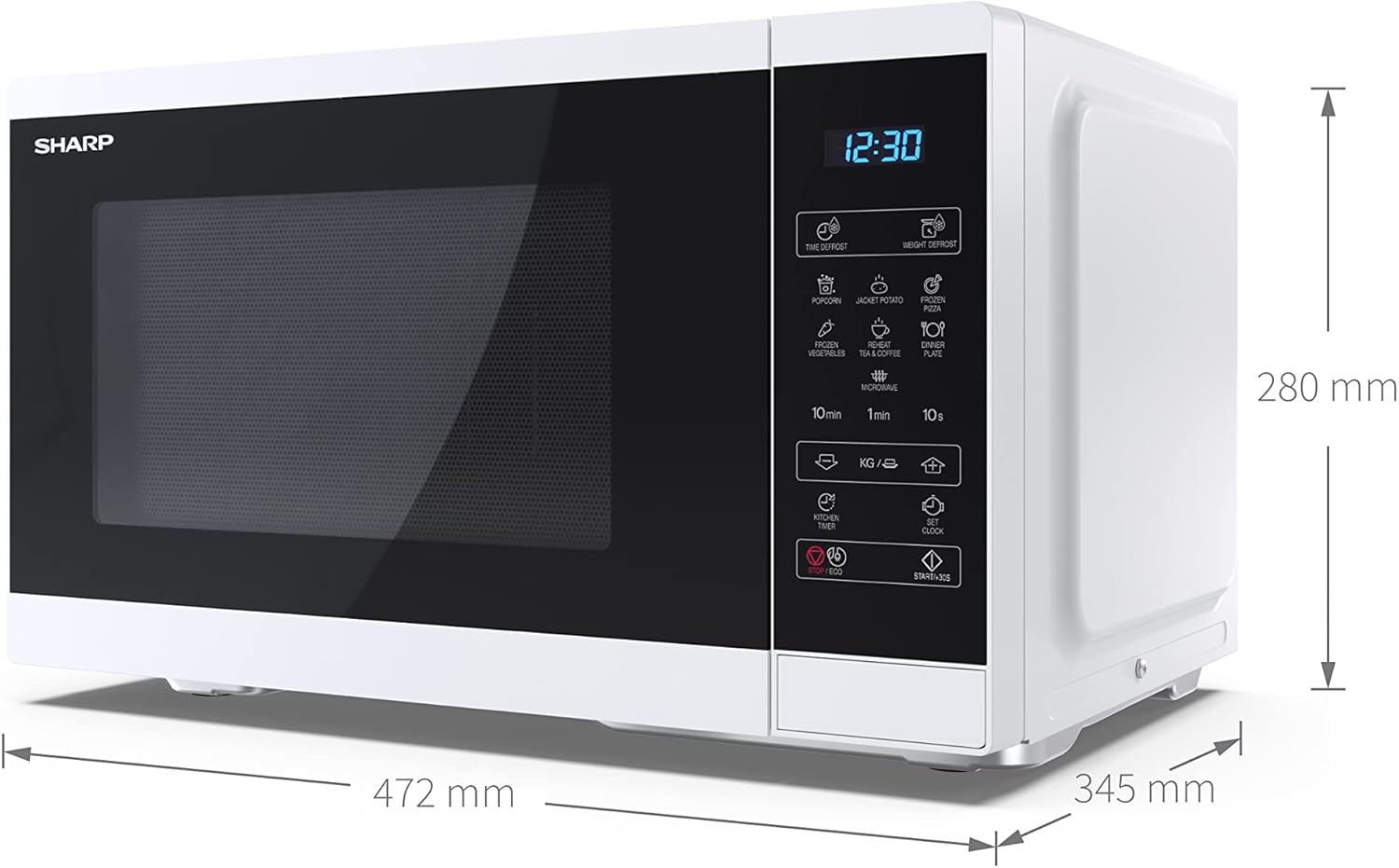
ചിത്രം: വശം view of the Sharp YC-MS252AE-W microwave oven, illustrating its dimensions: 472 mm width, 345 mm depth, and 280 mm height.
ടർട്ടബിൾ ഇൻസ്റ്റാളേഷൻ
The microwave oven is equipped with a glass turntable and a turntable ring. Place the turntable ring in the center of the oven cavity. Then, place the glass turntable securely on top of the turntable ring, ensuring it sits correctly on the central hub.

ചിത്രം: ഉൾഭാഗം view of the Sharp YC-MS252AE-W microwave oven, showing the glass turntable and roller ring correctly placed inside the cavity.
പവർ കണക്ഷൻ
പവർ കോഡ് ഒരു സ്റ്റാൻഡേർഡ് 220V, 50Hz ഗ്രൗണ്ടഡ് ഇലക്ട്രിക്കൽ ഔട്ട്ലെറ്റിലേക്ക് പ്ലഗ് ചെയ്യുക. എക്സ്റ്റൻഷൻ കോഡുകളോ അഡാപ്റ്ററുകളോ ഉപയോഗിക്കരുത്.
പ്രവർത്തന നിർദ്ദേശങ്ങൾ
The Sharp YC-MS252AE-W features a digital control panel for easy operation. Below are common functions and how to use them.

Image: Close-up of the digital control panel on the Sharp YC-MS252AE-W microwave oven, displaying various function buttons and the time display.
ക്ലോക്ക് ക്രമീകരിക്കുന്നു
- "ക്ലോക്ക്" ബട്ടൺ അമർത്തുക.
- Use the number buttons (10min, 1min, 10s) to enter the current time.
- സ്ഥിരീകരിക്കാൻ വീണ്ടും "CLOCK" അമർത്തുക.
അടിസ്ഥാന മൈക്രോവേവ് പാചകം
- ഭക്ഷണം മൈക്രോവേവ്-സുരക്ഷിത പാത്രത്തിൽ ടേൺടേബിളിൽ വയ്ക്കുക.
- അടുപ്പിൻ്റെ വാതിൽ അടയ്ക്കുക.
- Press the "MICROWAVE" button.
- Use the number buttons (10min, 1min, 10s) to set the desired cooking time.
- Press "START/+30s" to begin cooking.
പവർ ലെവൽ അഡ്ജസ്റ്റ്മെന്റ്
ഈ മൈക്രോവേവ് ഓവൻ 11 പവർ ലെവലുകൾ വാഗ്ദാനം ചെയ്യുന്നു. പവർ ലെവൽ ക്രമീകരിക്കാൻ:
- After setting the cooking time, press the "MICROWAVE" button repeatedly to cycle through power levels (P100, P90, P80... P10).
- Press "START/+30s" to begin cooking at the selected power level.
ഡിഫ്രോസ്റ്റ് പ്രവർത്തനം
The oven features both Time Defrost and Weight Defrost functions.
ടൈം ഡിഫ്രോസ്റ്റ്:
- Press the "TIME DEFROST" button.
- Use the number buttons to enter the desired defrosting time.
- Press "START/+30s".
ഭാരം കുറയ്ക്കൽ:
- Press the "WEIGHT DEFROST" button.
- Use the "KG / g" button to select the weight of the food.
- Press "START/+30s".
ഓട്ടോ കുക്ക് മെനുകൾ
The microwave includes pre-programmed settings for common foods:
- പോപ്പ്കോൺ: For preparing popcorn.
- Jacket Potato: For cooking baked potatoes.
- ശീതീകരിച്ച പിസ്സ: For reheating or cooking frozen pizza.
- ശീതീകരിച്ച പച്ചക്കറികൾ: ശീതീകരിച്ച പച്ചക്കറികൾ പാചകം ചെയ്യുന്നതിന്.
- Tea & Coffee: For reheating beverages.
- ഡിന്നർ പ്ലേറ്റ്: For reheating a dinner plate.
To use an auto cook menu:
- ഭക്ഷണം അടുപ്പത്തുവെച്ചു വയ്ക്കുക.
- Press the corresponding auto cook button (e.g., "POPCORN").
- Press "START/+30s". The oven will automatically set the time and power level.
ചൈൽഡ് ലോക്ക് പ്രവർത്തനം
ചൈൽഡ് ലോക്ക് സജീവമാക്കാൻ:
- Press and hold the "STOP/ECO" button for 3 seconds. The lock indicator will appear on the display.
ചൈൽഡ് ലോക്ക് നിർജ്ജീവമാക്കാൻ:
- Press and hold the "STOP/ECO" button for 3 seconds. The lock indicator will disappear.
പരിചരണവും പരിപാലനവും
ഓവൻ ഇന്റീരിയർ വൃത്തിയാക്കുന്നു
Regularly clean the oven cavity, door, and door seals with a mild detergent and a soft cloth. Do not use abrasive cleaners or harsh chemicals. For stubborn stains, place a bowl of water with lemon juice inside and microwave for a few minutes to loosen residue.
ടേൺടേബിളും റോളർ റിംഗും വൃത്തിയാക്കൽ
The glass turntable and roller ring can be removed for cleaning. Wash them in warm, soapy water or in a dishwasher. Ensure they are completely dry before placing them back in the oven.
ബാഹ്യ ശുചീകരണം
ഒരു മൃദുവായ, ഡി ഉപയോഗിച്ച് ബാഹ്യ പ്രതലങ്ങൾ തുടയ്ക്കുകamp തുണി. വെന്റിലേഷൻ ദ്വാരങ്ങളിലേക്ക് വെള്ളം കയറുന്നത് ഒഴിവാക്കുക.
ട്രബിൾഷൂട്ടിംഗ്
| പ്രശ്നം | സാധ്യമായ കാരണം | പരിഹാരം |
|---|---|---|
| ഓവൻ ആരംഭിക്കുന്നില്ല. | പവർ കോർഡ് പ്ലഗ് ഇൻ ചെയ്തിട്ടില്ല; വാതിൽ ശരിയായി അടച്ചിട്ടില്ല; ഫ്യൂസ് പൊട്ടിത്തെറിച്ചു അല്ലെങ്കിൽ സർക്യൂട്ട് ബ്രേക്കർ ട്രിപ്പുചെയ്തു. | പവർ കോർഡ് സുരക്ഷിതമായി പ്ലഗ് ഇൻ ചെയ്തിട്ടുണ്ടെന്ന് ഉറപ്പാക്കുക; വാതിൽ ദൃഢമായി അടയ്ക്കുക; വീട്ടിലെ ഫ്യൂസ് പരിശോധിക്കുക അല്ലെങ്കിൽ സർക്യൂട്ട് ബ്രേക്കർ പുനഃസജ്ജമാക്കുക. |
| ഭക്ഷണം ചൂടാക്കുന്നില്ല. | Door not closed properly; Cooking time or power level set incorrectly. | Ensure door is closed; Verify cooking time and power level settings. |
| ടേണബിൾ കറങ്ങുന്നില്ല. | Turntable not properly seated; Obstruction under the roller ring. | ടേൺടേബിളും റോളർ റിംഗും ശരിയായി സ്ഥാപിച്ചിട്ടുണ്ടെന്ന് ഉറപ്പാക്കുക; ഏതെങ്കിലും ഭക്ഷണ അവശിഷ്ടങ്ങളോ തടസ്സങ്ങളോ നീക്കം ചെയ്യുക. |
| അടുപ്പിനുള്ളിൽ തീപ്പൊരി. | Metal or foil in the oven; Food residue. | ലോഹ വസ്തുക്കൾ നീക്കം ചെയ്യുക; ഓവൻ ഉൾഭാഗം നന്നായി വൃത്തിയാക്കുക. |
ഈ പരിഹാരങ്ങൾ പരീക്ഷിച്ചതിനുശേഷവും പ്രശ്നം നിലനിൽക്കുകയാണെങ്കിൽ, ദയവായി ഉപഭോക്തൃ പിന്തുണയുമായി ബന്ധപ്പെടുക.
സ്പെസിഫിക്കേഷനുകൾ
| ഫീച്ചർ | വിശദാംശങ്ങൾ |
|---|---|
| ബ്രാൻഡ് | മൂർച്ചയുള്ള |
| മോഡൽ നമ്പർ | YC-MS252AE-W |
| നിറം | വെള്ള |
| ശേഷി | 25 ലിറ്റർ |
| മൈക്രോവേവ് പവർ | 900 വാട്ട്സ് |
| പവർ ലെവലുകൾ | 11 |
| വാല്യംtage | 220 വോൾട്ട് |
| മെറ്റീരിയൽ | സ്റ്റെയിൻലെസ്സ് സ്റ്റീൽ |
| അളവുകൾ (D x W x H) | 34.5 x 47 x 28 സെ.മീ |
| ഇനത്തിൻ്റെ ഭാരം | 12 കിലോഗ്രാം |
| പ്രത്യേക ഫീച്ചർ | ഡിഫ്രോസ്റ്റ് |
| ഓട്ടോമാറ്റിക് സ്റ്റോപ്പ് ഫംഗ്ഷൻ | അതെ |
| ഇൻസ്റ്റലേഷൻ തരം | കൗണ്ടർടോപ്പ് |
| ഉൾപ്പെടുത്തിയ ഘടകങ്ങൾ | Microwave Oven, Turntable, Roller Ring, Quick Start Guide, Warranty Card |
വാറൻ്റി വിവരങ്ങൾ
This Sharp microwave oven comes with a manufacturer's warranty. Please refer to the included Warranty Card for specific terms and conditions, including the warranty period and coverage details. Spare parts are available for a period of 5 years from the date of purchase.
ഏതെങ്കിലും വാറന്റി ക്ലെയിമുകൾക്ക് നിങ്ങളുടെ വാങ്ങലിന്റെ തെളിവ് സൂക്ഷിക്കുക.
ഉപഭോക്തൃ പിന്തുണ
For technical assistance, service, or questions regarding your Sharp microwave oven, please refer to the contact information provided in your Warranty Card or Quick Start Guide.
You can also visit the official Sharp webഅധിക വിഭവങ്ങൾക്കും പിന്തുണക്കുമുള്ള സൈറ്റ്.
For more information about Sharp products, visit the Sharp Brand Store.


