ആമുഖം
Thank you for choosing the Singer C7225 Computerized Sewing Machine. This manual provides comprehensive instructions for the safe operation, setup, maintenance, and troubleshooting of your new sewing machine. Please read this manual thoroughly before using the machine to ensure proper function and to maximize your sewing experience.
The Singer C7225 is designed for a wide range of sewing projects, offering advanced features and ease of use for both beginners and experienced sewers.
പ്രധാനപ്പെട്ട സുരക്ഷാ നിർദ്ദേശങ്ങൾ
ഒരു ഇലക്ട്രിക്കൽ ഉപകരണം ഉപയോഗിക്കുമ്പോൾ, ഇനിപ്പറയുന്നവ ഉൾപ്പെടെ അടിസ്ഥാന സുരക്ഷാ മുൻകരുതലുകൾ എല്ലായ്പ്പോഴും പാലിക്കണം:
- തയ്യൽ മെഷീൻ ഉപയോഗിച്ചതിന് ശേഷവും വൃത്തിയാക്കുന്നതിനും, കവറുകൾ നീക്കം ചെയ്യുന്നതിനും, അല്ലെങ്കിൽ ഉപയോക്തൃ സർവീസിംഗ് ക്രമീകരണങ്ങൾ വരുത്തുന്നതിനും മുമ്പും, തയ്യൽ മെഷീൻ എല്ലായ്പ്പോഴും ഇലക്ട്രിക്കൽ ഔട്ട്ലെറ്റിൽ നിന്ന് അൺപ്ലഗ് ചെയ്യുക.
- കളിപ്പാട്ടമായി ഉപയോഗിക്കാൻ അനുവദിക്കരുത്. കുട്ടികളോ സമീപത്തോ ഈ ഉപകരണം ഉപയോഗിക്കുമ്പോൾ വളരെ ശ്രദ്ധ ആവശ്യമാണ്.
- ഈ മാനുവലിൽ വിവരിച്ചിരിക്കുന്നതുപോലെ ഈ ഉപകരണം ഉദ്ദേശിച്ച ഉപയോഗത്തിന് മാത്രം ഉപയോഗിക്കുക. ഈ മാനുവലിൽ അടങ്ങിയിരിക്കുന്ന നിർമ്മാതാവ് ശുപാർശ ചെയ്യുന്ന അറ്റാച്ച്മെന്റുകൾ മാത്രം ഉപയോഗിക്കുക.
- കേടായ ചരട് അല്ലെങ്കിൽ പ്ലഗ് ഉണ്ടെങ്കിൽ, അത് ശരിയായി പ്രവർത്തിക്കുന്നില്ലെങ്കിൽ, അത് ഉപേക്ഷിക്കുകയോ കേടുപാടുകൾ സംഭവിക്കുകയോ അല്ലെങ്കിൽ വെള്ളത്തിൽ പതിക്കുകയോ ചെയ്താൽ ഒരിക്കലും അത് പ്രവർത്തിപ്പിക്കരുത്.
- വായു ദ്വാരങ്ങൾ അടഞ്ഞുകിടക്കുമ്പോൾ ഉപകരണം ഒരിക്കലും പ്രവർത്തിപ്പിക്കരുത്. തയ്യൽ മെഷീനിന്റെയും ഫുട് കൺട്രോളറിന്റെയും വെന്റിലേഷൻ ഓപ്പണിംഗുകളിൽ ലിന്റ്, പൊടി, അയഞ്ഞ തുണി എന്നിവയുടെ അടിഞ്ഞുകൂടൽ ഒഴിവാക്കുക.
- ചലിക്കുന്ന എല്ലാ ഭാഗങ്ങളിൽ നിന്നും വിരലുകൾ അകറ്റി നിർത്തുക. തയ്യൽ മെഷീൻ സൂചിക്ക് ചുറ്റും പ്രത്യേക ശ്രദ്ധ ആവശ്യമാണ്.
- എല്ലായ്പ്പോഴും ശരിയായ സൂചി പ്ലേറ്റ് ഉപയോഗിക്കുക. തെറ്റായ പ്ലേറ്റ് സൂചി തകരാൻ കാരണമാകും.
- തുന്നുമ്പോൾ തുണി വലിക്കുകയോ തള്ളുകയോ ചെയ്യരുത്. ഇത് സൂചി വഴിതിരിച്ചുവിട്ട് പൊട്ടാൻ ഇടയാക്കും.
- സൂചിയിൽ ത്രെഡ് ഇടുക, സൂചി മാറ്റുക, ബോബിൻ ത്രെഡ് ഇടുക, അല്ലെങ്കിൽ പ്രഷർ ഫൂട്ട് മാറ്റുക തുടങ്ങിയ സൂചി ഭാഗത്ത് എന്തെങ്കിലും ക്രമീകരണങ്ങൾ വരുത്തുമ്പോൾ തയ്യൽ മെഷീൻ ഓഫ് ചെയ്യുക.
- Always unplug the sewing machine from the electrical outlet when removing the covers, lubricating, or when making any other user servicing adjustments mentioned in the instruction manual.
ഉൽപ്പന്നം കഴിഞ്ഞുview
Familiarize yourself with the main components of your Singer C7225 sewing machine.

ചിത്രം 1: ഫ്രണ്ട് view of the Singer C7225 sewing machine, showcasing the main body, needle area, and control panel with various stitch patterns.

ചിത്രം 2: വശം view of the Singer C7225, highlighting the handwheel and the power input port at the rear.
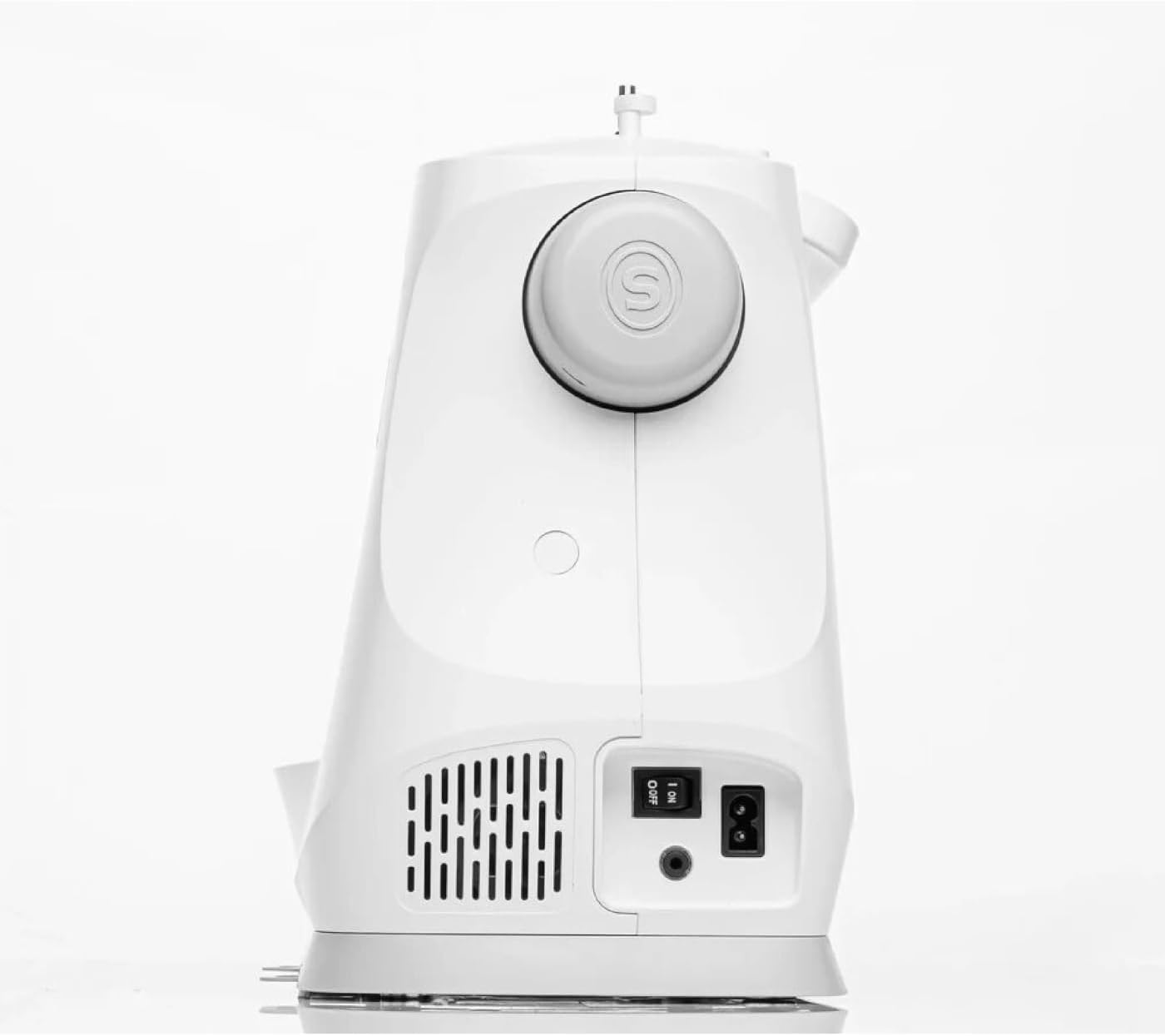
ചിത്രം 3: പിൻഭാഗം view of the Singer C7225, showing the power switch and power cord connection point.

ചിത്രം 4: ക്ലോസ്-അപ്പ് ഫ്രണ്ട് view of the Singer C7225, focusing on the needle, presser foot, and bobbin area.
പ്രധാന ഘടകങ്ങൾ:
- സൂചി പ്ലേറ്റ്: The metal plate under the needle, often with seam allowance guides.
- പ്രഷർ ഫൂട്ട്: Holds the fabric firmly against the feed dogs while sewing.
- നായ്ക്കൾക്ക് ഭക്ഷണം കൊടുക്കുക: Teeth-like mechanisms that move the fabric under the presser foot.
- ബോബിൻ കേസ്: Holds the bobbin, which supplies the lower thread.
- ത്രെഡ് ഗൈഡുകൾ: Paths for the upper thread to follow from the spool to the needle.
- ടെൻഷൻ ഡയൽ: മുകളിലെ നൂലിന്റെ പിരിമുറുക്കം ക്രമീകരിക്കുന്നു.
- ഹാൻഡ്വീൽ: സൂചി സ്വമേധയാ ഉയർത്തുകയും താഴ്ത്തുകയും ചെയ്യുന്നു.
- Control Panel/LCD Screen: For selecting stitches, adjusting settings, and viewവിവരങ്ങൾ.
- Foot Controller Port: Where the foot pedal is connected.
- വൈദ്യുതി സ്വിച്ച്: മെഷീൻ ഓണും ഓഫും ചെയ്യുന്നു.
സജ്ജമാക്കുക
1. അൺപാക്കിംഗും പ്ലേസ്മെൻ്റും:
- Carefully remove the machine from its packaging. Retain all packaging materials for future storage or transport.
- മതിയായ വെളിച്ചമുള്ള, സ്ഥിരതയുള്ളതും പരന്നതുമായ ഒരു പ്രതലത്തിൽ മെഷീൻ സ്ഥാപിക്കുക. തുണിത്തരങ്ങൾ കൈകാര്യം ചെയ്യുന്നതിന് മെഷീനിന് ചുറ്റും മതിയായ ഇടമുണ്ടെന്ന് ഉറപ്പാക്കുക.
2. പവർ കണക്ഷൻ:
- Locate the power cord and foot controller.
- Insert the foot controller plug into the foot controller port on the machine.
- Insert the power cord plug into the power input port on the machine.
- പവർ കോഡിന്റെ മറ്റേ അറ്റം അനുയോജ്യമായ ഒരു ഇലക്ട്രിക്കൽ ഔട്ട്ലെറ്റിലേക്ക് പ്ലഗ് ചെയ്യുക.
- Turn on the power switch, usually located on the side or rear of the machine. The LCD screen should illuminate.
3. Winding the Bobbin:
- സ്പൂൾ പിന്നിൽ ഒരു സ്പൂൾ ത്രെഡ് വയ്ക്കുക.
- Follow the bobbin winding path indicated by the arrows on the machine.
- ബോബിൻ വൈൻഡിംഗ് സ്പിൻഡിൽ ഒരു ഒഴിഞ്ഞ ബോബിൻ വയ്ക്കുക.
- ബോബിൻ വൈൻഡിംഗ് സ്പിൻഡിൽ വലതുവശത്തേക്ക് തള്ളുക.
- വൈൻഡിംഗ് ആരംഭിക്കാൻ ഫുട് കൺട്രോളർ അല്ലെങ്കിൽ സ്റ്റാർട്ട്/സ്റ്റോപ്പ് ബട്ടൺ അമർത്തുക. ബോബിൻ നിറയുമ്പോൾ നിർത്തുക.
- ത്രെഡ് മുറിച്ച് ബോബിൻ നീക്കം ചെയ്യുക.
4. Inserting the Bobbin:
- ബോബിൻ കവർ പ്ലേറ്റ് തുറക്കുക.
- നൂൽ ശരിയായ ദിശയിൽ (സാധാരണയായി എതിർ ഘടികാരദിശയിൽ) അഴിക്കുന്നുണ്ടെന്ന് ഉറപ്പാക്കിക്കൊണ്ട്, മുറിവ് ബോബിൻ ബോബിൻ കേസിൽ തിരുകുക.
- ടെൻഷൻ സ്പ്രിംഗിലൂടെ ത്രെഡ് ഗൈഡ് സ്ലോട്ടിലേക്ക് നയിക്കുക.
- ബോബിൻ കവർ പ്ലേറ്റ് മാറ്റിസ്ഥാപിക്കുക.
5. Threading the Upper Thread:
- പ്രസ്സർ ഫുട്ട് ലിഫ്റ്റർ ഉയർത്തുക.
- സ്പൂൾ പിന്നിൽ ഒരു സ്പൂൾ ത്രെഡ് വയ്ക്കുക.
- മെഷീനിൽ സൂചിപ്പിച്ചിരിക്കുന്ന നമ്പർ നൽകിയ ത്രെഡിംഗ് പാത്ത് പിന്തുടരുക, ത്രെഡ് എല്ലാ ഗൈഡുകളിലൂടെയും ടേക്ക്-അപ്പ് ലിവറിലൂടെയും കടന്നുപോകുന്നുണ്ടെന്ന് ഉറപ്പാക്കുക.
- Thread the needle from front to back using the automatic needle threader if available, or manually.
- സൂചിക്കുഴയിലൂടെ ഏകദേശം 6 ഇഞ്ച് നൂൽ വലിക്കുക.
6. Bringing Up the Bobbin Thread:
- Hold the upper thread lightly.
- സൂചി സൂചി പ്ലേറ്റിലേക്ക് താഴ്ത്താൻ ഹാൻഡ്വീൽ നിങ്ങളുടെ നേരെ തിരിക്കുക, തുടർന്ന് അത് വീണ്ടും ഉയർത്തുക.
- മുകളിലെ നൂൽ ബോബിൻ നൂലിൽ പിടിച്ച് ഒരു ലൂപ്പ് ഉണ്ടാക്കും. സൂചി പ്ലേറ്റ് ദ്വാരത്തിലൂടെ ലൂപ്പ് മുകളിലേക്ക് വലിക്കുക.
- മുകളിലെ ത്രെഡും ബോബിൻ ത്രെഡും പ്രഷർ പാദത്തിനടിയിലൂടെയും മെഷീനിന്റെ പിൻഭാഗത്തേക്കും വലിക്കുക.
പ്രവർത്തന നിർദ്ദേശങ്ങൾ
1. Selecting a Stitch:
- മെഷീൻ ഓണാക്കുക.
- Use the stitch selection buttons or dial on the control panel to choose your desired stitch. The selected stitch will be displayed on the LCD screen.
- The C7225 offers a wide variety of utility, decorative, and alphanumeric stitches.
2. Adjusting Stitch Settings:
- തുന്നൽ നീളം: Adjust the length of each stitch using the dedicated buttons. Longer stitches are for basting or thicker fabrics, shorter for fine details.
- തുന്നൽ വീതി: Adjust the width for zigzag or decorative stitches.
- ത്രെഡ് ടെൻഷൻ: The machine typically sets tension automatically, but manual adjustment may be needed for specific fabrics or threads. Refer to the tension dial.
- സൂചി സ്ഥാനം: Adjust the needle position (left, center, right) for certain techniques like topstitching or zipper insertion.
3. Starting to Sew:
- തുണി പ്രഷർ പാദത്തിനടിയിൽ വയ്ക്കുക, സൂചി പ്ലേറ്റിൽ ഒരു സീം ഗൈഡ് ഉപയോഗിച്ച് അറ്റം വിന്യസിക്കുക.
- പ്രഷർ കാൽ താഴ്ത്തുക.
- Press the foot controller gently or press the Start/Stop button to begin sewing.
- Guide the fabric gently with both hands, but do not push or pull it. Allow the feed dogs to move the fabric.
- To reverse stitch (for securing seams), press and hold the reverse button.
- When finished, press the Start/Stop button or release the foot controller.
- ഹാൻഡ് വീൽ ഉപയോഗിച്ച് സൂചി അതിന്റെ ഏറ്റവും ഉയർന്ന സ്ഥാനത്തേക്ക് ഉയർത്തുക.
- പ്രഷർ കാൽ ഉയർത്തുക.
- Pull the fabric towards the back and cut the threads using the thread cutter on the machine.
4. Changing Needles and Presser Feet:
- Changing Needles: Always turn off the machine before changing the needle. Loosen the needle clamp screw, remove the old needle, insert the new needle with the flat side facing the back, and tighten the screw. Use the correct needle type and size for your fabric.
- Changing Presser Feet: Raise the presser foot lifter. Press the release button on the back of the presser foot holder to detach the current foot. Position the new presser foot under the holder and lower the presser foot lifter until it snaps into place.
മെയിൻ്റനൻസ്
പതിവ് അറ്റകുറ്റപ്പണികൾ നിങ്ങളുടെ തയ്യൽ മെഷീനിന്റെ ദീർഘായുസ്സും മികച്ച പ്രകടനവും ഉറപ്പാക്കുന്നു.
1. വൃത്തിയാക്കൽ:
- ഓരോ ഉപയോഗത്തിനും ശേഷം: ബോബിൻ ഭാഗത്തും സൂചി പ്ലേറ്റിനടിയിലും നിന്ന് ലിന്റും പൊടിയും നീക്കം ചെയ്യാൻ ഒരു ചെറിയ ബ്രഷ് ഉപയോഗിക്കുക.
- പതിവായി: Remove the needle plate and clean the feed dogs and bobbin case area thoroughly. A small vacuum attachment can be helpful.
- പുറം: ഒരു സോഫ്റ്റ്, ഡി ഉപയോഗിച്ച് മെഷീൻ്റെ പുറംഭാഗം തുടയ്ക്കുകamp തുണി. കഠിനമായ രാസവസ്തുക്കൾ ഉപയോഗിക്കരുത്.
2. Oiling:
The Singer C7225 is largely self-lubricating. Refer to the full instruction manual for specific oiling points if necessary. Over-oiling can cause issues.
3. സംഭരണം:
When not in use, cover the machine with a dust cover to protect it from dust and debris. Store in a dry, cool place.
ട്രബിൾഷൂട്ടിംഗ്
നിങ്ങൾ നേരിട്ടേക്കാവുന്ന സാധാരണ പ്രശ്നങ്ങളെ ഈ വിഭാഗം അഭിസംബോധന ചെയ്യുന്നു. കൂടുതൽ സങ്കീർണ്ണമായ പ്രശ്നങ്ങൾക്ക്, ഉപഭോക്തൃ പിന്തുണയുമായി ബന്ധപ്പെടുക.
| പ്രശ്നം | സാധ്യമായ കാരണം | പരിഹാരം |
|---|---|---|
| Machine not sewing / No power | Power cord not plugged in; Power switch off; Foot controller not connected. | Check all power connections; Turn on power switch; Ensure foot controller is securely plugged in. |
| തുന്നലുകൾ ഒഴിവാക്കി | Incorrect needle; Needle bent or dull; Machine not threaded correctly; Incorrect tension. | Change needle to correct type/size; Replace bent/dull needle; Re-thread machine completely; Adjust tension. |
| നൂൽ പൊട്ടൽ | Improper threading; Thread tension too tight; Needle bent or wrong size; Poor quality thread. | Re-thread machine; Loosen upper tension; Replace needle; Use good quality thread. |
| തുണി ഊരുന്നില്ല | Presser foot not lowered; Feed dogs lowered; Lint under needle plate. | Lower presser foot; Raise feed dogs; Clean under needle plate. |
| ബോബിൻ നൂൽ കുരുങ്ങുന്നു | Bobbin incorrectly inserted; Bobbin case dirty; Upper tension too loose. | Re-insert bobbin correctly; Clean bobbin case; Tighten upper tension. |
സ്പെസിഫിക്കേഷനുകൾ
| ഫീച്ചർ | വിശദാംശങ്ങൾ |
|---|---|
| ബ്രാൻഡ് | ഗായകൻ |
| മോഡൽ | C7225 |
| നിറം | വെള്ള |
| മെറ്റീരിയൽ | ഇരുമ്പ് |
| ഭാരം | 8 കിലോഗ്രാം |
| അളവുകൾ (L x W x H) | 20P x 28l x 22H centimeters (Approximate) |
| പവർ ഉറവിടം | ഇലക്ട്രിക് കേബിൾ |
| ടൈപ്പ് ചെയ്യുക | കമ്പ്യൂട്ടറൈസ്ഡ് തയ്യൽ മെഷീൻ |
| Spare Parts Availability (EU) | 2 വർഷം |
വാറൻ്റിയും പിന്തുണയും
വാറൻ്റി വിവരങ്ങൾ: The Singer C7225 sewing machine comes with a manufacturer's warranty. Please refer to the warranty card included with your purchase for specific terms, conditions, and duration. Keep your proof of purchase for warranty claims.
ഉപഭോക്തൃ പിന്തുണ: For technical assistance, spare parts, or service, please contact Singer customer support. Contact details can typically be found on the Singer official webസൈറ്റ് അല്ലെങ്കിൽ വാറന്റി കാർഡിൽ.
ഓൺലൈൻ ഉറവിടങ്ങൾ: Visit the official Singer website for additional resources, including FAQs, video tutorials, and updated information about your C7225 model.


