1. ആമുഖം
This manual provides detailed instructions for the assembly, operation, and maintenance of your RFIVER TF3001WHT TV Stand. Please read these instructions carefully before beginning assembly to ensure safe and correct installation and usage. Keep this manual for future reference.
2 സുരക്ഷാ വിവരങ്ങൾ
- അസംബ്ലി ചെയ്യുന്നതിന് മുമ്പ് എല്ലാ ഭാഗങ്ങളും ഉണ്ടെന്നും കേടുപാടുകൾ സംഭവിച്ചിട്ടില്ലെന്നും ഉറപ്പാക്കുക. ഏതെങ്കിലും ഭാഗങ്ങൾ നഷ്ടപ്പെട്ടാലോ തകരാറുള്ളാലോ ഉപയോഗിക്കരുത്.
- പരമാവധി ഭാര ശേഷി 35 കിലോഗ്രാം (77 പൗണ്ട്) കവിയരുത്.
- This stand is designed for TVs between 32 and 65 inches. Verify your TV's size and VESA pattern before installation.
- പോറലുകൾ ഉണ്ടാകാതിരിക്കാൻ മൃദുവും വൃത്തിയുള്ളതുമായ ഒരു പ്രതലത്തിൽ കൂട്ടിച്ചേർക്കുക.
- Tighten all screws firmly, but do not overtighten. Overtightening can damage threads.
- അസംബ്ലി സമയത്ത് കുട്ടികളെയും വളർത്തുമൃഗങ്ങളെയും അകറ്റി നിർത്തുക. ചെറിയ ഭാഗങ്ങൾ ശ്വാസംമുട്ടലിന് കാരണമായേക്കാം.
- Always ensure the TV is securely mounted to the stand and stable before use.
3. പാക്കേജ് ഉള്ളടക്കം
താഴെ ലിസ്റ്റ് ചെയ്തിരിക്കുന്ന എല്ലാ ഘടകങ്ങളും നിങ്ങളുടെ പാക്കേജിൽ ഉൾപ്പെടുത്തിയിട്ടുണ്ടെന്ന് ഉറപ്പാക്കുക:
- ടെമ്പർഡ് ഗ്ലാസ് ബേസ്
- പ്രധാന പിന്തുണ കോളം
- ടിവി മൗണ്ടിംഗ് ബ്രാക്കറ്റുകൾ (ഇടതും വലതും)
- VESA അഡാപ്റ്റർ പ്ലേറ്റുകൾ (ബാധകമെങ്കിൽ)
- ഹാർഡ്വെയർ കിറ്റ് (വിവിധ സ്ക്രൂകൾ, വാഷറുകൾ, ടിവിക്കും സ്റ്റാൻഡ് അസംബ്ലിക്കും വേണ്ടിയുള്ള സ്പെയ്സറുകൾ)
- കേബിൾ മാനേജ്മെന്റ് ക്ലിപ്പുകൾ
- Non-slip Feet for Base

4. അസംബ്ലി നിർദ്ദേശങ്ങൾ
ശരിയായ അസംബ്ലിക്ക് ഈ ഘട്ടങ്ങൾ ശ്രദ്ധാപൂർവ്വം പിന്തുടരുക:
- Attach Non-slip Feet to Base: Carefully place the tempered glass base on a soft surface. Attach the non-slip feet to the designated spots on the underside of the glass base.
- Secure Main Support Column to Base: Align the main support column with the mounting holes on the tempered glass base. Use the provided screws and tools to securely fasten the column to the base. Ensure it is stable and upright.
- Attach TV Mounting Brackets to TV: Identify the VESA mounting holes on the back of your television. Select the appropriate screws, washers, and spacers from the hardware kit that fit your TV. Attach the left and right TV mounting brackets to the back of your TV. Ensure the brackets are level and securely fastened.
- ടിവി സ്റ്റാൻഡിലേക്ക് ഘടിപ്പിക്കുക: With assistance, carefully lift the television and hook the TV mounting brackets onto the main support column. Ensure the brackets are properly seated on the column's hooks.
- Secure TV with Safety Locks: Once the TV is hung, locate the safety locks on the bottom of the TV mounting brackets. Tighten these screws to secure the TV to the stand, preventing accidental dislodgement.
- കേബിൾ മാനേജുമെന്റ്: Use the provided cable management clips to route and organize cables along the back of the main support column. This helps maintain a tidy appearance and prevents cable damage.


5. പ്രവർത്തന നിർദ്ദേശങ്ങൾ
5.1 ഉയരം ക്രമീകരിക്കൽ
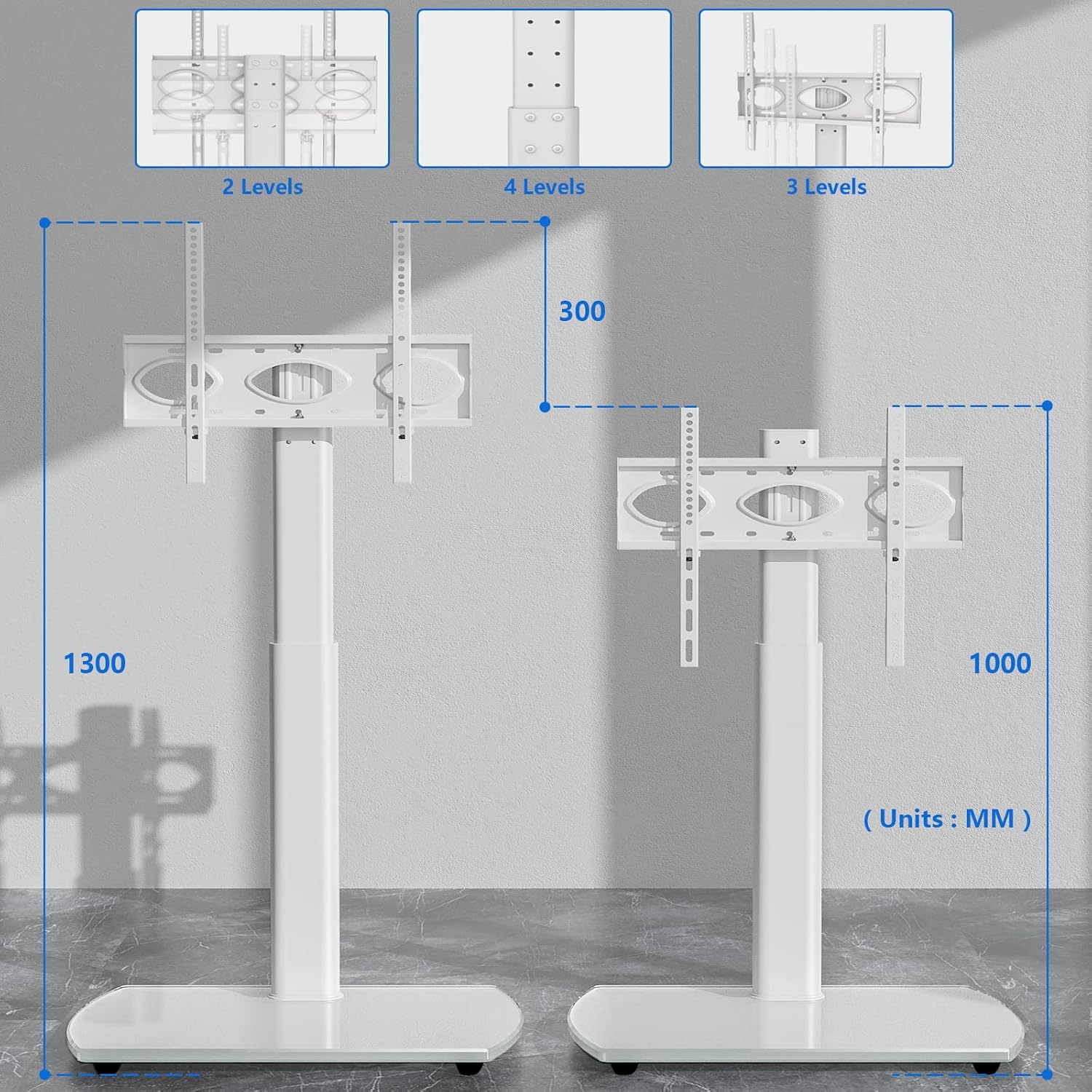
The RFIVER TF3001WHT TV stand allows for height adjustment to optimize your viewing experience. The TV can be adjusted between 1000 mm and 1300 mm from the floor.
- To adjust the height, loosen the screws on the main support column that secure the TV mounting plate.
- Carefully slide the TV (with brackets) up or down to the desired height.
- Once the desired height is achieved, retighten all screws firmly to secure the TV in place.
5.2 സ്വിവൽ ഫംഗ്ഷൻ
The TV stand features a swivel function, allowing you to rotate your television for optimal viewകോണുകൾ.
- The TV can be swiveled up to 30 degrees to the left and 30 degrees to the right.
- Gently grasp the sides of your television and rotate it to the desired angle. No locking mechanism is required for the swivel function.

6. പരിപാലനം
To ensure the longevity and appearance of your TV stand, follow these maintenance guidelines:
- വൃത്തിയാക്കൽ: ഒരു സോഫ്റ്റ് ഉപയോഗിക്കുക, ഡിamp cloth to clean the glass base and metal parts. Avoid abrasive cleaners or harsh chemicals that could damage the finish.
- പരിശോധന: എല്ലാ സ്ക്രൂകളും കണക്ഷനുകളും ഇറുകിയതാണെന്ന് ഉറപ്പാക്കാൻ ഇടയ്ക്കിടെ പരിശോധിക്കുക. ആവശ്യമെങ്കിൽ വീണ്ടും മുറുക്കുക.
- ഭാരം വിതരണം: Avoid placing excessive weight on the stand, especially on the edges of the glass base.
7. പ്രശ്നപരിഹാരം
എന്തെങ്കിലും പ്രശ്നങ്ങൾ നേരിടുകയാണെങ്കിൽ, ഇനിപ്പറയുന്ന പൊതുവായ പ്രശ്നങ്ങളും പരിഹാരങ്ങളും പരിശോധിക്കുക:
- ടിവി നിലവാരമില്ലാത്തതാണ്: Ensure the TV mounting brackets are installed evenly on the back of the TV. Check that the main support column is securely fastened to the base and is not leaning.
- സ്റ്റാൻഡ് അസ്ഥിരമായി തോന്നുന്നു: Verify that all assembly screws are fully tightened. Ensure the stand is placed on a flat, stable surface. Do not exceed the maximum weight capacity.
- Difficulty with height adjustment: Loosen the adjustment screws sufficiently before attempting to slide the TV. Ensure no cables are snagged.
- വിട്ടുപോയ ഭാഗങ്ങൾ: If any parts are missing upon opening the package, contact RFIVER customer support for assistance.
8 സ്പെസിഫിക്കേഷനുകൾ
Detailed product specifications for the RFIVER TF3001WHT TV Stand:
| ഫീച്ചർ | സ്പെസിഫിക്കേഷൻ |
|---|---|
| മോഡൽ നമ്പർ | TF3001WHT |
| അനുയോജ്യമായ ടിവി വലുപ്പങ്ങൾ | 32-65 ഇഞ്ച് |
| പരമാവധി ഭാരം ശേഷി | 35 കി.ഗ്രാം (77 പൗണ്ട്) |
| VESA അനുയോജ്യത | 100x100mm മുതൽ 400x400mm വരെ |
| ഉയരം ക്രമീകരിക്കൽ ശ്രേണി | 1000mm - 1300mm |
| സ്വിവൽ ആംഗിൾ | ± 30 ഡിഗ്രി |
| അടിസ്ഥാന മെറ്റീരിയൽ | ടെമ്പർഡ് ഗ്ലാസ് |
| നിറം | വെള്ള |

9. വാറൻ്റിയും പിന്തുണയും
The RFIVER TF3001WHT TV Stand comes with a manufacturer's warranty of 5 years.
For warranty claims, technical support, or any questions regarding your product, please contact RFIVER customer service through the retailer's platform or the official RFIVER website. Please have your model number (TF3001WHT) and purchase information ready when contacting support.


