1. ആമുഖം
This manual provides essential information for the safe and effective operation, setup, and maintenance of your SCULPFUN S30 Ultra 22W Laser Engraver. Please read this manual thoroughly before using the device to ensure proper functionality and safety.
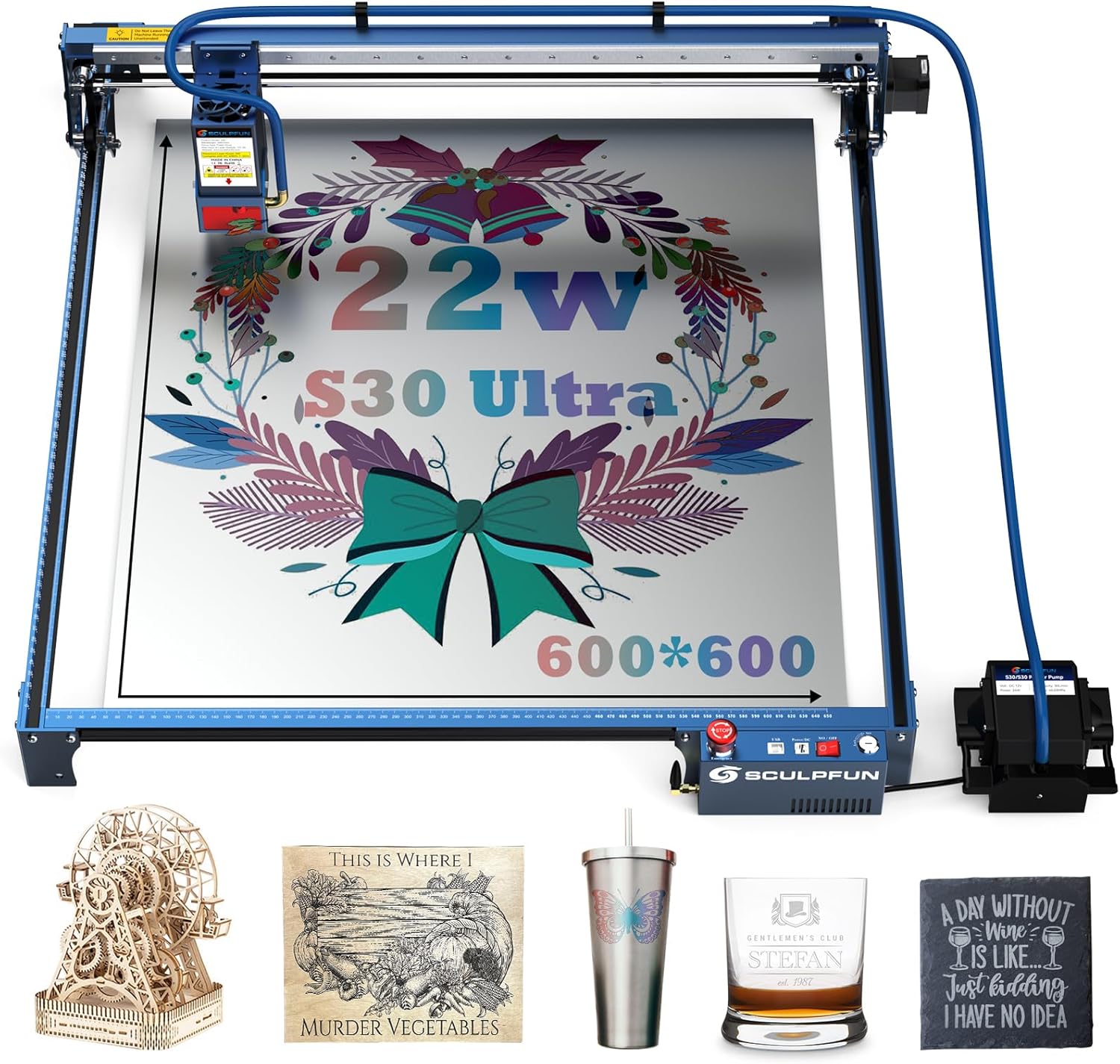
The SCULPFUN S30 Ultra 22W Laser Engraver, featuring a large working area and integrated air assist, shown with various finished engraving and cutting projects.
2 സുരക്ഷാ വിവരങ്ങൾ
WARNING: Laser radiation can cause eye damage and skin burns. Always wear appropriate laser safety glasses during operation. Never look directly into the laser beam.
- Laser Cover: The laser module is equipped with a protective cover designed to prevent direct eye exposure to the laser beam and minimize lens pollution from smoke and debris.
- എമർജൻസി സ്റ്റോപ്പ് സ്വിച്ച്: A prominent emergency stop button is provided to immediately halt all machine operations in case of an emergency.
- കീ ലോക്ക്: The machine features a key lock mechanism to prevent unauthorized use, especially by children. Ensure the key is removed when the machine is not in use.
- സ്വിച്ച് പരിമിതപ്പെടുത്തുക: X/Y axis limit switches are installed to define the working boundaries and prevent the laser head from exceeding the frame, reducing the risk of collision or damage.
- വെൻ്റിലേഷൻ: Operate the laser engraver in a well-ventilated area to dissipate fumes and smoke generated during the engraving and cutting process.
- അഗ്നി സുരക്ഷ: ഒരു അഗ്നിശമന ഉപകരണം സമീപത്ത് സൂക്ഷിക്കുക. പ്രവർത്തന സമയത്ത്, പ്രത്യേകിച്ച് കത്തുന്ന വസ്തുക്കൾ മുറിക്കുമ്പോൾ, യന്ത്രം ശ്രദ്ധിക്കാതെ വിടരുത്.
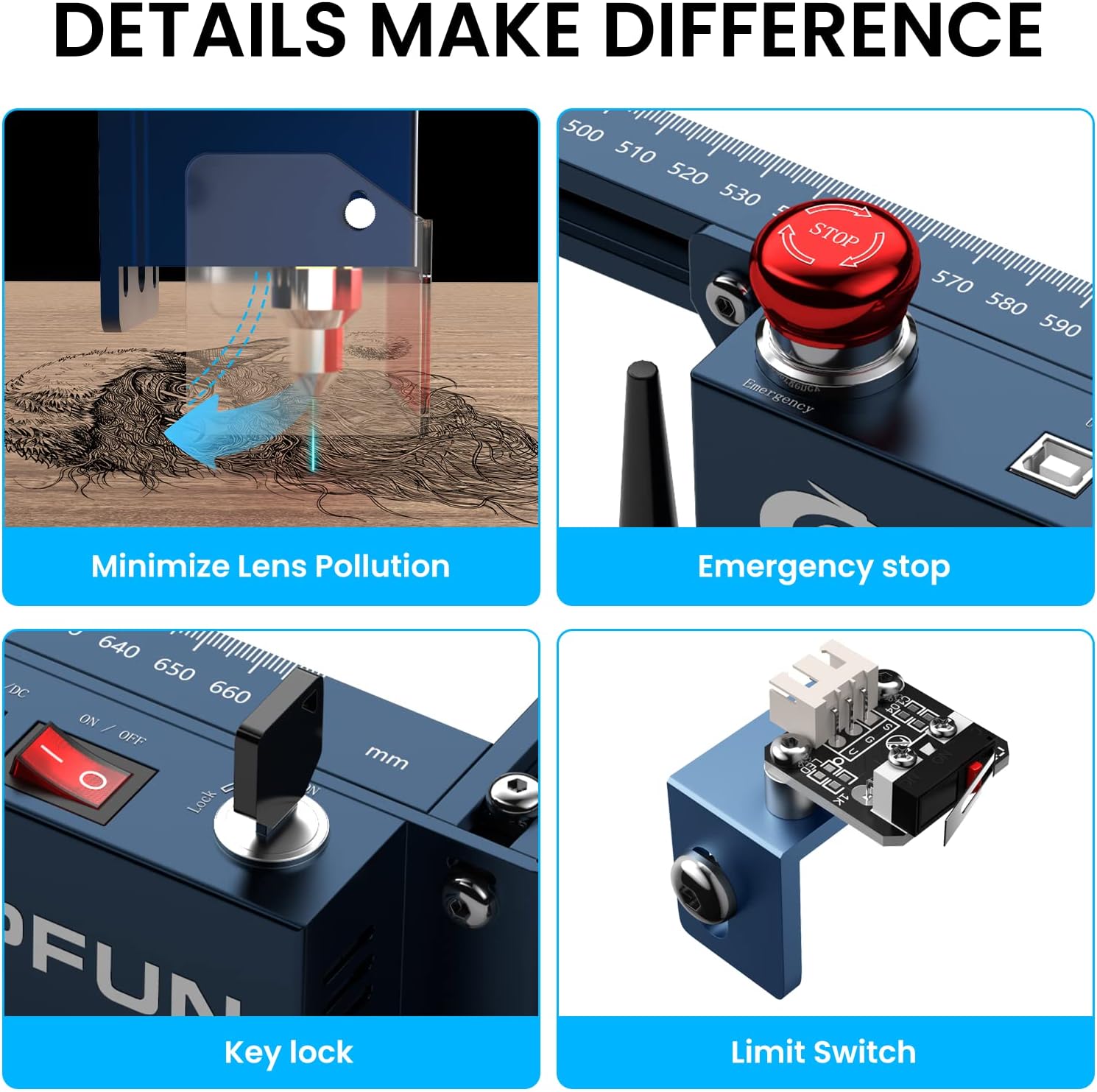
Key safety features include a laser cover to minimize lens pollution, an emergency stop button for immediate shutdown, a key lock to prevent unauthorized use, and X/Y axis limit switches for precise positioning and collision prevention.
3. ഉൽപ്പന്ന സവിശേഷതകൾ
3.1. High Power Laser Output
The SCULPFUN S30 Ultra is equipped with a powerful 22000mW (22W) laser output, providing strong cutting capabilities. It can cut through 15mm wood or 10mm acrylic in a single pass. The ultra-fine 0.05x0.05mm compressed laser spot allows for highly detailed engraving, producing lines as thin as a hair.

This image demonstrates the powerful 22W laser output, capable of cutting 15mm wood, 10mm black acrylic, and 0.08mm steel in a single pass.
3.2. Large Working Area
With a generous 600x600mm (23.6x23.6 inches) working area, the S30 Ultra offers ample space for large-scale projects. This eliminates the need for purchasing separate extendable axes, saving both time and cost.

The SCULPFUN S30 Ultra features an expansive 600x600mm working area, providing ample space for larger engraving and cutting projects without requiring additional extensions.
3.3. Intelligent Air Assist
The integrated intelligent air assist system, controlled by a 32-bit mainboard, automatically activates and deactivates during cutting and engraving. This feature ensures clean cutting edges and smooth surfaces, optimizing the quality of your work and conserving energy.

The intelligent air assist system, controlled by a 32-bit mainboard, automatically provides airflow to ensure clean cuts and smooth engraving surfaces, as demonstrated by the improved snowflake design.
3.4. High Accuracy Engraving
The 0.05x0.05mm ultra-fine compressed laser spot enables the SCULPFUN S30 Ultra to achieve industry-standard engraving precision, rendering intricate details vividly and perfectly on various materials.

Achieve exceptional detail with the 0.05x0.05mm ultra-fine compressed laser spot, allowing for precise and intricate engravings.
3.5. Metallic Color Engraving
The powerful 22W laser beam can oxidize metallic surfaces, creating vibrant and colorful engravings. This feature allows for adding unique aesthetic elements to metal projects.

Examples of metallic surfaces engraved with colorful designs and a color palette. The 22W laser can oxidize metallic surfaces to create vibrant, colorful engravings, offering over 350 color options for creative projects.
3.6. Extended Laser Lifespan
The S30 Ultra series incorporates an innovative replaceable lens design, significantly extending the laser's service life by more than 10 times compared to conventional lasers. A laser repair kit is included for lens replacement, ensuring consistent cutting power over time.

The S30 Ultra series features an innovative replaceable lens design, extending the laser's service life by more than 10 times compared to other general lasers. A laser repair kit is included.
4. സജ്ജീകരണം
The SCULPFUN S30 Ultra is designed for straightforward assembly. Components are typically organized in marked bags with an accompanying manual for step-by-step guidance.
4.1. അസംബ്ലി
- എല്ലാ ഘടകങ്ങളും അൺപാക്ക് ചെയ്ത് പാക്കിംഗ് ലിസ്റ്റുമായി താരതമ്യം ചെയ്യുക.
- Follow the included assembly instructions carefully to construct the frame and mount the laser module.
- Connect all cables, including power, USB, and air assist lines, ensuring secure connections.
- Ensure the X and Y axes are properly aligned and belts are tensioned correctly.
4.2. സോഫ്റ്റ്വെയർ ഇൻസ്റ്റാളേഷൻ
The S30 Ultra is compatible with popular laser control software such as LightBurn and LaserGRBL. Install your preferred software on your computer.
- Download the latest version of LightBurn or LaserGRBL from their official webസൈറ്റുകൾ.
- Follow the software installation prompts.
- Connect the engraver to your computer via USB, Bluetooth, or SD card.
- Configure the software settings according to the provided software guide or manufacturer recommendations for the S30 Ultra model.

The S30 Ultra series supports popular software like LaserGRBL and LightBurn, offering versatile connection options including Bluetooth, SD card, and USB cable for convenient data transfer.
5. പ്രവർത്തന നിർദ്ദേശങ്ങൾ
5.1. Preparing for Engraving/Cutting
- Place the material securely on the working bed.
- Ensure proper ventilation is established.
- Wear laser safety glasses.
- Turn on the machine using the key lock and power switch.
- Open your chosen software (LightBurn/LaserGRBL) and connect to the engraver.
5.2. സോഫ്റ്റ്വെയർ പ്രവർത്തനം
- സോഫ്റ്റ്വെയറിനുള്ളിൽ നിങ്ങളുടെ ഡിസൈൻ ഇറക്കുമതി ചെയ്യുക അല്ലെങ്കിൽ സൃഷ്ടിക്കുക.
- Adjust laser power, speed, and passes according to the material type and desired effect. Refer to material test guides for optimal settings.
- Set the origin point and frame the work area to ensure correct positioning.
- സോഫ്റ്റ്വെയറിൽ നിന്ന് കൊത്തുപണി അല്ലെങ്കിൽ മുറിക്കൽ പ്രക്രിയ ആരംഭിക്കുക.
5.3. പ്രവർത്തന സമയത്ത്
- Monitor the process closely. Do not leave the machine unattended.
- The intelligent air assist will activate automatically to maintain clean cuts.
- In case of any malfunction or emergency, press the emergency stop button immediately.
6. പരിപാലനം
6.1. ലെൻസ് ക്ലീനിംഗ്
Regularly inspect and clean the laser lens to maintain optimal performance. Use a soft, lint-free cloth and appropriate lens cleaning solution. The laser module's opening window design helps reduce dust accumulation on the lens.

The laser module incorporates an opening window design to protect the lens from smoke and reduce dust accumulation, along with HD protective glass for safe observation.
6.2 ലെൻസ് മാറ്റിസ്ഥാപിക്കൽ
If the laser lens becomes damaged or its performance degrades significantly after extended use, it can be replaced. Refer to the included laser repair kit and follow the specific instructions for lens replacement to restore full cutting power.
6.3 ജനറൽ ക്ലീനിംഗ്
Keep the machine free from dust and debris. Regularly clean the rails and moving parts to ensure smooth operation and prevent wear.
7. പ്രശ്നപരിഹാരം
- മെഷീൻ പ്രവർത്തിക്കുന്നില്ല:
- Ensure the power cable is securely connected to both the machine and a working power outlet.
- Verify the key is inserted and turned to the 'ON' position.
- ഏതെങ്കിലും ഇൻഡിക്കേറ്റർ ലൈറ്റുകൾക്കായി പവർ സപ്ലൈ യൂണിറ്റ് പരിശോധിക്കുക.
- Connection Issues (USB/Bluetooth):
- Ensure the correct drivers are installed for your operating system.
- മറ്റൊരു USB കേബിളോ പോർട്ടോ പരീക്ഷിക്കുക.
- Restart both the computer and the engraver.
- For Bluetooth, ensure the device is discoverable and paired correctly.
- കൃത്യമല്ലാത്ത കൊത്തുപണി/മുറിക്കൽ:
- Check that the material is securely fastened and not moving during operation.
- Verify that the X and Y axis belts are properly tensioned and not loose.
- Ensure the laser focus is correctly set for the material thickness.
- Clean the laser lens if it appears dirty.
- മോശം കട്ടിംഗ് പ്രകടനം:
- Increase laser power or reduce speed in your software settings.
- Ensure air assist is functioning correctly for cleaner cuts.
- Consider replacing the laser lens if it has been used extensively.
8 സ്പെസിഫിക്കേഷനുകൾ
| ഫീച്ചർ | സ്പെസിഫിക്കേഷൻ |
|---|---|
| ബ്രാൻഡ് | SCULPFUN |
| മോഡൽ നമ്പർ | S30 Ultra 22W |
| ലേസർ ഔട്ട്പുട്ട് പവർ | 22000 മെഗാവാട്ട് (22 വാട്ട്) |
| വർക്കിംഗ് ഏരിയ | 600 x 600 മി.മീ |
| ലേസർ സ്പോട്ട് വലിപ്പം | 0.05 x 0.05 മി.മീ |
| മെറ്റീരിയൽ അനുയോജ്യത | Acrylic, Metal, Wood, etc. |
| ഓപ്പറേഷൻ മോഡ് | ഓട്ടോമാറ്റിക് |
| ഉൽപ്പന്ന അളവുകൾ | 34.21 x 9.8 x 9.41 ഇഞ്ച് |
| ഇനത്തിൻ്റെ ഭാരം | 9.71 കിലോഗ്രാം (21.4 പൗണ്ട്) |
| ബാറ്ററികൾ ആവശ്യമാണ് | ഇല്ല |
9. വാറൻ്റിയും പിന്തുണയും
9.1. വാറൻ്റി വിവരങ്ങൾ
The SCULPFUN S30 Ultra 22W Laser Engraver comes with a 1 വർഷത്തെ വാറൻ്റി വാങ്ങിയ തീയതി മുതൽ. സാധാരണ ഉപയോഗ സാഹചര്യങ്ങളിൽ നിർമ്മാണ വൈകല്യങ്ങളും തകരാറുകളും ഈ വാറന്റി ഉൾക്കൊള്ളുന്നു.
9.2. ഉപഭോക്തൃ പിന്തുണ
For any issues, questions, or technical assistance, please contact SCULPFUN customer support. Details for contacting support can typically be found on the official SCULPFUN webസൈറ്റ് അല്ലെങ്കിൽ നിങ്ങളുടെ വാങ്ങൽ പ്ലാറ്റ്ഫോം വഴി.


