ആമുഖം
This manual provides comprehensive instructions for the operation and maintenance of your OIEXI UHD 4K Video Camera Camcorder. Designed for ease of use, this camcorder features 4K Ultra HD video recording, 64MP photo capabilities, 18X digital zoom, a 4.0-inch rotating touchscreen, and various advanced functions to capture high-quality visuals. Please read this manual thoroughly before using the device to ensure optimal performance and longevity.

Figure 1: OIEXI UHD 4K Video Camera Camcorder and Included Accessories.
ഉൽപ്പന്നം കഴിഞ്ഞുview ഘടകങ്ങളും
Familiarize yourself with the various parts of your camcorder to ensure proper operation.

Figure 2: Detailed diagram of the camcorder's components.
- 1. Handle Charging Port: For charging the camera via the handle.
- 2. ബാറ്ററി: Main power source for the camcorder.
- 3. Video Button: Initiates and stops video recording.
- 4. Photo Button: നിശ്ചല ചിത്രങ്ങൾ പകർത്തുന്നു.
- 5. Confirmation Button/Control Wheel: മെനുകളിലൂടെ നാവിഗേറ്റ് ചെയ്ത് തിരഞ്ഞെടുപ്പുകൾ സ്ഥിരീകരിക്കുന്നു.
- 6. DISP Button: Toggles display information on/off.
- 7. USB Interface/Camera Charging Port: Connects to computer or charger.
- 8. MIC Interface: Connects external microphone.
- 9. HDMI Interface: Connects to external display.
- 10. ലെൻസ്: The primary optical component for capturing images.
- 11. പവർ ബട്ടൺ: Turns the camcorder on/off.
- 12. Menu Button: Accesses the camcorder's settings menu.
- 13. മോഡ് ബട്ടൺ: Switches between different operating modes (e.g., video, photo, playback).
- 14. Playback Button: Enters playback mode to review recorded media.
- 15. SD Card Slot: നിങ്ങളുടെ SD കാർഡ് ഇവിടെ ചേർക്കുക.
- 16. സ്പീക്കർ: ഓഡിയോ പ്ലേബാക്കിനായി.
- 17. Internal Hot Shoe: For attaching accessories like the external microphone.
- 18. Handle Video/Photo Button: Alternative buttons on the handle for recording video or taking photos.
- 19. Handle Digital Zoom: Controls digital zoom from the handle.
- 20. Camera Zoom: Controls optical/digital zoom.
- 21. Camera Hot Shoe: ആക്സസറികൾ ഘടിപ്പിക്കുന്നതിന്.
സജ്ജമാക്കുക
1 ബാറ്ററി ചാർജ് ചെയ്യുന്നു
Before first use, fully charge the included Lithium Ion battery. The 4500mAh battery provides over 3 hours of continuous use. You can also record while charging.
- ബാറ്ററി കമ്പാർട്ട്മെൻ്റിലേക്ക് ബാറ്ററി തിരുകുക.
- Connect the USB cable to the camera's charging port (7) or the handle charging port (1) and then to the charger.
- Plug the charger into a power outlet. The charging indicator will show the charging status.

Figure 3: Battery charging and SD card insertion.
2. SD കാർഡ് ചേർക്കൽ
This camcorder supports SD cards up to 256GB. A 64GB SD card is included for immediate use.
- Locate the SD card slot (15) on the camcorder.
- Insert the SD card with the metal contacts facing down until it clicks into place.
3. ആക്സസറികൾ ഘടിപ്പിക്കൽ
- ബാഹ്യ മൈക്രോഫോൺ: Connect the external microphone to the MIC Interface (8) for improved audio clarity and noise reduction.
- ലെൻസ് ഹുഡ്: Attach the lens hood to the front of the lens (10) to protect it from damage and reduce glare, improving photo color and contrast.
- ഹാൻഡ്ഹെൽഡ് സ്റ്റെബിലൈസർ: For low-angle shots and improved video stability, attach the camcorder to the included handheld stabilizer. The stabilizer also features zoom and shooting buttons for convenience.
പ്രവർത്തന നിർദ്ദേശങ്ങൾ
1. പവർ ഓൺ/ഓഫ്
Press the Power Button (11) to turn the camcorder on or off.
2. Basic Recording (Video & Photo)
- വീഡിയോ റെക്കോർഡിംഗ്: Press the Video Button (3) or the Handle Video Button (18) to start recording. Press again to stop.
- ഫോട്ടോ ക്യാപ്ചർ: Press the Photo Button (4) or the Handle Photo Button (18) to take a still picture.
- സൂം: Use the Camera Zoom (20) or Handle Digital Zoom (19) controls to adjust the 18X digital zoom.
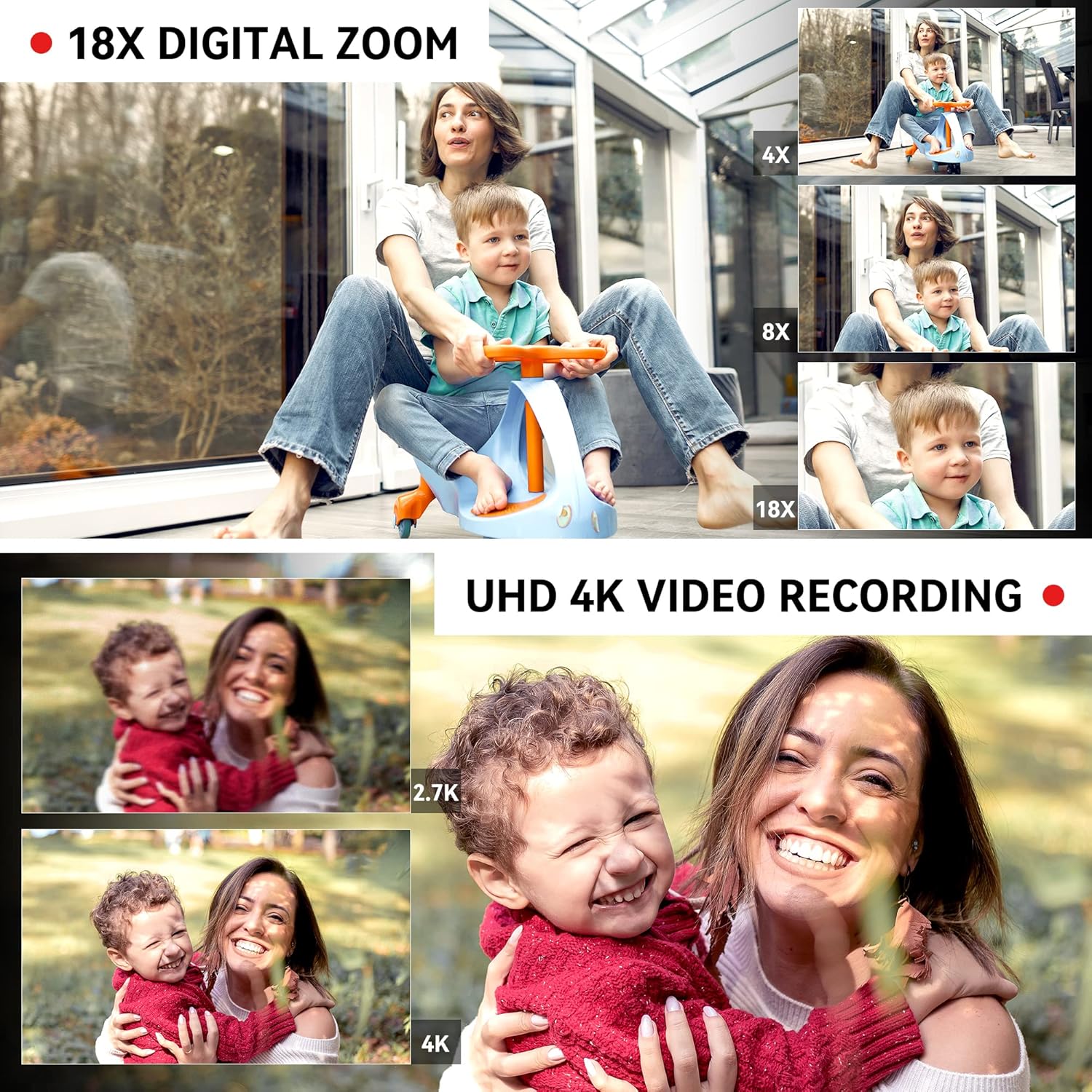
Figure 4: Demonstrating 18X Digital Zoom and 4K video quality.
3. Touchscreen and Menu Navigation
The 4.0-inch 270-degree rotating touchscreen allows for easy navigation. Use the Confirmation Button/Control Wheel (5) or touch the screen directly to select options and adjust settings via the Menu Button (12).
Video 1: This video demonstrates the camcorder's physical features, including the rotating screen, and shows the menu interface for selecting multiple shooting modes and adjusting focus. It also illustrates the wireless connection feature.
4. Multiple Shooting Modes
Press the Mode Button (13) to switch between various shooting modes, including:
- പ്രവർത്തനം താൽക്കാലികമായി നിർത്തുക: Temporarily stop and resume recording within the same file.
- സമയക്കുറവ്: Capture images at set intervals to create a time-lapse video.
- സ്ലോ മോഷൻ: Record video at a higher frame rate for slow-motion playback.
- തുടർച്ചയായ ഷൂട്ടിംഗ്: വേഗത്തിൽ ഒന്നിനുപുറകെ ഒന്നായി ഒന്നിലധികം ഫോട്ടോകൾ എടുക്കുക.
- സ്വയം-ടൈമർ: Set a delay before taking a photo.
- ലൂപ്പ് റെക്കോർഡിംഗ്: Continuously record, overwriting the oldest fileമെമ്മറി കാർഡ് നിറയുമ്പോൾ s.

Figure 5: Visual representation of different shooting modes available.
5. ഫോക്കസ് അഡ്ജസ്റ്റ്മെന്റ്
The camcorder supports both manual and auto-focus. Adjust focus as needed for sharp images and videos.
6. Connectivity and File കൈമാറ്റം
- വയർലെസ് കണക്ഷൻ (വൈ-ഫൈ): Use the "XDV PRO" app on your smartphone to remotely control the camcorder and transfer videos and photos. No internet connection is required for direct file transfer between the camera and phone via Wi-Fi.
- യുഎസ്ബി കണക്ഷൻ (Webcam/Mass Storage): Connect the camcorder to a computer using the USB cable. You can select "Webcam" for live streaming or video calls, or "Mass Storage" to transfer fileനേരിട്ട് നിങ്ങളുടെ കമ്പ്യൂട്ടറിലേക്ക്.
- HDMI ഔട്ട്പുട്ട്: Connect the camcorder to a TV or monitor using the HDMI cable (9) for a larger viewഅനുഭവം.

Figure 6: Connecting the camcorder to a computer and selecting modes.

Figure 7: Remote and Wi-Fi control options.
7. റിമോട്ട് കൺട്രോൾ
The included 2.4G wireless remote control allows you to easily control shooting functions from up to 65 feet away.
മെയിൻ്റനൻസ്
- വൃത്തിയാക്കൽ: Use the provided wiping cloth to gently clean the lens and screen. Avoid using harsh chemicals.
- സംഭരണം: When not in use, store the camcorder in the included camera bag in a cool, dry place away from direct sunlight and extreme temperatures.
- ബാറ്ററി കെയർ: ബാറ്ററി ലൈഫ് വർദ്ധിപ്പിക്കാൻ, ബാറ്ററി ഇടയ്ക്കിടെ പൂർണ്ണമായും ഡിസ്ചാർജ് ചെയ്യുന്നത് ഒഴിവാക്കുക. ദീർഘനേരം ഉപയോഗിച്ചിട്ടില്ലെങ്കിൽ പോലും പതിവായി ചാർജ് ചെയ്യുക.
- SD കാർഡ് മാനേജുമെന്റ്: Regularly back up your files and format the SD card in the camera to maintain optimal performance.
ട്രബിൾഷൂട്ടിംഗ്
| പ്രശ്നം | സാധ്യമായ കാരണം | പരിഹാരം |
|---|---|---|
| കാംകോർഡർ പവർ ഓൺ ചെയ്യുന്നില്ല. | ബാറ്ററി ചാർജ് ചെയ്തിട്ടില്ല അല്ലെങ്കിൽ ശരിയായി ചേർത്തിട്ടില്ല. | Ensure the battery is fully charged and properly inserted. Try charging the battery for at least 30 minutes before attempting to power on again. |
| SD card not recognized or files corrupted. | SD card not inserted correctly, incompatible, or corrupted. | Reinsert the SD card. Ensure it is a compatible SDXC card (up to 256GB). Try formatting the SD card within the camera (this will erase all data). If issues persist, try a different SD card. |
| മോശം ശബ്ദ നിലവാരം. | Internal microphone limitations or external microphone not connected/charged. | Ensure the external microphone is securely connected to the MIC interface (8). If using an external microphone, ensure its battery is charged (if applicable). For optimal sound, use the external microphone. |
| Video recording stops or files are split/corrupted during long recordings. | SD card speed is too slow or card is faulty. | Use a high-speed SD card (Class 10 or higher, U3 recommended for 4K). Format the SD card regularly. If the problem persists, try a different, high-quality SD card. |
| Cannot connect to phone via Wi-Fi. | Incorrect Wi-Fi settings or app issues. | Ensure Wi-Fi is enabled on the camcorder and your phone. Check that you have the correct "XDV PRO" app installed. Restart both devices and try again. |
സ്പെസിഫിക്കേഷനുകൾ
| ഫീച്ചർ | വിശദാംശങ്ങൾ |
|---|---|
| ബ്രാൻഡ് | OIEXI |
| മോഡൽ നമ്പർ | 666186954140 |
| വീഡിയോ ക്യാപ്ചർ റെസല്യൂഷൻ | 4K Ultra HD (60FPS) |
| ഫോട്ടോ റെസല്യൂഷൻ | 64 മെഗാപിക്സലുകൾ വരെ |
| ഡിജിറ്റൽ സൂം | 18X |
| സ്ക്രീൻ വലിപ്പം | 4.0 Inches (270° Rotating Touchscreen) |
| സെൻസർ തരം | 1/2" CMOS Sensor |
| ബാറ്ററി തരം | ലിഥിയം അയോൺ (4500mAh) |
| സ്റ്റോറേജ് മീഡിയ | SD Card (up to 256GB, 64GB included) |
| കണക്റ്റിവിറ്റി | Wi-Fi, USB, HDMI |
| പ്രത്യേക സവിശേഷതകൾ | Built-In Light, Microphone Input, Remote Control, Time Lapse, Touchscreen, Pause Function, Slow Motion, Continuous Shooting, Self-Timer, Anti-Shake |
| അളവുകൾ | 7.09 x 3.92 x 3.14 ഇഞ്ച് |
| ഭാരം | 3.45 പൗണ്ട് |

Figure 8: Camcorder dimensions and weight.
ബോക്സിൽ എന്താണുള്ളത്
Your OIEXI UHD 4K Video Camera Camcorder package includes the following items:
- 1 x Camcorder
- 1 x ബാറ്ററി
- 1 x ചാർജർ
- 1 x 64GB SD കാർഡ്
- 1 x Handheld Stabilizer
- 1 x Camera Bag
- 1 x ഇൻസ്ട്രക്ഷൻ മാനുവൽ
- 1 x Wiping Cloth
- 1 x റിമോട്ട് കൺട്രോൾ
- 2 x Remote Control Batteries
- 1 x USB കേബിൾ
- 1 x HDMI കേബിൾ
- 1 x ബാഹ്യ മൈക്രോഫോൺ
- 1 x Lens Hood

Figure 9: All accessories included in the package.
വാറൻ്റിയും പിന്തുണയും
വാറന്റി വിവരങ്ങൾക്കും ഉപഭോക്തൃ പിന്തുണയ്ക്കും, നിങ്ങളുടെ വാങ്ങലിനൊപ്പം നൽകിയിരിക്കുന്ന ഡോക്യുമെന്റേഷൻ പരിശോധിക്കുകയോ വിൽപ്പനക്കാരനെ നേരിട്ട് ബന്ധപ്പെടുകയോ ചെയ്യുക. ഏതെങ്കിലും വാറന്റി ക്ലെയിമുകൾക്കായി നിങ്ങളുടെ വാങ്ങലിന്റെ തെളിവ് സൂക്ഷിക്കുക.