ആമുഖം
The Keychron Q6 Pro is a full-metal, QMK/VIA compatible, Bluetooth wireless and Type-C wired custom mechanical keyboard featuring a 100% full-size layout. Crafted with high-quality 6063 aluminum, it incorporates a double-gasket design, durable PBT keycaps, and screw-in stabilizers to provide an exceptional typing experience. This manual provides comprehensive instructions for setting up, operating, maintaining, and troubleshooting your Keychron Q6 Pro keyboard.
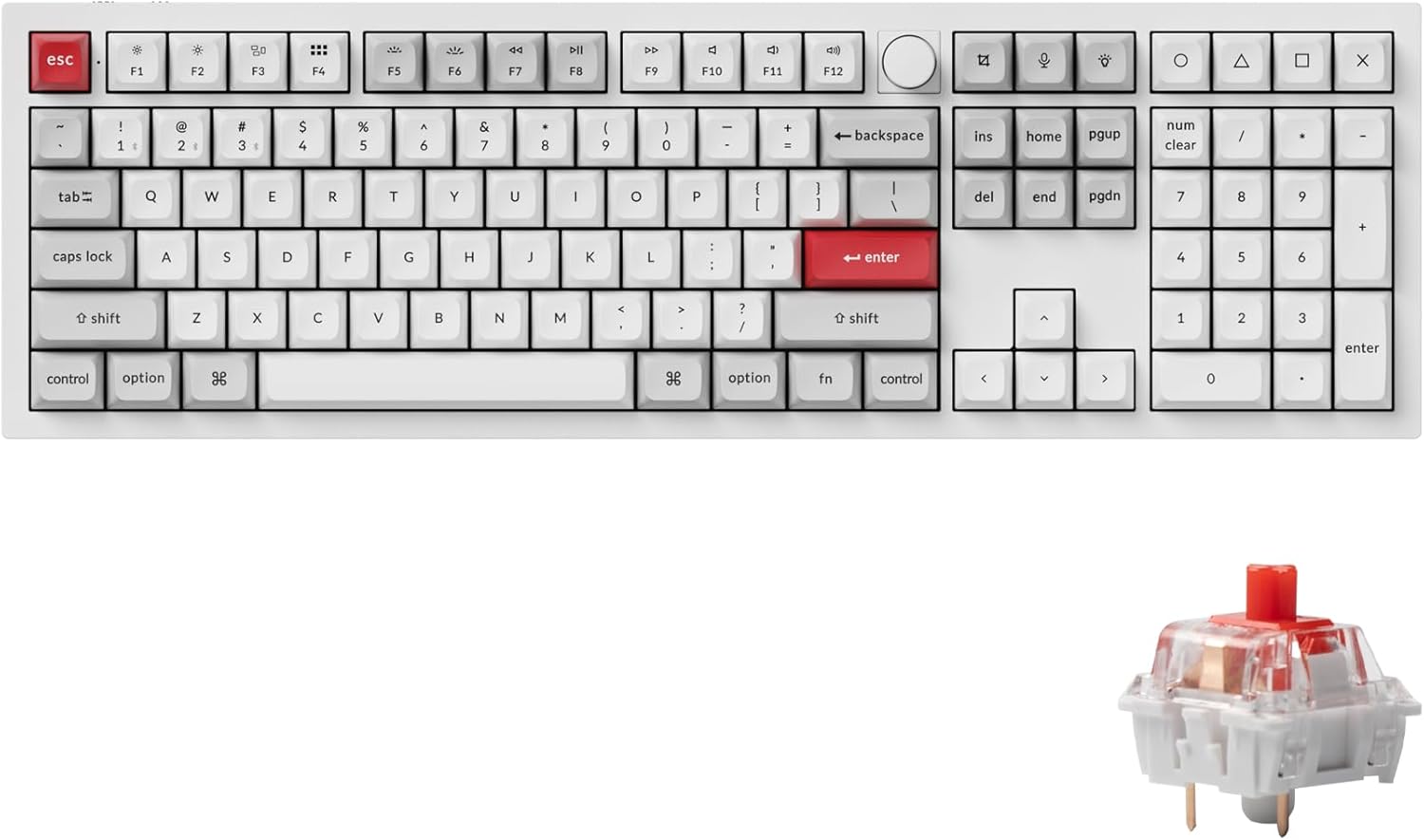
Image: Keychron Q6 Pro Full-Size Mechanical Keyboard with KSA Double-Shot PBT Keycaps and Red Switches.
ബോക്സിൽ എന്താണുള്ളത്
Upon unboxing your Keychron Q6 Pro, please verify that all the following components are included:
കീബോർഡ് ഘടകങ്ങൾ
- 1x പൂർണ്ണമായും അസംബിൾ ചെയ്ത കീബോർഡ്
- 1x അലുമിനിയം കേസ്
- 1x പിസി പ്ലേറ്റ്
- 1x ശബ്ദം ആഗിരണം ചെയ്യുന്ന നുര
- 1x കേസ് നുര
- 16x Gaskets (12 Installed, 4 in box)
- 8 സെറ്റ് x സ്റ്റെബിലൈസറുകൾ
- 1 set x Keycaps (Double-Shot KSA PBT)
- 1 set x Switches (Keychron K Pro Red Switch)
Cables & Tools
- 1x ടൈപ്പ്-സി മുതൽ ടൈപ്പ്-സി കേബിൾ വരെ
- 1x ടൈപ്പ്-എ മുതൽ ടൈപ്പ്-സി അഡാപ്റ്റർ വരെ
- 1x സ്വിച്ച് പുള്ളർ
- 1x കീക്യാപ്പ് പുള്ളർ
- 1x സ്ക്രൂഡ്രൈവർ
- 1x ഹെക്സ് കീ

Image: Diagram showing all components included in the Keychron Q6 Pro Fully Assembled Version package.
സജ്ജമാക്കുക
- കീബോർഡ് അൺപാക്ക് ചെയ്യുക: പാക്കേജിംഗിൽ നിന്ന് കീബോർഡും എല്ലാ അനുബന്ധ ഉപകരണങ്ങളും ശ്രദ്ധാപൂർവ്വം നീക്കം ചെയ്യുക.
- Connect to Power/Device:
- വയർഡ് മോഡ്: Connect the keyboard to your computer using the provided Type-C to Type-C cable or Type-A to Type-C adapter. The keyboard will automatically switch to wired mode and begin charging.
- Wireless (Bluetooth) Mode:
- Ensure the mode switch on the back of the keyboard is set to "BT" (Bluetooth).
- On your computer or device, enable Bluetooth.
- Press and hold the "Fn" key and one of the Bluetooth keys (e.g., "Fn" + "1" for Device 1) for 4 seconds until the key starts blinking rapidly. This indicates pairing mode.
- On your device's Bluetooth settings, select "Keychron Q6 Pro" from the list of available devices to pair.
- The key will stop blinking and remain solid once successfully paired. The keyboard can connect to up to 3 devices via Bluetooth.
- ഓപ്പറേറ്റിംഗ് സിസ്റ്റം സ്വിച്ച്: Locate the OS switch on the back of the keyboard. Set it to "Mac" for macOS devices or "Win" for Windows/Linux devices to ensure correct key mapping.
- പ്രാരംഭ ചാർജ്: For optimal battery life, it is recommended to fully charge the keyboard before its first wireless use. The charging indicator light will show charging status.

Image: The Keychron Q6 Pro keyboard highlighting its dual connectivity options: Bluetooth 5.1 and Type-C wired.
പ്രവർത്തന നിർദ്ദേശങ്ങൾ
പ്രധാന പ്രവർത്തനങ്ങളും ലേഔട്ടും
The Keychron Q6 Pro features a full-size layout with dedicated function keys, a numeric keypad, and a programmable knob.
ചിത്രം: ഓവർഹെഡ് view of the Keychron Q6 Pro keyboard, illustrating its full-size layout with a knob.
QMK/VIA സോഫ്റ്റ്വെയർ കസ്റ്റമൈസേഷൻ
The Q6 Pro is fully programmable with QMK/VIA firmware, allowing you to remap any key, create custom macros, shortcuts, and key combinations. This provides extensive personalization for your typing and gaming needs.
- VIA സോഫ്റ്റ്വെയർ ഡൗൺലോഡ് ചെയ്യുക: ഔദ്യോഗിക കീക്രോൺ സന്ദർശിക്കുക website to download the latest VIA software compatible with your operating system.
- Download Keymap JSON: Download the specific keymap JSON file for the Keychron Q6 Pro from the Keychron webസൈറ്റ്.
- Load Keymap in VIA:
- Open the VIA application.
- Go to the "Settings" tab and enable "Show Design tab".
- Drag and drop the downloaded Q6 Pro keymap JSON file into the "Design" tab within VIA. This will load the keyboard's layout for customization.
- Remap Keys and Create Macros: Use the intuitive interface in VIA to reassign key functions, set up complex macros, and adjust lighting effects. Changes are applied in real-time.
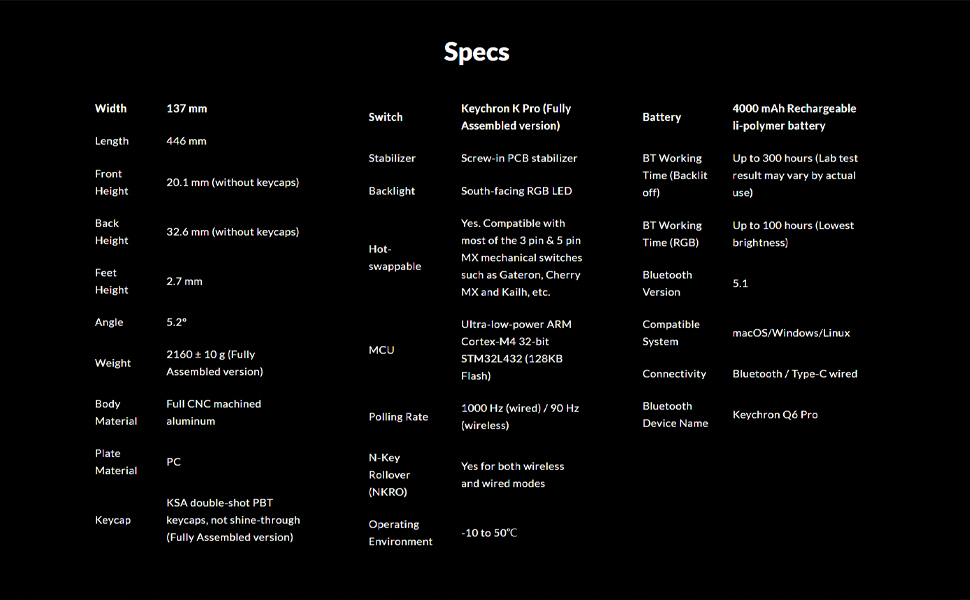
Image: Screenshot of the QMK/VIA software interface, demonstrating its capabilities for programming the Keychron Q6 Pro keyboard.
ഹോട്ട്-സ്വാപ്പ് ചെയ്യാവുന്ന സ്വിച്ചുകൾ
The Keychron Q6 Pro features hot-swappable sockets, allowing you to easily change mechanical switches without soldering. This provides flexibility to customize your typing feel.
- അനുയോജ്യത: The keyboard is compatible with most 3-pin and 5-pin MX style mechanical switches (e.g., Cherry, Gateron, Kailh, Panda).
- സ്വിച്ചുകൾ നീക്കംചെയ്യുന്നു: Use the provided switch puller tool. Gently grip the switch from the top and bottom, then pull straight up to remove it from the PCB.
- സ്വിച്ചുകൾ ഇൻസ്റ്റാൾ ചെയ്യുന്നു: പുതിയ സ്വിച്ചിന്റെ പിന്നുകൾ പിസിബിയിലെ ദ്വാരങ്ങളുമായി വിന്യസിക്കുക. സ്വിച്ച് സ്ഥലത്ത് ക്ലിക്ക് ആകുന്നതുവരെ ദൃഢമായി അമർത്തുക. പിന്നുകൾ വളഞ്ഞിട്ടില്ലെന്ന് ഉറപ്പാക്കുക.

ചിത്രം: ക്ലോസ്-അപ്പ് view demonstrating the hot-swappable switch feature of the Keychron Q6 Pro, with switches being removed and installed.
RGB ബാക്ക്ലൈറ്റിംഗ്
The Q6 Pro features south-facing RGB LED backlighting with 22 types of pre-set lighting effects. You can further customize the RGB hue, saturation, brightness, effect speed, and modes through the QMK/VIA software.
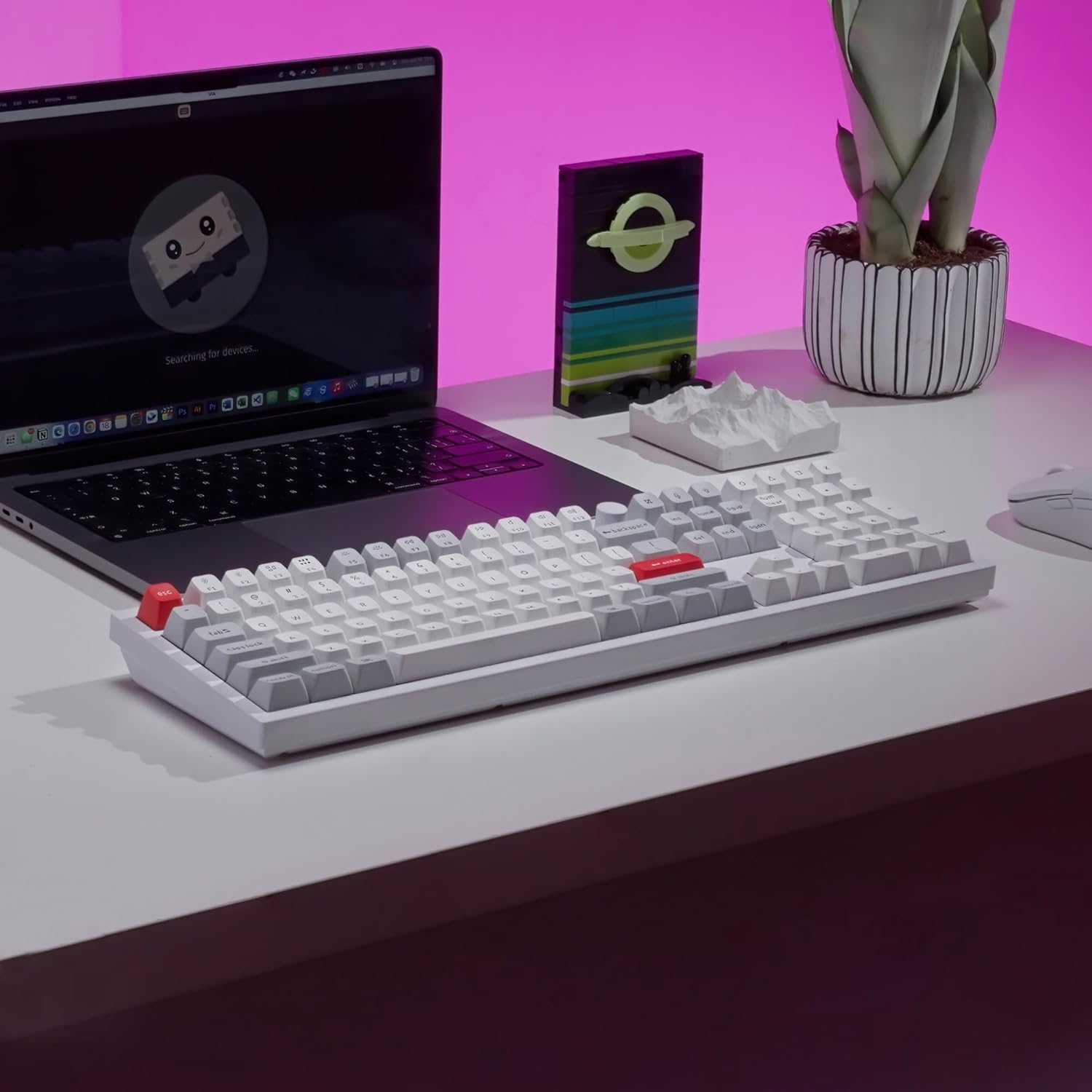
Image: The Keychron Q6 Pro keyboard illuminated with its vibrant South-Facing RGB backlighting.
മെയിൻ്റനൻസ്
- കീക്യാപ്പുകൾ വൃത്തിയാക്കൽ: Use a keycap puller to remove keycaps. Clean them with a soft cloth dampവീര്യം കുറഞ്ഞ സോപ്പും വെള്ളവും ഉപയോഗിച്ച് തുടച്ചുമാറ്റുക. വീണ്ടും ഘടിപ്പിക്കുന്നതിന് മുമ്പ് അവ പൂർണ്ണമായും ഉണങ്ങിയെന്ന് ഉറപ്പാക്കുക.
- കേസ് വൃത്തിയാക്കൽ: അലൂമിനിയം കേസ് മൃദുവായതോ, ഉണങ്ങിയതോ, അല്ലെങ്കിൽ ചെറുതായി ഡി-ടാപ്പിംഗ് മെഷീനോ ഉപയോഗിച്ച് തുടയ്ക്കുക.amp തുണി. ഉരച്ചിലുകൾ ഉണ്ടാക്കുന്ന ക്ലീനറുകളോ ലായകങ്ങളോ ഒഴിവാക്കുക.
- Switch Lubrication (Optional): For advanced users, switches can be lubricated to enhance smoothness and sound. This requires disassembling the switch.
- ഫേംവെയർ അപ്ഡേറ്റുകൾ: Periodically check the Keychron official webഒപ്റ്റിമൽ പ്രകടനവും പുതിയ സവിശേഷതകളിലേക്കുള്ള ആക്സസും ഉറപ്പാക്കാൻ ഫേംവെയർ അപ്ഡേറ്റുകൾക്കായുള്ള സൈറ്റ്.

Image: Close-up of keycaps being removed from the keyboard, illustrating the process for cleaning or replacement.
ട്രബിൾഷൂട്ടിംഗ്
| പ്രശ്നം | സാധ്യമായ കാരണം | പരിഹാരം |
|---|---|---|
| കീബോർഡ് പ്രതികരിക്കുന്നില്ല (വയർ മുഖേന) | Loose cable connection, incorrect OS switch setting. | Ensure USB-C cable is securely connected. Check the OS switch on the back of the keyboard (Mac/Win). Try a different USB port or cable. |
| കീബോർഡ് കണക്റ്റ് ചെയ്യുന്നില്ല (ബ്ലൂടൂത്ത്) | Keyboard not in pairing mode, Bluetooth off on device, interference, low battery. | Ensure keyboard is in "BT" mode. Press Fn + (1/2/3) for 4 seconds to enter pairing mode. Check device's Bluetooth settings. Charge the keyboard. Move closer to the device. |
| കീകൾ രജിസ്റ്റർ ചെയ്യുന്നില്ല അല്ലെങ്കിൽ ഇരട്ട ടൈപ്പ് ചെയ്യുന്നില്ല. | Faulty switch, debris under keycap, bent switch pin. | Remove keycap and switch. Check for debris and clean. Inspect switch pins for bends; straighten carefully if bent. Replace faulty switch if necessary. |
| RGB ലൈറ്റിംഗ് പ്രവർത്തിക്കുന്നില്ല അല്ലെങ്കിൽ തെറ്റാണ് | Software setting, firmware issue. | Adjust RGB settings via QMK/VIA software. Ensure keyboard firmware is up to date. |
| Programmable knob not working | VIA software configuration, physical damage. | Verify knob functions are correctly mapped in VIA. Ensure the knob is securely attached. |
സ്പെസിഫിക്കേഷനുകൾ
| ഫീച്ചർ | വിശദാംശങ്ങൾ |
|---|---|
| മോഡൽ | Keychron Q6 Pro (Q6P-P1) |
| Dimensions (Width x Length) | 137 mm x 446 mm |
| Height (Front / Back without keycap) | 20.1 mm / 32.6 mm |
| Feet Height | 2.7 മി.മീ |
| ടൈപ്പിംഗ് ആംഗിൾ | 5.2° |
| ഭാരം | 2160 ± 10 g (Fully Assembled version) |
| ബോഡി മെറ്റീരിയൽ | Full CNC machined aluminum |
| പ്ലേറ്റ് മെറ്റീരിയൽ | PC |
| കീകാപ്പുകൾ | KSA double-shot PBT (not shine-through) |
| സ്വിച്ചുകൾ | Keychron K Pro Red (Fully Assembled version) |
| സ്റ്റെബിലൈസറുകൾ | PCB-mounted screw-in stabilizers |
| ബാക്ക്ലൈറ്റ് | South-facing RGB LED |
| ഹോട്ട്-സ്വാപ്പബിൾ | Yes, compatible with most 3-pin & 5-pin MX mechanical switches |
| എം.സി.യു | അൾട്രാ-ലോ-പവർ ARM കോർട്ടെക്സ്-M4 32-ബിറ്റ് STM32L432 (128KB ഫ്ലാഷ്) |
| പോളിംഗ് നിരക്ക് | 1000 Hz (wired) / 90 Hz (wireless) |
| എൻ-കീ റോൾഓവർ (NKRO) | Yes (both wireless and wired modes) |
| പ്രവർത്തന പരിസ്ഥിതി | -10 മുതൽ 50 ഡിഗ്രി സെൽഷ്യസ് വരെ |
| ബാറ്ററി | 4000 mAh Rechargeable Li-polymer battery |
| Bluetooth Working Time (Backlit off) | Up to 300 hours (Lab test result may vary) |
| Bluetooth Working Time (RGB Lowest brightness) | 100 മണിക്കൂർ വരെ |
| ബ്ലൂടൂത്ത് പതിപ്പ് | 5.1 |
| അനുയോജ്യമായ സിസ്റ്റം | macOS, Windows, Linux |
| കണക്റ്റിവിറ്റി | Bluetooth / Type-C wired |
| ബ്ലൂടൂത്ത് ഉപകരണത്തിന്റെ പേര് | കീക്രോൺ Q6 പ്രോ |

Image: Detailed technical specifications for the Keychron Q6 Pro keyboard.
വാറൻ്റിയും പിന്തുണയും
Keychron products are designed for durability and performance. For detailed warranty information, please refer to the official Keychron webസൈറ്റ് അല്ലെങ്കിൽ നിങ്ങളുടെ ഉൽപ്പന്നത്തിൽ ഉൾപ്പെടുത്തിയിരിക്കുന്ന വാറന്റി കാർഡ്.
- തിരികെ നൽകൽ നയം: This product is eligible for a refund or replacement within 30 days of purchase, subject to the retailer's return policy.
- ഉപയോക്തൃ ഗൈഡുകൾ: Additional user guides and manuals in PDF format are available for download:
- ഓൺലൈൻ പിന്തുണ: For further assistance, troubleshooting tips, firmware updates, and software downloads, please visit the official Keychron support page.


