1. ആമുഖം
The Keychron Q5 Pro is a highly customizable 96% layout wireless mechanical keyboard designed for a premium typing experience. It features QMK/VIA support for key remapping, a full aluminum body, double-gasket design, hot-swappable switches, and KSA Double-Shot PBT keycaps. This manual provides detailed instructions for setting up, operating, and maintaining your Keychron Q5 Pro keyboard.

2. പാക്കേജ് ഉള്ളടക്കം
Verify that all items are present in your Keychron Q5 Pro package:
- 1x Fully Assembled Keyboard (including Aluminum Case, PCB, PC Plate, Sound Absorbing Foam, Case Foam, Battery, Silicone Gaskets, Bottom Case)
- 1x ടൈപ്പ്-സി മുതൽ ടൈപ്പ്-സി കേബിൾ വരെ
- 1x ടൈപ്പ്-എ മുതൽ ടൈപ്പ്-സി അഡാപ്റ്റർ വരെ
- 1x സ്വിച്ച് പുള്ളർ
- 1x കീക്യാപ്പ് പുള്ളർ
- 1x സ്ക്രൂഡ്രൈവർ
- 1x ഹെക്സ് കീ
- 14x ഗാസ്കറ്റുകൾ (10 ഇൻസ്റ്റാൾ ചെയ്തിട്ടുണ്ട്, 4 ബോക്സിൽ)
- 7 സെറ്റ് x സ്റ്റെബിലൈസറുകൾ
- 1 set x Keycaps (Double-Shot KSA PBT)
- 1 സെറ്റ് x സ്വിച്ചുകൾ

3. സജ്ജീകരണം
3.1 പ്രാരംഭ ചാർജിംഗ്
Before first use, connect the keyboard to a power source using the provided USB Type-C cable to fully charge the internal 4000mAh battery. The charging indicator will show the charging status.

3.2 Connecting Wirelessly (Bluetooth)
- Locate the mode switch on the back of the keyboard. Slide it to the 'BT' position for Bluetooth mode.
- On your device (computer, tablet, smartphone), enable Bluetooth and search for available devices.
- Select 'Keychron Q5 Pro' from the list of devices to pair.
- The keyboard can connect to up to 3 devices. Use Fn + 1, Fn + 2, or Fn + 3 to switch between paired devices.
3.3 Connecting Wired (USB)
- Locate the mode switch on the back of the keyboard. Slide it to the 'Cable' position for wired mode.
- കീബോർഡിൽ നിന്ന് നൽകിയിരിക്കുന്ന യുഎസ്ബി ടൈപ്പ്-സി കേബിൾ നിങ്ങളുടെ കമ്പ്യൂട്ടറിന്റെ യുഎസ്ബി പോർട്ടിലേക്ക് ബന്ധിപ്പിക്കുക.
- നിങ്ങളുടെ ഓപ്പറേറ്റിംഗ് സിസ്റ്റം കീബോർഡ് യാന്ത്രികമായി തിരിച്ചറിയും.
3.4 Operating System Compatibility Switch
The Keychron Q5 Pro includes a switch to toggle between Windows and macOS layouts. Ensure this switch is set to your operating system for correct key functionality.

4. പ്രവർത്തന നിർദ്ദേശങ്ങൾ
4.1 QMK/VIA Key Remapping
The Keychron Q5 Pro supports QMK/VIA, an open-source software that allows you to remap keys and program macros. This includes customizing the rotary knob functions.
- ഔദ്യോഗിക കീക്രോണിൽ നിന്ന് VIA സോഫ്റ്റ്വെയർ ഡൗൺലോഡ് ചെയ്യുക. webസൈറ്റ്.
- Connect the keyboard in wired mode to your computer. Key remapping can only be performed in wired mode.
- Launch the VIA software and follow the on-screen instructions to customize key assignments and macros.
- Once programmed, the custom keymap will function in both wired and wireless modes.
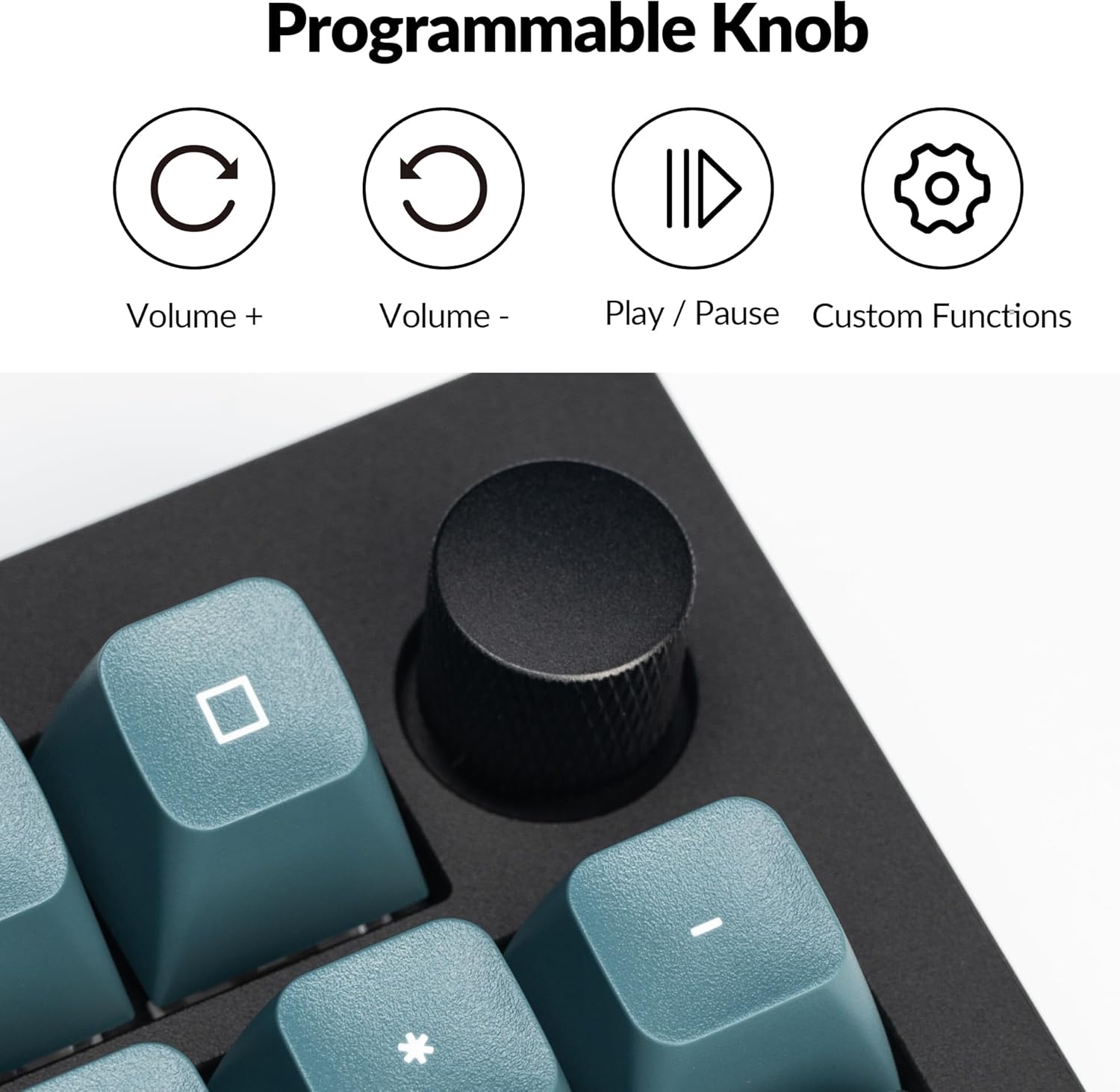
4.2 Programmable Rotary Knob
The rotary knob on the Keychron Q5 Pro offers versatile control. By default, it controls volume (rotate) and play/pause (press). Its functions can be customized using the VIA software.
- ഘടികാരദിശയിൽ തിരിക്കുക: വോളിയം കൂട്ടുക
- എതിർ ഘടികാരദിശയിൽ തിരിക്കുക: വോളിയം കുറയ്ക്കുക
- അമർത്തുക: മീഡിയ പ്ലേ ചെയ്യുക/താൽക്കാലികമായി നിർത്തുക
- Custom functions can be assigned via VIA software.

4.3 ഹോട്ട്-സ്വാപ്പബിൾ സ്വിച്ചുകൾ
The Q5 Pro features hot-swappable sockets, allowing you to change mechanical switches without soldering. This supports most 3-pin and 5-pin MX-style mechanical switches.
- കീബോർഡ് ഓഫ് ചെയ്യുക അല്ലെങ്കിൽ കമ്പ്യൂട്ടറിൽ നിന്ന് വിച്ഛേദിക്കുക.
- ആവശ്യമുള്ള കീക്യാപ്പ് ശ്രദ്ധാപൂർവ്വം നീക്കം ചെയ്യാൻ നൽകിയിരിക്കുന്ന കീക്യാപ്പ് പുള്ളർ ഉപയോഗിക്കുക.
- Use the provided switch puller to gently grip and pull the switch vertically out of its socket.
- പുതിയ സ്വിച്ചിന്റെ പിന്നുകൾ പിസിബിയിലെ ദ്വാരങ്ങളുമായി വിന്യസിക്കുക. പിന്നുകൾ നേരെയാണെന്ന് ഉറപ്പാക്കുക.
- Press the new switch firmly into the socket until it clicks into place.
- കീക്യാപ്പ് മാറ്റിസ്ഥാപിക്കുക.


4.4 Keycaps and Backlighting
The Q5 Pro comes with KSA profile double-shot PBT keycaps, known for their durability and oil resistance. The keyboard features south-facing RGB backlighting, which is optimized for non-shine-through keycaps.

5. പരിപാലനം
5.1 വൃത്തിയാക്കൽ
- പൊതുവായ ശുചീകരണം: കീബോർഡ് പ്രതലം തുടയ്ക്കാൻ മൃദുവായതും ഉണങ്ങിയതുമായ തുണി ഉപയോഗിക്കുക. കഠിനമായ അഴുക്കിന്, ചെറുതായി dampതുണിയിൽ വെള്ളമോ മൃദുവായ ക്ലീനിംഗ് ലായനിയോ ഇടുക.
- കീക്യാപ്പ് ക്ലീനിംഗ്: Keycaps can be removed using the provided keycap puller and cleaned with mild soap and water. Ensure they are completely dry before reattaching.
- പൊടി നീക്കം: കീക്യാപ്പുകൾക്കും സ്വിച്ചുകൾക്കുമിടയിലുള്ള പൊടിയും അവശിഷ്ടങ്ങളും നീക്കം ചെയ്യാൻ കംപ്രസ് ചെയ്ത വായു ഉപയോഗിക്കുക.
5.2 സ്റ്റെബിലൈസറുകൾ
The Q5 Pro utilizes screw-in stabilizers for enhanced key stability. If a large key (e.g., Spacebar, Shift, Enter) feels wobbly or rattles, the stabilizers may need lubrication or adjustment. Refer to online resources or Keychron support for detailed stabilizer maintenance guides.

6. പ്രശ്നപരിഹാരം
- കീബോർഡ് പ്രതികരിക്കുന്നില്ല: Ensure the keyboard is charged. Check the mode switch (BT/Cable) and ensure it's set correctly. If in Bluetooth mode, re-pair the device. If in wired mode, try a different USB port or cable.
- രജിസ്റ്റർ ചെയ്യാത്ത കീകൾ: If a specific key is not working, try hot-swapping the switch with a known working one to determine if the issue is with the switch or the PCB socket. Ensure switches are fully seated.
- ബ്ലൂടൂത്ത് കണക്റ്റിവിറ്റി പ്രശ്നങ്ങൾ: Ensure the keyboard is within range of your device. Remove and re-pair the keyboard in your device's Bluetooth settings. Ensure no other devices are interfering with the connection.
- QMK/VIA സോഫ്റ്റ്വെയർ കീബോർഡ് കണ്ടെത്തുന്നില്ല: Ensure the keyboard is connected in wired mode. Download the latest VIA software and firmware from the official Keychron webസൈറ്റ്.
- ബാക്ക്ലൈറ്റ് പ്രവർത്തിക്കുന്നില്ല: Check the keyboard's backlight settings. Ensure the brightness is turned up. If specific LEDs are not working, it may indicate a hardware issue.
7 സ്പെസിഫിക്കേഷനുകൾ
| ഫീച്ചർ | വിശദാംശങ്ങൾ |
|---|---|
| മോഡൽ നമ്പർ | Q5P-M3 |
| ലേഔട്ട് | 96% |
| കണക്റ്റിവിറ്റി | ബ്ലൂടൂത്ത് 5.1 (വയർലെസ്), യുഎസ്ബി ടൈപ്പ്-സി (വയർഡ്) |
| പോളിംഗ് നിരക്ക് | 1000 Hz (വയർഡ്), 90 Hz (വയർലെസ്) |
| സ്വിച്ചുകൾ | Hot-swappable K Pro Brown Switch (3-pin & 5-pin MX style compatible) |
| കീകാപ്പുകൾ | KSA Profile ഡബിൾ-ഷോട്ട് പിബിടി |
| ബോഡി മെറ്റീരിയൽ | Full Aluminum |
| Gasket Design | Double-Gasket |
| ബാറ്ററി | 4000mAh ലിഥിയം പോളിമർ |
| ഓപ്പറേറ്റിംഗ് സിസ്റ്റം അനുയോജ്യത | macOS, Windows, Linux |
| ബാക്ക്ലൈറ്റിംഗ് | തെക്ക് ദർശനമുള്ള RGB |
| ഉൽപ്പന്ന അളവുകൾ | 16.06 x 5.71 x 1.41 ഇഞ്ച് |
| ഇനത്തിൻ്റെ ഭാരം | 4.76 പൗണ്ട് |
7.1 Keychron K Pro Switch Features

7.2 പൊട്ടിത്തെറിച്ചു View ഘടകങ്ങളുടെ

8. വാറൻ്റിയും പിന്തുണയും
For warranty information, technical support, or further assistance, please visit the official Keychron webസൈറ്റിൽ ബന്ധപ്പെടുക അല്ലെങ്കിൽ അവരുടെ ഉപഭോക്തൃ സേവനവുമായി ബന്ധപ്പെടുക. വാറന്റി ക്ലെയിമുകൾക്കായി നിങ്ങളുടെ വാങ്ങിയതിന്റെ തെളിവ് സൂക്ഷിക്കുക.
- ഉദ്യോഗസ്ഥൻ Webസൈറ്റ്: www.keychron.com
- പിന്തുണ ഇമെയിൽ: ഉദ്യോഗസ്ഥനെ റഫർ ചെയ്യുക website for current support contact information.


