ആമുഖം
The Keychron Q6 Pro is a full-size, full-metal custom mechanical keyboard designed for an unparalleled typing experience. It features QMK/VIA programmability, wireless Bluetooth and wired USB-C connectivity, hot-swappable switches, a double-gasket design, KSA double-shot PBT keycaps, screw-in stabilizers, and south-facing RGB backlighting. This manual provides essential information for setting up, operating, maintaining, and troubleshooting your Keychron Q6 Pro keyboard.

Image: The Keychron Q6 Pro keyboard, showcasing its full layout and a close-up of a K Pro Banana switch.
പാക്കേജ് ഉള്ളടക്കം
ആരംഭിക്കുന്നതിന് മുമ്പ്, പാക്കേജിൽ എല്ലാ ഇനങ്ങളും ഉണ്ടെന്ന് ഉറപ്പാക്കുക:
- 1x Fully Assembled Keyboard (including Aluminum Case, PCB, PC Plate, Sound Absorbing Foam, Case Foam, 16x Gaskets, 8 sets x Stabilizers, 1 set x Keycaps (Double-Shot KSA PBT), 1 set x Switches)
- 1x ടൈപ്പ്-സി മുതൽ ടൈപ്പ്-സി കേബിൾ വരെ
- 1x ടൈപ്പ്-എ മുതൽ ടൈപ്പ്-സി അഡാപ്റ്റർ വരെ
- 1x സ്വിച്ച് പുള്ളർ
- 1x കീക്യാപ്പ് പുള്ളർ
- 1x സ്ക്രൂഡ്രൈവർ
- 1x ഹെക്സ് കീ
- ഉപയോക്തൃ മാനുവൽ
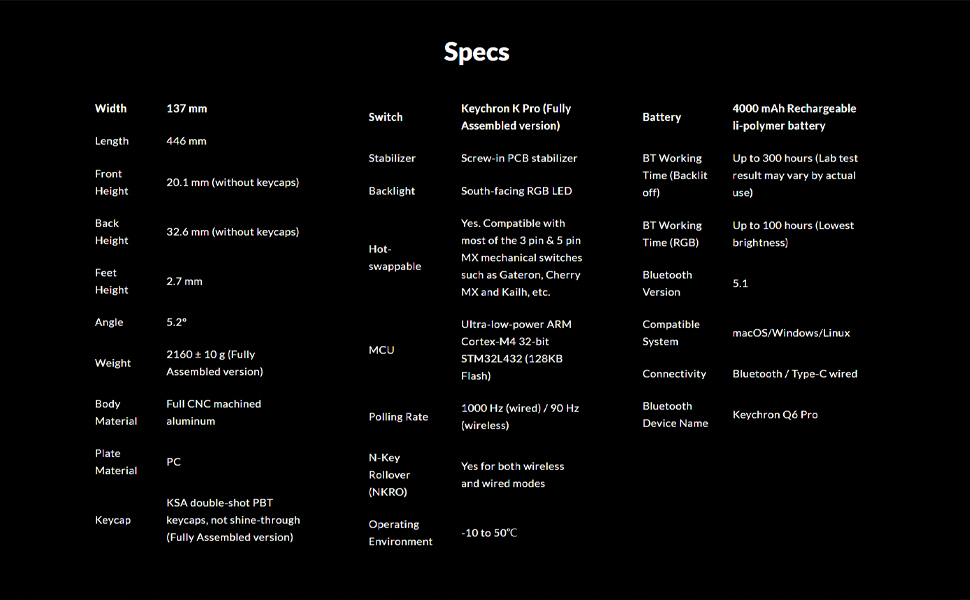
Image: An illustration showing all components included in the Keychron Q6 Pro package.
സജ്ജമാക്കുക
1. പ്രാരംഭ കണക്ഷൻ
The Keychron Q6 Pro supports both wired and wireless (Bluetooth) connectivity.
വയർഡ് മോഡ്:
Connect the keyboard to your computer using the provided Type-C to Type-C cable or the Type-C to Type-A adapter. The keyboard will automatically be recognized. The polling rate in wired mode is 1000 Hz.
Wireless (Bluetooth) Mode:
- കീബോർഡ് ചാർജ് ചെയ്തിട്ടുണ്ടെന്ന് ഉറപ്പാക്കുക.
- Flip the switch on the back of the keyboard to the Bluetooth mode.
- On your device (laptop, phone, tablet), enable Bluetooth and search for "Keychron Q6 Pro".
- Select the keyboard to pair. The keyboard can connect to up to 3 devices wirelessly.
The polling rate in wireless mode is 90 Hz.
2. ഓപ്പറേറ്റിംഗ് സിസ്റ്റം സ്വിച്ച്
The Q6 Pro is fully compatible with both Mac and Windows operating systems. Use the OS switch located on the back of the keyboard to select the appropriate layout for your system.

Image: The Keychron Q6 Pro keyboard demonstrating its multi-device wireless connectivity with a phone, tablet, and laptop.
പ്രവർത്തന നിർദ്ദേശങ്ങൾ
1. QMK/VIA കസ്റ്റമൈസേഷൻ
The Keychron Q6 Pro supports QMK/VIA for advanced customization. This allows you to remap any key, create macro commands, shortcuts, or key combinations.
- ഔദ്യോഗിക കീക്രോണിൽ നിന്ന് VIA സോഫ്റ്റ്വെയർ ഡൗൺലോഡ് ചെയ്യുക. webസൈറ്റ്.
- Connect the keyboard in wired mode to ensure proper detection by VIA.
- Use the VIA interface to customize key assignments, create macros, and adjust lighting effects.

Image: A visual representation of the VIA software interface, used for programming and customizing the keyboard's functions.
2. RGB ബാക്ക്ലൈറ്റിംഗ്
The keyboard features south-facing RGB backlighting with 22 types of preset effects. You can fine-tune the RGB hue, saturation, brightness, effect speed, and different modes directly on the keyboard or through QMK/VIA.

Image: The Keychron Q6 Pro keyboard illuminated with its south-facing RGB backlighting, displaying a spectrum of colors.
3. ഹോട്ട്-സ്വാപ്പബിൾ സ്വിച്ചുകൾ
The Q6 Pro allows you to hot-swap every switch with almost all 3-pin and 5-pin MX style mechanical switches on the market (e.g., Cherry, Gateron, Kailh, Panda) without soldering.

ചിത്രം: ഒരു ക്ലോസ്-അപ്പ് view of the Keychron Q6 Pro keyboard with several keycaps and switches removed, illustrating the hot-swappable sockets.
4. റോട്ടറി നോബ് പ്രവർത്തനം
The programmable rotary knob provides convenient control over various functions, typically volume control by default. Its function can be customized via QMK/VIA.
മെയിൻ്റനൻസ്
1. കീബോർഡ് വൃത്തിയാക്കൽ
- നിങ്ങളുടെ കമ്പ്യൂട്ടറിൽ നിന്ന് കീബോർഡ് വിച്ഛേദിക്കുക.
- നന്നായി വൃത്തിയാക്കുന്നതിന് കീക്യാപ്പുകൾ നീക്കം ചെയ്യാൻ ഒരു കീക്യാപ്പ് പുള്ളർ ഉപയോഗിക്കുക.
- സ്വിച്ചുകൾക്കിടയിൽ നിന്ന് പൊടിയും അവശിഷ്ടങ്ങളും നീക്കം ചെയ്യാൻ കംപ്രസ് ചെയ്ത വായു ഉപയോഗിക്കുക.
- Wipe keycaps and the keyboard frame with a soft, slightly damp തുണി. അമിതമായ ഈർപ്പം ഒഴിവാക്കുക.
2. Replacing Switches and Keycaps
Thanks to the hot-swappable design, switches and keycaps can be easily replaced.
- ആവശ്യമുള്ള കീക്യാപ്പ് സൌമ്യമായി നീക്കം ചെയ്യാൻ നൽകിയിരിക്കുന്ന കീക്യാപ്പ് പുള്ളർ ഉപയോഗിക്കുക.
- Use the provided switch puller to carefully remove the switch from its socket.
- പുതിയ സ്വിച്ചിന്റെ പിന്നുകൾ പിസിബിയിലെ ദ്വാരങ്ങളുമായി വിന്യസിക്കുക, അത് സ്ഥലത്ത് ക്ലിക്ക് ആകുന്നതുവരെ ദൃഢമായി അമർത്തുക. പിന്നുകൾ വളയുന്നില്ലെന്ന് ഉറപ്പാക്കുക.
- പുതിയ കീക്യാപ്പ് സ്വിച്ച് സ്റ്റെമിൽ വച്ച ശേഷം താഴേക്ക് അമർത്തുക.

ചിത്രം: വിശദമായ ഒരു ചിത്രം view of the Keychron Q6 Pro keyboard with several keycaps detached, revealing the underlying switch stems and stabilizers.
ട്രബിൾഷൂട്ടിംഗ്
If you encounter issues with your Keychron Q6 Pro, please refer to the following common solutions:
| ഇഷ്യൂ | സാധ്യമായ കാരണം / പരിഹാരം |
|---|---|
| കീബോർഡ് പ്രതികരിക്കുന്നില്ല (വയർ മുഖേന) |
|
| കീബോർഡ് കണക്റ്റ് ചെയ്യുന്നില്ല (ബ്ലൂടൂത്ത്) |
|
| RGB backlight not working or incorrect |
|
| പ്രത്യേക കീകൾ പ്രവർത്തിക്കുന്നില്ല |
|
For further assistance, please visit the official Keychron support website or consult the full user guide PDF available online.
സ്പെസിഫിക്കേഷനുകൾ
| ഫീച്ചർ | വിശദാംശങ്ങൾ |
|---|---|
| മോഡൽ | Keychron Q6 Pro (Q6P-M4) |
| ലേഔട്ട് | Full-size (108-Key) |
| ബോഡി മെറ്റീരിയൽ | Full CNC machined aluminum |
| കീക്യാപ് മെറ്റീരിയൽ | Double-shot KSA PBT |
| സ്വിച്ച് തരം | Keychron K Pro Banana (Hot-swappable) |
| ബാക്ക്ലൈറ്റ് | South-facing RGB LED |
| കണക്റ്റിവിറ്റി | Bluetooth 5.1 / Type-C wired |
| പോളിംഗ് നിരക്ക് (വയർഡ്) | 1000 Hz |
| പോളിംഗ് നിരക്ക് (വയർലെസ്) | 90 Hz |
| എം.സി.യു | അൾട്രാ-ലോ-പവർ ARM കോർട്ടെക്സ്-M4 32-ബിറ്റ് STM32L432 (128KB ഫ്ലാഷ്) |
| ബാറ്ററി | 4000 mAh Rechargeable Li-polymer battery |
| Battery Working Time (Backlight off) | 300 മണിക്കൂർ വരെ |
| Battery Working Time (RGB) | 100 മണിക്കൂർ വരെ (ഏറ്റവും കുറഞ്ഞ തെളിച്ചം) |
| അനുയോജ്യമായ സിസ്റ്റം | macOS/Windows/Linux |
| ഭാരം | Approximately 6.6 pounds (2160 ± 10 g) |
| അളവുകൾ (LxWxH) | 17.56 x 5.39 x 1.28 ഇഞ്ച് (446 x 137 x 32.6 മിമി) |
| പ്രവർത്തന പരിസ്ഥിതി | -10 മുതൽ 50 ഡിഗ്രി സെൽഷ്യസ് വരെ |
വാറൻ്റിയും പിന്തുണയും
Keychron products are designed for durability and performance. For information regarding product warranty, please refer to the official Keychron webസൈറ്റ് അല്ലെങ്കിൽ നിങ്ങളുടെ ഉൽപ്പന്നത്തിൽ ഉൾപ്പെടുത്തിയിരിക്കുന്ന വാറന്റി കാർഡ്.
For technical support, frequently asked questions, or to download the latest VIA software and firmware, please visit the Keychron support page:
You can also find additional resources, including the User Manual and User Guide PDFs, on the product's Amazon page under the "Product guides and documents" section.