ആമുഖം
This manual provides comprehensive instructions for the HOU Smart Folio Keyboard Case, designed to enhance your iPad experience. It covers setup, operation, maintenance, and troubleshooting to ensure optimal performance and longevity of your device.

Image: The HOU Smart Folio Keyboard Case in white, shown with an iPad inserted and the keyboard unfolded, ready for use. The image highlights the sleek design and integrated keyboard.
അനുയോജ്യത
The HOU Smart Folio Keyboard Case is specifically designed for the following iPad models:
- 10.9-inch iPad 10th Generation 2022 (Model Numbers: A2696, A2777, A2757)
- 11-inch iPad 11th Generation A16 2025
To verify your iPad model number, navigate to ക്രമീകരണങ്ങൾ > പൊതുവായത് > കുറിച്ച് നിങ്ങളുടെ ഉപകരണത്തിൽ.

Image: A visual guide showing how to find your iPad's model number and confirming compatibility with iPad 10th Generation (2022) and iPad 11th Generation A16 (2025), while indicating incompatibility with other iPad Pro/Air models.
ബോക്സിൽ എന്താണുള്ളത്
- HOU Smart Folio Keyboard Case
- മാഗ്നെറ്റിക് ചാർജിംഗ് കേബിൾ
- Product Instruction Manual (this document)
പ്രധാന സവിശേഷതകൾ
- Ultra-Slim and Lightweight Design: At 0.6 cm thin and weighing 434 grams, designed for portability.
- മോടിയുള്ള മെറ്റീരിയൽ: Constructed from PU (with silicon) and synthetic leather, offering wear-resistant and stain-resistant properties.
- കാന്തിക ചാർജിംഗ്: Innovative power solution allowing direct power "borrowing" from the tablet via the included USB-C magnetic cable.
- ക്രമീകരിക്കാവുന്ന Viewകോണുകൾ: Features dual magnetic points for stable triangular support, offering 115° for typing and 125° for media viewing.
- Auto Sleep/Wake Function: Automatically wakes your iPad when opened and puts it to sleep when closed, conserving battery.
- Full-size Chiclet Keys: Provides a comfortable and accurate typing experience with scissor foot structure.

ചിത്രം: സൈഡ് പ്രോfile of the HOU keyboard case highlighting its ultra-slim thickness and lightweight design (434g), along with icons for anti-fingerprints, oil resistance, impact resistance, dustproof, and scratch proof.

Image: An illustration demonstrating the powerful magnetic connection and smart layout that allows for adjustable viewing angles, ensuring stable support for the iPad.
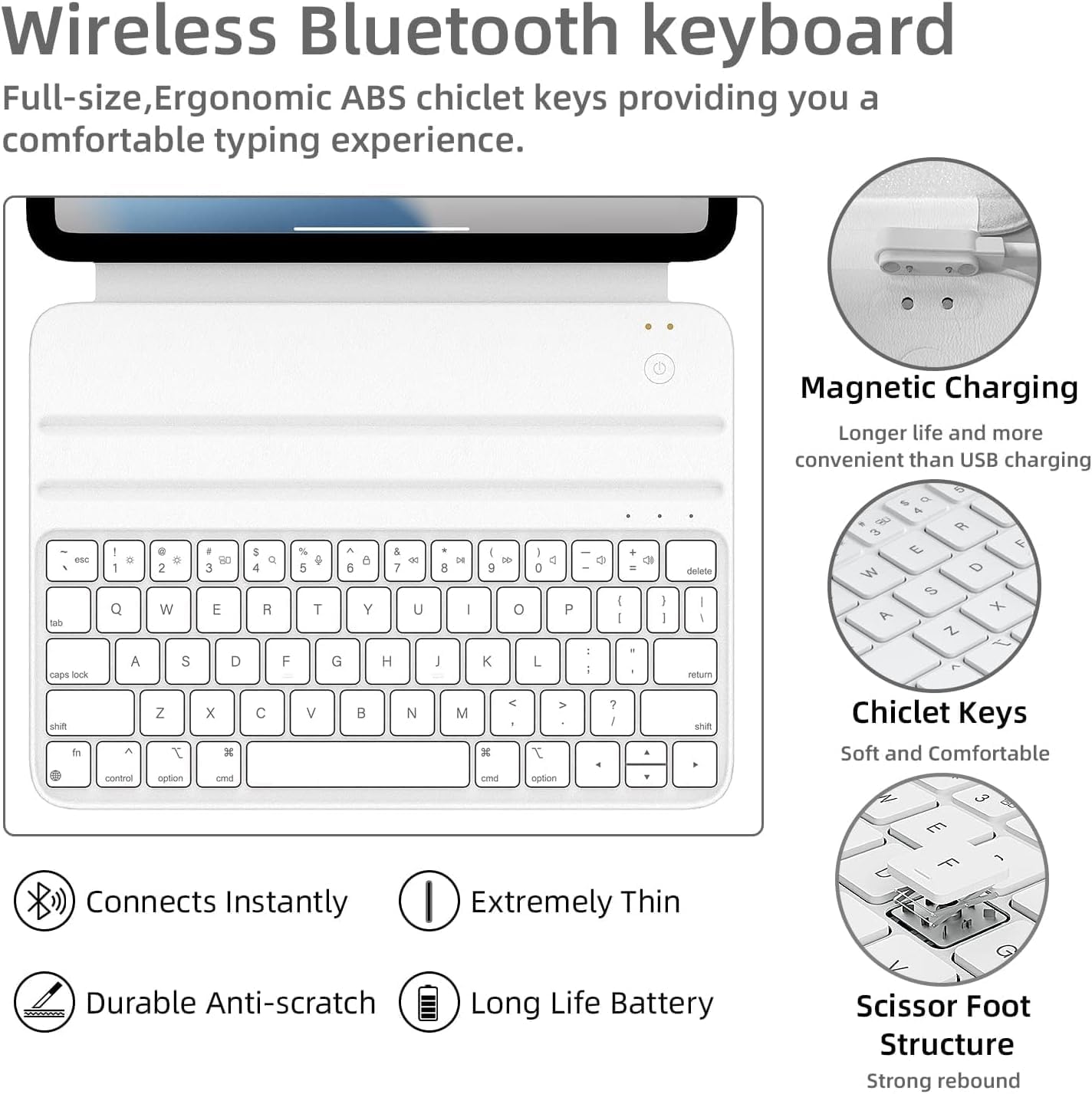
Image: A visual representation of the auto sleep/wake function, showing the iPad screen turning on when the case is opened and off when closed.

ചിത്രം: ഒരു ക്ലോസ്-അപ്പ് view of the keyboard keys, highlighting features like 1.2mm key travel, skin-friendly coating, scissor switch mechanism, and silent keys.
സജ്ജമാക്കുക
1. കീബോർഡ് ചാർജ് ചെയ്യുന്നു
The keyboard features an innovative magnetic charging solution. Connect the included USB-C cable to your iPad on one end and magnetically attach the other end to the keyboard's charging port. The keyboard will draw power directly from your iPad. A full charge provides approximately one week of battery life.

ചിത്രം: ഒരു ഓവർഹെഡ് view showing the HOU keyboard case connected to an iPad via the magnetic charging cable, illustrating the power transfer.
2. ബ്ലൂടൂത്ത് ജോടിയാക്കൽ
- കീബോർഡ് ചാർജ് ചെയ്തിട്ടുണ്ടെന്ന് ഉറപ്പാക്കുക.
- Turn on the keyboard using the concealed power switch.
- നിങ്ങളുടെ iPad-ൽ, പോകുക ക്രമീകരണങ്ങൾ > ബ്ലൂടൂത്ത്.
- ബ്ലൂടൂത്ത് പ്രവർത്തനക്ഷമമാക്കുക.
- Look for "HOU Keyboard" or a similar name in the "Other Devices" list and tap to connect.
- Once connected, the keyboard will automatically pair with your iPad when turned on in the future.

ചിത്രം: വിശദമായ ഒരു ചിത്രം view of the HOU wireless Bluetooth keyboard, highlighting features like magnetic charging, chiclet keys, instant connection, extreme thinness, durable anti-scratch surface, long battery life, and scissor foot structure.
3. നിങ്ങളുടെ ഐപാഡ് അറ്റാച്ചുചെയ്യുന്നു
Align your iPad with the magnetic back of the case. The strong magnets will securely hold your iPad in place, forming a stable triangular structure when unfolded for use.
പ്രവർത്തന നിർദ്ദേശങ്ങൾ
ക്രമീകരിക്കുന്നു Viewing കോണുകൾ
The case allows for two primary viewകോണുകൾ:
- 115° ആംഗിൾ: Ideal for typing and productivity tasks.
- 125° ആംഗിൾ: Suitable for media consumption, such as watching movies or reading.
Simply adjust the iPad's position along the magnetic grooves to achieve the desired angle.

Image: An X-ray style illustration showing the iPad magnetically attached to the keyboard case, highlighting the dual magnetic grooves that allow for stable, adjustable angles.
Keyboard Shortcuts and Functions
The keyboard provides a full set of function keys for quick access to iPad features. Press the Fn key in combination with the corresponding function key to activate features such as volume control, media playback, and screen brightness.
Video: A demonstration of the HOU Keyboard Case for iPad, showcasing its slim design, sustainable faux leather material, smooth typing experience with pinpoint accuracy, and seamless integration with the iPad, including adjustable viewകോണുകൾ.
മെയിൻ്റനൻസ്
- വൃത്തിയാക്കൽ: The silicon-containing tech leather fabric is designed to be stain-resistant. For minor spills or dirt, wipe the surface gently with a soft, damp തുണി. കഠിനമായ രാസവസ്തുക്കളോ ഉരച്ചിലുകളുള്ള ക്ലീനറുകളോ ഒഴിവാക്കുക.
- സംഭരണം: When not in use, keep the keyboard case closed to protect both the iPad and the keyboard. The auto-sleep function will help conserve battery.
- കൈകാര്യം ചെയ്യൽ: While durable, avoid excessive force or bending of the case to maintain its structural integrity and magnetic connections.

Image: A close-up of the HOU keyboard case surface with markers, demonstrating its stain-resistant and easy-to-clean properties.
ട്രബിൾഷൂട്ടിംഗ്
| പ്രശ്നം | സാധ്യമായ കാരണം | പരിഹാരം |
|---|---|---|
| കീബോർഡ് ബ്ലൂടൂത്ത് വഴി ബന്ധിപ്പിക്കുന്നില്ല. | Keyboard battery low; Bluetooth off on iPad; keyboard not in pairing mode; interference. | Charge the keyboard. Ensure iPad Bluetooth is on. Turn keyboard off and on. Forget device in iPad Bluetooth settings and re-pair. Move closer to iPad. |
| Keys are unresponsive or delayed. | Low battery; connection issue; software glitch. | Charge the keyboard. Reconnect Bluetooth. Restart iPad. |
| iPad not waking/sleeping automatically. | iPad not properly aligned; feature disabled in iPad settings. | Ensure iPad is correctly seated in the case. Check iPad settings for "Lock/Unlock" or "Cover Lock/Unlock" feature and ensure it's enabled. |
| Magnetic connection feels weak. | Incorrect iPad model; debris on magnets. | Verify iPad model compatibility. Clean magnetic surfaces on both the iPad and the case. |
സ്പെസിഫിക്കേഷനുകൾ
| ഫീച്ചർ | വിശദാംശങ്ങൾ |
|---|---|
| ഉൽപ്പന്ന അളവുകൾ | 9.8 x 3.3 x 0.3 ഇഞ്ച് |
| ഇനത്തിൻ്റെ ഭാരം | 15.2 ഔൺസ് (ഏകദേശം 434 ഗ്രാം) |
| നിർമ്മാതാവ് | HOU |
| അനുയോജ്യമായ ഐപാഡ് മോഡലുകൾ | 10.9-inch iPad 10th Generation 2022 (A2696/A2777/A2757), 11-inch iPad 11th Generation A16 2025 |
| ബാറ്ററി | 300 mAh (1 C battery included) |
| കണക്റ്റിവിറ്റി | ബ്ലൂടൂത്ത് |
| ചാർജിംഗ് രീതി | Magnetic (via USB-C cable) |
വാറൻ്റിയും പിന്തുണയും
HOU products are manufactured with high-quality standards. For any issues or inquiries, please refer to your purchase platform for specific warranty details and customer support contact information. Keep your proof of purchase for warranty claims.


