1. ഉൽപ്പന്നം കഴിഞ്ഞുview
The SJCAM C300 is a compact and versatile action camera designed to capture high-quality video and photos in various environments. Featuring 4K video recording, 6-axis gyro stabilization, and a waterproof design, it is suitable for a wide range of activities.
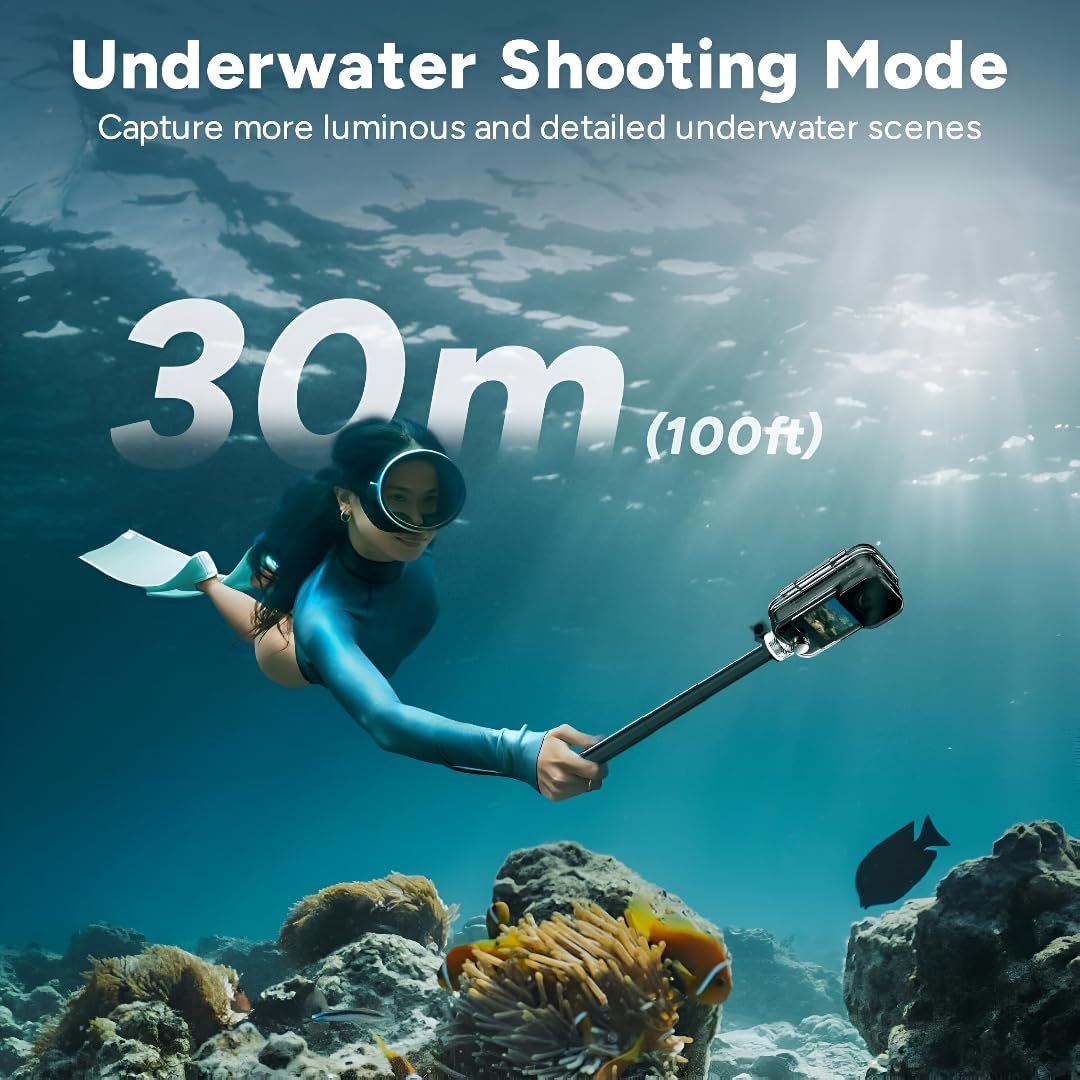
Figure 1: SJCAM C300 Action Camera in various usage scenarios, highlighting its versatility for activities like cycling, skiing, hiking, and vlogging.
പ്രധാന സവിശേഷതകൾ:
- 4K High Resolution: Captures delicate 4K images at 30 frames per second, restoring true color.
- 6-Axis Gyro Stabilization: Built-in stabilizer for clear and stable images, even during dynamic action.
- 30m Waterproof with Case: Achieves IP68 diving waterproof grade with the included waterproof case, also drop-proof, dust-proof, and shock-proof.
- 1.3″ Dual Touch Color Screen: Front and back touchscreens for flexible shooting positions and easy control.
- 154° Large Wide Angle: Wide-angle lens with aspherical optics to control image distortion and capture broad scenes.
2. പാക്കേജ് ഉള്ളടക്കം
Ensure all items are present in your SJCAM C300 package:
- 1 x C300 Camera
- 1 x ബാക്ക് ക്ലിപ്പ്
- 1 x ബേസ് മൗണ്ട്
- 1 x Flat Bottom Bracket
- 2 x Helmet Base
- 1 x സ്ക്രൂ
- 1 x വാട്ടർപ്രൂഫ് കേസ്
- 1 x ലാനിയാർഡ്
- 2 x 3M സ്റ്റിക്കർ
- 2 x Sjcam Stickers
3. ക്യാമറ ഘടകങ്ങൾ
Familiarize yourself with the main components of your SJCAM C300 Action Camera:

ചിത്രം 2: മുൻഭാഗം View
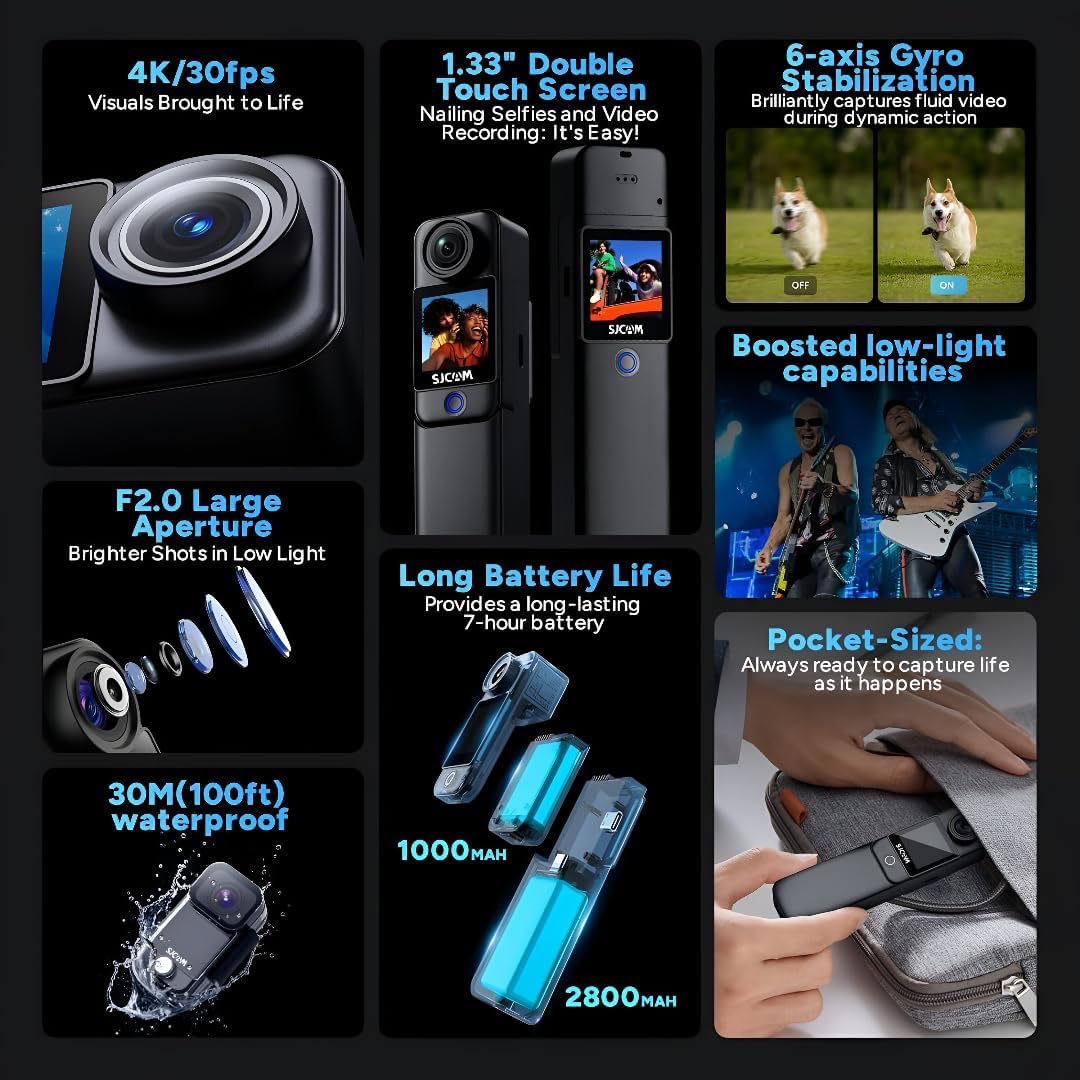
ചിത്രം 3: വശം View (USB-C പോർട്ട്)

ചിത്രം 4: പിന്നിലേക്ക് View (മൈക്രോ എസ്ഡി സ്ലോട്ട്)
മോഡുലാർ ഡിസൈൻ:
The C300 features a modular design, allowing you to attach different battery packs for extended use. The standard module includes a 1000mAh battery, while an optional larger module provides a 2800mAh battery and a secondary screen.

Figure 5: Long Battery Life with Modular Attachments
4. സജ്ജീകരണം
4.1. ഒരു മൈക്രോ എസ്ഡി കാർഡ് ചേർക്കൽ
- Open the battery compartment on the back of the camera.
- Insert a Micro SD card (up to 128GB, not included) into the designated slot until it clicks into place.
- ബാറ്ററി കമ്പാർട്ട്മെൻ്റ് സുരക്ഷിതമായി അടയ്ക്കുക.
4.2. ക്യാമറ ചാർജ് ചെയ്യുന്നു
- Connect the camera to a 5V2A power source using the provided USB Type-C cable.
- ചാർജിംഗ് ഇൻഡിക്കേറ്റർ ലൈറ്റ് ചാർജിംഗ് സ്റ്റാറ്റസ് കാണിക്കും.
4.3. Attaching Battery Modules and Accessories
- To attach the larger battery module, align the connectors and slide it onto the main camera unit until it locks.
- Use the included back clip, base mount, flat bottom bracket, or helmet bases to attach the camera to various surfaces or gear.
4.4. വാട്ടർപ്രൂഫ് കേസ് ഉപയോഗിക്കുന്നത്
- Insert the camera (without the larger battery module) into the waterproof case.
- Ensure the case is properly sealed before submerging the camera in water. The waterproof case allows for diving up to 30 meters (100 feet).

Figure 6: Underwater Shooting with Waterproof Case
5. പ്രവർത്തന നിർദ്ദേശങ്ങൾ
5.1. പവർ ഓൺ/ഓഫ്
- Press and hold the power button (usually located on the front or side) to turn the camera on or off.
5.2. ടച്ച് സ്ക്രീൻ നാവിഗേറ്റ് ചെയ്യുക
- Swipe left/right or up/down to navigate through menus and settings.
- Tap on icons to select options or confirm actions.
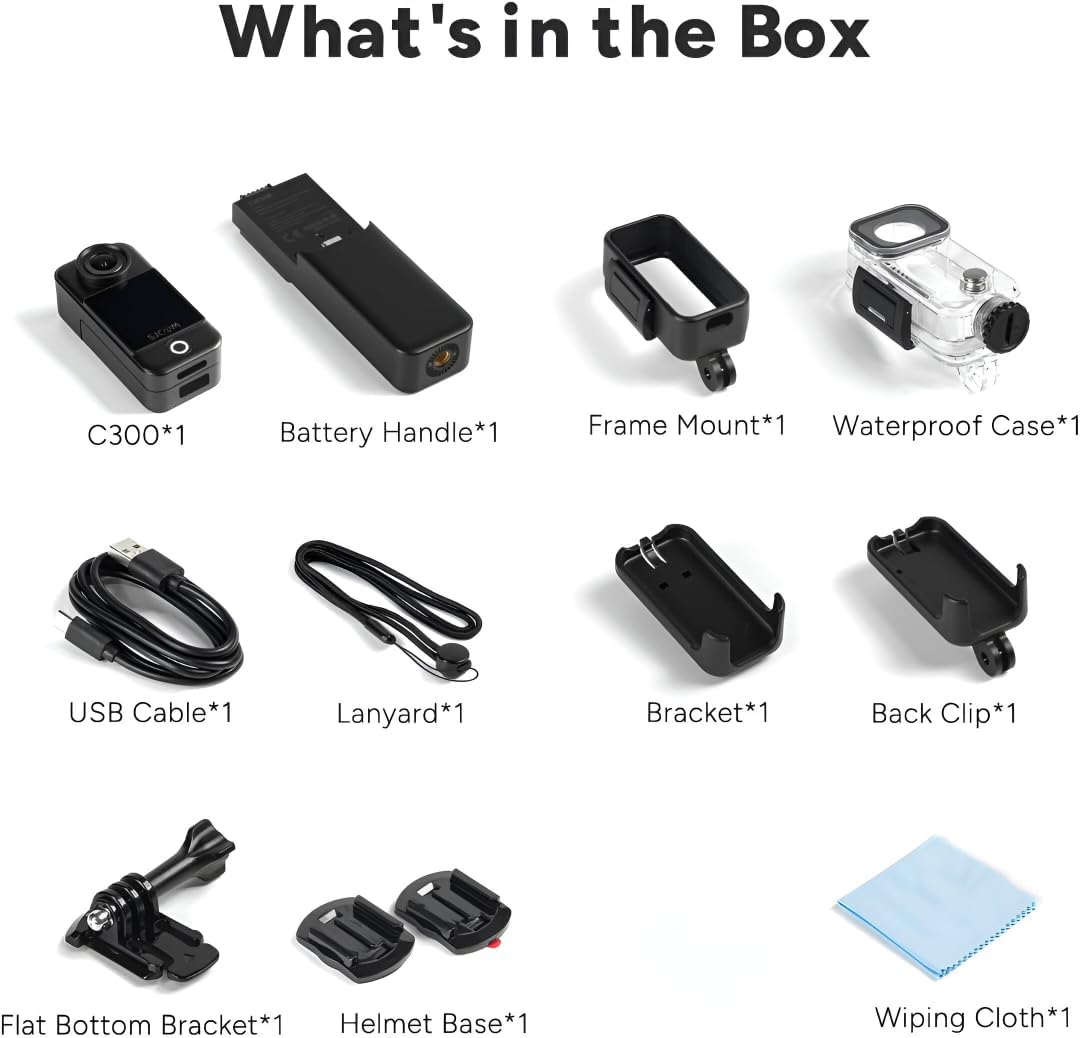
Figure 7: Dual Touchscreens in Operation
5.3. വീഡിയോ, ഫോട്ടോ മോഡുകൾ
- വീഡിയോ മിഴിവ്: Select from 4K 30FPS, 2K 60/30FPS, 1080P 120/60/30FPS, or 720P 120/60/30FPS.
- ഫോട്ടോ മിഴിവ്: Choose from 20M, 16M, 14M, 12M, 10M, 8M, 5M, 3M, 2M.
- ഷൂട്ടിംഗ് മോഡുകൾ: Includes Burst mode, Timed shooting, Quick shooting, Photo lapse, Slow motion, Motion detection, Video lapse, and Car mode.
5.4. 6-Axis Gyro Stabilization
- Enable the 6-axis gyro image stabilization in the settings menu for smoother footage, especially during movement. This feature is available up to 4K 30FPS.
5.5. കണക്റ്റിവിറ്റി
- വൈഫൈ: Connect to the SJCAM Zone app via 2.4GHz/5GHz Wi-Fi for remote control and file കൈമാറ്റം.
- തത്സമയ സ്ട്രീമിംഗ്: The camera supports live streaming functionality.
- റിമോട്ട് കൺട്രോൾ: The camera supports remote control accessories.
6. പരിപാലനം
6.1. വൃത്തിയാക്കൽ
- Use a soft, lint-free cloth to clean the camera body and screens.
- ലെൻസിന്, പോറലുകൾ ഒഴിവാക്കാൻ ഒരു പ്രത്യേക ലെൻസ് ക്ലീനിംഗ് തുണിയും ലായനിയും ഉപയോഗിക്കുക.
- Ensure the waterproof case is clean and free of debris before and after use.
6.2. ബാറ്ററി പരിചരണം
- ആദ്യ ഉപയോഗത്തിന് മുമ്പ് ബാറ്ററി പൂർണ്ണമായും ചാർജ് ചെയ്യുക.
- അങ്ങേയറ്റത്തെ താപനിലയിലേക്ക് ബാറ്ററി തുറന്നുകാട്ടുന്നത് ഒഴിവാക്കുക.
- If storing for extended periods, charge the battery to about 50% and store in a cool, dry place.
6.3. സംഭരണം
- Store the camera in a dry, dust-free environment.
- മൈക്രോ എസ്ഡി കാർഡ് ദീർഘനേരം ഉപയോഗത്തിലില്ലെങ്കിൽ അത് നീക്കം ചെയ്യുക.
7. പ്രശ്നപരിഹാരം
7.1. ക്യാമറ ഓണാകുന്നില്ല
- ബാറ്ററി ചാർജ്ജ് ചെയ്തിട്ടുണ്ടെന്ന് ഉറപ്പാക്കുക. ഒരു പവർ സ്രോതസ്സിലേക്ക് കണക്റ്റ് ചെയ്ത് വീണ്ടും ശ്രമിക്കുക.
- ബാറ്ററി ശരിയായി ചേർത്തിട്ടുണ്ടോയെന്ന് പരിശോധിക്കുക.
7.2. SD Card Errors
- Use a high-speed (Class 10 or higher) Micro SD card from a reputable brand.
- Format the SD card using the camera's settings menu.
- SD കാർഡ് ശരിയായി ചേർത്തിട്ടുണ്ടെന്ന് ഉറപ്പാക്കുക.
7.3. മോശം ഓഡിയോ നിലവാരം
- When recording yourself (selfie mode), ensure the microphone is not obstructed. The microphone is located on the back of the camera.
- In windy conditions, consider using external wind reduction accessories if available.
7.4. Video Stabilization Issues
- Ensure 6-axis Gyro Stabilization is enabled in the camera settings.
- Note that stabilization may not be available at all resolutions or frame rates (e.g., 1080P 120FPS).
8 സ്പെസിഫിക്കേഷനുകൾ
| ഫീച്ചർ | സ്പെസിഫിക്കേഷൻ |
|---|---|
| മോഡൽ | C300 |
| വീഡിയോ റെസല്യൂഷൻ | 4K 30FPS; 2K 60/30FPS; 1080P 120/60/30FPS; 720P 120/60/30FPS |
| ചിത്രത്തിൻ്റെ വലുപ്പം | 20M, 16M, 14M, 12M, 10M, 8M, 5M, 3M, 2M |
| സ്ക്രീൻ | 1.3″ HD display with touch (main) |
| സെക്കൻഡറി സ്ക്രീൻ | 1.3″ HD display with touch (on larger battery module) |
| ക്യാമറ ആംഗിൾ | 154° |
| Battery (Main) | 1000mAh (നീക്കം ചെയ്യാവുന്നത്) |
| Battery (Larger Module) | 2800mAh (നീക്കം ചെയ്യാവുന്നത്) |
| വൈഫൈ | 2.4GHz/5GHz |
| Anti Shake | Six-axis gyro image stabilization |
| എൻകോഡിംഗ് ഫോർമാറ്റ് | H.264/H.265 |
| വീഡിയോ ഫോർമാറ്റ് | MP4 |
| ഇമേജ് ഫോർമാറ്റ് | ജെ.പി.ജി |
| തത്സമയ സ്ട്രീമിംഗ് | പിന്തുണച്ചു |
| റിമോട്ട് കൺട്രോൾ | പിന്തുണച്ചു |
| യുഎസ്ബി ഇൻ്റർഫേസ് | ടൈപ്പ്-സി |
| പവർ ഇൻപുട്ട് | 5V2A |
| സംഭരണ മീഡിയം | MICRO SD card, maximum support 128G |
| പ്രവർത്തന താപനില | -10 °C ~ 45 °C |
| ഉൽപ്പന്ന വലുപ്പം | 130.0 x 32.0 x 22.2 മിമി |
| ഇനത്തിൻ്റെ ഭാരം | 14.4 ഔൺസ് |
9. വാറൻ്റിയും പിന്തുണയും
For warranty information and technical support, please refer to the official SJCAM webസൈറ്റിൽ ബന്ധപ്പെടുക അല്ലെങ്കിൽ അവരുടെ ഉപഭോക്തൃ സേവനവുമായി നേരിട്ട് ബന്ധപ്പെടുക. വാറന്റി ക്ലെയിമുകൾക്കായി നിങ്ങളുടെ വാങ്ങൽ രസീത് സൂക്ഷിക്കുക.


