ആമുഖം
This manual provides comprehensive instructions for the setup, operation, and maintenance of your RockJam 61-Key Keyboard Piano Kit. This kit includes a digital keyboard with 61 full-size keys giving you that traditional piano feel whilst maintaining a portable and compact design that can be powered by either mains (power supply included) or batteries. It features an LED panel that both displays and engages the 200 rhythms, 200 tones, a teaching function, and 30 demo songs that are part of its functionality. The kit also includes a sturdy keyboard stand, a comfortable padded bench, headphones, and access to the Simply Piano App for enhanced learning.
സജ്ജമാക്കുക
1. പായ്ക്ക് ചെയ്യൽ, ഉള്ളടക്ക പരിശോധന
ബോക്സിലെ എല്ലാ ഘടകങ്ങളും ശ്രദ്ധാപൂർവ്വം അൺപാക്ക് ചെയ്യുക. ഇനിപ്പറയുന്ന ഇനങ്ങൾ ഉണ്ടെന്ന് ഉറപ്പാക്കുക:
- RockJam 61-Key Digital Keyboard
- കീബോർഡ് സ്റ്റാൻഡ്
- Keyboard Bench
- ഹെഡ്ഫോണുകൾ
- Power Supply (Mains Adapter)
- Simply Piano Application Access Code
- Keynote Stickers

Figure 1: Complete RockJam 61-Key Keyboard Piano Kit setup.
2. കീബോർഡ് സ്റ്റാൻഡ് കൂട്ടിച്ചേർക്കൽ
The keyboard stand is an X-style design for stability. Unfold the stand and adjust its height using the central locking mechanism to a comfortable playing position. Ensure all locking pins are securely engaged before placing the keyboard on top.

Figure 2: The adjustable X-style keyboard stand.
3. Assembling the Bench
The padded bench is also foldable for easy storage. Unfold the legs until they lock into place, forming a stable seat. The thick padding ensures comfort during extended playing sessions.

Figure 3: The foldable padded bench.
4. പവർ കണക്ഷൻ
Connect the included power supply to the DC 9V input port located on the rear of the keyboard. Plug the adapter into a standard wall outlet. Alternatively, the keyboard can be powered by batteries (not included) for portable use.

Figure 4: Rear panel connections including DC 9V power input.
5. ഹെഡ്ഫോണുകൾ ബന്ധിപ്പിക്കുന്നു
For private practice, plug the included headphones into the "PHONES" jack on the rear panel of the keyboard. This will mute the internal speakers.

Figure 5: RockJam headphones for private listening.
6. Applying Keynote Stickers
For beginners, the included keynote stickers can be applied to the keys to help identify notes. Carefully peel and stick them onto the white keys as indicated in the separate sticker guide (if provided).

Figure 6: Keynote stickers applied to keyboard keys.
പ്രവർത്തന നിർദ്ദേശങ്ങൾ
1. പവർ ഓൺ/ഓഫ്, വോളിയം നിയന്ത്രണം
അമർത്തുക പവർ button to turn the keyboard on or off. Adjust the master volume using the വോളിയം knob or buttons, typically located on the left side of the control panel.
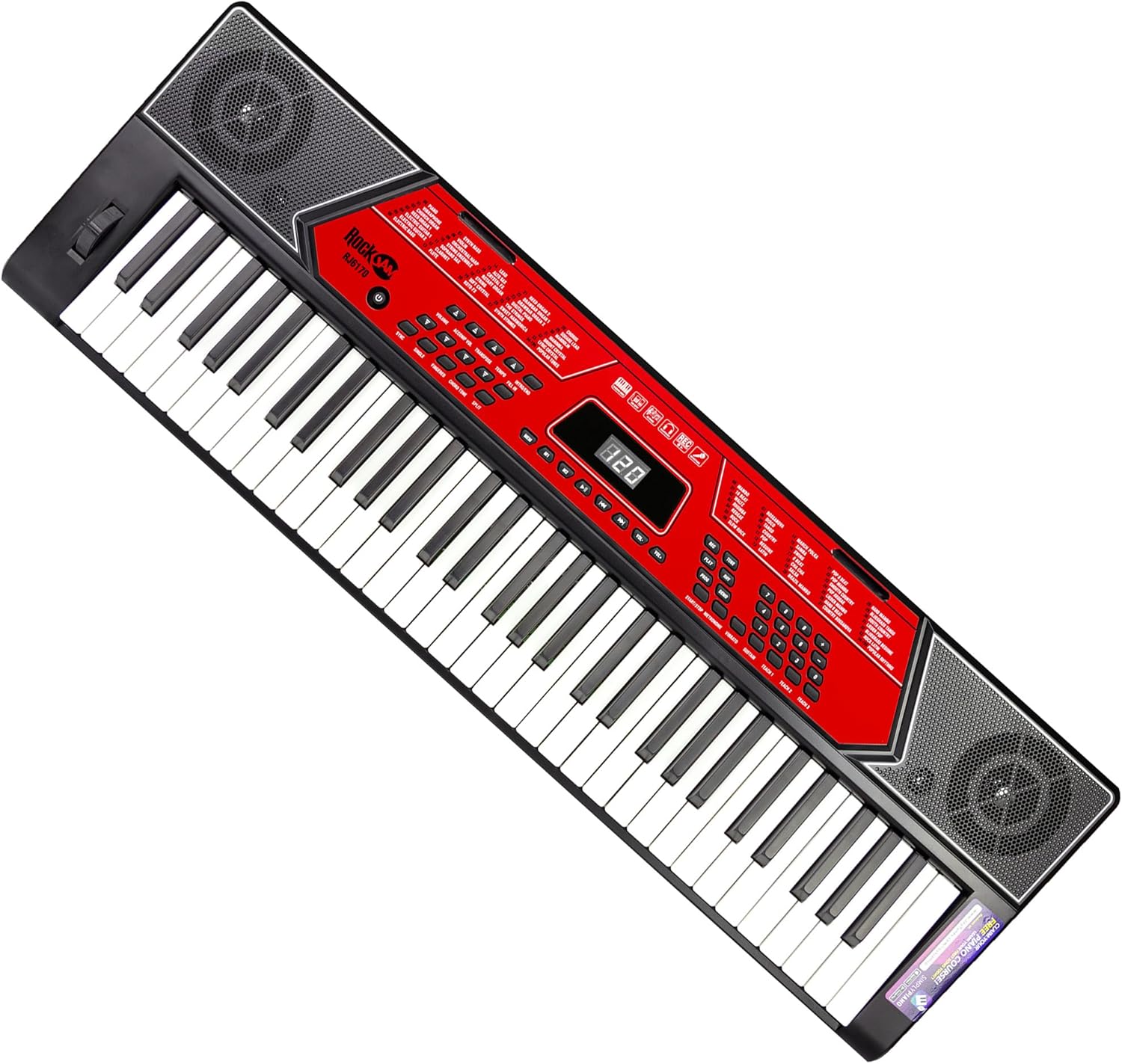
Figure 7: Keyboard control panel with power and volume controls.
2. Selecting Tones and Rhythms
The keyboard features 200 different tones (instrument sounds) and 200 rhythms (backing tracks). Use the dedicated buttons or numeric keypad on the control panel to select your desired tone or rhythm. The LED display will show the current selection.
3. Teaching Function
Engage the teaching function to assist with learning songs. Refer to the on-screen prompts on the LED display and the specific instructions for the teaching modes (e.g., One-Key, Follow, Ensemble).
4. റെക്കോർഡും പ്ലേബാക്കും
The record function allows you to capture your performances. Press the രേഖപ്പെടുത്തുക button to start recording, play your piece, and then press കളിക്കുക to listen back. This feature is useful for reviewing your progress and layering sounds.
5. Auxiliary Input (AUX IN)
ഒരു ബാഹ്യ ഓഡിയോ ഉപകരണം (ഉദാ: സ്മാർട്ട്ഫോൺ, MP3 പ്ലെയർ) ഇതിലേക്ക് ബന്ധിപ്പിക്കുക ഓക്സ് ഇൻ jack on the rear panel using a 3.5mm audio cable. This allows you to play along with your favorite songs through the keyboard's speakers.
6. USB and MIDI Connectivity
The keyboard supports USB and MIDI connectivity. Use the USB port to connect to a computer for MIDI data transfer, allowing the keyboard to function as a MIDI controller with compatible software. The മിഡി port provides traditional MIDI IN/OUT capabilities.
മെയിൻ്റനൻസ്
1. വൃത്തിയാക്കൽ
To clean the keyboard and accessories, use a soft, dry cloth. For stubborn marks, a slightly damp cloth with mild soap can be used, followed by a dry cloth. Avoid using abrasive cleaners, solvents, or excessive moisture, as these can damage the finish and internal components.
2. സംഭരണം
When not in use, store the keyboard kit in a cool, dry place away from direct sunlight, extreme temperatures, and high humidity. If storing for an extended period, remove any batteries to prevent leakage.
3. ബാറ്ററി മാറ്റിസ്ഥാപിക്കൽ
If using batteries, replace them when the keyboard's performance degrades or it fails to power on. Refer to the battery compartment for the correct battery type and polarity. Always use new batteries of the same type and replace all batteries at once.
ട്രബിൾഷൂട്ടിംഗ്
| പ്രശ്നം | സാധ്യമായ കാരണം | പരിഹാരം |
|---|---|---|
| ശക്തിയില്ല | Power adapter not connected, faulty outlet, dead batteries. | Ensure power adapter is securely connected and outlet is functional. If using batteries, replace them. |
| സ്പീക്കറുകളിൽ നിന്ന് ശബ്ദമില്ല | Volume too low, headphones connected, internal speaker issue. | Increase volume. Disconnect headphones. Check if a tone is selected. |
| കീകൾ പ്രതികരിക്കുന്നില്ല | Keyboard mode issue, internal fault. | Restart the keyboard. Ensure no specific mode (e.g., teaching mode) is preventing normal play. |
| വികലമായ ശബ്ദം | Volume too high, faulty connection, external interference. | Reduce volume. Check all cable connections. Move away from other electronic devices. |
ഈ പരിഹാരങ്ങൾ പരീക്ഷിച്ചതിനുശേഷവും പ്രശ്നം നിലനിൽക്കുകയാണെങ്കിൽ, ദയവായി ഉപഭോക്തൃ പിന്തുണയുമായി ബന്ധപ്പെടുക.
സ്പെസിഫിക്കേഷനുകൾ
| ഫീച്ചർ | വിശദാംശങ്ങൾ |
|---|---|
| മോഡലിൻ്റെ പേര് | RJ6170-SK |
| കീകളുടെ എണ്ണം | 61 (Full-size) |
| അളവുകൾ (L x W x H) | 93.5 x 28.5 x 7.8 സെ.മീ |
| ഇനത്തിൻ്റെ ഭാരം | 3.3 കി.ഗ്രാം |
| ടോണുകൾ | 200 |
| താളം | 200 |
| ഡെമോ ഗാനങ്ങൾ | 30 |
| കണക്റ്റിവിറ്റി | ഓക്സിലറി, യുഎസ്ബി, മിഡിഐ |
| ഹെഡ്ഫോൺ ജാക്ക് | 3.5 എംഎം ജാക്ക് |
| പവർ ഉറവിടം | Corded Electric (9V DC) or Batteries |
| പിന്തുണയ്ക്കുന്ന സോഫ്റ്റ്വെയർ | Simply Piano (iOS, Android) |
| മെറ്റീരിയൽ | Plastic + Steel |
വാറൻ്റിയും പിന്തുണയും
Your RockJam 61-Key Keyboard Piano Kit is covered by a manufacturer's warranty. Please refer to the warranty card included with your product for specific terms and conditions. For technical support, troubleshooting assistance beyond this manual, or warranty claims, please contact RockJam customer service through their official webഉൽപ്പന്നം വാങ്ങിയ സൈറ്റ് അല്ലെങ്കിൽ റീട്ടെയിലർ.
For more information, visit the official RockJam Store: RockJam Store on Amazon
അനുബന്ധ രേഖകൾ - RJ6170-SK
 |
RockJam RJ5061 61-കീ മൾട്ടി-ഫംഗ്ഷൻ കീബോർഡ് ഉപയോക്തൃ ഗൈഡ് RockJam RJ5061 61-കീ മൾട്ടി-ഫംഗ്ഷൻ കീബോർഡിനായുള്ള സമഗ്രമായ ഉപയോക്തൃ ഗൈഡ്, സജ്ജീകരണം, പ്രവർത്തനം, സവിശേഷതകൾ, ട്രബിൾഷൂട്ടിംഗ് എന്നിവ ഉൾക്കൊള്ളുന്നു. ടോണുകൾ, താളങ്ങൾ, റെക്കോർഡിംഗ്, അധ്യാപന രീതികൾ, സാങ്കേതിക സവിശേഷതകൾ എന്നിവയെക്കുറിച്ചുള്ള വിശദാംശങ്ങൾ ഇതിൽ ഉൾപ്പെടുന്നു. |
 |
RockJam RJ461AX 61-Key Music Keyboard with Alexa - User Guide Comprehensive user guide for the RockJam RJ461AX 61-key music keyboard, covering setup, operation, features, and Amazon Alexa integration. Learn how to connect, play, and utilize advanced functions. |
 |
RockJam RJ6170 61 Key Multi-function Keyboard User Guide This user guide provides comprehensive instructions for the RockJam RJ6170 61 Key Multi-function Keyboard, covering setup, operation, features, and troubleshooting. |
 |
RockJam RJ461 61-Key Electronic Keyboard User Guide Comprehensive user guide for the RockJam RJ461 61-key full-size electronic keyboard, detailing its features, operation, connections, and specifications for optimal use. |
 |
RockJam RJ-761 Multi-function Keyboard User Guide Comprehensive user guide for the RockJam RJ-761 61-key multi-function keyboard, detailing its features, operation, connections, safety precautions, and technical specifications. |
 |
RockJam RJ88DP 88 Key Digital Piano User Guide Comprehensive user guide for the RockJam RJ88DP 88 Key Digital Piano Keyboard, detailing setup, features like demo songs, tones, layer/split modes, advanced functions, metronome, MP3 playback, troubleshooting, and technical specifications. |