1. ആമുഖം
This manual provides instructions for the installation, configuration, and operation of the TP-Link TL-SG3428X-M2 24-Port Multi-Gigabit L2+ Managed Switch. This device is designed to provide high-performance network connectivity with advanced management features.
പ്രധാന സവിശേഷതകളിൽ ഇവ ഉൾപ്പെടുന്നു:
- 24x 2.5-Gigabit Ethernet ports for high-speed connections.
- 4x 10 Gbps SFP+ slots for high-bandwidth uplinks.
- Support for Omada Software Defined Networking (SDN) for centralized cloud management.
- Enhanced network security features including 802.1Q VLAN, IP-MAC-Port binding, ACL, and DoS defend.
- L2+ features such as Static Routing for efficient network resource utilization.
2. ഉൽപ്പന്നം കഴിഞ്ഞുview
2.1 ഫ്രണ്ട് പാനൽ

ചിത്രം 2.1: ഫ്രണ്ട് view of the TP-Link TL-SG3428X-M2 switch, showing 24 2.5G Ethernet ports, 4 10G SFP+ ports, console port, and LED indicators.
2.2 വശം View
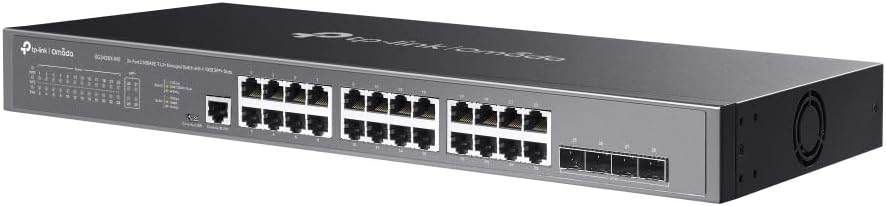
ചിത്രം 2.2: വശം view of the TP-Link TL-SG3428X-M2 switch, highlighting the ventilation and overall chassis design.
2.3 പിൻ പാനൽ

ചിത്രം 2.3: പിൻഭാഗം view of the TP-Link TL-SG3428X-M2 switch, showing the power input and grounding screw.
2.4 കോണാകൃതിയിലുള്ളത് View

ചിത്രം 2.4: കോണാകൃതിയിലുള്ളത് view of the TP-Link TL-SG3428X-M2 switch, providing a comprehensive look at its form factor.
2.5 Port and Dimension Diagram

ചിത്രം 2.5: Detailed diagram illustrating the port layout, including 1x RJ45 Console Port, 1x Micro-USB Console Port, 24x 2.5 Gigabit Ethernet Ports, and 4x 10G SFP+ Fiber Ports. Dimensions are also indicated: 440 mm width, 220 mm depth, and 44 mm height, with a switching capacity of 128 Gbps.
3. സജ്ജീകരണം
3.1 പാക്കേജ് ഉള്ളടക്കം
നിങ്ങളുടെ പാക്കേജിൽ ഇനിപ്പറയുന്ന ഇനങ്ങൾ ഉൾപ്പെടുത്തിയിട്ടുണ്ടെന്ന് ഉറപ്പാക്കുക:
- TP-Link TL-SG3428X-M2 Switch
- പവർ കോർഡ്
- റാക്ക്മൗണ്ട് കിറ്റ് (ബാധകമെങ്കിൽ)
- റബ്ബർ അടി
- ദ്രുത ഇൻസ്റ്റലേഷൻ ഗൈഡ്
3.2 ഫിസിക്കൽ ഇൻസ്റ്റലേഷൻ
- മൗണ്ടിംഗ്: Place the switch on a flat, stable surface or install it in a standard 19-inch equipment rack using the provided rackmount kit. Ensure adequate ventilation around the device.
- പവർ കണക്ഷൻ: Connect the power cord to the switch's power inlet and then to a grounded electrical outlet.
- ഗ്രൗണ്ടിംഗ്: For enhanced safety, connect a grounding cable (not included) from the switch's grounding screw to a protective ground.
3.3 നെറ്റ്വർക്ക് കണക്ഷനുകൾ
- ഇഥർനെറ്റ് പോർട്ടുകൾ: Connect your network devices (computers, servers, access points) to the 2.5 Gigabit Ethernet ports using standard RJ45 Ethernet cables.
- SFP+ പോർട്ടുകൾ: For high-speed uplinks or connections to other fiber-optic devices, insert compatible 10G SFP+ modules (not included) into the SFP+ slots and connect fiber optic cables.
- കൺസോൾ പോർട്ട്: For initial configuration or advanced management, connect a console cable (RJ45 to RS232 or Micro-USB to USB) from your computer to the switch's console port.
4. ഓപ്പറേഷൻ
4.1 പ്രാരംഭ കോൺഫിഗറേഷൻ
Upon powering on, the switch will perform a self-test. You can access the switch's management interface via a web browser or through the console port.
- Web-അധിഷ്ഠിത ജിയുഐ: Connect your computer to an Ethernet port on the switch. Configure your computer's IP address to be in the same subnet as the switch's default IP address (refer to the Quick Installation Guide for default IP). Open a web ലോഗിൻ പേജ് ആക്സസ് ചെയ്യുന്നതിന് ബ്രൗസറിൽ പോയി സ്വിച്ചിന്റെ ഐപി വിലാസം നൽകുക.
- CLI (Console): Use a terminal emulator program (e.g., PuTTY) on your computer to connect to the console port. Configure the serial port settings (e.g., 115200 baud rate, 8 data bits, no parity, 1 stop bit, no flow control).
4.2 ഒമാഡ എസ്ഡിഎൻ ഇന്റഗ്രേഷൻ
The TL-SG3428X-M2 supports TP-Link's Omada Software Defined Networking (SDN) platform, allowing for centralized management of your network devices.
- ഒമാഡ കൺട്രോളർ: The switch can be managed by an Omada Hardware Controller, Omada Software Controller, or Omada Cloud-based Controller.
- ക്ലൗഡ് ആക്സസ്: Remote cloud access and the Omada app enable management of your entire network from a single interface, anywhere, anytime.
- ഒറ്റപ്പെട്ട മോഡ്: The switch can also operate in standalone mode, configured directly via its web GUI അല്ലെങ്കിൽ CLI.
4.3 വിപുലമായ സവിശേഷതകൾ
Utilize the switch's advanced features for optimized network performance and security:
- VLAN-കൾ (വെർച്വൽ ലോക്കൽ ഏരിയ നെറ്റ്വർക്കുകൾ): Segment your network to improve security and performance.
- സ്റ്റാറ്റിക് റൂട്ടിംഗ്: Configure static routes to direct traffic efficiently within your network.
- QoS (സേവന നിലവാരം): നിർണായക ആപ്ലിക്കേഷനുകൾക്കായി നെറ്റ്വർക്ക് ട്രാഫിക്കിന് മുൻഗണന നൽകുക.
- സുരക്ഷാ സവിശേഷതകൾ: Implement IP-MAC-Port Binding, Access Control Lists (ACLs), Port Security, DoS Defend, Storm Control, DHCP Snooping, and 802.1X Radius Authentication.
5. പരിപാലനം
പതിവ് അറ്റകുറ്റപ്പണികൾ നിങ്ങളുടെ സ്വിച്ചിന്റെ മികച്ച പ്രകടനവും ദീർഘായുസ്സും ഉറപ്പാക്കുന്നു.
- ഫേംവെയർ അപ്ഡേറ്റുകൾ: ഇടയ്ക്കിടെ ടിപി-ലിങ്ക് പരിശോധിക്കുക webഏറ്റവും പുതിയ ഫേംവെയർ പതിപ്പുകൾക്കായുള്ള സൈറ്റ്. ഫേംവെയർ അപ്ഡേറ്റ് ചെയ്യുന്നത് പുതിയ സവിശേഷതകൾ, പ്രകടന മെച്ചപ്പെടുത്തലുകൾ, സുരക്ഷാ പാച്ചുകൾ എന്നിവ നൽകും.
- വൃത്തിയാക്കൽ: Keep the switch and its ventilation openings clean and free of dust. Use a soft, dry cloth for cleaning. Do not use liquid or aerosol cleaners.
- പരിസ്ഥിതി വ്യവസ്ഥകൾ: Ensure the switch operates within its specified temperature and humidity ranges. Avoid placing it in direct sunlight or near heat sources.
- കോൺഫിഗറേഷൻ ബാക്കപ്പ്: Regularly back up your switch's configuration settings to prevent data loss in case of unexpected issues.
6. പ്രശ്നപരിഹാരം
നിങ്ങളുടെ സ്വിച്ചിൽ പ്രശ്നങ്ങൾ നേരിടുകയാണെങ്കിൽ, ഇനിപ്പറയുന്ന പൊതുവായ ട്രബിൾഷൂട്ടിംഗ് ഘട്ടങ്ങൾ പരിശോധിക്കുക:
- ശക്തിയില്ല: പവർ കോർഡ് സ്വിച്ചുമായും പവർ ഔട്ട്ലെറ്റുമായും സുരക്ഷിതമായി ബന്ധിപ്പിച്ചിട്ടുണ്ടെന്ന് ഉറപ്പാക്കുക. പവർ ഔട്ട്ലെറ്റ് പ്രവർത്തനക്ഷമമാണെന്ന് ഉറപ്പാക്കുക.
- ലിങ്ക് ലൈറ്റ് ഇല്ല: Check the Ethernet cable connections. Ensure the connected device is powered on and functioning correctly. Try a different port or cable.
- നെറ്റ്വർക്ക് കണക്റ്റിവിറ്റി പ്രശ്നങ്ങൾ: Verify IP address settings on connected devices. Check VLAN configurations if applicable. Ensure there are no IP conflicts.
- മന്ദഗതിയിലുള്ള പ്രകടനം: Check for network loops, excessive broadcast traffic, or faulty cables. Monitor port utilization.
- മാനേജ്മെന്റ് ഇന്റർഫേസ് ആക്സസ് ചെയ്യുന്നു: Confirm your computer's IP address is in the same subnet as the switch. Clear your browser's cache or try a different browser.
- ഫാക്ടറി പുന et സജ്ജമാക്കുക: If configuration issues persist, you may need to perform a factory reset. Refer to the Quick Installation Guide or the full user manual on the TP-Link website for instructions on how to reset the device. കുറിപ്പ്: ഫാക്ടറി റീസെറ്റ് എല്ലാ ഇഷ്ടാനുസൃത കോൺഫിഗറേഷനുകളും മായ്ക്കും.
7 സ്പെസിഫിക്കേഷനുകൾ
| ഫീച്ചർ | സ്പെസിഫിക്കേഷൻ |
|---|---|
| മോഡൽ നമ്പർ | TL-SG3428X-M2 |
| ബ്രാൻഡ് | ടിപി-ലിങ്ക് |
| തുറമുഖങ്ങളുടെ എണ്ണം | 24 (2.5Gbps Ethernet) + 4 (10Gbps SFP+) |
| ഇൻ്റർഫേസ് തരം | ആർജെ45, എസ്എഫ്പി+ |
| ഡാറ്റ കൈമാറ്റ നിരക്ക് | 2.5 Gigabits Per Second (Ethernet), 10 Gigabits Per Second (SFP+) |
| ഉൽപ്പന്ന അളവുകൾ | 17.32 x 7.09 x 1.73 ഇഞ്ച് (440 x 180 x 44 മിമി) |
| ഇനത്തിൻ്റെ ഭാരം | 4.95 പൗണ്ട് (2.25 കിലോഗ്രാം) |
| വാല്യംtage | 100-240 വോൾട്ട് (എസി) |
| കേസ് മെറ്റീരിയൽ | ലോഹം |
| പ്രവർത്തന താപനില | 0°C മുതൽ 40°C വരെ (32°F മുതൽ 104°F വരെ) |
| സംഭരണ താപനില | -40°C മുതൽ 70°C വരെ (-40°F മുതൽ 158°F വരെ) |
| പ്രവർത്തന ഹ്യുമിഡിറ്റി | 10% മുതൽ 90% വരെ ഘനീഭവിക്കാത്തത് |
| സംഭരണ ഈർപ്പം | 5% മുതൽ 90% വരെ ഘനീഭവിക്കാത്തത് |
8. വാറൻ്റിയും പിന്തുണയും
TP-Link provides a comprehensive warranty and technical support for this product.
- വാറൻ്റി: This product is backed by a 5-year manufacturer warranty. Please retain your proof of purchase for warranty claims.
- സാങ്കേതിക സഹായം: Free 24/7 technical support is available.
കൂടുതൽ സഹായത്തിന്, ദയവായി TP-Link പിന്തുണയുമായി ബന്ധപ്പെടുക:
- ഫോൺ: (866) 225-8139
- Webസൈറ്റ്: myproducts.tp-link.com/us (www.myproducts.tp-link.com) എന്ന വിലാസത്തിൽ നിന്നും നിങ്ങൾക്ക് ഏറ്റവും പുതിയ വിവരങ്ങൾ ലഭിക്കും.
- ഇമെയിൽ: support.USA@tp-link.com


