1. ആമുഖം
This manual provides detailed instructions for the safe installation, operation, and maintenance of your Fanimation FP3050BN Obvi LED Indoor Ceiling Fan. Please read this manual thoroughly before beginning installation and keep it for future reference.

Figure 1.1: Fanimation FP3050BN Obvi LED Indoor Ceiling Fan (Brushed Nickel)
The Fanimation FP3050BN is a 26-inch LED indoor ceiling fan featuring a modern design with integrated LED lighting and smart control capabilities via remote and app. It is designed for indoor use and offers both flush mount and semi-flush mount installation options.
2. പ്രധാന സുരക്ഷാ നിർദ്ദേശങ്ങൾ
Read and save these instructions to prevent injury or damage.
- വൈദ്യുതി വിച്ഛേദിക്കൽ: ഏതെങ്കിലും ഇൻസ്റ്റാളേഷൻ, അറ്റകുറ്റപ്പണി അല്ലെങ്കിൽ അറ്റകുറ്റപ്പണികൾ നടത്തുന്നതിന് മുമ്പ് പ്രധാന സർക്യൂട്ട് ബ്രേക്കറിലോ ഫ്യൂസ് ബോക്സിലോ എല്ലായ്പ്പോഴും വൈദ്യുതി വിച്ഛേദിക്കുക.
- ഇലക്ട്രിക്കൽ വയറിംഗ്: All electrical wiring must be performed by a qualified electrician and conform to national and local electrical codes.
- മൗണ്ടിംഗ് സപ്പോർട്ട്: Ensure the outlet box and supporting structure are securely fastened and capable of supporting the fan's weight (approximately 20 pounds).
- ഇൻഡോർ ഉപയോഗത്തിന് മാത്രം: This ceiling fan is designed exclusively for indoor environments. Do not install in damp അല്ലെങ്കിൽ നനഞ്ഞ സ്ഥലങ്ങൾ.
- ബ്ലേഡ് ക്ലിയറൻസ്: Ensure there is adequate clearance from the fan blades to any obstructions.
- അംഗീകൃത ഭാഗങ്ങൾ: Use only Fanimation authorized replacement parts and accessories.
- സംയോജിത LED: The LED light source is integrated and non-removable. Do not attempt to replace individual LEDs.
3. പാക്കേജ് ഉള്ളടക്കം
Before beginning installation, carefully unpack all components and verify that you have received all items listed below. If any parts are missing or damaged, contact Fanimation customer support immediately.
- ഫാൻ മോട്ടോർ അസംബ്ലി
- LED Light Kit (integrated)
- റിമോട്ട് കൺട്രോൾ
- മ Bra ണ്ടിംഗ് ബ്രാക്കറ്റും ഹാർഡ്വെയറും
- ഇൻസ്ട്രക്ഷൻ മാനുവൽ
4. സജ്ജീകരണവും ഇൻസ്റ്റാളേഷനും
The Fanimation FP3050BN supports both Flush Mount and Semi Flush Mount installation types. Due to the electrical nature of this product, professional installation is highly recommended.
4.1 ഫാൻ ഘടിപ്പിക്കൽ
Follow the detailed wiring and mounting instructions provided in the separate installation guide included with your fan. Ensure all electrical connections are secure and properly insulated.
4.2 Connecting to Smart Devices (fanSync App)
Your Fanimation ceiling fan is equipped with a fanSync WiFi receiver for smart control. Refer to the diagram below for an overview of the connection process.

Figure 4.1: fanSync WiFi Receiver and App Integration
- Wire and Install Receiver: Wire and install the fanSync WiFi receiver into your ceiling fan's hanger bracket/canopy as per the wiring diagram.
- Download fanSync App: Download the fanSync Wifi app from the Google Play Store (for Android) or the Apple App Store (for iOS).
- ഇൻ-ആപ്പ് നിർദ്ദേശങ്ങൾ പാലിക്കുക: Open the fanSync app and follow the simple on-screen setup instructions to pair your fan with your smart device.
The fanSync system integrates with popular smart home platforms including Amazon Echo (Alexa), Google Home (Google Assistant), Nest, Ecobee, and SmartThings, allowing for voice control and advanced automation.
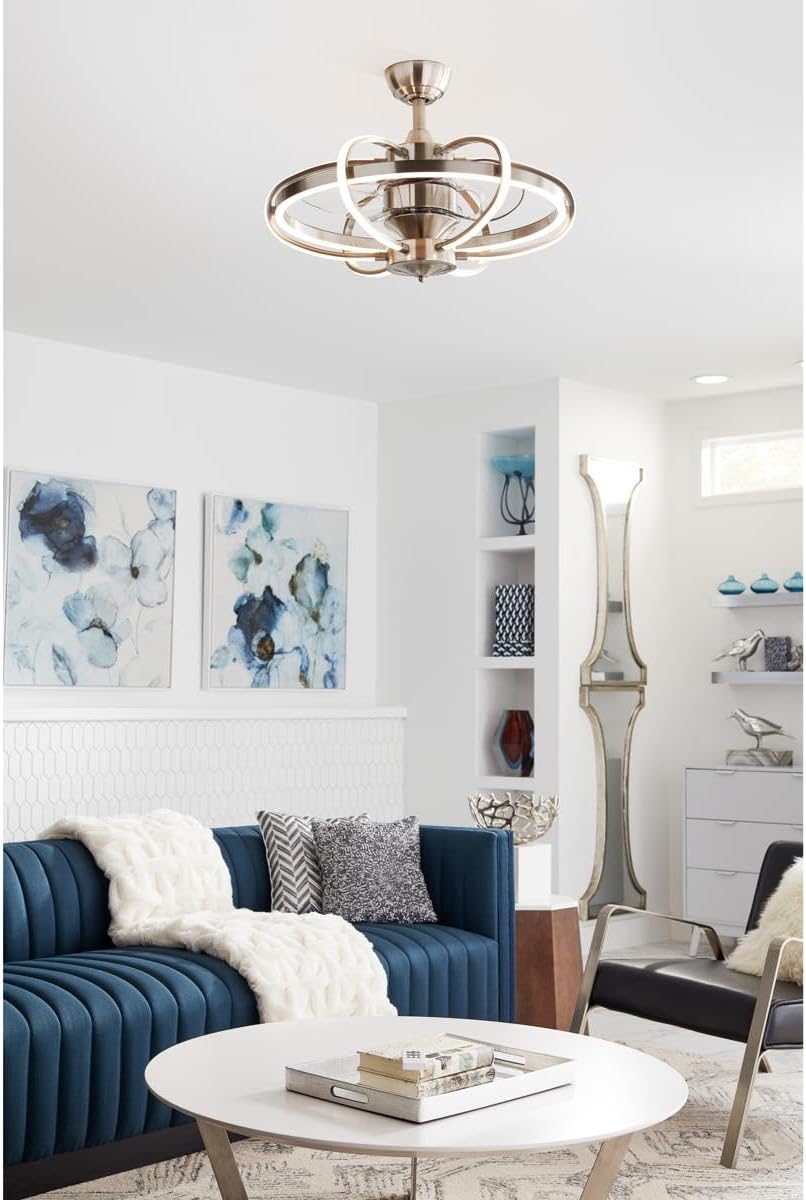
Figure 4.2: Fanimation FP3050BN installed in a modern living space.
5. പ്രവർത്തന നിർദ്ദേശങ്ങൾ
Your Fanimation Obvi LED Ceiling Fan can be controlled using the included remote control or through the fanSync mobile application.
5.1 റിമോട്ട് കൺട്രോൾ ഓപ്പറേഷൻ
The remote control allows for direct control of the fan and light functions:
- പവർ ബട്ടൺ: ഫാനും ലൈറ്റും ഓണാക്കുകയോ ഓഫാക്കുകയോ ചെയ്യുന്നു.
- ഫാൻ സ്പീഡ് ബട്ടണുകൾ: Adjusts the fan speed (typically 3 speeds for AC fans, variable for DC fans).
- ലൈറ്റ് ബട്ടൺ: Turns the LED light on or off.
- Dimming Buttons: LED ലൈറ്റിന്റെ തെളിച്ചം ക്രമീകരിക്കുന്നു.
5.2 App Control (fanSync)
The fanSync app provides enhanced control features:
- പൂർണ്ണ നിയന്ത്രണം: Operate fan speed and light functions from your smartphone.
- ടൈമർ പ്രവർത്തനങ്ങൾ: Set schedules for the fan and light to turn on/off automatically.
- പ്രിയപ്പെട്ട ക്രമീകരണങ്ങൾ: Save preferred fan speeds and light brightness levels for quick access.
- വോയ്സ് കൺട്രോൾ ഇന്റഗ്രേഷൻ: Connect with Amazon Alexa or Google Assistant for hands-free operation. Example കമാൻഡുകൾ: "Hey Google, turn bedroom fan on." or "Alexa, turn living room light on."
6. പരിചരണവും പരിപാലനവും
Regular care and maintenance will help preserve the appearance and extend the life of your ceiling fan.
- വൃത്തിയാക്കൽ: ഫാൻ വൃത്തിയാക്കാൻ, മൃദുവായ, ഡി തുണി ഉപയോഗിച്ച് തുടയ്ക്കുക.amp തുണി. അബ്രാസീവ് ക്ലീനറുകൾ, ലായകങ്ങൾ, അല്ലെങ്കിൽ കഠിനമായ രാസവസ്തുക്കൾ എന്നിവ ഉപയോഗിക്കരുത്, കാരണം ഇവ ഫിനിഷിനോ ഇലക്ട്രിക്കൽ ഘടകങ്ങൾക്കോ കേടുവരുത്തും.
- പ്രകാശ സ്രോതസ്സ്: The LED light source is integrated and non-removable. Do not attempt to replace individual LEDs. If the light fails, contact Fanimation customer support.
- മോട്ടോർ: The fan motor is permanently lubricated and requires no oiling.
- ദൃഢത പരിശോധന: Periodically check all screws and connections on the fan and mounting hardware to ensure they are secure.
7. പ്രശ്നപരിഹാരം
ഉപഭോക്തൃ പിന്തുണയുമായി ബന്ധപ്പെടുന്നതിന് മുമ്പ്, പൊതുവായ പ്രശ്നങ്ങൾക്ക് ഇനിപ്പറയുന്ന ട്രബിൾഷൂട്ടിംഗ് ഗൈഡ് പരിശോധിക്കുക.
| പ്രശ്നം | സാധ്യമായ കാരണം | പരിഹാരം |
|---|---|---|
| ഫാൻ ആരംഭിക്കുന്നില്ല. | No power to the fan; loose wiring connection; remote control battery dead. | Check circuit breaker and wall switch. Ensure all wiring connections are secure. Replace remote control batteries. |
| ഫാൻ അമിതമായ ശബ്ദം പുറപ്പെടുവിക്കുന്നു. | Loose mounting screws; unbalanced blades; internal component issue. | Ensure all mounting screws are tight. Check for any loose parts. If noise persists, contact customer support. |
| വെളിച്ചം പ്രവർത്തിക്കുന്നില്ല. | Light kit wiring issue; LED failure. | Check light kit wiring connections. Since the LED is non-removable, if it's faulty, contact Fanimation customer support for service. |
| റിമോട്ട് കൺട്രോൾ പ്രതികരിക്കുന്നില്ല. | Dead batteries; remote not paired with fan. | Replace batteries in the remote control. Refer to the full installation manual for remote pairing instructions. |
| ആപ്പ് നിയന്ത്രണം പ്രവർത്തിക്കുന്നില്ല. | Wi-Fi connectivity issue; fan not paired with app. | Ensure your home Wi-Fi network is active and the fan is within range. Re-pair the fan with the fanSync app if necessary. |
8. ഉൽപ്പന്ന സവിശേഷതകൾ
- മോഡൽ: FP3050BN
- ബ്രാൻഡ്: ഫാനിമേഷൻ
- നിറം: ബ്രഷ് ചെയ്ത നിക്കൽ
- ശൈലി: ആധുനികം
- ലൈറ്റ് ഫിക്ചർ ഫോം: സീലിംഗ്
- ഇൻഡോർ/ഔട്ട്ഡോർ ഉപയോഗം: ഇൻഡോർ
- ഊർജ്ജ സ്രോതസ്സ്: കോർഡഡ് ഇലക്ട്രിക്
- ഇൻസ്റ്റലേഷൻ തരം: ഫ്ലഷ് മൗണ്ട്, സെമി ഫ്ലഷ് മൗണ്ട്
- നിയന്ത്രണ രീതി: റിമോട്ട് കൺട്രോൾ, ആപ്പ് കൺട്രോൾ
- പ്രകാശ സ്രോതസ്സ് തരം: എൽഇഡി
- ഫിനിഷ് തരം: ബ്രഷ് ചെയ്തു
- ഷേഡ് മെറ്റീരിയൽ: ക്രിസ്റ്റൽ
- പ്രകാശ സ്രോതസ്സുകളുടെ എണ്ണം: 6
- വാല്യംtage: 120 വോൾട്ട്
- ഇളം നിറം: വെള്ള
- ഉൾപ്പെടുത്തിയ ഘടകങ്ങൾ: ലൈറ്റ് കിറ്റ്
- ഇനത്തിൻ്റെ ഭാരം: 20 പൗണ്ട്
- വാട്ട്tage: 4 വാട്ട്സ്
- തെളിച്ചം: 2000 ലുമൺ
- ഉൽപ്പന്ന അളവുകൾ: 1 x 1 x 1 ഇഞ്ച്
- ആദ്യം ലഭ്യമായ തീയതി: ജൂലൈ 14, 2021
9. വാറണ്ടിയും ഉപഭോക്തൃ പിന്തുണയും
For detailed warranty information, technical assistance, or to purchase replacement parts, please contact Fanimation customer support directly. Keep your proof of purchase for warranty claims.
You can find additional resources and contact information by visiting the official Fanimation website or their store page on Amazon:


