1. ആമുഖം
This manual provides detailed instructions for the safe and efficient operation, maintenance, and troubleshooting of your FOHERE 20L/24h Electric Dehumidifier. Please read this manual thoroughly before using the appliance and retain it for future reference.
2. സുരക്ഷാ നിർദ്ദേശങ്ങൾ
Always observe the following basic safety precautions when using electrical appliances to reduce the risk of fire, electric shock, or injury.
- വൈദ്യുതി വിതരണം വോളിയം ഉറപ്പാക്കുകtage ഡീഹ്യൂമിഡിഫയറിലെ റേറ്റിംഗ് ലേബലുമായി പൊരുത്തപ്പെടുന്നു.
- കേടായ ചരടോ പ്ലഗോ ഉപയോഗിച്ച് ഡീഹ്യൂമിഡിഫയർ പ്രവർത്തിപ്പിക്കരുത്.
- യൂണിറ്റ്, പവർ കോർഡ്, പ്ലഗ് എന്നിവ വെള്ളത്തിലോ മറ്റ് ദ്രാവകങ്ങളിലോ മുക്കരുത്.
- താപ സ്രോതസ്സുകളിൽ നിന്നും നേരിട്ടുള്ള സൂര്യപ്രകാശത്തിൽ നിന്നും ഉപകരണം അകറ്റി നിർത്തുക.
- Ensure adequate ventilation around the unit; do not block air inlets or outlets.
- Always unplug the dehumidifier before cleaning, moving, or performing any maintenance.
- കുട്ടികളെ ഡീഹ്യൂമിഡിഫയർ ഉപയോഗിച്ച് കളിക്കാനോ പ്രവർത്തിപ്പിക്കാനോ അനുവദിക്കരുത്.
- വെള്ളം നിറഞ്ഞൊഴുകുന്നത് തടയാൻ പതിവായി ടാങ്ക് ശൂന്യമാക്കുക.
- Do not use the appliance in areas where flammable gases or liquids are stored.
3. ഉൽപ്പന്നം കഴിഞ്ഞുview
3.1 ഘടകങ്ങൾ

Figure 3.1: The FOHERE 20L/24h Dehumidifier, showcasing its compact design and the mobile application interface for smart control. The unit is white with a top control panel and side air vents.
3.2 നിയന്ത്രണ പാനൽ

Figure 3.2: Close-up of the dehumidifier's top control panel, indicating buttons for Timer, Swing, Humidity Adjustment (+/-), Mode, and ON/OFF, along with indicators for Timer, WiFi, Tank Full, Dry, Fan, and Laundry modes.
The control panel features an LED display and touch-sensitive buttons for various functions:
- ടൈമർ ബട്ടൺ: Sets the auto-on or auto-off time.
- സ്വിംഗ് ബട്ടൺ: Activates or deactivates the oscillating air outlet.
- Humidity Adjustment (+/-) Buttons: ആവശ്യമുള്ള ഈർപ്പം നില കൂട്ടുകയോ കുറയ്ക്കുകയോ ചെയ്യുന്നു.
- മോഡ് ബട്ടൺ: Cycles through operating modes (Dry, Fan, Laundry).
- ഓൺ/ഓഫ് ബട്ടൺ: യൂണിറ്റ് ഓണാക്കുകയോ ഓഫാക്കുകയോ ചെയ്യുന്നു.
- സൂചകങ്ങൾ: Lights for Timer, WiFi connection, Tank Full, Dry mode, Fan mode, and Laundry mode.
4. സജ്ജീകരണം
4.1 അൺപാക്കിംഗ്
Carefully remove the dehumidifier from its packaging. Inspect the unit for any signs of damage. Retain the packaging materials for future storage or transport.
4.2 പ്ലേസ്മെൻ്റ്
Place the dehumidifier on a flat, stable surface in the desired room. Ensure there is at least 20 cm (8 inches) of clear space around all sides of the unit for proper airflow. Avoid placing it near heat sources or in direct sunlight.
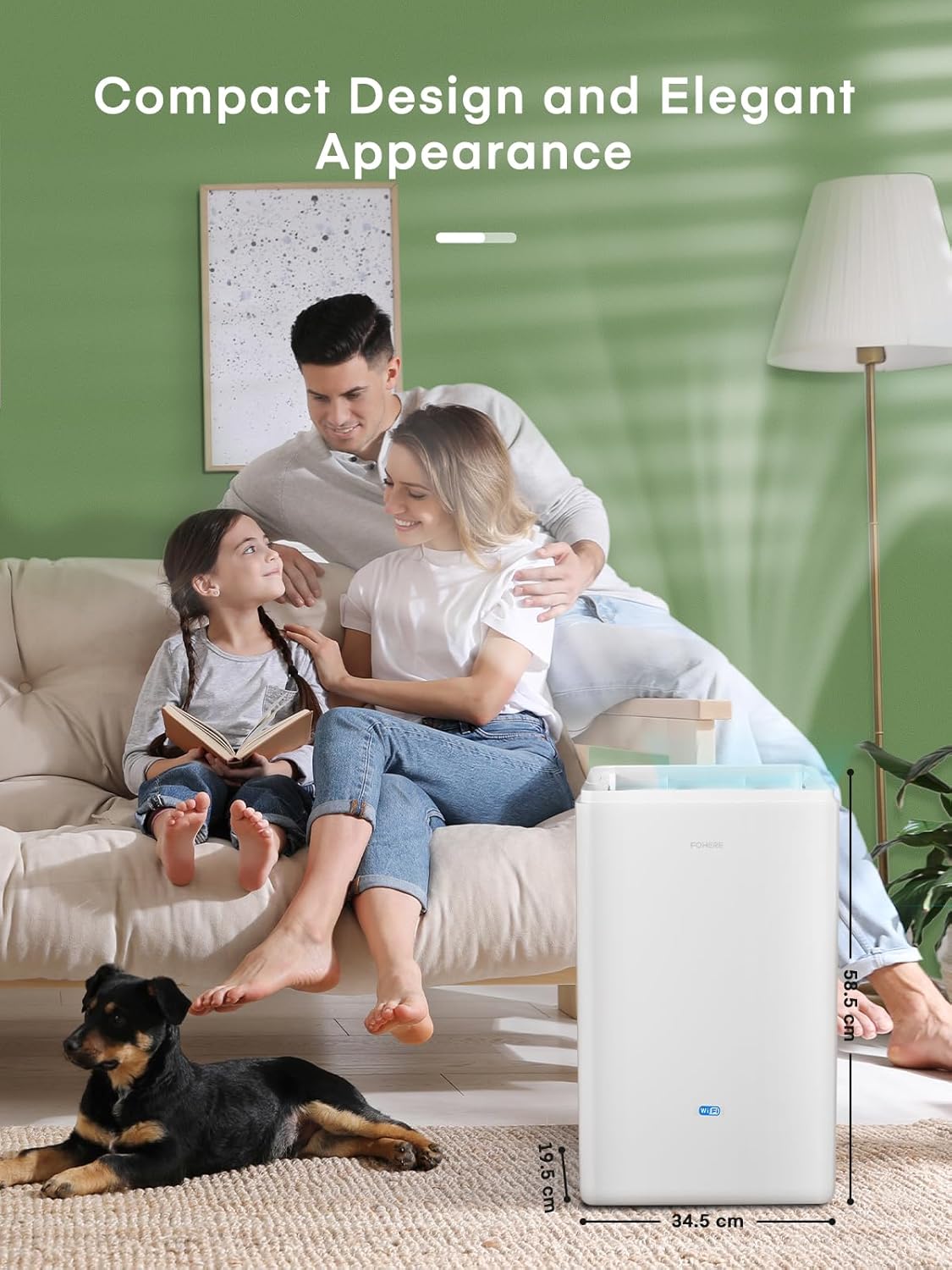
Figure 4.1: The dehumidifier positioned in a living room, illustrating its compact dimensions of 39.7 cm (height) x 24.3 cm (width) x 64 cm (depth), making it suitable for various indoor spaces.
4.3 പവർ കണക്ഷൻ
Plug the power cord into a grounded electrical outlet. Ensure the outlet meets the power requirements of the dehumidifier.
4.4 ഡ്രെയിനേജ് ഓപ്ഷനുകൾ
നിങ്ങളുടെ ഡീഹ്യുമിഡിഫയർ രണ്ട് ഡ്രെയിനേജ് രീതികൾ വാഗ്ദാനം ചെയ്യുന്നു:
- Manual Tank Drainage: The dehumidifier collects water in its internal 4.2L water tank. When the tank is full, the unit will automatically shut off and the 'Tank Full' indicator will illuminate. Empty the tank by carefully pulling it out from the side of the unit and pouring out the collected water. Reinsert the tank firmly until it clicks into place.
- തുടർച്ചയായ ഡ്രെയിനേജ്: For continuous operation without needing to empty the tank, connect the included drain hose to the continuous drainage port on the back of the unit. Route the hose to a suitable drain (e.g., floor drain, sink) ensuring it is sloped downwards for gravity drainage.
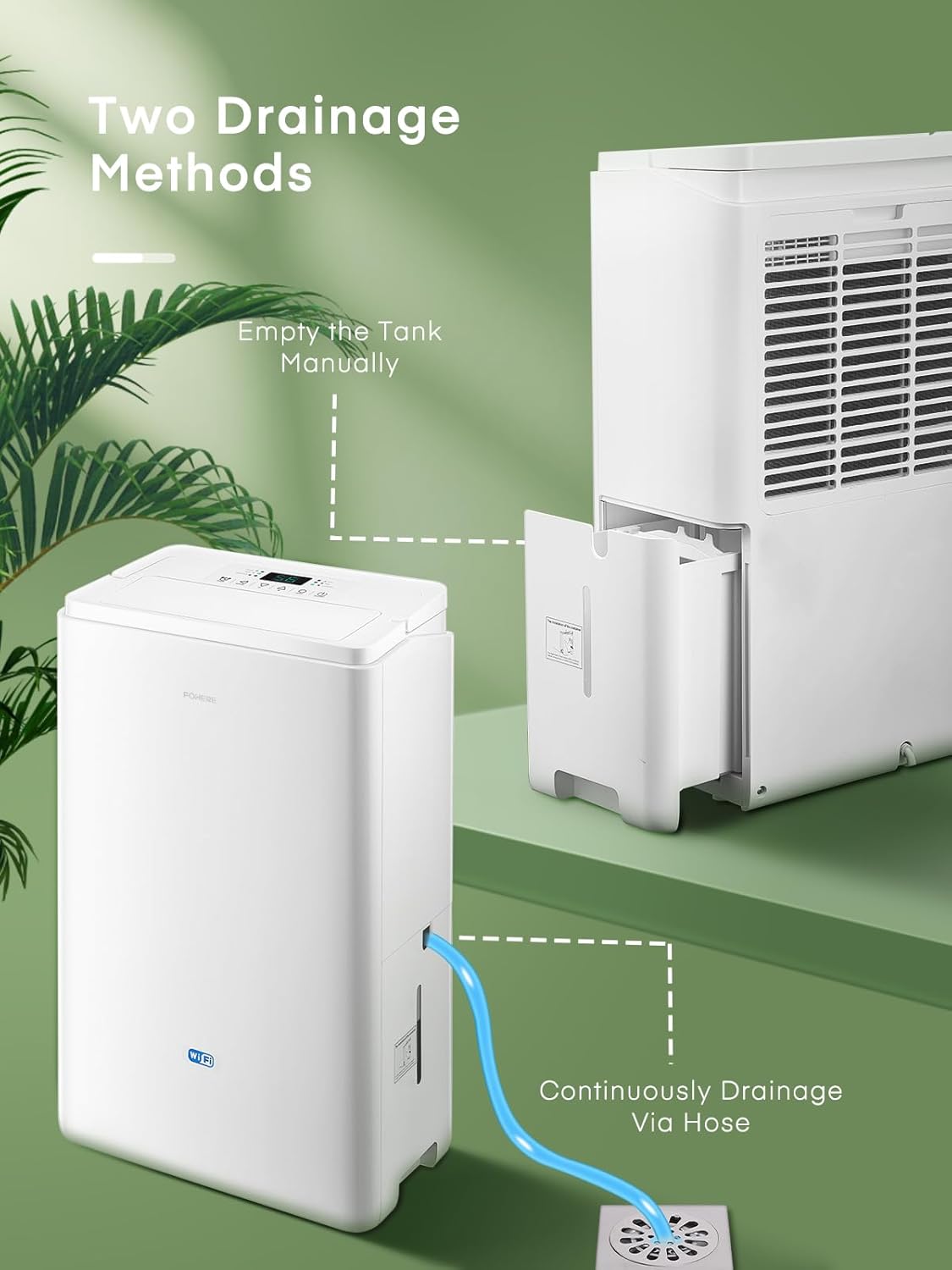
Figure 4.2: Illustration of the two drainage methods: manually emptying the removable water tank and connecting a hose for continuous drainage directly to a floor drain.
5. പ്രവർത്തന നിർദ്ദേശങ്ങൾ
5.1 അടിസ്ഥാന പ്രവർത്തനം
- അമർത്തുക ഓൺ/ഓഫ് button to power on the dehumidifier.
- The unit will start operating in its default mode.
5.2 ഓപ്പറേറ്റിംഗ് മോഡുകൾ
അമർത്തുക മോഡ് ലഭ്യമായ ഓപ്പറേറ്റിംഗ് മോഡുകളിലൂടെ സൈക്കിൾ ചെയ്യാൻ ബട്ടൺ:

Figure 5.1: The control panel highlighting the three main operation modes: Dry, Fan, and Laundry, along with the Swing function.
- ഡ്രൈ മോഡ്: Standard dehumidification for general use.
- ഫാൻ മോഡ്: Operates as a fan, circulating air without dehumidification.
- അലക്കു മോഡ്: Designed for faster drying of clothes in a confined space. The unit operates at a higher fan speed and continuous dehumidification.
5.3 ഈർപ്പം ക്രമീകരണം
In Dry mode, use the + or - buttons to set your desired humidity level (e.g., 40% to 80% relative humidity). The unit will operate until the ambient humidity reaches the set level, then cycle on and off to maintain it.
5.4 ടൈമർ പ്രവർത്തനം
അമർത്തുക ടൈമർ button to set an auto-on or auto-off time (from 1 to 24 hours). Each press increases the time by one hour. The timer indicator will light up when active.
5.5 Oscillating Mode
അമർത്തുക സ്വിംഗ് button to activate the oscillating function, which helps distribute dehumidified air more evenly throughout the room. Press again to stop oscillation.
5.6 APP and WiFi Control
The dehumidifier can be controlled remotely via a smartphone application. Follow the instructions provided in the separate APP setup guide to connect your device to your home WiFi network. Once connected, you can adjust modes, set humidity, create schedules, and monitor real-time humidity from your phone.

Figure 5.2: An illustrative diagram demonstrating how smart app control simplifies life by allowing users to adjust modes, humidity, create schedules, view real-time humidity, and set timers remotely.
6. പരിപാലനം
പതിവ് അറ്റകുറ്റപ്പണികൾ മികച്ച പ്രകടനം ഉറപ്പാക്കുകയും നിങ്ങളുടെ ഡീഹ്യൂമിഡിഫയറിന്റെ ആയുസ്സ് വർദ്ധിപ്പിക്കുകയും ചെയ്യുന്നു.
6.1 എയർ ഫിൽട്ടർ വൃത്തിയാക്കൽ
ഉപയോഗവും വായുവിന്റെ ഗുണനിലവാരവും അനുസരിച്ച് രണ്ടാഴ്ച കൂടുമ്പോഴോ അതിലധികമോ തവണ എയർ ഫിൽറ്റർ വൃത്തിയാക്കണം. വൃത്തികെട്ട ഫിൽറ്റർ കാര്യക്ഷമതയും വായുപ്രവാഹവും കുറയ്ക്കും.
- ഡീഹ്യൂമിഡിഫയർ ഓഫ് ചെയ്ത് പവർ ഔട്ട്ലെറ്റിൽ നിന്ന് അത് ഊരിമാറ്റുക.
- Locate the air filter cover on the back or side of the unit.
- സൌമ്യമായി പുറത്തെടുത്ത് ഫിൽട്ടർ നീക്കം ചെയ്യുക.
- ഫിൽറ്റർ ഒരു വാക്വം ക്ലീനർ ഉപയോഗിച്ച് വൃത്തിയാക്കുക അല്ലെങ്കിൽ ചൂടുള്ള സോപ്പ് വെള്ളത്തിൽ കഴുകുക. നന്നായി കഴുകുക.
- ഫിൽട്ടർ വീണ്ടും ഇടുന്നതിനുമുമ്പ് പൂർണ്ണമായും വായുവിൽ ഉണങ്ങാൻ അനുവദിക്കുക. ഡ്രയർ ഉപയോഗിക്കരുത് അല്ലെങ്കിൽ നേരിട്ട് ചൂടാക്കരുത്.
- Slide the dry filter back into its slot and close the cover.

Figure 6.1: A hand demonstrating the removal of the washable air filter from the back of the dehumidifier for cleaning.
6.2 വാട്ടർ ടാങ്ക് വൃത്തിയാക്കൽ
പൂപ്പലും പൂപ്പലും തടയാൻ വാട്ടർ ടാങ്ക് പതിവായി വൃത്തിയാക്കുക.
- യൂണിറ്റ് ഓഫ് ചെയ്ത് അൺപ്ലഗ് ചെയ്യുക.
- വാട്ടർ ടാങ്ക് നീക്കം ചെയ്യുക.
- Wash the tank with mild detergent and warm water. Rinse thoroughly.
- Dry the tank completely before reinserting it into the dehumidifier.

Figure 6.2: A hand demonstrating the removal of the 4.2L water tank from the side of the dehumidifier.
6.3 സംഭരണം
ഡീഹ്യൂമിഡിഫയർ ദീർഘകാലത്തേക്ക് ഉപയോഗിക്കുന്നില്ലെങ്കിൽ:
- വാട്ടർ ടാങ്ക് ശൂന്യമാക്കി വൃത്തിയാക്കുക.
- എയർ ഫിൽട്ടർ വൃത്തിയാക്കുക.
- യൂണിറ്റ് ഊരി പവർ കോർഡ് വൃത്തിയായി ചുരുട്ടുക.
- Store the dehumidifier in a cool, dry place, preferably in its original packaging.
7. പ്രശ്നപരിഹാരം
ഉപഭോക്തൃ പിന്തുണയുമായി ബന്ധപ്പെടുന്നതിന് മുമ്പ്, പൊതുവായ പ്രശ്നങ്ങളും അവയുടെ പരിഹാരങ്ങളും അറിയാൻ ദയവായി ഇനിപ്പറയുന്ന പട്ടിക പരിശോധിക്കുക.
| പ്രശ്നം | സാധ്യമായ കാരണം | പരിഹാരം |
|---|---|---|
| ഡീഹ്യൂമിഡിഫയർ ഓണാക്കുന്നില്ല. | No power supply; Power cord not plugged in; Power outage. | Check power outlet; Ensure plug is fully inserted; Check household circuit breaker. |
| Unit stops operating, 'Tank Full' indicator is on. | വാട്ടർ ടാങ്ക് നിറഞ്ഞിരിക്കുന്നു അല്ലെങ്കിൽ ശരിയായി ചേർത്തിട്ടില്ല. | വാട്ടർ ടാങ്ക് ശൂന്യമാക്കി ശരിയായി വീണ്ടും ചേർക്കുക. |
| No or low dehumidification. | Air filter is dirty; Room temperature is too low; Air inlet/outlet blocked; Humidity setting is too high. | Clean the air filter; Ensure room temperature is above 5°C (41°F); Clear obstructions; Lower the desired humidity setting. |
| യൂണിറ്റ് ശബ്ദമയമാണ്. | Unit is not on a level surface; Air filter is dirty; Internal components vibrating. | Place on a flat, stable surface; Clean the air filter; If noise persists, contact customer support. |
| Water leaking from the unit. | Water tank not properly inserted; Continuous drain hose is loose or clogged. | Ensure water tank is fully seated; Check continuous drain hose connection and clear any blockages. |
8 സ്പെസിഫിക്കേഷനുകൾ
| ഫീച്ചർ | സ്പെസിഫിക്കേഷൻ |
|---|---|
| ബ്രാൻഡ് | ഇവിടെ |
| മോഡൽ നമ്പർ | DEW 20LEB |
| നിർജ്ജലീകരണ ശേഷി | 20 Litres/24h |
| വാട്ടർ ടാങ്ക് കപ്പാസിറ്റി | 4.2 ലിറ്റർ |
| പവർ / വാട്ട്tage | 445 വാട്ട്സ് |
| ശബ്ദ നില | 41 ഡി.ബി |
| ഉൽപ്പന്ന അളവുകൾ (L x W x H) | 39.7 x 24.3 x 64 സെ.മീ |
| ഇനത്തിൻ്റെ ഭാരം | 13.7 കി.ഗ്രാം |
| ശുപാർശ ചെയ്യുന്ന തറ വിസ്തീർണ്ണം | 50 ചതുരശ്ര മീറ്റർ വരെ |
| മെറ്റീരിയൽ | പ്ലാസ്റ്റിക്, മെറ്റൽ |
| പ്രത്യേക സവിശേഷതകൾ | Continuous Draining, Timer, Automatic, APP WiFi Control, Oscillating Mode, Clothes Drying |
9. വാറൻ്റിയും പിന്തുണയും
FOHERE products are manufactured to high-quality standards. For information regarding warranty coverage, technical support, or service inquiries, please refer to the warranty card included with your purchase or contact FOHERE customer service through the official webസൈറ്റ് അല്ലെങ്കിൽ നിങ്ങളുടെ റീട്ടെയിലർ.


