1. ആമുഖം
The Behringer Four LFO is a versatile 4-channel Low Frequency Oscillator Eurorack module designed for modular synthesis systems. It provides a wide range of modulation possibilities with user-assignable waveforms and various operational modes, making it an essential tool for creating dynamic and evolving soundscapes.
പ്രധാന സവിശേഷതകളിൽ ഇവ ഉൾപ്പെടുന്നു:
- 14HP 4-channel LFO Module with 4 Creative Modes
- User-assignable Waveforms
- Reset/Sync Modes
- സൂം മോഡ്
- CV (നിയന്ത്രണ വോളിയംtage) capabilities
2. പ്രധാന സുരക്ഷാ നിർദ്ദേശങ്ങൾ
Always follow basic safety precautions when using electrical products to reduce the risk of fire, electric shock, and injury to persons.
- ഈ നിർദ്ദേശങ്ങൾ വായിക്കുക.
- ഈ നിർദ്ദേശങ്ങൾ സൂക്ഷിക്കുക.
- എല്ലാ മുന്നറിയിപ്പുകളും ശ്രദ്ധിക്കുക.
- എല്ലാ നിർദ്ദേശങ്ങളും പാലിക്കുക.
- വെള്ളത്തിനടുത്ത് ഈ ഉപകരണം ഉപയോഗിക്കരുത്.
- ഉണങ്ങിയ തുണി ഉപയോഗിച്ച് മാത്രം വൃത്തിയാക്കുക.
- വെൻ്റിലേഷൻ ഓപ്പണിംഗുകളൊന്നും തടയരുത്. നിർമ്മാതാവിൻ്റെ നിർദ്ദേശങ്ങൾക്കനുസൃതമായി ഇൻസ്റ്റാൾ ചെയ്യുക.
- റേഡിയറുകൾ, ഹീറ്റ് രജിസ്റ്ററുകൾ, സ്റ്റൗകൾ, അല്ലെങ്കിൽ മറ്റ് ഉപകരണങ്ങൾ (ഉൾപ്പെടെ) പോലെയുള്ള താപ സ്രോതസ്സുകൾക്ക് സമീപം ഇൻസ്റ്റാൾ ചെയ്യരുത്. ampലൈഫയറുകൾ) ചൂട് ഉത്പാദിപ്പിക്കുന്നത്.
- പോളറൈസ്ഡ് അല്ലെങ്കിൽ ഗ്രൗണ്ടിംഗ്-ടൈപ്പ് പ്ലഗിൻ്റെ സുരക്ഷാ ഉദ്ദേശ്യത്തെ പരാജയപ്പെടുത്തരുത്. ധ്രുവീകരിക്കപ്പെട്ട പ്ലഗിന് രണ്ട് ബ്ലേഡുകൾ ഉണ്ട്, ഒന്ന് മറ്റൊന്നിനേക്കാൾ വീതിയുള്ളതാണ്. ഒരു ഗ്രൗണ്ടിംഗ് ടൈപ്പ് പ്ലഗിന് രണ്ട് ബ്ലേഡുകളും മൂന്നാമത്തെ ഗ്രൗണ്ടിംഗ് പ്രോംഗും ഉണ്ട്. നിങ്ങളുടെ സുരക്ഷയ്ക്കായി വിശാലമായ ബ്ലേഡ് അല്ലെങ്കിൽ മൂന്നാമത്തെ പ്രോംഗ് നൽകിയിരിക്കുന്നു. നൽകിയിരിക്കുന്ന പ്ലഗ് നിങ്ങളുടെ ഔട്ട്ലെറ്റിലേക്ക് യോജിക്കുന്നില്ലെങ്കിൽ, കാലഹരണപ്പെട്ട ഔട്ട്ലെറ്റ് മാറ്റിസ്ഥാപിക്കുന്നതിന് ഒരു ഇലക്ട്രീഷ്യനെ സമീപിക്കുക.
- പ്രത്യേകിച്ച് പ്ലഗുകൾ, കൺവീനിയൻസ് റിസപ്റ്റക്കിളുകൾ, ഉപകരണത്തിൽ നിന്ന് പുറത്തുകടക്കുന്ന പോയിൻ്റ് എന്നിവയിൽ നടക്കുകയോ പിഞ്ച് ചെയ്യുകയോ ചെയ്യുന്നതിൽ നിന്ന് പവർ കോർഡ് സംരക്ഷിക്കുക.
- നിർമ്മാതാവ് വ്യക്തമാക്കിയ അറ്റാച്ച്മെൻ്റുകൾ/ആക്സസറികൾ മാത്രം ഉപയോഗിക്കുക.
- നിർമ്മാതാവ് വ്യക്തമാക്കിയ കാർട്ട്, സ്റ്റാൻഡ്, ട്രൈപോഡ്, ബ്രാക്കറ്റ് അല്ലെങ്കിൽ ടേബിൾ എന്നിവയ്ക്കൊപ്പം മാത്രം ഉപയോഗിക്കുക, അല്ലെങ്കിൽ ഉപകരണം ഉപയോഗിച്ച് വിൽക്കുക. ഒരു കാർട്ട് ഉപയോഗിക്കുമ്പോൾ, ടിപ്പ്-ഓവറിൽ നിന്നുള്ള പരിക്ക് ഒഴിവാക്കാൻ വണ്ടി/ഉപകരണ കോമ്പിനേഷൻ നീക്കുമ്പോൾ ജാഗ്രത പാലിക്കുക.
- മിന്നൽ കൊടുങ്കാറ്റുകളുടെ സമയത്തോ ദീർഘനേരം ഉപയോഗിക്കാത്ത സമയത്തോ ഈ ഉപകരണം അൺപ്ലഗ് ചെയ്യുക.
- എല്ലാ സേവനങ്ങളും യോഗ്യതയുള്ള സേവന ഉദ്യോഗസ്ഥർക്ക് റഫർ ചെയ്യുക. പവർ സപ്ലൈ കോർഡ് അല്ലെങ്കിൽ പ്ലഗ് കേടാകുക, ദ്രാവകം ഒഴുകുകയോ ഉപകരണങ്ങൾ ഉപകരണത്തിലേക്ക് വീഴുകയോ ചെയ്യുക, ഉപകരണം മഴയോ ഈർപ്പമോ സമ്പർക്കം പുലർത്തുക, സാധാരണയായി പ്രവർത്തിക്കാത്തത് എന്നിങ്ങനെയുള്ള ഏതെങ്കിലും വിധത്തിൽ ഉപകരണത്തിന് കേടുപാടുകൾ സംഭവിക്കുമ്പോൾ സേവനം ആവശ്യമാണ്. , അല്ലെങ്കിൽ ഉപേക്ഷിച്ചു.
2.1 FCC Compliance Information
എഫ്സിസി നിയമങ്ങളുടെ 15-ാം ഭാഗം അനുസരിച്ച്, ഈ ഉപകരണം പരീക്ഷിക്കുകയും ക്ലാസ് ബി ഡിജിറ്റൽ ഉപകരണത്തിൻ്റെ പരിധികൾ പാലിക്കുകയും ചെയ്യുന്നു. ഒരു റെസിഡൻഷ്യൽ ഇൻസ്റ്റാളേഷനിൽ ഹാനികരമായ ഇടപെടലിനെതിരെ ന്യായമായ സംരക്ഷണം നൽകുന്നതിനാണ് ഈ പരിധികൾ രൂപകൽപ്പന ചെയ്തിരിക്കുന്നത്. ഈ ഉപകരണം റേഡിയോ ഫ്രീക്വൻസി എനർജി ഉത്പാദിപ്പിക്കുകയും ഉപയോഗിക്കുകയും വികിരണം ചെയ്യുകയും ചെയ്യുന്നു, കൂടാതെ നിർദ്ദേശങ്ങൾക്കനുസൃതമായി ഇൻസ്റ്റാൾ ചെയ്യുകയും ഉപയോഗിക്കുകയും ചെയ്തില്ലെങ്കിൽ, റേഡിയോ ആശയവിനിമയങ്ങളിൽ ഹാനികരമായ ഇടപെടലിന് കാരണമായേക്കാം. എന്നിരുന്നാലും, ഒരു പ്രത്യേക ഇൻസ്റ്റാളേഷനിൽ ഇടപെടൽ ഉണ്ടാകില്ലെന്ന് ഉറപ്പില്ല.

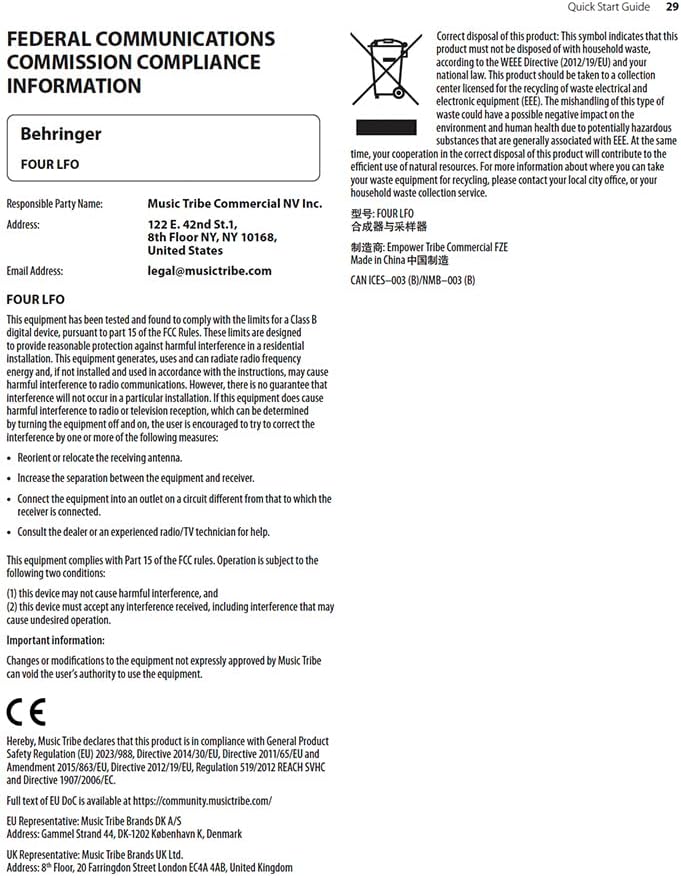
Figure 2.1: FCC Compliance and WEEE Directive Information. This image details the Federal Communications Commission compliance statement and the WEEE (Waste Electrical and Electronic Equipment) directive symbol, indicating proper disposal of the product.
ഈ ഉപകരണം റേഡിയോ അല്ലെങ്കിൽ ടെലിവിഷൻ റിസപ്ഷനിൽ ഹാനികരമായ ഇടപെടൽ ഉണ്ടാക്കുന്നുവെങ്കിൽ, അത് ഉപകരണം ഓഫാക്കിയും ഓണാക്കിയും നിർണ്ണയിക്കാവുന്നതാണ്, ഇനിപ്പറയുന്ന ഒന്നോ അതിലധികമോ നടപടികളിലൂടെ ഇടപെടൽ ശരിയാക്കാൻ ഉപയോക്താവിനെ പ്രോത്സാഹിപ്പിക്കുന്നു:
- സ്വീകരിക്കുന്ന ആൻ്റിന പുനഃക്രമീകരിക്കുക അല്ലെങ്കിൽ മാറ്റി സ്ഥാപിക്കുക.
- ഉപകരണങ്ങളും റിസീവറും തമ്മിലുള്ള വേർതിരിവ് വർദ്ധിപ്പിക്കുക.
- റിസീവർ ബന്ധിപ്പിച്ചിരിക്കുന്നതിൽ നിന്ന് വ്യത്യസ്തമായ ഒരു സർക്യൂട്ടിലെ ഒരു ഔട്ട്ലെറ്റിലേക്ക് ഉപകരണങ്ങൾ ബന്ധിപ്പിക്കുക.
- സഹായത്തിന് ഡീലറെയോ പരിചയസമ്പന്നനായ റേഡിയോ/ടിവി ടെക്നീഷ്യനെയോ സമീപിക്കുക.
ഈ ഉപകരണം FCC നിയമങ്ങളുടെ 15-ാം ഭാഗം പാലിക്കുന്നു. പ്രവർത്തനം ഇനിപ്പറയുന്ന രണ്ട് നിബന്ധനകൾക്ക് വിധേയമാണ്:
- ഈ ഉപകരണം ദോഷകരമായ ഇടപെടലിന് കാരണമായേക്കില്ല, കൂടാതെ
- അനാവശ്യമായ പ്രവർത്തനത്തിന് കാരണമായേക്കാവുന്ന ഇടപെടൽ ഉൾപ്പെടെ, ലഭിച്ച ഏതൊരു ഇടപെടലും ഈ ഉപകരണം അംഗീകരിക്കണം.
പ്രധാനപ്പെട്ട വിവരങ്ങൾ: മ്യൂസിക് ട്രൈബ് വ്യക്തമായി അംഗീകരിക്കാത്ത ഉപകരണങ്ങളിലെ മാറ്റങ്ങളോ പരിഷ്കരണങ്ങളോ ഉപകരണം ഉപയോഗിക്കാനുള്ള ഉപയോക്താവിന്റെ അധികാരത്തെ അസാധുവാക്കും.
3. സജ്ജീകരണവും ഇൻസ്റ്റാളേഷനും
The Behringer Four LFO is a Eurorack module and requires a compatible Eurorack case with a power supply. Ensure your Eurorack case provides sufficient power for the module.
3.1 ഫിസിക്കൽ ഇൻസ്റ്റലേഷൻ
- പവർ ഓഫ്: Before installing, ensure your Eurorack case's power supply is completely turned off.
- റിബൺ കേബിൾ ബന്ധിപ്പിക്കുക: Connect the included ribbon cable to the module's power header. Ensure the red stripe on the ribbon cable aligns with the -12V pin on both the module and your Eurorack power bus board. Incorrect connection can damage the module.
- മൗണ്ട് മൊഡ്യൂൾ: Carefully align the module with the rail nuts in your Eurorack case. Use the provided screws to secure the module firmly to the rails. Do not overtighten.
- പവർ ഓൺ: Once securely mounted and connected, you can power on your Eurorack case.
3.2 കണക്റ്റിവിറ്റി
The Four LFO module features various jacks for integration into your modular system:
- RESET/SYNC Jacks: These inputs allow external signals to reset or synchronize the LFOs.
- SINE Jacks: Output for the sine waveform of each LFO.
- ASSIGN Jacks: Assignable outputs for various waveforms or modes, depending on the module's settings.
- SQUARE Jacks: Output for the square waveform of each LFO.

Figure 3.1: Front panel of the Behringer Four LFO module, showing all controls and jacks.
4. ഓപ്പറേഷൻ
The Four LFO module offers four independent LFO channels, each with dedicated controls and outputs. Understanding the different modes and controls is key to unlocking its full potential.
4.1 നിയന്ത്രണങ്ങൾ കഴിഞ്ഞുview
ചിത്രം 4.1: ക്ലോസപ്പ് view of the Behringer Four LFO's control section, highlighting the sliders and switches.
- Hz Slider: Controls the frequency of the LFOs. The range can be adjusted from very slow (0.01 Hz) to audio rates (100 Hz).
- Φ (Phase) Slider: Adjusts the phase relationship between the LFOs, particularly relevant in certain modes.
- DIV (Divide) Slider: Sets the division factor for LFO frequencies in divide modes.
- മോഡ് സ്വിച്ച്: Selects the operational mode of the LFOs.
- സൗജന്യ ബട്ടൺ: Toggles between free-running and synchronized operation.
- ASSIGN Switch: Configures the function of the ASSIGN outputs.
4.2 പ്രവർത്തന രീതികൾ
The MODE switch allows you to select between four distinct operational modes, each offering unique modulation capabilities:
- FREQ (Frequency) Mode: In this mode, each of the four LFOs operates independently, and their frequencies are controlled by the Hz slider. This is ideal for general-purpose modulation where individual control over each LFO's speed is desired.
- QUAD Mode: This mode links the four LFOs, allowing for complex polyrhythmic or synchronized modulation. The exact behavior depends on the phase and divide settings.
- FRQ-PH-DIV (Frequency-Phase-Divide) Mode: This mode offers advanced control where the frequency, phase, and division of the LFOs are interconnected, enabling intricate rhythmic and evolving patterns.
- PHASE Mode: Focuses on phase relationships between the LFOs. The Φ slider becomes central to shaping the modulation.
- DIVIDE Mode: In this mode, the frequencies of LFOs 2, 3, and 4 are divisions of the frequency of LFO 1, as set by the DIV slider. This is excellent for creating harmonically related or synchronized LFO patterns.
4.3 സിൻക്രൊണൈസേഷനും പുനഃസജ്ജീകരണവും
The Four LFO module can be synchronized to external clock signals or reset manually:
- RESET/SYNC Inputs: Patch a gate or trigger signal into these jacks to reset or synchronize the corresponding LFO. This is crucial for keeping LFOs in time with sequencers or drum machines.
- സൗജന്യ ബട്ടൺ: Pressing the FREE button toggles between free-running LFO operation and synchronized operation. When synchronized, the LFOs will restart or sync to an incoming signal.
5. പരിപാലനം
Proper care and maintenance will ensure the longevity and optimal performance of your Behringer Four LFO module.
- വൃത്തിയാക്കൽ: Use a soft, dry cloth to clean the module's surface. Do not use abrasive cleaners, solvents, or waxes, as these can damage the finish and controls.
- പരിസ്ഥിതി: Keep the module in a dry environment, away from direct sunlight, extreme temperatures, and excessive dust.
- കണക്ഷനുകൾ: Periodically check all patch cable connections for secure fit. Avoid excessive force when inserting or removing cables.
- സംഭരണം: If storing the module for an extended period, ensure it is disconnected from power and stored in a protective case or anti-static bag.
6. പ്രശ്നപരിഹാരം
If you encounter issues with your Behringer Four LFO module, refer to the following common problems and solutions:
| പ്രശ്നം | സാധ്യമായ കാരണം | പരിഹാരം |
|---|---|---|
| No LFO output | Module not powered; incorrect power cable connection; output jack not connected. | Ensure Eurorack case is powered on. Verify ribbon cable orientation (red stripe to -12V). Connect a patch cable from a SINE, ASSIGN, or SQUARE output to an audio or CV input. |
| LFOs not synchronizing | Incorrect RESET/SYNC input; FREE button engaged (free-running mode). | Ensure a proper gate or trigger signal is patched to the RESET/SYNC input. Press the FREE button to disengage free-running mode and enable synchronization. |
| Unexpected LFO behavior | Incorrect MODE selection; conflicting CV input. | Check the MODE switch setting and ensure it matches your desired operation. Disconnect any CV inputs to isolate the issue. |
| Module not recognized by software (if applicable) | USB connection issue; driver not installed. | Ensure USB cable is securely connected. Install necessary drivers if required by your operating system or software (e.g., VCV Rack). |
If the problem persists after attempting these solutions, please contact Behringer customer support or refer to the official Behringer webകൂടുതൽ സഹായത്തിനുള്ള സൈറ്റ്.
7 സ്പെസിഫിക്കേഷനുകൾ
| ഫീച്ചർ | വിശദാംശങ്ങൾ |
|---|---|
| മോഡലിൻ്റെ പേര് | നാല് എൽഎഫ്ഒ |
| ബ്രാൻഡ് | ബെഹ്രിംഗർ |
| ഇനത്തിൻ്റെ ഭാരം | 9.6 ഔൺസ് (ഏകദേശം 272 ഗ്രാം) |
| ഉൽപ്പന്ന അളവുകൾ | 6.95 x 4.1 x 3.05 ഇഞ്ച് (ഏകദേശം 17.65 x 10.41 x 7.75 സെ.മീ) |
| പവർ ഉറവിടം | ഡിസി പവർ സപ്ലൈ (യൂറോറാക്ക് സ്റ്റാൻഡേർഡ്) |
| കണക്റ്റർ തരം | USB Type B (for potential future firmware updates or specific software integration) |
| പിന്തുണയ്ക്കുന്ന സോഫ്റ്റ്വെയർ | VCV Rack or Modular (implies compatibility with virtual modular environments) |
| നിറം | കറുപ്പ് |
| നിർമ്മാതാവ് | ബെഹ്രിംഗർ |
| ASIN | B0C5TQQFSP |
| യു.പി.സി | 787790557753 |
8. വാറൻ്റിയും പിന്തുണയും
വിശദമായ വാറന്റി വിവരങ്ങൾക്കും സാങ്കേതിക പിന്തുണയ്ക്കും, ദയവായി ഔദ്യോഗിക ബെഹ്രിംഗർ സന്ദർശിക്കുക. website or contact Music Tribe Commercial NV Inc., the manufacturer's representative.
- ഉദ്യോഗസ്ഥൻ Webസൈറ്റ്: music.tribe.com
- ഇമെയിൽ പിന്തുണ: legal@musictribe.com
- നിർമ്മാതാവ്: മ്യൂസിക് ട്രൈബ് കൊമേഴ്സ്യൽ എൻവി ഇങ്ക്.
- വിലാസം: 122 E 42nd St.1, 8th Floor, NY NY 10168, United States
ഏതെങ്കിലും വാറന്റി ക്ലെയിമുകൾക്കായി നിങ്ങളുടെ വാങ്ങിയതിന്റെ തെളിവ് സൂക്ഷിക്കുക.


