1. ആമുഖം
The Teslong TTM160P is a compact thermal imaging camera designed for use with Android smartphones, tablets, and PCs that support OTG functionality. It provides high-resolution thermal imagery for various applications, including home inspections, industrial diagnostics, and automotive services. This manual provides detailed instructions for setting up, operating, maintaining, and troubleshooting your TTM160P thermal camera.
1.1 ഉൽപ്പന്നം കഴിഞ്ഞുview
The TTM160P features a 160x120 pixel infrared resolution and a 25Hz frame rate, allowing for clear thermal image capture and smooth video recording. Its 50mK thermal sensitivity enables detection of subtle temperature variations. The device operates within a wide temperature range of 5℉ to 1112℉ (-15°C to 600°C) with an accuracy of ±2°C or ±2%.

This image displays the Teslong TTM160P thermal imaging camera connected to an Android smartphone, showing a thermal view of a circuit board. A small black carrying case is also visible, indicating portability.
1.2 പാക്കേജ് ഉള്ളടക്കം
- Teslong TTM160P Thermal Imaging Camera
- പ്രൊട്ടക്റ്റീവ് കാരിയിംഗ് കേസ്
- ഉപയോക്തൃ മാനുവൽ (ഈ പ്രമാണം)
2 സ്പെസിഫിക്കേഷനുകൾ
| ഫീച്ചർ | സ്പെസിഫിക്കേഷൻ |
|---|---|
| മോഡൽ നമ്പർ | TTM160P |
| ഇൻഫ്രാറെഡ് റെസല്യൂഷൻ | 160 x 120 പിക്സലുകൾ |
| ഫ്രെയിം റേറ്റ് | 25 Hz |
| തെർമൽ സെൻസിറ്റിവിറ്റി (NETD) | 50 എം.കെ. |
| താപനില പരിധി | 5℉ to 1112℉ (-15°C to 600°C) |
| താപനില കൃത്യത | ±2°C അല്ലെങ്കിൽ ±2% |
| വർണ്ണ പാലറ്റുകൾ | 6 (Iron, White Hot, Black Hot, Rainbow, Red Hot, Cold Blue) |
| കണക്റ്റിവിറ്റി | USB Type-C (OTG compatible) |
| പവർ ഉറവിടം | Powered by connected device (no internal battery) |
| അളവുകൾ (L x W x H) | 2.05 x 3.63 x 1.09 സെ.മീ (ഏകദേശം 0.81 x 1.43 x 0.43 ഇഞ്ച്) |
| ഭാരം | 19 ഗ്രാം (ഉപകരണം മാത്രം) |
| മെറ്റീരിയൽ | അലുമിനിയം അലോയ് |

This image illustrates the difference in clarity between various thermal resolutions, highlighting the 160x120 IR resolution of the Teslong TTM160P camera. Three thermal images of a circuit board are shown at 160x120, 144x108, and 80x60 pixels, demonstrating the higher detail captured at 160x120.
3. സജ്ജീകരണം
3.1 സിസ്റ്റം ആവശ്യകതകൾ
- Android smartphone, tablet, or PC with USB Type-C port.
- Device must support USB On-The-Go (OTG) functionality.
- Not compatible with iOS devices.
3.2 സോഫ്റ്റ്വെയർ ഇൻസ്റ്റലേഷൻ
- ആപ്പ് ഡൗൺലോഡ് ചെയ്യുക: ഇതിനായി തിരയുക "Teslong Thermal" on the Google Play Store or scan the QR code provided in the product packaging to download and install the application.
- അനുമതികൾ നൽകുക: Upon first launch, the app may request certain permissions (e.g., camera, storage). Grant these permissions for full functionality.
3.3 ഉപകരണം ബന്ധിപ്പിക്കുന്നു
- Ensure the "Teslong Thermal" app is installed on your Android device.
- Carefully plug the Teslong TTM160P thermal camera into the USB Type-C port of your Android device.
- The device is plug-and-play and will draw power directly from your smartphone, tablet, or PC. No additional batteries or charging are required for the thermal camera itself.
- Launch the "Teslong Thermal" app. The thermal image feed should appear automatically.

This image shows the Teslong TTM160P thermal camera with an arc indicating its wide temperature detection range from 5℉ to 1112℉ (-15°C to 600°C). Icons below confirm its plug-and-play nature, Type-C USB connection, Android compatibility, and lack of iOS support.
4. പ്രവർത്തന നിർദ്ദേശങ്ങൾ
Once connected and the app is running, the thermal camera will display a live thermal feed. The app interface provides various tools and settings to optimize your thermal imaging experience.
4.1 അടിസ്ഥാന പ്രവർത്തനം
- തത്സമയം View: The main screen displays the real-time thermal image.
- Capture Image/Video: Use the dedicated buttons within the app to capture still images or record thermal videos.
- ഗാലറി: Access captured images and videos through the app's gallery feature.
4.2 Temperature Measurement Modes
The Teslong Thermal app offers several modes for precise temperature analysis:
- Max/Min/Center Point Analysis: Displays the highest, lowest, and central temperature readings within the current view.
- താപനില ട്രാക്കിംഗ്: Continuously monitors and updates the Max/Min/Center point temperatures as the camera moves.
- Point Measurement: Manually select specific points on the screen to display their exact temperatures.
- Line Measurement: Draw a line across the thermal image to identify the highest and lowest temperatures along that line.
- Surface Measurement: Define a rectangular area to display the highest and lowest temperatures within that region.

This image demonstrates the temperature tracking feature, showing a thermal view of a circuit board on a smartphone screen. It highlights the minimum, maximum, and center point temperatures detected, along with a comparison of thermal readings before and after equipment testing.
4.3 വർണ്ണ പാലറ്റുകൾ
The camera offers 6 color palettes to visualize temperature differences. You can switch between these palettes to best suit your application and enhance contrast for specific scenarios:
- ഇരുമ്പ്: A common palette, good for general use.
- വൈറ്റ് ഹോട്ട്: Hotter areas appear white, cooler areas appear black.
- ബ്ലാക്ക് ഹോട്ട്: Hotter areas appear black, cooler areas appear white.
- മഴവില്ല്: Uses a spectrum of colors to represent temperature.
- റെഡ് ഹോട്ട്: Highlights hotter areas with shades of red.
- Cold Blue: Emphasizes cooler areas with shades of blue.
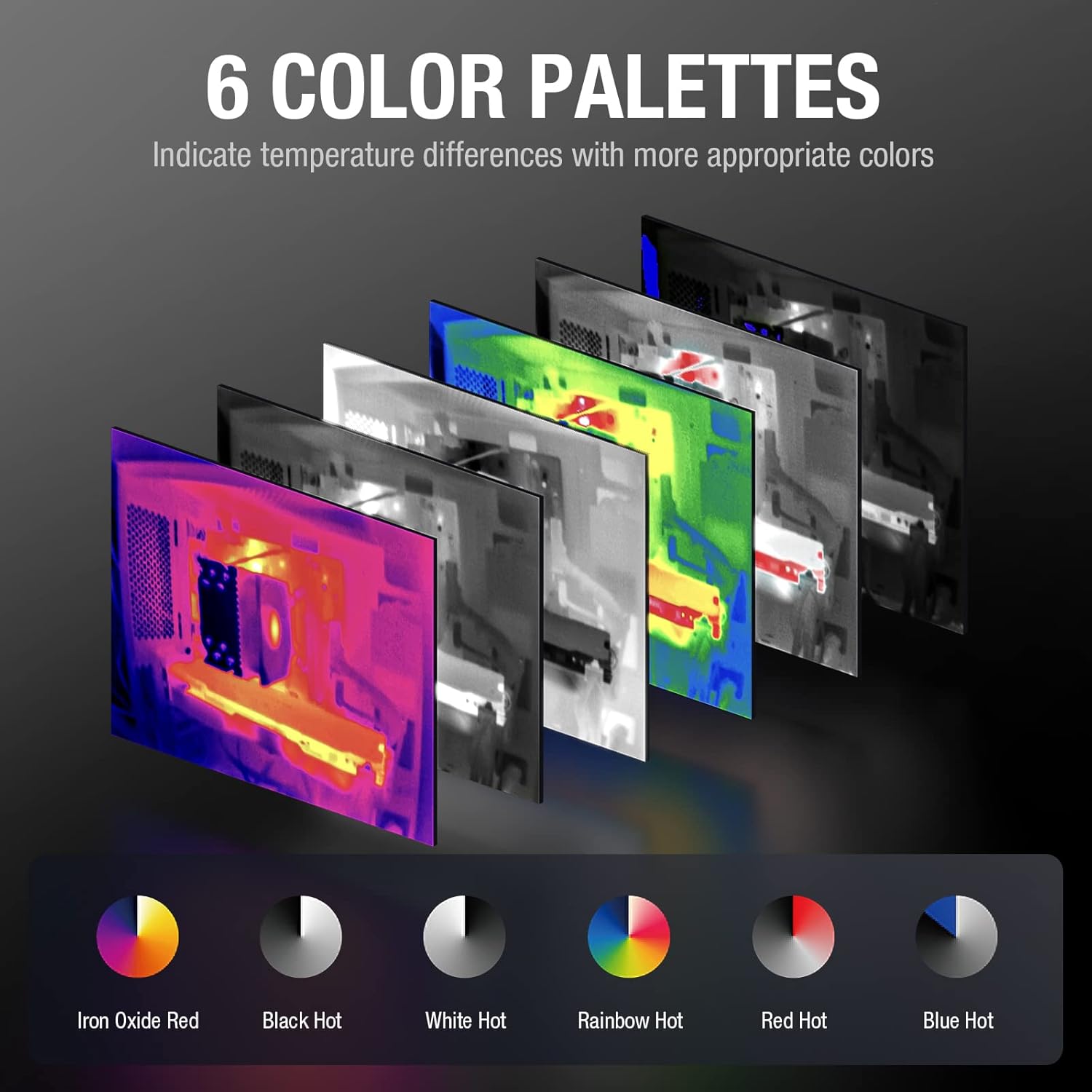
This image presents six distinct color palettes available for the thermal imager: Iron, White Hot, Black Hot, Rainbow, Red Hot, and Cold Blue. Each palette is shown applied to a thermal image, demonstrating how different color schemes can highlight temperature variations.
4.4 വിപുലമായ സവിശേഷതകൾ
The Teslong Thermal app includes additional features for enhanced analysis:
- Regional Temperature Measurement: Allows for detailed temperature analysis within user-defined regions.
- Highlight Rectangle Temperature: Focuses on and highlights temperature data within a specific rectangular area.
- ഉയർന്ന താപനില അലാറം: Set a threshold for high temperatures, and the app will alert you when this threshold is exceeded.
- Highlight High-Temperature Regions: Automatically identifies and visually emphasizes areas exceeding a specified temperature.

This image illustrates various functional modes within the Teslong Thermal app. It shows options for regional temperature measurement, highlighting rectangular areas, setting high-temperature alarms, and automatically highlighting high-temperature regions on the thermal display.
5. പരിപാലനം
5.1 പരിചരണവും ശുചീകരണവും
- Keep the thermal camera lens clean. Use a soft, lint-free cloth to gently wipe the lens. Avoid abrasive materials or harsh chemicals.
- Clean the device body with a dry or slightly damp തുണി. ഉപകരണം വെള്ളത്തിൽ മുക്കരുത്.
- Ensure the USB Type-C connector is free from dust and debris.
5.2 സംഭരണം
- When not in use, store the thermal camera in its protective carrying case to prevent damage.
- നേരിട്ടുള്ള സൂര്യപ്രകാശത്തിൽ നിന്നും അങ്ങേയറ്റത്തെ താപനിലയിൽ നിന്നും അകലെ തണുത്തതും വരണ്ടതുമായ സ്ഥലത്ത് സൂക്ഷിക്കുക.
6. പ്രശ്നപരിഹാരം
6.1 പൊതുവായ പ്രശ്നങ്ങളും പരിഹാരങ്ങളും
- ഇമേജ് ഡിസ്പ്ലേ ഇല്ല:
- Ensure the camera is securely plugged into the USB Type-C port.
- Verify that your Android device supports OTG functionality.
- Check if the "Teslong Thermal" app is installed and has necessary permissions.
- Restart the app or your Android device.
- കൃത്യമല്ലാത്ത താപനില വായനകൾ:
- ക്യാമറ ലെൻസ് വൃത്തിയുള്ളതാണെന്നും തടസ്സങ്ങളില്ലെന്നും ഉറപ്പാക്കുക.
- Verify that the emissivity settings in the app are appropriate for the surface being measured (refer to app settings for adjustments).
- Allow the camera to stabilize in the environment for a few minutes before taking critical measurements.
- ആപ്പ് ക്രാഷിംഗ്/ഫ്രീസിംഗ്:
- ആപ്പ് അടച്ച് വീണ്ടും തുറക്കുക.
- Ensure your Android device's operating system is up to date.
- Clear the app's cache from your device settings.
7. വാറൻ്റിയും പിന്തുണയും
7.1 വാറൻ്റി വിവരങ്ങൾ
The Teslong TTM160P Thermal Imaging Camera comes with a 12 മാസ വാറൻ്റി വാങ്ങിയ തീയതി മുതൽ, സാധാരണ ഉപയോഗത്തിലുള്ള നിർമ്മാണ വൈകല്യങ്ങളും തകരാറുകളും ഉൾക്കൊള്ളുന്നു.
7.2 സാങ്കേതിക പിന്തുണ
For any questions, technical assistance, or warranty claims, please contact Teslong customer support:
- യുഎസ് ഫോൺ സേവനം: 1-877-899-8809
- പ്രവർത്തന സമയം: തിങ്കൾ - വെള്ളി, രാവിലെ 8:00 - വൈകുന്നേരം 5:00 PST


