DrunkDeer A75 റാപ്പിഡ് ട്രിഗർ മെക്കാനിക്കൽ കീബോർഡ് യൂസർ മാനുവൽ
Brand: DrunkDeer | Model: A75 ANSI
1. ഉൽപ്പന്നം കഴിഞ്ഞുview
The DrunkDeer A75 is a 75% layout mechanical keyboard designed for high-performance gaming and efficient typing. It features magnetic switches, adjustable actuation distance, and rapid trigger technology for precise and responsive input. This manual provides essential information for setting up, operating, customizing, and maintaining your keyboard.
പ്രധാന സവിശേഷതകൾ
- ക്രമീകരിക്കാവുന്ന പ്രവർത്തന ദൂരം: Customize key actuation from 0.2mm to 3.8mm with 0.1mm precision.
- റാപ്പിഡ് ട്രിഗർ: Keys trigger upon press and reset upon release, allowing for quick, repeated inputs. Sensitivity is adjustable from 0.1-3.6mm with 0.1mm accuracy.
- മാഗ്നറ്റിക് സ്വിച്ചുകൾ: Utilizes the Hall effect for actuation, eliminating physical contact for a lifespan of 100 million keystrokes.
- ഒഇഎം പ്രോfile പിബിടി കീക്യാപ്പുകൾ: Ergonomically designed keycaps reduce hand fatigue and offer durability with a comfortable touch.
- 75% ANSI Layout: Compact design with 82 keys, including a function row and arrow keys.
- Ultra Response Speed: Up to 10 times faster than traditional mechanical keyboards.
2. സജ്ജീകരണ നിർദ്ദേശങ്ങൾ
പാക്കേജ് ഉള്ളടക്കം
Your DrunkDeer A75 keyboard package includes:
- DrunkDeer A75 Mechanical Keyboard
- യുഎസ്ബി-സി കേബിൾ
- കീക്യാപ് പുള്ളർ
- Spare Magnetic Switches (2 pieces)
പ്രാരംഭ കണക്ഷൻ
Connect the provided USB-C cable from the keyboard to an available USB port on your computer. The keyboard is plug-and-play and should be recognized automatically by your operating system.
Firmware Warning
WARNING: Ensure you have the A75 ANSI model and download the correct firmware. Installing the wrong firmware can cause hardware problems. If you encounter any issues, contact DrunkDeer customer support immediately.
3. പ്രവർത്തന നിർദ്ദേശങ്ങൾ
അടിസ്ഥാന കീബോർഡ് പ്രവർത്തനങ്ങൾ
The DrunkDeer A75 features a standard 75% ANSI layout. All keys function as labeled. For advanced functions, refer to the key combinations listed on the underside of the keyboard or within the software driver.
RGB ലൈറ്റിംഗ് നിയന്ത്രണം
The keyboard features customizable RGB backlighting. You can cycle through 18 different light effects and adjust brightness with 10 levels directly on the keyboard using function key combinations. Single key custom RGB lamp effects are also supported via the software.
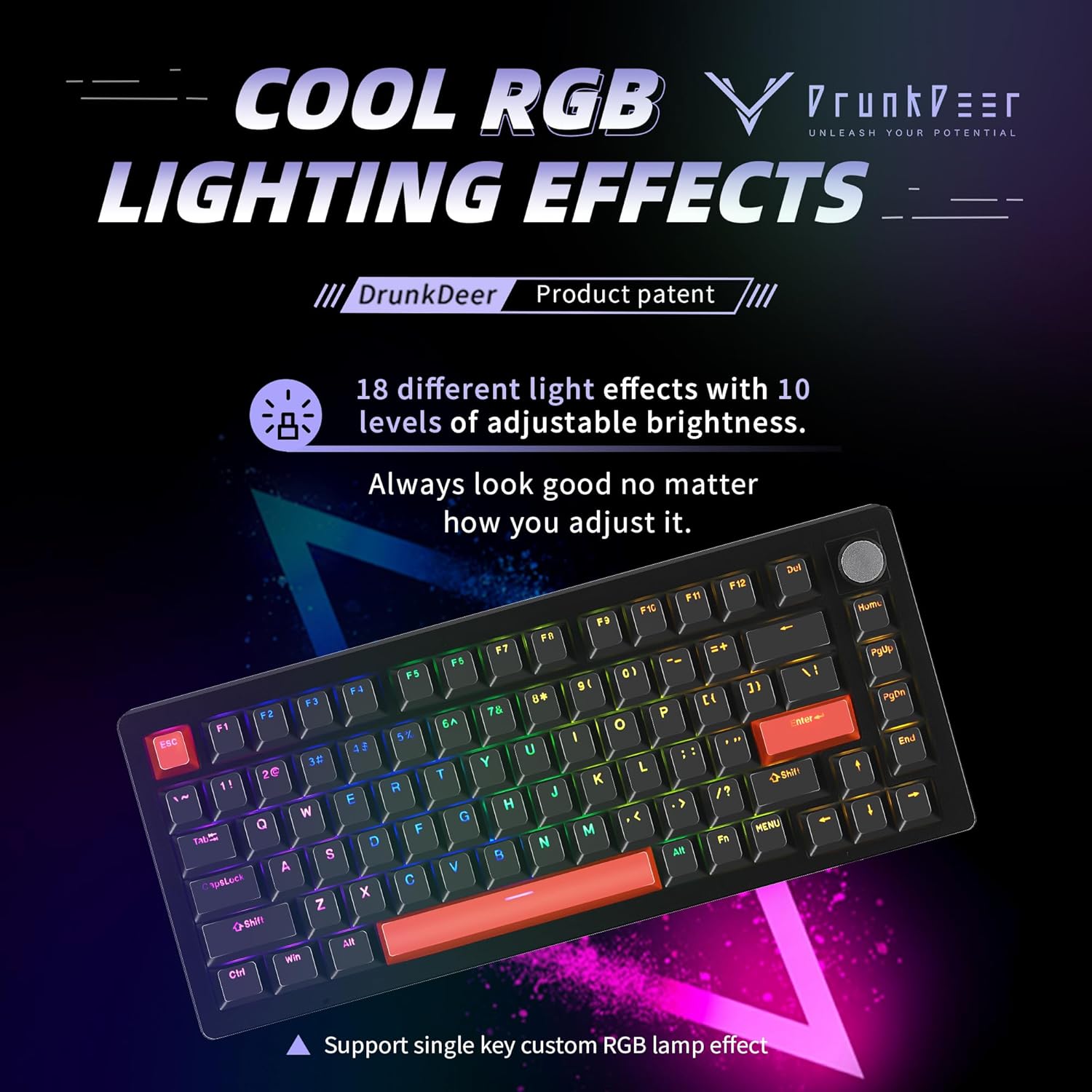
Image: DrunkDeer A75 keyboard showcasing അതിന്റെ ഇഷ്ടാനുസൃതമാക്കാവുന്ന RGB ലൈറ്റിംഗ് ഇഫക്റ്റുകൾ.
Video: Demonstrates the RGB lighting effects of the DrunkDeer A75 keyboard, highlighting its visual appeal for gaming setups.
4. ഇഷ്ടാനുസൃതമാക്കലും സോഫ്റ്റ്വെയറും
Adjustable Actuation Distance & Rapid Trigger
The DrunkDeer A75 allows for precise adjustment of key actuation distance and rapid trigger sensitivity. This is managed through the dedicated web driver software. Users can set actuation points from 0.2mm to 3.8mm and rapid trigger sensitivity from 0.1mm to 3.6mm, with 0.1mm accuracy. This feature is particularly beneficial for competitive gaming, enabling faster and more precise inputs.

Image: Visual explanation of the adjustable actuation distance and rapid trigger features, showing the range of customization for key presses.
Video: Demonstrates the 'RT Plus - Last Win Mode' feature, which prioritizes the last keystroke for improved responsiveness in gaming scenarios.
Web ഡ്രൈവർ സോഫ്റ്റ്വെയർ
The DrunkDeer A75 utilizes a self-developed web driver for convenient customization. This allows users to adjust key bindings, performance settings (actuation point, rapid trigger), and RGB lighting effects without the need for bulky downloadable software. Settings are saved directly to the keyboard's onboard memory, ensuring consistent performance across different devices.

Image: The easy-to-use web driver interface for the DrunkDeer A75, providing comprehensive customization for keyboard settings.
Video: Illustrates the automatic calibration algorithm function of the DrunkDeer keyboard, ensuring optimal performance.
5. പരിപാലനം
വൃത്തിയാക്കൽ
To maintain your keyboard's performance and appearance, regularly clean it using a soft, dry cloth. For deeper cleaning, use the provided keycap puller to remove keycaps and gently clean any dust or debris from the switches and plate. Avoid using harsh chemicals or abrasive materials.
കീക്യാപ്പും സ്വിച്ചും മാറ്റിസ്ഥാപിക്കൽ
The DrunkDeer A75 features hot-swappable magnetic switches. Use the provided keycap puller to remove keycaps. To remove a switch, gently pull it straight up. Only use compatible magnetic switches designed for the DrunkDeer A75, as standard mechanical switches are not compatible due to the Hall effect design.
6. പ്രശ്നപരിഹാരം
പൊതുവായ പ്രശ്നങ്ങൾ
- കീബോർഡ് പ്രതികരിക്കുന്നില്ല: Ensure the USB-C cable is securely connected to both the keyboard and your computer. Try a different USB port or cable.
- Incorrect key input: Verify that the correct firmware for your A75 ANSI model is installed. Reset the keyboard to factory settings via the web driver if necessary.
- RGB ലൈറ്റിംഗ് പ്രവർത്തിക്കുന്നില്ല: Check function key combinations for lighting control. Ensure the keyboard is properly connected and the web driver is accessible.
പിന്തുണയുമായി ബന്ധപ്പെടുക
If you encounter persistent issues that cannot be resolved with the troubleshooting steps, please contact DrunkDeer customer support for assistance.
7. ഉൽപ്പന്ന സവിശേഷതകൾ
| സ്പെസിഫിക്കേഷൻ | വിശദാംശങ്ങൾ |
|---|---|
| ഉൽപ്പന്ന അളവുകൾ | 5.2 x 2.17 x 0.45 ഇഞ്ച് |
| ഇനത്തിൻ്റെ ഭാരം | 2.53 പൗണ്ട് |
| നിർമ്മാതാവ് | DrunkDeer |
| ഇനത്തിൻ്റെ മോഡൽ നമ്പർ | A75 ANSI |
| ആദ്യ തീയതി ലഭ്യമാണ് | ഒക്ടോബർ 11, 2023 |
| അനുയോജ്യമായ ഉപകരണങ്ങൾ | PC |
| കണക്റ്റിവിറ്റി ടെക്നോളജി | USB-C |
| കീബോർഡ് വിവരണം | മെക്കാനിക്കൽ |
| ഉൽപ്പന്നത്തിനുള്ള ശുപാർശിത ഉപയോഗങ്ങൾ | ഗെയിമിംഗ് |
| പ്രത്യേക ഫീച്ചർ | ബാക്ക്ലിറ്റ് |
| കീബോർഡ് ബാക്ക്ലൈറ്റിംഗ് വർണ്ണ പിന്തുണ | RGB |
| ശൈലി | ആധുനികം |
8. വാറൻ്റിയും പിന്തുണയും
For warranty information or further technical assistance, please refer to the official DrunkDeer webസൈറ്റിൽ ബന്ധപ്പെടുക അല്ലെങ്കിൽ അവരുടെ ഉപഭോക്തൃ പിന്തുണയുമായി നേരിട്ട് ബന്ധപ്പെടുക. വാറന്റി ക്ലെയിമുകൾക്കായി നിങ്ങളുടെ വാങ്ങൽ രസീത് സൂക്ഷിക്കുക.


