1. ആമുഖം
Thank you for choosing the OMTech 60W CO2 Laser Engraver. This machine is designed for precision engraving and cutting across various materials such as wood, glass, and acrylic. This manual will guide you through the setup, operation, and maintenance of your laser engraver to ensure safe and optimal performance. Your laser engraver comes equipped with essential accessories including a water chiller for consistent laser performance and LightBurn software for intuitive control.
2 സുരക്ഷാ വിവരങ്ങൾ
Operating a laser engraver requires adherence to strict safety protocols. Failure to follow these guidelines may result in serious injury or damage to the equipment.
- ലേസർ ക്ലാസ്: This device is a Class 2 laser product with 0.827mW output power. Avoid direct exposure to the laser beam.
- നേത്ര സംരക്ഷണം: Always wear appropriate laser safety glasses when operating the machine. The widened viewing window is made from flame-retardant material for enhanced safety during observation.
- വെൻ്റിലേഷൻ: Ensure the built-in air assist and external exhaust system are properly connected and functioning to efficiently remove smoke and dust, protecting laser lenses and reflective mirrors, and maintaining a safe working environment.
- മെറ്റീരിയൽ സുരക്ഷ: Only engrave or cut materials approved for CO2 lasers. Certain materials can produce toxic fumes or catch fire.
- അടിയന്തരമായി നിർത്തുക: അടിയന്തര സ്റ്റോപ്പ് ബട്ടണിന്റെ സ്ഥാനവും പ്രവർത്തനവും സ്വയം പരിചയപ്പെടുത്തുക.
3. ഉൽപ്പന്ന സവിശേഷതകൾ
The OMTech 60W CO2 Laser Engraver is equipped with advanced features designed for precision and ease of use:
- Commercial Laser Cutter Bundle: Includes a 60W CO2 laser engraver, water chiller, and LightBurn software for consistent performance and intuitive navigation.
- Autofocus Function: Eliminates manual adjustments. The workbeds adjust automatically, and the preinstalled autofocus finds the correct focal distance with the touch of a button.
- വലിയ ജോലിസ്ഥലം: Features honeycomb and aluminum blade beds with a 20"x28" (500x700 mm) work area.
- Four-Way Pass-Through Doors: Accommodates larger and longer items for extended project capabilities.
- Efficient Air Assist & Exhaust System: Built-in air assist removes smoke and dust, protecting laser lenses and reflective mirrors.
- Safe Observation Window: വീതി കൂട്ടി viewing window made from flame-retardant material for safe process monitoring.
- High-Performance Laser Tube: Equipped with a Yongli H2 tube, offering a high-efficiency laser beam with a lifespan of up to 12,000 hours.

Image: The autofocus system automatically adjusts the laser head for precise focusing.

Image: The machine features convenient 4-way pass-through doors for handling oversized materials.

Image: The efficient exhaust system ensures a clean working area by removing smoke and debris.
4. ബോക്സിൽ എന്താണുള്ളത്?
Upon receiving your OMTech 60W CO2 Laser Engraver, please verify that all components listed below are included:
- 1x 60W CO2 Laser Engraver
- 1x Water Chiller (CW-5200)
- 1x LightBurn Software
- 1x ഉപയോക്തൃ മാനുവൽ
- 1x പവർ കോർഡ്
- 1x USB ഫ്ലാഷ് ഡ്രൈവ്
- 1x USB കേബിൾ
- 1x ഇഥർനെറ്റ് കേബിൾ
- 1x ഇരട്ട-വശങ്ങളുള്ള ടേപ്പ്
- 1x Wrench Set
- 1x Tube of Silicone Insulation
- 1x Ceramic Resistor
- 1x Exhaust Pipe
- 1x Pipe Clamp
- 1x Water Pump
- 1x Water Pipe
- 1x Wire Set
- 6x കീകൾ

Image: The OMTech 60W CO2 Laser Engraver and its primary bundled accessories.
5. സജ്ജീകരണം
5.1 അൺപാക്കിംഗും പ്ലേസ്മെന്റും
Carefully unpack the laser engraver. Due to its weight (249 pounds) and dimensions (47.2 x 34.3 x 36.6 inches), it is recommended to have multiple people assist with placement. Position the machine on a stable, level surface in a well-ventilated area, away from flammable materials.
5.2 വാട്ടർ ചില്ലർ ബന്ധിപ്പിക്കുന്നു
The water chiller is crucial for cooling the laser tube and ensuring consistent performance. Connect the water pipes from the chiller to the laser engraver's inlet and outlet ports as per the user manual. Fill the chiller with distilled water to the recommended level.
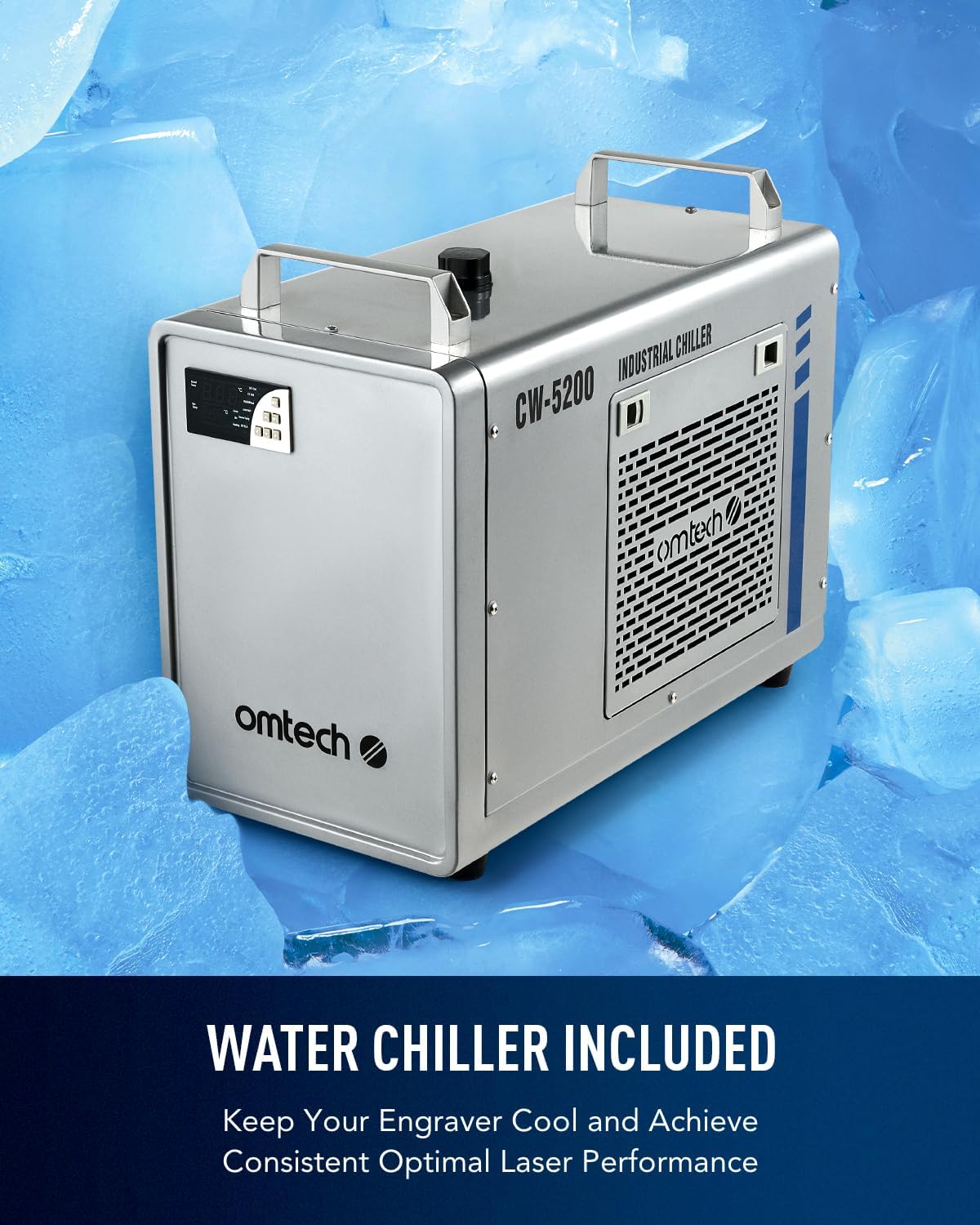
Image: The included CW-5200 industrial water chiller for laser tube cooling.
5.3 എയർ അസിസ്റ്റ് ആൻഡ് എക്സ്ഹോസ്റ്റ് സിസ്റ്റം
Connect the air assist hose to the laser head and the exhaust pipe to the machine's exhaust port. Ensure the exhaust system vents outside or to a suitable filtration unit to remove smoke and fumes.
5.4 ഇലക്ട്രിക്കൽ, ഡാറ്റ കണക്ഷനുകൾ
Connect the power cord to a grounded outlet. Connect the laser engraver to your computer using the provided USB cable or Ethernet cable. The USB flash drive contains necessary drivers and software.
5.5 സോഫ്റ്റ്വെയർ ഇൻസ്റ്റലേഷൻ (ലൈറ്റ്ബേൺ)
Install the LightBurn software from the provided USB flash drive or download the latest version from the official LightBurn website. Follow the on-screen instructions for installation and initial setup.

Image: The LightBurn software interface, compatible with Windows, Linux, and macOS.
6. ഓപ്പറേഷൻ
6.1 മെറ്റീരിയൽ ലോഡുചെയ്യുന്നു
Open the laser engraver's lid. Place your material (e.g., wood, acrylic, glass) onto the honeycomb or aluminum blade bed. Ensure the material lies flat and is secured if necessary. Utilize the four-way pass-through doors for larger materials.
6.2 Using Autofocus
The autofocus feature simplifies setting the correct focal distance. Position the laser head over your material and activate the autofocus function via the control panel or software. The bed will adjust automatically to achieve optimal focus.
6.3 ഡിജിറ്റൽ നിയന്ത്രണ പാനൽ
The digital control panel allows for direct control over basic functions, job initiation, and monitoring. It is compatible with LightBurn, CorelDRAW, and AutoCAD.

Image: The digital control panel for easy and convenient operation.
6.4 കൊത്തുപണി, മുറിക്കൽ പ്രക്രിയ
Prepare your design in LightBurn. Set appropriate power and speed settings for your material. Initiate the job from the software or control panel. Monitor the process through the flame-retardant viewഇൻ വിൻഡോ.
Video: Demonstration of laser engraving and cutting on acrylic mirror. This video illustrates the process of preparing acrylic mirror for engraving, setting up the design in LightBurn, and cleaning the finished product.
Video: Guide on how to laser engrave a photo using a CO2 laser engraver. This video details the steps for preparing an image for engraving on wood, adjusting settings in LightBurn, and achieving optimal photo-realistic results.
7. പരിപാലനം
പതിവ് അറ്റകുറ്റപ്പണികൾ നിങ്ങളുടെ ലേസർ എൻഗ്രേവറിന്റെ ദീർഘായുസ്സും മികച്ച പ്രകടനവും ഉറപ്പാക്കുന്നു.
- ക്ലീനിംഗ് ഒപ്റ്റിക്സ്: Periodically clean the laser lenses and reflective mirrors to prevent residue buildup, which can degrade laser performance. Use appropriate cleaning solutions and lint-free wipes.
- വാട്ടർ ചില്ലർ പരിപാലനം: Regularly check and maintain the water level in the chiller. Replace the water periodically to prevent algae growth and ensure efficient cooling of the laser tube.
- എക്സ്ഹോസ്റ്റ് സിസ്റ്റം: Clean the exhaust pipe and fan to ensure proper airflow and efficient removal of smoke and debris.
- വർക്ക്ബെഡ് വൃത്തിയാക്കൽ: Keep the honeycomb and blade beds clean from debris and small cut pieces to maintain a level working surface and prevent fire hazards.
8. പ്രശ്നപരിഹാരം
If you encounter issues with your laser engraver, consider the following common troubleshooting steps:
- ലേസർ ഔട്ട്പുട്ട് ഇല്ല: Check power connections, ensure the laser tube is properly cooled by the water chiller, and verify software settings for laser power.
- മോശം കൊത്തുപണി/മുറിക്കൽ നിലവാരം: Ensure the material is flat and properly focused using the autofocus function. Clean the laser lenses and mirrors. Adjust power and speed settings in LightBurn for the specific material.
- Banding or Uneven Engraving: This can occur with certain materials or settings. Experiment with different DPI settings and ensure the material is securely held to prevent movement.
- സോഫ്റ്റ്വെയർ കണക്ഷൻ പ്രശ്നങ്ങൾ: Verify USB/Ethernet cable connections and ensure LightBurn drivers are correctly installed. Restart both the machine and computer if necessary.
- അമിതമായ പുക/പുക: Check the exhaust system for blockages and ensure it is properly venting. Verify air assist is active.
9 സ്പെസിഫിക്കേഷനുകൾ
| ഫീച്ചർ | വിശദാംശങ്ങൾ |
|---|---|
| മോഡൽ നമ്പർ | RYGELAMZ-USB0705U1&LCW5200&USBLIGH |
| ലേസർ പവർ | 60W CO2 |
| വർക്ക് ഏരിയ | 20" x 28" (500x700 മിമി) |
| പരമാവധി. കൊത്തുപണി വേഗത | 600 മിമി/സെ |
| ഉൽപ്പന്ന അളവുകൾ | 47.2 x 34.3 x 36.6 ഇഞ്ച് |
| ഇനത്തിൻ്റെ ഭാരം | 249 പൗണ്ട് |
| ഡാറ്റ ട്രാൻസ്മിഷൻ | യുഎസ്ബി കേബിൾ, ഇതർനെറ്റ് കേബിൾ, യുഎസ്ബി ഫ്ലാഷ് ഡ്രൈവ്, ഓഫ്ലൈൻ |
| കടന്നുപോകുക | 4-Way (Front/Back: 32.8x3.7 in., Side/Side: 20.4x0.7 in.) |
| ലേസർ ക്ലാസ് | Class 2, 0.827mW output power |
| നിർമ്മാതാവ് | ഒഎംടെക് |
| ആദ്യ തീയതി ലഭ്യമാണ് | മെയ് 25, 2023 |
10. വാറണ്ടിയും പിന്തുണയും
OMTech is committed to providing excellent customer service and support for your laser engraver.
- Two-Year Support: Your product is covered by a two-year support period.
- US-Based Technical Support: Access quick response technical assistance from our US-based team to resolve any issues you encounter.
- 24/7 ഓൺലൈൻ ഉപഭോക്തൃ സേവനം: Our customer service team is available around the clock to assist you.
For further assistance, please visit the official OMTech webസൈറ്റ് അല്ലെങ്കിൽ ഉപഭോക്തൃ പിന്തുണയെ നേരിട്ട് ബന്ധപ്പെടുക.


