1. ആമുഖം
Thank you for choosing the LOUTOC Replacement Remote Control. This remote is designed to provide seamless control for compatible Roku streaming devices. It offers a straightforward, out-of-the-box experience without the need for complex programming. Please read this manual carefully to ensure proper use and to understand the full capabilities and limitations of your new remote.
2 അനുയോജ്യത
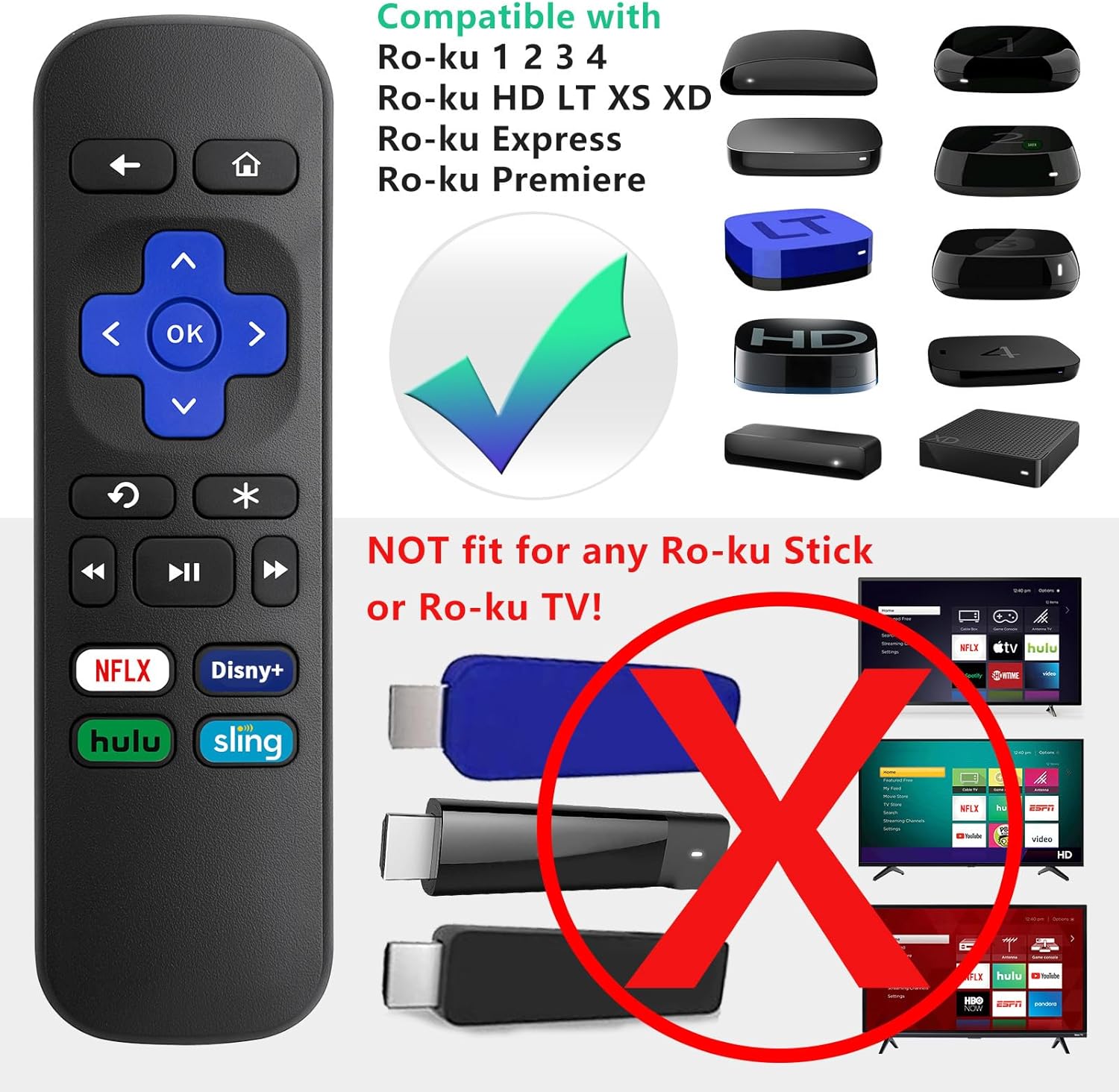
This LOUTOC Replacement Remote Control is specifically designed for use with the following Roku models:
- റോക്കു എക്സ്പ്രസ്
- റോക്കു പ്രീമിയർ
- Roku Box
- Roku Player (Models 1, 2, 3, 4)
- Roku HD, LT, XS, XD
പ്രധാന അനുയോജ്യതാ കുറിപ്പുകൾ:
- ഈ റിമോട്ട് അല്ല compatible with any Roku Stick or Roku TV models.
- This is an IR (Infrared) remote. It does അല്ല feature volume control, a power button, a headphone jack, a pairing button, or voice search functionality.

3. സവിശേഷതകൾ
Your LOUTOC Replacement Remote Control offers the following features:
- തൽക്ഷണ സജ്ജീകരണം: No programming required. Simply insert batteries and it's ready to use.
- IR Technology: Operates using infrared signals, requiring a direct line of sight to your Roku device.
- Dedicated Shortcut Buttons: Quick access to popular streaming channels including Netflix, Disney+, Hulu, and Sling.
- നീണ്ടുനിൽക്കുന്ന നിർമ്മാണം: Made from ABS material for longevity.


4. സജ്ജീകരണവും ഇൻസ്റ്റാളേഷനും
Follow these simple steps to begin using your new remote:
- ബാറ്ററികൾ ചേർക്കുക: Open the battery compartment cover on the back of the remote. Insert two (2) AAA batteries, ensuring correct polarity (+/-). Close the cover securely.
- യാന്ത്രിക കണക്ഷൻ: Point the remote directly at your compatible Roku device. The remote should function immediately without any additional programming or pairing steps.

Video 4.1: This video demonstrates the ease of setup for the LOUTOC Replacement Remote Control, highlighting that it works immediately after battery insertion with compatible Roku devices.
5. പ്രവർത്തന നിർദ്ദേശങ്ങൾ
The remote features standard navigation and playback controls:
- ദിശാസൂചന പാഡ് (പർപ്പിൾ ക്രോസ്): Use the up, down, left, and right arrows to navigate menus and content.
- ശരി ബട്ടൺ: തിരഞ്ഞെടുക്കലുകൾ സ്ഥിരീകരിക്കുന്നു.
- Back Button (Left Arrow): മുമ്പത്തെ സ്ക്രീനിലേക്കോ മെനുവിലേക്കോ മടങ്ങുന്നു.
- ഹോം ബട്ടൺ (ഹൗസ് ഐക്കൺ): Returns to the Roku home screen.
- പ്ലേബാക്ക് നിയന്ത്രണങ്ങൾ: Play/Pause, Fast Forward, Rewind buttons for media control.
- തൽക്ഷണ റീപ്ലേ: The curved arrow button allows for quick replay of content.
- കുറുക്കുവഴി ബട്ടണുകൾ: Directly launch Netflix, Disney+, Hulu, and Sling with a single press.

6. പ്രശ്നപരിഹാരം
If you encounter issues with your remote, consider the following:
- റിമോട്ട് പ്രതികരിക്കുന്നില്ല: Ensure fresh AAA batteries are correctly inserted.
- No Line of Sight: As an IR remote, ensure there are no obstructions between the remote and your Roku device.
- Incorrect Roku Model: Double-check that your Roku device is one of the compatible models listed in Section 2. This remote will not work with Roku Sticks or Roku TVs.
7 സ്പെസിഫിക്കേഷനുകൾ
| ഉൽപ്പന്ന അളവുകൾ | 3.93 x 1.12 x 0.59 ഇഞ്ച് |
| ഇനത്തിൻ്റെ ഭാരം | 1.76 ഔൺസ് |
| ബാറ്ററികൾ ആവശ്യമാണ് | 2 AAA ബാറ്ററികൾ (ഉൾപ്പെടുത്തിയിട്ടില്ല) |
| സാങ്കേതികവിദ്യ | ഇൻഫ്രാറെഡ് (IR) |
| മെറ്റീരിയൽ | എബിഎസ് |
8. വാറൻ്റിയും പിന്തുണയും
Your LOUTOC Replacement Remote Control comes with a 60-day replacement policy. For any questions or support needs, please refer to the LOUTOC store on Amazon or contact customer service.

സന്ദർശിക്കുക LOUTOC സ്റ്റോർ കൂടുതൽ ഉൽപ്പന്നങ്ങൾക്കും പിന്തുണയ്ക്കും.


