1. ആമുഖം
Thank you for choosing the Choetech True Wireless Earbuds. This manual provides detailed instructions on how to set up, operate, and maintain your earbuds to ensure optimal performance and longevity. Please read this manual carefully before using the product and keep it for future reference.
2. പാക്കേജ് ഉള്ളടക്കം
- Choetech True Wireless Earbuds (Left & Right)
- ചാർജിംഗ് കേസ്
- യുഎസ്ബി ചാർജിംഗ് കേബിൾ
- ഒന്നിലധികം വലിപ്പത്തിലുള്ള ഇയർടിപ്പുകൾ
- ഉപയോക്തൃ മാനുവൽ
3. ഉൽപ്പന്നം കഴിഞ്ഞുview
Familiarize yourself with the components of your Choetech True Wireless Earbuds.

Image: The Choetech True Wireless Earbuds and their compact charging case.

Image: The earbuds placed inside the open charging case, showing the charging contacts.
ഇയർബഡ് ഘടകങ്ങൾ:
- ടച്ച് കൺട്രോൾ ഏരിയ: പ്ലേബാക്ക്, കോളുകൾ, വോയ്സ് അസിസ്റ്റന്റ് എന്നിവ കൈകാര്യം ചെയ്യുന്നതിന്.
- LED സൂചകം: ജോടിയാക്കൽ നിലയും ബാറ്ററി നിലയും കാണിക്കുന്നു.
- മൈക്രോഫോൺ: കോളുകൾക്കും വോയ്സ് കമാൻഡുകൾക്കും.
- ചാർജിംഗ് കോൺടാക്റ്റുകൾ: കേസിനുള്ളിൽ ചാർജ് ചെയ്യുന്നതിന്.
ചാർജിംഗ് കേസ് ഘടകങ്ങൾ:
- ഇയർബഡ് ചാർജിംഗ് സ്ലോട്ടുകൾ: ഇയർബഡുകൾ സുരക്ഷിതമായി പിടിച്ച് ചാർജ് ചെയ്യുന്നു.
- Charging Case LED Indicator: Shows case battery status.
- യുഎസ്ബി ചാർജിംഗ് പോർട്ട്: കേസെടുത്തതിന്.
4. സജ്ജീകരണം
4.1 ഇയർബഡുകളും കേസും ചാർജ് ചെയ്യുന്നു
ആദ്യ ഉപയോഗത്തിന് മുമ്പ്, ഇയർബഡുകളും ചാർജിംഗ് കേസും പൂർണ്ണമായും ചാർജ് ചെയ്യുക.
- ഇയർബഡുകൾ ചാർജിംഗ് കേസിൽ വയ്ക്കുക, അവ ശരിയായി ഇട്ടിട്ടുണ്ടെന്ന് ഉറപ്പാക്കുക.
- യുഎസ്ബി ചാർജിംഗ് കേബിൾ കേസിലെ ചാർജിംഗ് പോർട്ടിലേക്കും ഒരു പവർ സ്രോതസ്സിലേക്കും (ഉദാ: യുഎസ്ബി വാൾ അഡാപ്റ്റർ, കമ്പ്യൂട്ടർ യുഎസ്ബി പോർട്ട്) ബന്ധിപ്പിക്കുക.
- ഇയർബഡുകളിലെയും കെയ്സിലെയും LED ഇൻഡിക്കേറ്ററുകൾ ചാർജിംഗ് സ്റ്റാറ്റസ് കാണിക്കും. പൂർണ്ണമായി ചാർജ് ചെയ്യുമ്പോൾ അവ ഓഫാകും അല്ലെങ്കിൽ നിറം മാറും.
A full charge provides over 5 hours of playback time for the earbuds, and the charging case extends total usage to approximately 120 hours in standby mode.

Image: Visual representation of the earbuds' long battery endurance, indicating playback, talk, and standby times.
4.2 Pairing with Your Device (Bluetooth 5.2)
The earbuds utilize advanced Bluetooth 5.2 technology for a fast and stable connection.
- Open the charging case. The earbuds will automatically power on and enter pairing mode. The earbud LED indicators will flash, indicating they are ready to pair.
- നിങ്ങളുടെ ഉപകരണത്തിൽ (സ്മാർട്ട്ഫോൺ, ടാബ്ലെറ്റ് മുതലായവ), ബ്ലൂടൂത്ത് പ്രവർത്തനക്ഷമമാക്കുക.
- ഇതിനായി തിരയുക available Bluetooth devices and select "Choetech BH-T06" from the list.
- Once connected, the earbud LED indicators will stop flashing. You will hear a confirmation tone.
The earbuds support seamless switching, allowing each earbud to independently fast switch between two different audio devices.
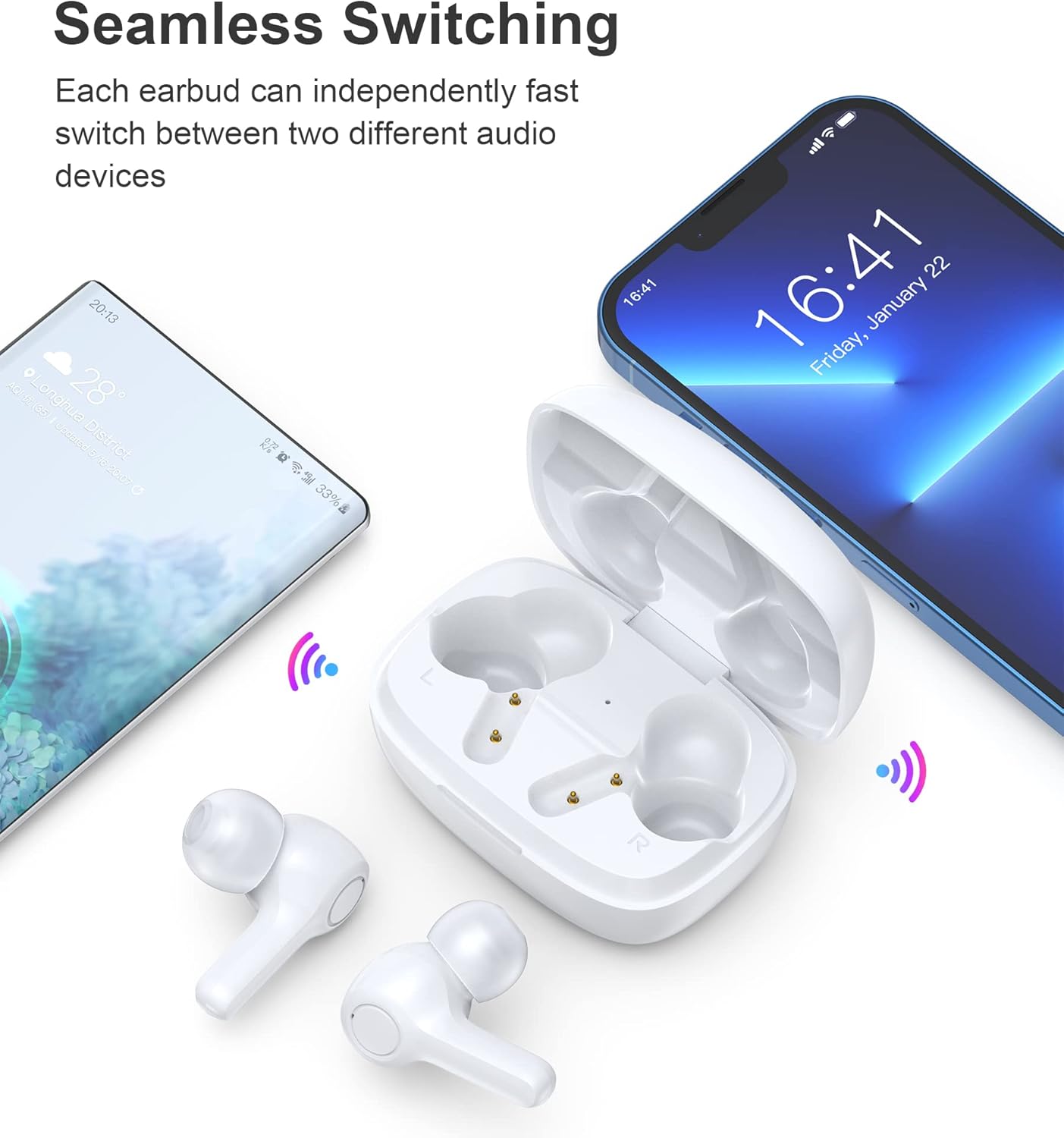
Image: Illustration demonstrating the seamless switching capability between a smartphone and another device.
കുറിപ്പ്: After initial pairing, the earbuds will automatically connect to the last paired device when taken out of the case, provided Bluetooth is enabled on the device.
5. പ്രവർത്തന നിർദ്ദേശങ്ങൾ
5.1 പവർ ഓൺ/ഓഫ്
- പവർ ഓൺ: ചാർജിംഗ് കെയ്സ് തുറക്കുക, ഇയർബഡുകൾ സ്വയമേവ ഓണാകും.
- പവർ ഓഫ്: ഇയർബഡുകൾ തിരികെ ചാർജിംഗ് കെയ്സിലേക്ക് വയ്ക്കുക, ലിഡ് അടയ്ക്കുക. അവ യാന്ത്രികമായി ഓഫാകുകയും ചാർജ് ചെയ്യാൻ തുടങ്ങുകയും ചെയ്യും.
5.2 ടച്ച് നിയന്ത്രണങ്ങൾ
The earbuds feature sensitive touch controls for easy operation.
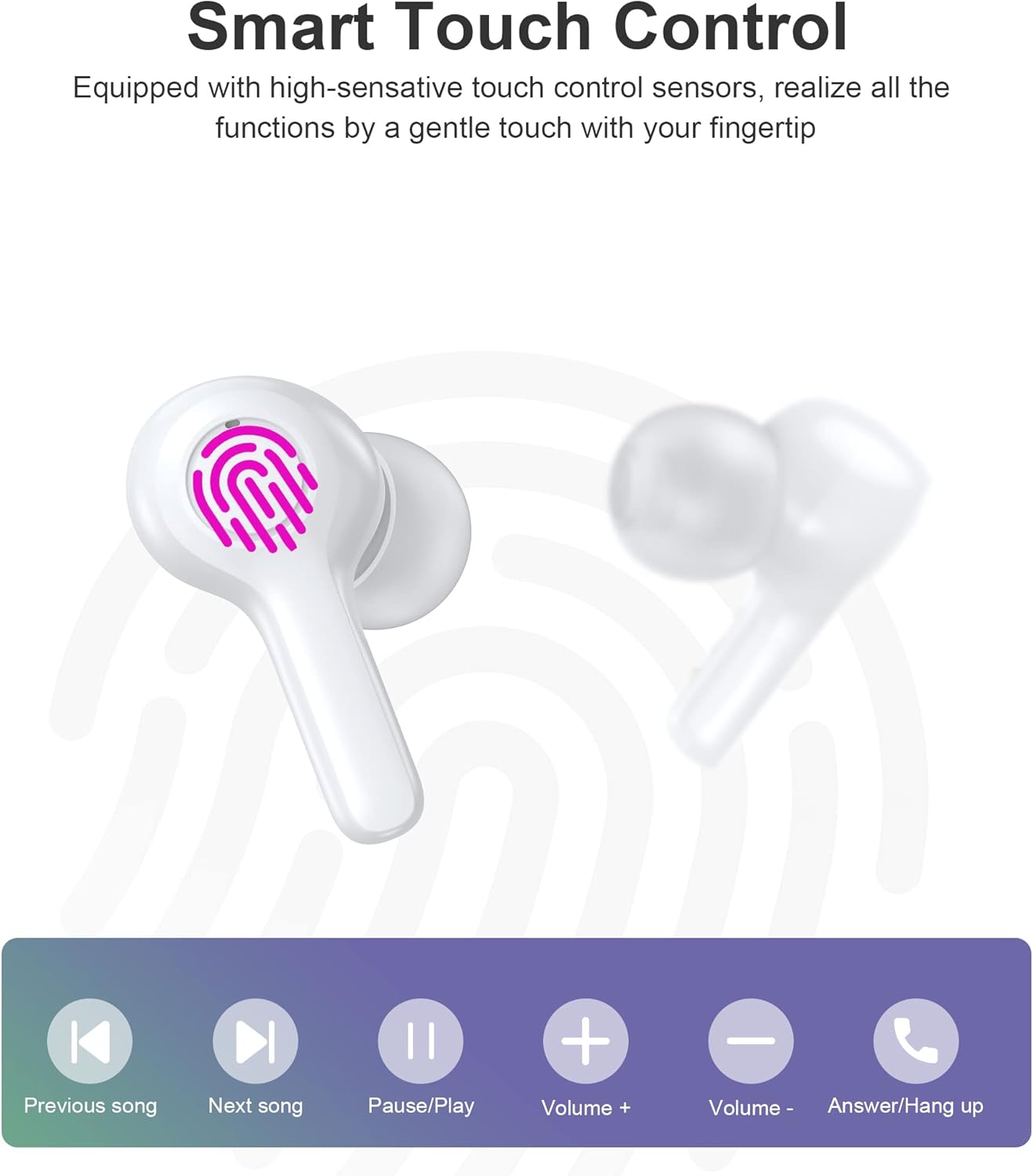
Image: Diagram illustrating the various touch control functions on the earbuds, including playback, volume, and call management.
| ആക്ഷൻ | ഇടത് ഇയർബഡ് | വലത് ഇയർബഡ് |
|---|---|---|
| പ്ലേ/താൽക്കാലികമായി നിർത്തുക | ഒറ്റ ടാപ്പ് | ഒറ്റ ടാപ്പ് |
| അടുത്ത ഗാനം | രണ്ടുതവണ ടാപ്പ് ചെയ്യുക | |
| മുൻ ഗാനം | രണ്ടുതവണ ടാപ്പ് ചെയ്യുക | |
| വോളിയം കൂട്ടുക | ട്രിപ്പിൾ ടാപ്പ് | |
| വോളിയം ഡൗൺ | ട്രിപ്പിൾ ടാപ്പ് | |
| ഉത്തരം / കോൾ അവസാനിപ്പിക്കുക | ഒറ്റ ടാപ്പ് | ഒറ്റ ടാപ്പ് |
| കോൾ നിരസിക്കുക | ദീർഘനേരം അമർത്തുക (2സെ) | ദീർഘനേരം അമർത്തുക (2സെ) |
| വോയ്സ് അസിസ്റ്റൻ്റ് സജീവമാക്കുക | ദീർഘനേരം അമർത്തുക (2സെ) | ദീർഘനേരം അമർത്തുക (2സെ) |
കുറിപ്പ്: Specific touch control functions may vary slightly depending on your connected device and its operating system.
6. പരിപാലനം
6.1 വൃത്തിയാക്കൽ
The earbuds are IPX8 waterproof, making them resistant to sweat and water. They can be easily cleaned.
- ഇയർബഡുകളും ചാർജിംഗ് കെയ്സും മൃദുവായതും ഉണങ്ങിയതും ലിന്റ് രഹിതവുമായ തുണി ഉപയോഗിച്ച് തുടയ്ക്കുക.
- കഠിനമായ അഴുക്കിന്, ചെറുതായി dampതുണിയിൽ വെള്ളം ഒഴിക്കുക. കഠിനമായ രാസവസ്തുക്കളോ ഉരച്ചിലുകളോ ഉള്ള വസ്തുക്കൾ ഉപയോഗിക്കരുത്.
- Ensure the charging contacts on both the earbuds and the case are clean and dry to prevent charging issues.

Image: Visual representation of the earbuds' IPX8 waterproof protection, showing them submerged in water.
6.2 സംഭരണം
- ഉപയോഗത്തിലില്ലാത്തപ്പോൾ, ഇയർബഡുകൾ സംരക്ഷിക്കുന്നതിനും ചാർജ്ജ് ചെയ്ത നിലയിൽ നിലനിർത്തുന്നതിനും അവ ചാർജിംഗ് കേസിൽ സൂക്ഷിക്കുക.
- Store the product in a cool, dry place, away from extreme temperatures and direct sunlight.
7. പ്രശ്നപരിഹാരം
എന്തെങ്കിലും പ്രശ്നങ്ങൾ നേരിടുകയാണെങ്കിൽ, ഇനിപ്പറയുന്ന പൊതുവായ പരിഹാരങ്ങൾ പരിശോധിക്കുക:
- ഇയർബഡുകൾ ജോടിയാക്കുന്നില്ല: Ensure both earbuds are out of the case and in pairing mode. Turn off and on your device's Bluetooth. Try forgetting the device in your Bluetooth settings and re-pairing.
- ഒരു ഇയർബഡ് മാത്രമേ പ്രവർത്തിക്കുന്നുള്ളൂ: രണ്ട് ഇയർബഡുകളും ചാർജിംഗ് കെയ്സിലേക്ക് തിരികെ വയ്ക്കുക, ലിഡ് അടയ്ക്കുക, കുറച്ച് നിമിഷങ്ങൾ കാത്തിരിക്കുക, തുടർന്ന് വീണ്ടും പുറത്തെടുക്കുക. ഇത് പലപ്പോഴും അവയെ വീണ്ടും സമന്വയിപ്പിക്കുന്നു.
- ശബ്ദമില്ല: നിങ്ങളുടെ ഉപകരണത്തിലെയും ഇയർബഡുകളിലെയും വോളിയം ലെവൽ പരിശോധിക്കുക. ഇയർബഡുകൾ നിങ്ങളുടെ ഉപകരണവുമായി ശരിയായി ബന്ധിപ്പിച്ചിട്ടുണ്ടെന്ന് ഉറപ്പാക്കുക.
- ചാർജിംഗ് പ്രശ്നങ്ങൾ: Clean the charging contacts on both earbuds and the case. Try a different USB cable and power source.
- മോശം കോൾ നിലവാരം: Ensure the microphones are not obstructed. Move closer to your device. The smart noise reduction technology helps provide clear calls, but extreme noisy environments may still affect quality.

Image: Visual representation of the noise reduction technology, showing sound waves being processed for clearer audio.
പ്രശ്നം നിലനിൽക്കുകയാണെങ്കിൽ, ദയവായി ഉപഭോക്തൃ പിന്തുണയുമായി ബന്ധപ്പെടുക.
8 സ്പെസിഫിക്കേഷനുകൾ
| ഫീച്ചർ | വിശദാംശങ്ങൾ |
|---|---|
| മോഡൽ | BH-T06 |
| ബ്ലൂടൂത്ത് പതിപ്പ് | 5.2 |
| വാട്ടർപ്രൂഫ് റേറ്റിംഗ് | IPX8 (Waterproof to 1 meter for 30 minutes) |
| ഇയർബഡ് ബാറ്ററി ശേഷി | 40mAh (ഓരോ ഇയർബഡും) |
| ചാർജിംഗ് കെയ്സ് ബാറ്ററി കപ്പാസിറ്റി | 300mAh |
| പ്ലേബാക്ക് സമയം | ~5+ hours (earbuds) |
| Standby Time (with case) | ~120 മണിക്കൂർ |
| സ്പീക്കർ വലിപ്പം | 8 മി.മീ |
| മൈക്രോഫോണുകൾ | 4 (വ്യക്തമായ കോളുകൾക്ക്) |
| കണക്റ്റിവിറ്റി ടെക്നോളജി | വയർലെസ് (ബ്ലൂടൂത്ത്) |
| ശബ്ദ നിയന്ത്രണം | Automatic Noise Reduction |
9 സുരക്ഷാ വിവരങ്ങൾ
- ഉൽപ്പന്നം വേർപെടുത്തുകയോ പരിഷ്കരിക്കുകയോ ചെയ്യരുത്.
- തീവ്രമായ താപനില, നേരിട്ടുള്ള സൂര്യപ്രകാശം, തുറന്ന തീജ്വാലകൾ എന്നിവയിൽ നിന്ന് അകന്നുനിൽക്കുക.
- ഉൽപ്പന്നം ശക്തമായ ആഘാതങ്ങൾക്ക് വിധേയമാക്കുകയോ ഉപേക്ഷിക്കുകയോ ചെയ്യരുത്.
- കുട്ടികൾക്കും വളർത്തുമൃഗങ്ങൾക്കും ലഭ്യമാകാതെ സൂക്ഷിക്കുക.
- കേൾവിക്ക് കേടുപാടുകൾ സംഭവിക്കാതിരിക്കാൻ, ദീർഘനേരം അമിതമായി ഉയർന്ന ശബ്ദത്തിൽ ഇയർബഡുകൾ ഉപയോഗിക്കരുത്.
10. വാറൻ്റിയും പിന്തുണയും
Choetech products come with a standard warranty. Please refer to the warranty card included in your package or visit the official Choetech website for detailed warranty terms and conditions. For technical support, troubleshooting assistance, or any inquiries, please contact Choetech customer service through their official channels.


