ആമുഖം
This manual provides instructions for the safe and efficient use of your eKids Bluey Bluetooth Headphones, model BU-B52. Please read this manual thoroughly before operating the device and retain it for future reference.

ചിത്രം: മുൻഭാഗം view of the eKids Bluey Bluetooth Headphones, featuring Bluey-themed earcups and plush ears on the headband.
സുരക്ഷാ വിവരങ്ങൾ
- വോളിയം നില: The headphones are designed with a volume limit of 85 dB to protect hearing. Prolonged exposure to high volume levels can still cause hearing damage.
- ശ്വാസംമുട്ടൽ അപകടം: ശ്വാസംമുട്ടൽ അപകടങ്ങൾ തടയാൻ ചെറിയ ഭാഗങ്ങളും കേബിളുകളും കൊച്ചുകുട്ടികളിൽ നിന്ന് അകറ്റി നിർത്തുക.
- ജല പ്രതിരോധം: This product is not water resistant. Avoid exposure to liquids.
- വൃത്തിയാക്കൽ: വൃത്തിയാക്കാൻ മൃദുവായതും ഉണങ്ങിയതുമായ തുണി ഉപയോഗിക്കുക. ലിക്വിഡ് ക്ലീനറുകളോ എയറോസോളുകളോ ഉപയോഗിക്കരുത്.
- ബാറ്ററി സുരക്ഷ: Do not attempt to replace the internal lithium-ion battery. Dispose of the product according to local regulations.
പാക്കേജ് ഉള്ളടക്കം
പാക്കേജിൽ എല്ലാ ഇനങ്ങളും ഉണ്ടെന്ന് ഉറപ്പാക്കുക:
- eKids Bluey Bluetooth Headphones (Model BU-B52)
- 3.5 എംഎം ഓഡിയോ കേബിൾ
- USB Charging Cable (Micro USB to USB-A, typically)
- ഉപയോക്തൃ മാനുവൽ (ഈ പ്രമാണം)

ചിത്രം: കഴിഞ്ഞുview of the headphones highlighting features like adjustable headband, foldable design, comfortable ear cushions, and showing the included charging and line-in cables.
ഉൽപ്പന്നം കഴിഞ്ഞുview
Familiarize yourself with the various parts and controls of your headphones:
- ക്രമീകരിക്കാവുന്ന ഹെഡ്ബാൻഡ്: Allows for a custom fit.
- Soft Ear Cushions: Provide comfort during use.
- ഓൺ-ഇയർ നിയന്ത്രണങ്ങൾ: Buttons for power, volume, and playback (specific functions detailed in Operating Instructions).
- ബിൽറ്റ്-ഇൻ മൈക്രോഫോൺ: ഹാൻഡ്സ് ഫ്രീ ആശയവിനിമയത്തിന്.
- 3.5mm ഓഡിയോ ജാക്ക്: വയർഡ് കണക്ഷനായി.
- യുഎസ്ബി ചാർജിംഗ് പോർട്ട്: ആന്തരിക ബാറ്ററി റീചാർജ് ചെയ്യുന്നതിന്.
- LED സൂചകം: പവറും ജോടിയാക്കൽ നിലയും പ്രദർശിപ്പിക്കുന്നു.
സജ്ജമാക്കുക
1. ഹെഡ്ഫോണുകൾ ചാർജ് ചെയ്യുന്നു
- Locate the USB charging port on the headphones.
- Connect the smaller end of the USB charging cable to the headphone's charging port.
- Connect the larger end of the USB charging cable to a powered USB port (e.g., computer, USB wall adapter).
- ചാർജ് ചെയ്യുമ്പോൾ LED ഇൻഡിക്കേറ്റർ പ്രകാശിക്കുകയും പൂർണ്ണമായി ചാർജ് ചെയ്യുമ്പോൾ അത് ഓഫാകുകയോ നിറം മാറുകയോ ചെയ്യും.
- A full charge provides up to 37 hours of continuous Bluetooth playtime.
2. പവർ ഓൺ/ഓഫ്
- പവർ ഓണാക്കാൻ: LED ഇൻഡിക്കേറ്റർ പ്രകാശിക്കുന്നത് വരെ പവർ ബട്ടൺ അമർത്തിപ്പിടിക്കുക.
- പവർ ഓഫ് ചെയ്യാൻ: LED ഇൻഡിക്കേറ്റർ ഓഫാകുന്നതുവരെ പവർ ബട്ടൺ അമർത്തിപ്പിടിക്കുക.
3. Bluetooth Pairing (Wireless Mode)
- ഹെഡ്ഫോണുകൾ ചാർജ് ചെയ്തിട്ടുണ്ടെന്നും പവർ ഓഫ് ചെയ്തിട്ടുണ്ടെന്നും ഉറപ്പാക്കുക.
- Press and hold the Power button for approximately 5-7 seconds until the LED indicator flashes rapidly (usually blue and red), indicating pairing mode.
- നിങ്ങളുടെ ഉപകരണത്തിൽ (സ്മാർട്ട്ഫോൺ, ടാബ്ലെറ്റ്, കമ്പ്യൂട്ടർ), ബ്ലൂടൂത്ത് പ്രവർത്തനക്ഷമമാക്കി ലഭ്യമായ ഉപകരണങ്ങൾക്കായി തിരയുക.
- Select "eKids Bluey Headphones" or "BU-B52" from the list of found devices.
- Once paired, the LED indicator will typically flash slowly or turn solid blue.
- പവർ ഓൺ ചെയ്യുമ്പോൾ ഹെഡ്ഫോണുകൾ അവസാനം ജോടിയാക്കിയ ഉപകരണത്തിലേക്ക് വീണ്ടും കണക്റ്റുചെയ്യാൻ ശ്രമിക്കും.
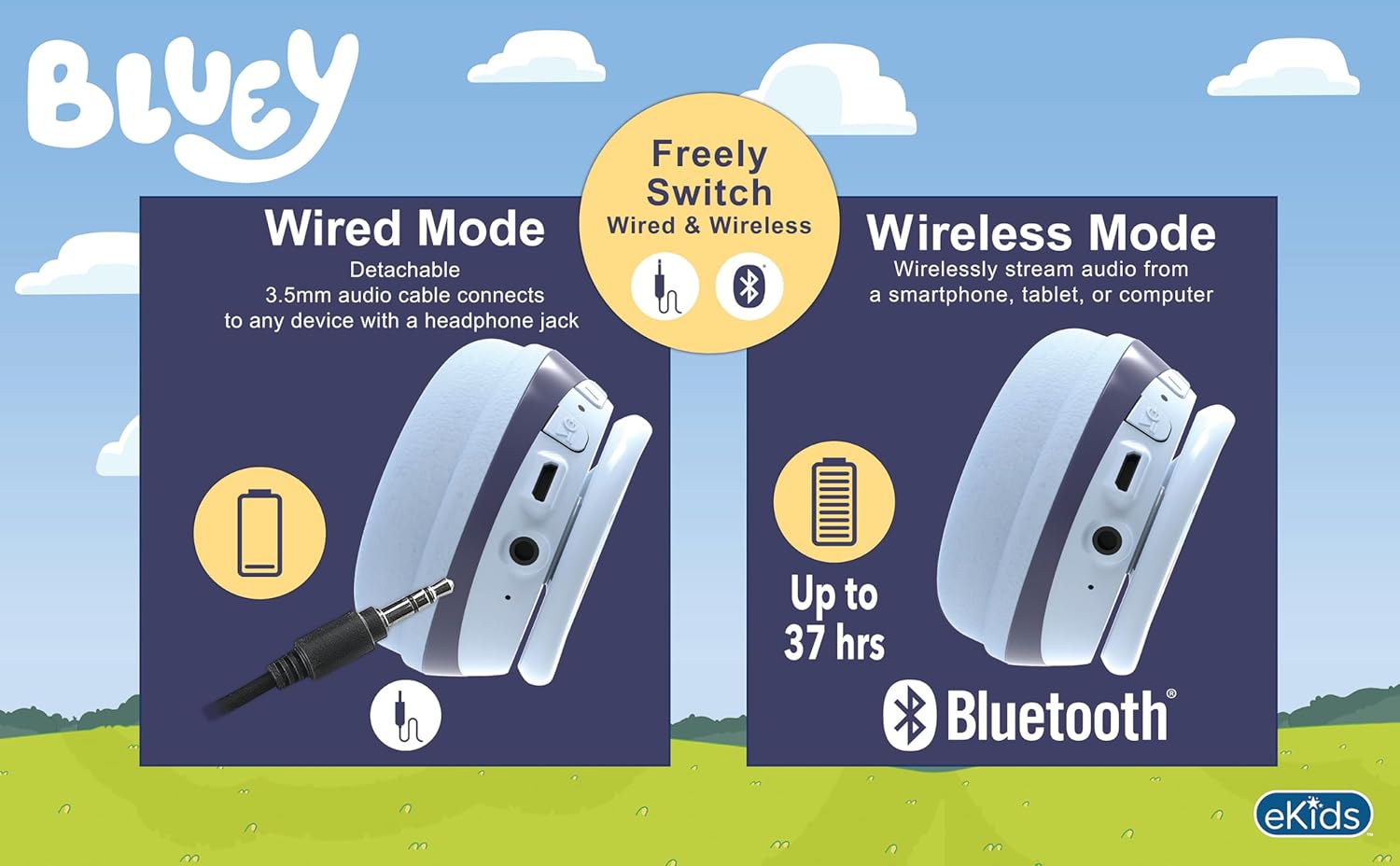
Image: A visual comparison of wired mode (using a 3.5mm audio cable) and wireless mode (Bluetooth connection with up to 37 hours of battery life).
4. വയർഡ് കണക്ഷൻ (ഓക്സ് മോഡ്)
- ഹെഡ്ഫോണുകൾ ഓഫാണെന്ന് ഉറപ്പാക്കുക.
- Connect one end of the included 3.5mm audio cable to the headphone's 3.5mm audio jack.
- 3.5mm ഓഡിയോ കേബിളിന്റെ മറ്റേ അറ്റം നിങ്ങളുടെ ഉപകരണത്തിന്റെ ഓഡിയോ ഔട്ട്പുട്ട് ജാക്കുമായി ബന്ധിപ്പിക്കുക.
- The headphones will function in wired mode, bypassing Bluetooth. No battery power is required for wired listening.
പ്രവർത്തന നിർദ്ദേശങ്ങൾ
The headphones feature integrated controls for ease of use.
1. വോളിയം നിയന്ത്രണം
- Use the volume buttons located on the headphones to adjust the listening level.
- The headphones have a built-in volume limiter set at 85 dB for hearing protection.
2. Music Playback (Bluetooth Mode)
- പ്ലേ/താൽക്കാലികമായി നിർത്തുക: Play/Pause ബട്ടൺ ഒരിക്കൽ അമർത്തുക.
- അടുത്ത ട്രാക്ക്: Press and hold the Volume Up button (or specific 'next' button if present).
- മുമ്പത്തെ ട്രാക്ക്: Press and hold the Volume Down button (or specific 'previous' button if present).
3. Call Functions (Bluetooth Mode)
- ഉത്തരം/അവസാന കോൾ: Press the Play/Pause button once during an incoming call or active call.
- കോൾ നിരസിക്കുക: Press and hold the Play/Pause button during an incoming call.
- മൈക്രോഫോൺ ഉപയോഗിക്കുന്നത്: The built-in microphone activates automatically during calls.
മെയിൻ്റനൻസ്
- വൃത്തിയാക്കൽ: Wipe the headphones with a soft, dry, lint-free cloth. Do not use abrasive cleaners, alcohol, or chemical solvents.
- സംഭരണം: ഉപയോഗത്തിലില്ലാത്തപ്പോൾ, ഹെഡ്ഫോണുകൾ തണുത്തതും വരണ്ടതുമായ സ്ഥലത്ത് സൂക്ഷിക്കുക, നേരിട്ടുള്ള സൂര്യപ്രകാശത്തിൽ നിന്നും കടുത്ത താപനിലയിൽ നിന്നും അകറ്റി നിർത്തുക. മടക്കാവുന്ന രൂപകൽപ്പന ഒതുക്കമുള്ള സംഭരണം അനുവദിക്കുന്നു.
- ബാറ്ററി കെയർ: ബാറ്ററി ലൈഫ് വർദ്ധിപ്പിക്കാൻ, ഹെഡ്ഫോണുകൾ ഇടയ്ക്കിടെ പൂർണ്ണമായും ചാർജ് ചെയ്യുന്നത് ഒഴിവാക്കുക. ദീർഘനേരം ഉപയോഗിച്ചിട്ടില്ലെങ്കിൽ പോലും അവ പതിവായി ചാർജ് ചെയ്യുക.
ട്രബിൾഷൂട്ടിംഗ്
| പ്രശ്നം | സാധ്യമായ പരിഹാരം |
|---|---|
| ഹെഡ്ഫോണുകൾ പവർ ഓൺ ചെയ്യുന്നില്ല. | Ensure the headphones are fully charged. Connect to a power source using the USB charging cable. |
| ബ്ലൂടൂത്ത് വഴി ജോടിയാക്കാൻ കഴിയില്ല. |
|
| വയർലെസ് മോഡിൽ ശബ്ദമില്ല. |
|
| വയേർഡ് മോഡിൽ ശബ്ദമില്ല. |
|
| മൈക്രോഫോൺ പ്രവർത്തിക്കുന്നില്ല. |
|
സ്പെസിഫിക്കേഷനുകൾ
| മോഡൽ നമ്പർ | BU-B52 |
| കണക്റ്റിവിറ്റി | Bluetooth (Wireless), 3.5mm Audio Jack (Wired) |
| ബ്ലൂടൂത്ത് ശ്രേണി | 10 മീറ്റർ വരെ (33 അടി) |
| ബാറ്ററി തരം | ലിഥിയം അയോൺ (ഉൾപ്പെടുന്നു) |
| ബാറ്ററി ലൈഫ് | Up to 37 hours (Bluetooth playtime) |
| സംവേദനക്ഷമത | 85 dB (Volume Limited) |
| ഫ്രീക്വൻസി റേഞ്ച് | 20 ഹെർട്സ് - 20,000 ഹെർട്സ് |
| ഭാരം | 9.3 ഔൺസ് (0.27 കിലോഗ്രാം) |
| മെറ്റീരിയൽ | പ്ലാസ്റ്റിക് |
| നിർമ്മാതാവ് | കിഡ്ഡിസൈനുകൾ |
വാറൻ്റിയും പിന്തുണയും
For warranty information or technical support, please refer to the documentation included with your purchase or visit the official eKids webസൈറ്റ്. ഉപഭോക്തൃ സേവനത്തിനായുള്ള കോൺടാക്റ്റ് വിശദാംശങ്ങൾ സാധാരണയായി നിർമ്മാതാവിന്റെ സൈറ്റിൽ ലഭ്യമാണ്. webസൈറ്റ്.
You can visit the eKids store at eKids Amazon Store കൂടുതൽ വിവരങ്ങൾക്ക്.


