ആമുഖം
Thank you for choosing the THOMSON D528 Computer Speakers. This manual provides essential information for the proper setup, operation, and maintenance of your new soundbar. Featuring Bluetooth 5.0 connectivity, 10W stereo sound, dynamic RGB lighting, and versatile 3.5mm Aux-in and USB power options, these speakers are designed to enhance your audio experience for PC, desktop monitors, laptops, and tablets.
ഒപ്റ്റിമൽ പ്രകടനവും സുരക്ഷയും ഉറപ്പാക്കാൻ ഉൽപ്പന്നം ഉപയോഗിക്കുന്നതിന് മുമ്പ് ദയവായി ഈ മാനുവൽ നന്നായി വായിക്കുക.
ബോക്സിൽ എന്താണുള്ളത്
- THOMSON D528 Computer Speakers
- ഉപയോക്തൃ മാനുവൽ

സജ്ജമാക്കുക
Follow these steps to set up your THOMSON D528 Computer Speakers:
- പ്ലേസ്മെൻ്റ്: Position the soundbar on a stable, flat surface, such as your desktop, beneath your monitor. Ensure adequate space for cable connections.
- പവർ കണക്ഷൻ: Connect the USB cable from the speaker to a USB port on your computer, laptop, or a USB power adapter (not included). The speakers are USB powered.
- ഓഡിയോ കണക്ഷൻ: ഇനിപ്പറയുന്ന രീതികളിൽ ഒന്ന് തിരഞ്ഞെടുക്കുക:
- 3.5mm Aux-in: Connect the 3.5mm audio cable from the speaker to the audio output jack on your device (PC, laptop, tablet, etc.).
- ബ്ലൂടൂത്ത് 5.0: Ensure the speaker is powered on. Activate Bluetooth on your device and search for "THOMSON D528" in the list of available devices. Select it to pair.
- പ്രാരംഭ പവർ ഓൺ: Long press the multi-function knob to turn on the speakers.


പ്രവർത്തന നിർദ്ദേശങ്ങൾ
The THOMSON D528 speakers feature a multi-function knob for easy control:
- പവർ ഓൺ/ഓഫ്: Long press the knob to turn the speakers on or off.
- വോളിയം ക്രമീകരണം: ശബ്ദം കൂട്ടാൻ നോബ് ഘടികാരദിശയിലും കുറയ്ക്കാൻ എതിർ ഘടികാരദിശയിലും തിരിക്കുക.
- ലൈറ്റ് മോഡുകൾ മാറുക: Short press the knob once to cycle through the dynamic RGB lighting modes.
- Switch Bluetooth/AUX Mode: Short press the knob twice to switch between Bluetooth and 3.5mm Aux-in audio input modes.

ഡൈനാമിക് RGB ലൈറ്റിംഗ്
The THOMSON D528 speakers are equipped with dynamic RGB lighting effects to enhance your listening, gaming, or movie-watching experience. The light strip at the bottom of the soundbar can display multiple colors and modes.
- ലൈറ്റ് മോഡുകൾ മാറ്റുന്നു: Short press the multi-function knob once to cycle through the available light modes and colors.
- Turning Lights Off: Continue pressing the knob until the lights turn off, or select a static color if preferred.

കണക്റ്റിവിറ്റി
The THOMSON D528 offers flexible connectivity options:
- ബ്ലൂടൂത്ത് 5.0: Provides wide compatibility and a stable wireless connection for devices like smartphones, tablets, and laptops. The Bluetooth range is up to 60 meters.
- 3.5mm Aux-in: For wired connections to any device with a standard 3.5mm audio jack, including PCs, desktop monitors, laptops, and MP3 players.
- USB പവർ: The speakers draw power directly from a USB port, eliminating the need for an external power adapter.

മെയിൻ്റനൻസ്
നിങ്ങളുടെ സ്പീക്കറുകളുടെ ദീർഘായുസ്സും ഒപ്റ്റിമൽ പ്രകടനവും ഉറപ്പാക്കാൻ, ഈ അറ്റകുറ്റപ്പണി മാർഗ്ഗനിർദ്ദേശങ്ങൾ പാലിക്കുക:
- വൃത്തിയാക്കൽ: സ്പീക്കറുകളുടെ പുറംഭാഗം തുടയ്ക്കാൻ മൃദുവായതും ഉണങ്ങിയതുമായ തുണി ഉപയോഗിക്കുക. ലിക്വിഡ് ക്ലീനറുകളോ ഉരച്ചിലുകളുള്ള വസ്തുക്കളോ ഉപയോഗിക്കരുത്.
- സംഭരണം: ദീർഘനേരം ഉപയോഗിക്കാത്തപ്പോൾ, നേരിട്ടുള്ള സൂര്യപ്രകാശത്തിൽ നിന്നും കടുത്ത താപനിലയിൽ നിന്നും മാറി തണുത്തതും വരണ്ടതുമായ സ്ഥലത്ത് സ്പീക്കറുകൾ സൂക്ഷിക്കുക.
- കൈകാര്യം ചെയ്യൽ: സ്പീക്കറുകൾ താഴെയിടുകയോ ശക്തമായ ആഘാതങ്ങൾക്ക് വിധേയമാക്കുകയോ ചെയ്യുന്നത് ഒഴിവാക്കുക.
- കേബിൾ കെയർ: കേബിളുകൾ ബലമായി വലിക്കരുത്. വിച്ഛേദിക്കുമ്പോൾ എപ്പോഴും പ്ലഗ് പിടിക്കുക.

ട്രബിൾഷൂട്ടിംഗ്
If you encounter any issues with your THOMSON D528 speakers, refer to the following common problems and solutions:
- ശബ്ദമില്ല:
- Ensure the speakers are powered on and the volume is turned up.
- Check that the audio cable (3.5mm Aux-in) is securely connected to both the speaker and your device, or that Bluetooth is successfully paired.
- Verify that your device's audio output is set to the correct source (e.g., external speakers, Bluetooth).
- ബ്ലൂടൂത്ത് വിച്ഛേദിക്കൽ:
- Ensure the speakers are within the 60-meter Bluetooth range of your device.
- Try unpairing and re-pairing the speakers with your device.
- Restart both the speakers and your Bluetooth device.
- RGB ലൈറ്റുകൾ പ്രവർത്തിക്കുന്നില്ല:
- Short press the multi-function knob to cycle through light modes; ensure it's not set to the 'off' mode.
- Verify the speakers are receiving power via USB.
- ശബ്ദ വ്യതിയാനം:
- സ്പീക്കറുകളിലും കണക്റ്റുചെയ്തിരിക്കുന്ന ഉപകരണത്തിലും ശബ്ദം കുറയ്ക്കുക.
- Ensure the audio cable is not damaged and is fully inserted.
- Move the speakers away from other electronic devices that might cause interference.
സ്പെസിഫിക്കേഷനുകൾ
| ഫീച്ചർ | സ്പെസിഫിക്കേഷൻ |
|---|---|
| മോഡലിൻ്റെ പേര് | കമ്പ്യൂട്ടർ സ്പീക്കറുകൾ |
| സ്പീക്കർ തരം | സൗണ്ട്ബാർ |
| കണക്റ്റിവിറ്റി ടെക്നോളജി | ഓക്സിലറി, ബ്ലൂടൂത്ത്, യുഎസ്ബി |
| വയർലെസ് കമ്മ്യൂണിക്കേഷൻ ടെക്നോളജി | ബ്ലൂടൂത്ത് 5.0 |
| ബ്ലൂടൂത്ത് ശ്രേണി | 60 മീറ്റർ |
| ഓഡിയോ put ട്ട്പുട്ട് മോഡ് | സ്റ്റീരിയോ |
| സ്പീക്കർ പരമാവധി ഔട്ട്പുട്ട് പവർ | 10 വാട്ട്സ് |
| പ്രത്യേക ഫീച്ചർ | USB Port, Dynamic RGB Lighting |
| നിയന്ത്രണ രീതി | നോബ് |
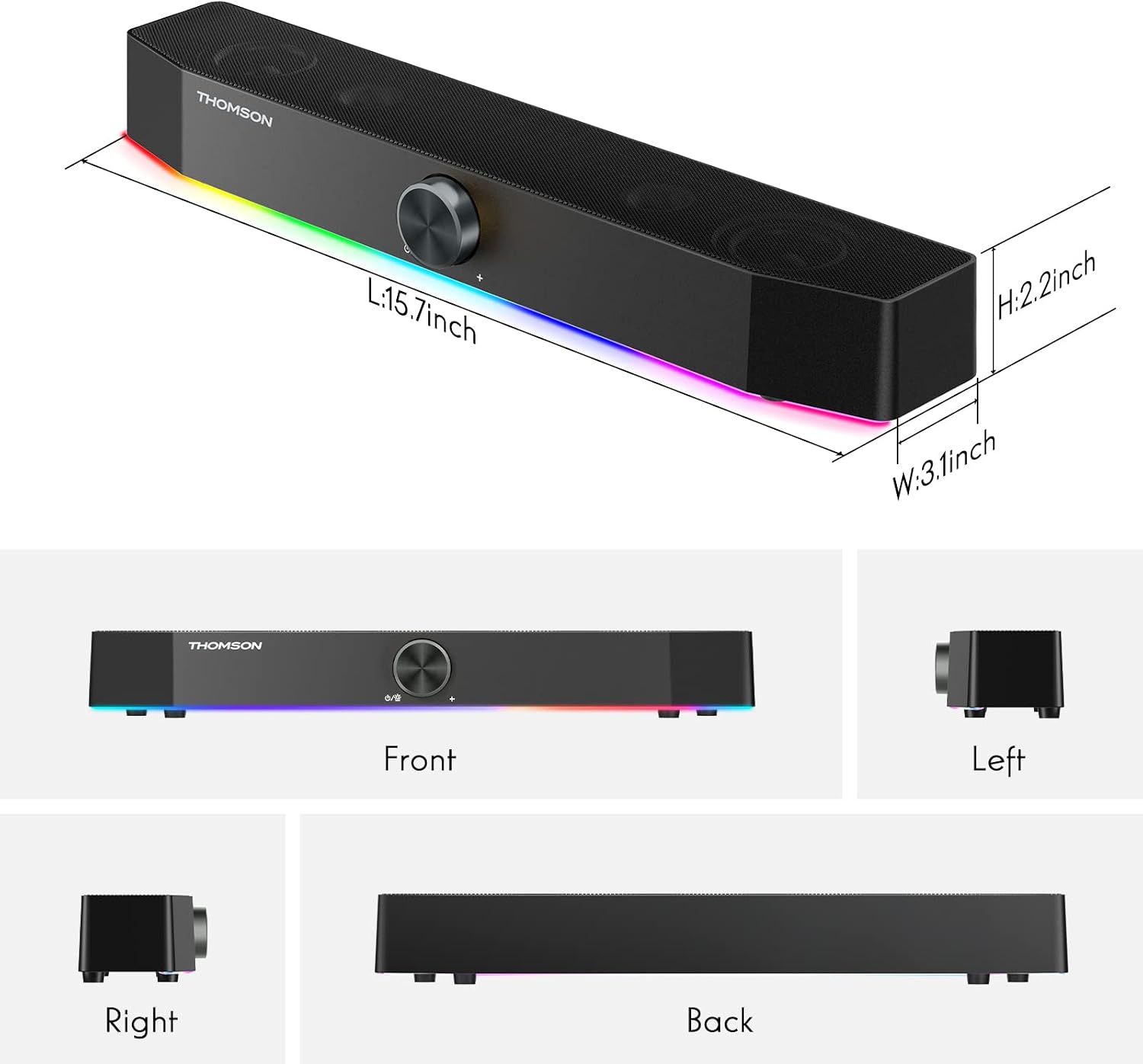
| ഉൽപ്പന്ന അളവുകൾ | 3.07"D x 15.62"W x 2.01"H |
| ഇനത്തിൻ്റെ ഭാരം | 1.74 പൗണ്ട് |
| അനുയോജ്യമായ ഉപകരണങ്ങൾ | സ്മാർട്ട്ഫോൺ, ടാബ്ലെറ്റ്, എംപി3 പ്ലെയർ, ഡെസ്ക്ടോപ്പ്, ടെലിവിഷൻ, പ്രൊജക്ടർ, ലാപ്ടോപ്പ് |

വാറൻ്റിയും പിന്തുണയും
The THOMSON D528 Computer Speakers come with a 12-month worry-free warranty. For any product-related inquiries, technical assistance, or warranty claims, please contact THOMSON customer service. Our team is committed to providing lifetime friendly customer service.
For further assistance, please refer to the contact information provided on the product packaging or the official THOMSON webസൈറ്റ്.
ഔദ്യോഗിക ഉൽപ്പന്ന വീഡിയോകൾ
Video: A customer demonstrates the THOMSON D528 speaker in use, showcasing its features and sound quality in a real-world setting. This video is provided by NUOWEI STORE.
Video: A short demonstration of the THOMSON D528 Computer Speakers, highlighting their design and RGB lighting effects. This video is provided by NUOWEI STORE.


