ആമുഖം
Thank you for choosing Roseland Over-Ear Bluetooth Headphones. These wireless headphones are designed to provide an optimal audio experience with comfort and convenience. Featuring soft ear cushions and an integrated microphone, they are perfect for listening to music and making calls on the go. This manual provides essential information on setting up, operating, maintaining, and troubleshooting your headphones.
ഉൽപ്പന്നം കഴിഞ്ഞുview

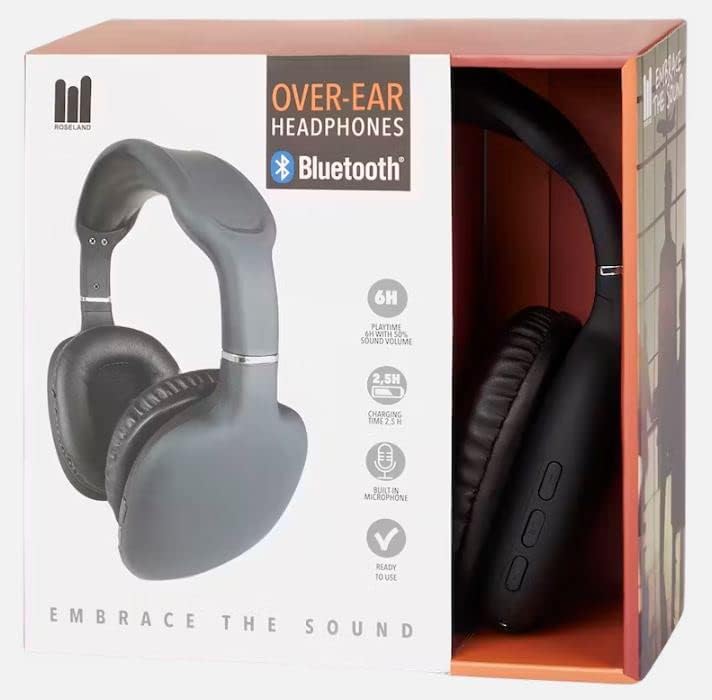
സജ്ജമാക്കുക
1. ഹെഡ്ഫോണുകൾ ചാർജ് ചെയ്യുന്നു
Before first use, fully charge your headphones. Connect the included charging cable to the charging port on the headphones and the other end to a USB power source (e.g., computer USB port, wall adapter). The charging indicator light will show the charging status. A full charge takes approximately 2.5 മണിക്കൂർ.
2. പവർ ഓൺ/ഓഫ്
- To power on: Press and hold the Power button until the indicator light flashes.
- പവർ ഓഫ് ചെയ്യാൻ: ഇൻഡിക്കേറ്റർ ലൈറ്റ് ഓഫ് ആകുന്നതുവരെ പവർ ബട്ടൺ അമർത്തിപ്പിടിക്കുക.
3. ബ്ലൂടൂത്ത് ജോടിയാക്കൽ
The Roseland headphones use Bluetooth 5.0 for stable and efficient connection.
- ഹെഡ്ഫോണുകൾ ഓഫാണെന്ന് ഉറപ്പാക്കുക.
- ജോടിയാക്കൽ മോഡ് സൂചിപ്പിക്കുന്ന ഇൻഡിക്കേറ്റർ ലൈറ്റ് ചുവപ്പും നീലയും മാറിമാറി മിന്നുന്നതുവരെ ഏകദേശം 5-7 സെക്കൻഡ് നേരത്തേക്ക് പവർ ബട്ടൺ അമർത്തിപ്പിടിക്കുക.
- നിങ്ങളുടെ സ്മാർട്ട്ഫോണിലോ മറ്റ് ബ്ലൂടൂത്ത് പ്രവർത്തനക്ഷമമാക്കിയ ഉപകരണത്തിലോ, ബ്ലൂടൂത്ത് ക്രമീകരണങ്ങളിലേക്ക് പോകുക.
- ഇതിനായി തിരയുക "Roseland Casque Bluetooth" or a similar name in the list of available devices.
- Select the headphones to connect. Once connected, the indicator light will turn solid blue or flash slowly.
- പാസ്വേഡ് ആവശ്യപ്പെടുകയാണെങ്കിൽ, "0000" എന്ന് നൽകുക.
Note: The headphones will automatically try to reconnect to the last paired device when powered on.
പ്രവർത്തന നിർദ്ദേശങ്ങൾ
Basic Controls (Buttons on the side)
- പവർ ബട്ടൺ: Power on/off, Play/Pause music, Answer/End calls.
- വോളിയം കൂട്ടുക (+): Increase volume, Next track (long press).
- വോളിയം ഡൗൺ (-): Decrease volume, Previous track (long press).
സംഗീത പ്ലേബാക്ക്
- പ്ലേ/താൽക്കാലികമായി നിർത്തുക: പവർ ബട്ടൺ ഒരിക്കൽ അമർത്തുക.
- അടുത്ത ട്രാക്ക്: വോളിയം അപ്പ് (+) ബട്ടൺ ദീർഘനേരം അമർത്തുക.
- മുമ്പത്തെ ട്രാക്ക്: വോളിയം ഡൗൺ (-) ബട്ടൺ ദീർഘനേരം അമർത്തുക.
- വോളിയം ക്രമീകരിക്കുക: വോളിയം അപ്പ് (+) അല്ലെങ്കിൽ വോളിയം ഡൗൺ (-) ബട്ടണുകൾ ഹ്രസ്വമായി അമർത്തുക.
ഫോൺ കോളുകൾ
The integrated microphone allows for hands-free calling.
- മറുപടി കോൾ: Press the Power button once when a call comes in.
- കോൾ അവസാനിപ്പിക്കുക: Press the Power button once during a call.
- കോൾ നിരസിക്കുക: Long press the Power button when a call comes in.
- അവസാന നമ്പർ വീണ്ടും ഡയൽ ചെയ്യുക: പവർ ബട്ടൺ രണ്ടുതവണ അമർത്തുക.
ബാറ്ററി ലൈഫ്
The headphones provide approximately 6 മണിക്കൂർ കളി സമയം on a single charge, depending on volume level and usage.
കംഫർട്ട് ധരിക്കൽ
The soft, memory foam earcups are designed for superior comfort during extended listening sessions. They provide a circum-aural fit, enveloping your ears for an immersive sound experience. For optimal comfort and ear health, it is recommended to remove the headphones every 2 മുതൽ 3 മണിക്കൂർ വരെ to allow your ears to rest.
മെയിൻ്റനൻസ്
- വൃത്തിയാക്കൽ: ഹെഡ്ഫോണുകൾ വൃത്തിയാക്കാൻ മൃദുവായതും ഉണങ്ങിയതുമായ തുണി ഉപയോഗിക്കുക. അബ്രാസീവ് ക്ലീനറുകളോ ലായകങ്ങളോ ഉപയോഗിക്കരുത്.
- സംഭരണം: നേരിട്ടുള്ള സൂര്യപ്രകാശത്തിൽ നിന്നും കടുത്ത താപനിലയിൽ നിന്നും മാറി തണുത്തതും വരണ്ടതുമായ സ്ഥലത്ത് ഹെഡ്ഫോണുകൾ സൂക്ഷിക്കുക.
- ജല പ്രതിരോധം: ഈ ഹെഡ്ഫോണുകൾ വാട്ടർപ്രൂഫ് അല്ല. Avoid exposure to water, rain, or excessive moisture. While they are sweat-resistant, prolonged exposure to heavy sweat should be avoided.
- ചാർജിംഗ്: Always use the provided charging cable or a certified equivalent.
ട്രബിൾഷൂട്ടിംഗ്
- ഹെഡ്ഫോണുകൾ ഓണാകില്ല: ഹെഡ്ഫോണുകൾ പൂർണ്ണമായും ചാർജ്ജ് ചെയ്തിട്ടുണ്ടെന്ന് ഉറപ്പാക്കുക.
- ഉപകരണവുമായി ജോടിയാക്കാൻ കഴിയില്ല:
- നിങ്ങളുടെ ഉപകരണത്തിൽ ബ്ലൂടൂത്ത് പ്രവർത്തനക്ഷമമാക്കിയിട്ടുണ്ടെന്ന് ഉറപ്പാക്കുക.
- Ensure the headphones are in pairing mode (flashing red and blue).
- ഹെഡ്ഫോണുകൾ നിങ്ങളുടെ ഉപകരണത്തിന് അടുത്തേക്ക് നീക്കുക.
- ഹെഡ്ഫോണുകളും നിങ്ങളുടെ ഉപകരണവും ഓഫാക്കി ഓണാക്കുക.
- നിങ്ങളുടെ ഉപകരണത്തിലെ മുൻ ബ്ലൂടൂത്ത് കണക്ഷനുകൾ വളരെയധികം സംഭരിച്ചിട്ടുണ്ടെങ്കിൽ അവ മായ്ക്കുക.
- ശബ്ദമില്ല അല്ലെങ്കിൽ കുറഞ്ഞ ശബ്ദം:
- ഹെഡ്ഫോണുകളിലും കണക്റ്റുചെയ്തിരിക്കുന്ന ഉപകരണത്തിലും വോളിയം ലെവൽ പരിശോധിക്കുക.
- ഹെഡ്ഫോണുകൾ ശരിയായി ജോടിയാക്കിയിട്ടുണ്ടെന്ന് ഉറപ്പാക്കുക.
- വ്യത്യസ്തമായ ഒരു ആപ്ലിക്കേഷനിൽ നിന്നോ ഉറവിടത്തിൽ നിന്നോ ഓഡിയോ പ്ലേ ചെയ്യാൻ ശ്രമിക്കുക.
- മോശം ശബ്ദ നിലവാരം:
- തടസ്സങ്ങൾ ഒഴിവാക്കാൻ നിങ്ങളുടെ കണക്റ്റുചെയ്ത ഉപകരണത്തിന് അടുത്തേക്ക് നീങ്ങുക.
- Ensure there are no physical obstructions between the headphones and the device.
- Check if the audio source quality is good.
- ചാർജിംഗ് പ്രശ്നങ്ങൾ:
- ചാർജിംഗ് കേബിൾ സുരക്ഷിതമായി ബന്ധിപ്പിച്ചിട്ടുണ്ടെന്ന് ഉറപ്പാക്കുക.
- മറ്റൊരു USB പോർട്ട് അല്ലെങ്കിൽ പവർ അഡാപ്റ്റർ പരീക്ഷിക്കുക.
സ്പെസിഫിക്കേഷനുകൾ
| ബ്രാൻഡ് | റോസ്ലാൻഡ് |
| മോഡൽ നമ്പർ | GE015877 |
| കണക്റ്റിവിറ്റി ടെക്നോളജി | വയർലെസ്സ് (ബ്ലൂടൂത്ത് 5.0) |
| ശൈലി | Over-Ear (Circum-Aural) |
| ചെവി പ്ലേസ്മെൻ്റ് | Supra-Aural |
| നിറം | കറുപ്പ് |
| മെറ്റീരിയൽ | പ്ലാസ്റ്റിക് |
| ബാറ്ററി ലൈഫ് (പ്ലേടൈം) | ഏകദേശം 6 മണിക്കൂർ |
| ചാർജിംഗ് സമയം | ഏകദേശം 2.5 മണിക്കൂർ |
| ഫ്രീക്വൻസി റേഞ്ച് | 20 ഹെർട്സ് - 20,000 ഹെർട്സ് |
| നിയന്ത്രണ തരം | വോളിയം നിയന്ത്രണം |
| പ്രത്യേക സവിശേഷതകൾ | Lightweight, Sweat-resistant, Built-in Microphone |
| ജല പ്രതിരോധ നില | വാട്ടർപ്രൂഫ് അല്ല |
| അനുയോജ്യമായ ഉപകരണങ്ങൾ | സ്മാർട്ട്ഫോണുകൾ |
| ശുപാർശ ചെയ്യുന്ന ഉപയോഗങ്ങൾ | Sport, Running, Calls, Music Listening |
| ഉൾപ്പെടുത്തിയ ഘടകങ്ങൾ | ചാർജിംഗ് കേബിൾ |
വാറൻ്റിയും പിന്തുണയും
Specific warranty information for the Roseland Over-Ear Bluetooth Headphones (Model: GE015877) is not available in the provided product details. Please refer to the product packaging or the retailer's website for any applicable warranty terms.
For technical support or further assistance, please contact the manufacturer, ZD Trading, or your point of purchase. Contact details are typically found on the product packaging or the manufacturer's official webസൈറ്റ്.


