1. ഉൽപ്പന്നം കഴിഞ്ഞുview
The Spigen OneTap Pro 3 is a wireless charging phone mount designed for Tesla vehicles. It features a foldable and hidden design, providing a secure and convenient way to mount and charge compatible smartphones. The mount attaches to the back of the Tesla's center display and offers adjustable viewകോണുകൾ.

Image: The Spigen OneTap Pro 3 mount attached to a Tesla screen, holding a smartphone.
2 അനുയോജ്യത
This mount is compatible with specific Tesla models and smartphone types:
- Tesla Models: All Tesla Model Y, Model 3, Model S, Model X, and Cybertruck. Also compatible with the updated 16-inch QHD front display for Model Y Premium/Performance (2026).
- സ്മാർട്ട്ഫോണുകൾ:
- iPhones with MagSafe (iPhone 12 or newer, including iPhone 17, 16, 15, 14, 13, 12 series) or iPhones with MagSafe cases.
- Galaxy phones (Galaxy S25, S24, S23, etc.) or Pixel phones (Pixel 9, 8, 7, etc.) with MagSafe cases.
- Pixel 10, Pixel 10 Pro, Pixel 10 Pro XL, Pixel 10 Pro Fold with Pixelsnap.

Image: Visual guide illustrating compatible Tesla models and iPhone generations.
3. സജ്ജീകരണ നിർദ്ദേശങ്ങൾ
Follow these steps for proper installation of your Spigen OneTap Pro 3 mount:
- ഉപരിതലം തയ്യാറാക്കുക: Ensure the back of your Tesla's center display is clean, dry, and free of dust or oils.
- പശ പ്രയോഗിക്കുക: Remove the protective film from the strong double-sided tape on the mount. Carefully position the mount in the desired location on the back of the display, ensuring it is level. Press firmly for several seconds.
- Allow Adhesive to Cure: For optimal adhesion strength, allow the adhesive to set for at least 8 hours before using the mount. For full strength, wait 24 hours. An extra adhesive tape is included for reinstallation if needed.
- പവർ കേബിൾ ബന്ധിപ്പിക്കുക: Route the extended L-shaped USB-C charging cable from the mount to a rear USB outlet in your Tesla. The L-shaped design ensures seamless connectivity and a neat appearance.

Image: Step-by-step visual for applying the adhesive mount and recommended curing times.
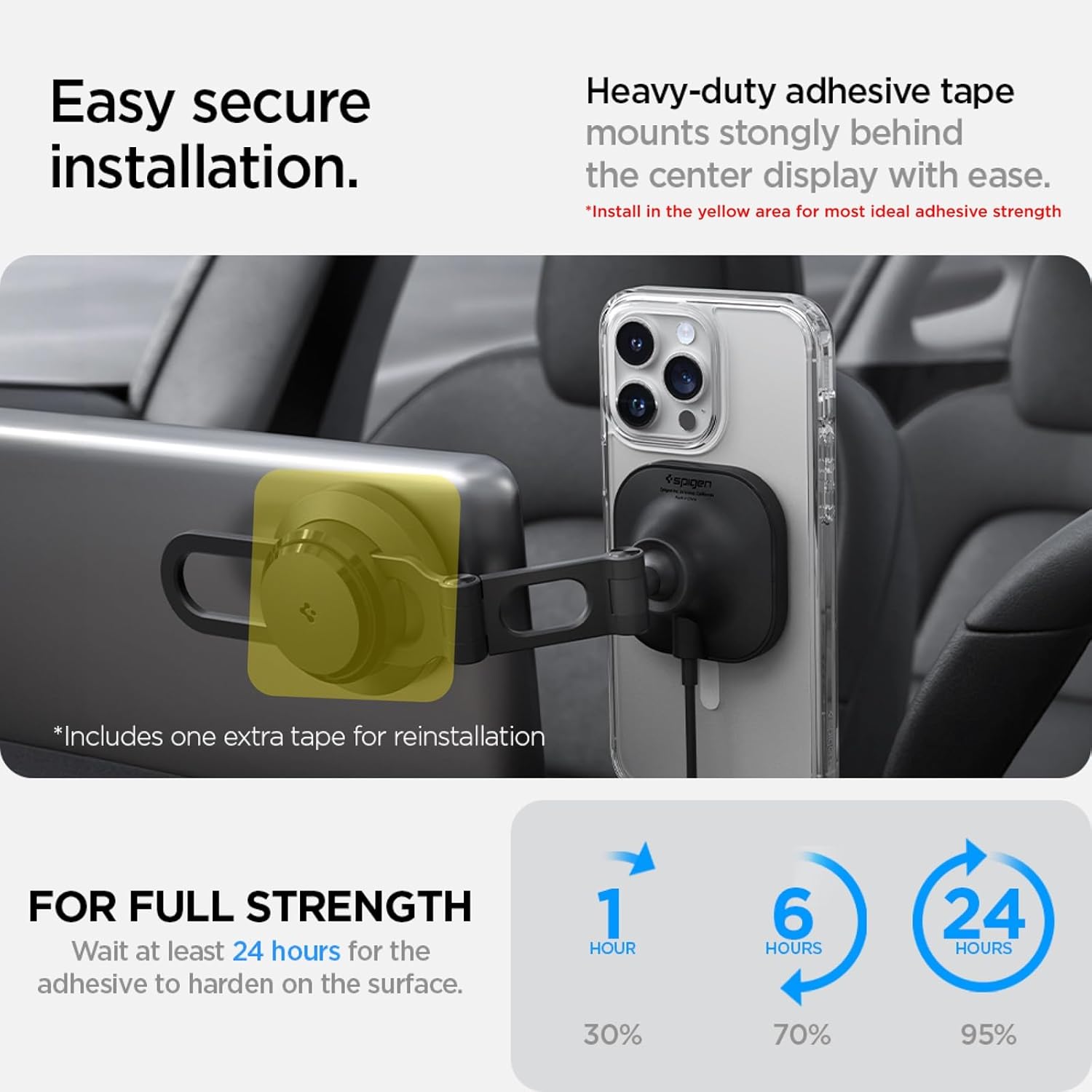
Image: The extended L-shaped USB-C cable connected to a Tesla's rear outlet for power.
ഇൻസ്റ്റലേഷൻ വീഡിയോ ഗൈഡ്
Video: Official Spigen installation guide for the OneTap Pro 3 Wireless Car Charger designed for Tesla.
4. പ്രവർത്തന നിർദ്ദേശങ്ങൾ
Utilize the features of your Spigen OneTap Pro 3 mount for an optimal experience:
- നിങ്ങളുടെ ഫോൺ അറ്റാച്ചുചെയ്യുന്നു: Simply place your MagSafe-compatible iPhone or MagSafe-cased Android/Pixel phone onto the magnetic charging pad. The strong magnetic connection will securely hold your device.
- വയർലെസ് ചാർജിംഗ്: Once your phone is attached, wireless charging will begin automatically, indicated by your phone's charging status.
- ക്രമീകരിക്കുന്നു Viewഇൻ ആംഗിൾ: The mount features a double-jointed metal arm and a 360-degree rotatable head. Use the 'Push-to-Lock' mechanism to adjust the arm and rotate your phone to achieve your preferred viewing angle for navigation or other functions.
- മടക്കാവുന്ന ഡിസൈൻ: When not in use, the mount can be easily folded away behind the dashboard screen to maintain a clean and uncluttered interior.
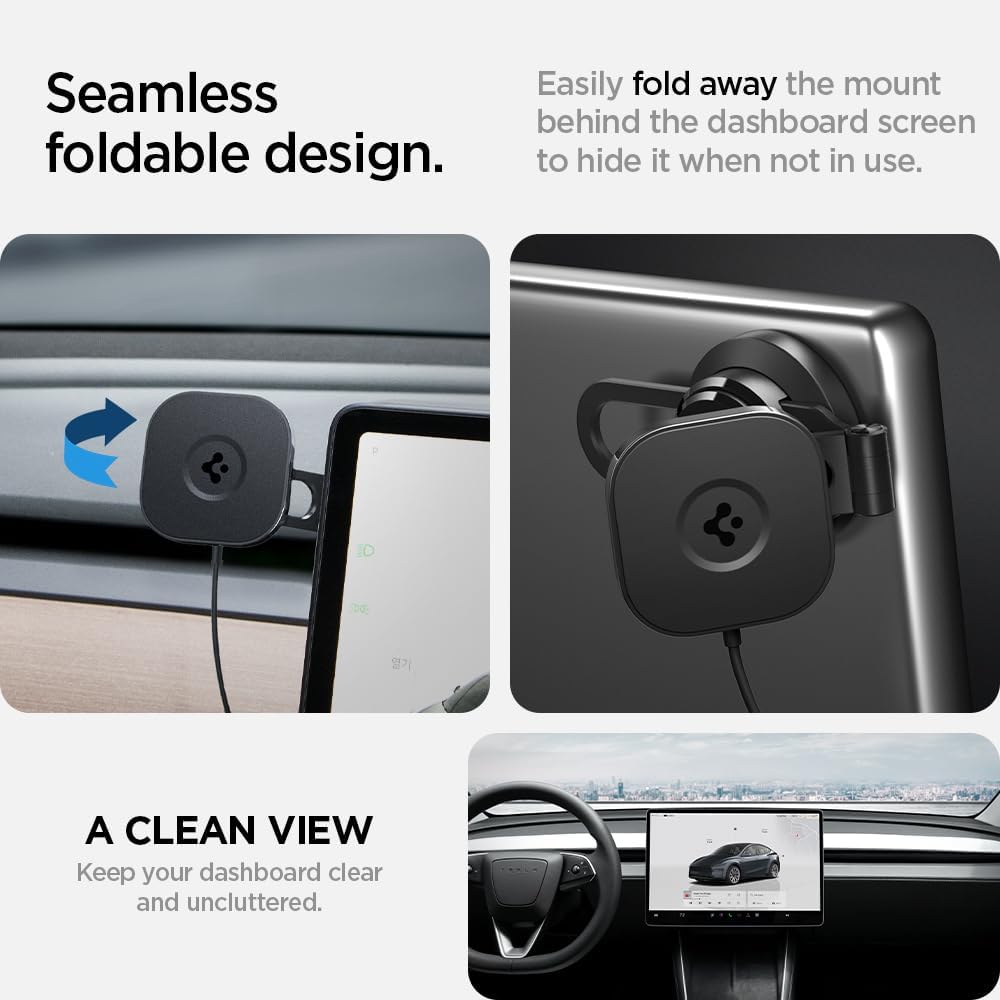
Image: The mount in its folded and extended positions, showcasing അതിന്റെ മറഞ്ഞിരിക്കുന്ന ഡിസൈൻ.

Image: Visual representation of how to adjust the mount's angle and rotation.

ചിത്രം: വിശദമായത് view of the double-jointed arm allowing for extensive adjustability.

Image: A smartphone displaying a charging indicator while mounted, demonstrating steady wireless charging.
5. പരിപാലനം
To ensure the longevity and optimal performance of your phone mount:
- വൃത്തിയാക്കൽ: Wipe the mount regularly with a soft, dry, or slightly damp cloth to remove dust and fingerprints. Avoid harsh chemicals or abrasive cleaners.
- പശ പരിശോധന: Periodically check the adhesive bond to the Tesla screen. If the mount feels loose, clean the area thoroughly and reapply with the provided extra adhesive tape, ensuring proper curing time.
- കേബിൾ പരിശോധന: Inspect the USB-C cable for any signs of wear or damage. Replace if necessary to ensure consistent charging.
6. പ്രശ്നപരിഹാരം
If you encounter issues with your Spigen OneTap Pro 3 mount, refer to the following common solutions:
- Mount is not sticking or falls off:
- Ensure the installation surface was thoroughly cleaned and dry before applying the adhesive.
- Allow the adhesive sufficient time to cure (at least 8 hours, ideally 24 hours) before placing a phone on the mount.
- Extreme temperatures (very hot or very cold) can affect adhesive performance. If installed in such conditions, allow more curing time or consider reapplication in moderate temperatures.
- Use the provided extra adhesive tape for reinstallation if the original adhesive has failed.
- Phone is not charging wirelessly:
- Verify that the USB-C cable is securely connected to both the mount and a functional USB outlet in your Tesla.
- Ensure your phone is correctly aligned on the magnetic charging pad. The phone's charging coil needs to align with the mount's coil.
- Confirm your phone is MagSafe compatible (iPhone 12 or newer) or is using a MagSafe-compatible case for Android/Pixel devices.
- വയർലെസ് ചാർജിംഗിന് തടസ്സമായേക്കാവുന്ന കട്ടിയുള്ള ഫോൺ കേസുകൾ നീക്കം ചെയ്യുക.
- Phone gets hot during charging:
- It is normal for phones to warm up during wireless charging, especially during prolonged use or in hot weather conditions. This is typically not a cause for concern.
- If the phone becomes excessively hot, temporarily remove it from the charger to allow it to cool down.
7 സ്പെസിഫിക്കേഷനുകൾ
| ഉൽപ്പന്ന അളവുകൾ | 7.89 x 2.59 x 2.05 ഇഞ്ച് |
| ഇനത്തിൻ്റെ ഭാരം | 2.8 ഔൺസ് |
| ഇനം മോഡൽ നമ്പർ | ACP06860 |
| കണക്റ്റിവിറ്റി ടെക്നോളജികൾ | വയർലെസ് |
| പ്രത്യേക സവിശേഷതകൾ | Ergonomic, Foldable, Rotatable, Tilt Head, Wireless Charging |
| നിറം | കറുപ്പ് |
| നിർമ്മാതാവ് | സ്പൈജൻ |
| അനുയോജ്യമായ ഉപകരണങ്ങൾ | MagSafe compatible iPhones and Galaxy/Pixel phones with MagSafe cases |
| അനുയോജ്യമായ ഫോൺ മോഡലുകൾ | iPhone 17 Pro Max, iPhone 17 Pro, iPhone Air, iPhone 17, 16, 15, 14, 13, 12, MagSafe compatible case |
| മൗണ്ടിംഗ് തരം | വെഹിക്കിൾ മ .ണ്ട് |
8. വാറണ്ടിയും ഉപഭോക്തൃ പിന്തുണയും
Spigen products are designed for quality and durability. For information regarding product warranty, please refer to the official Spigen webസൈറ്റ് അല്ലെങ്കിൽ നിങ്ങളുടെ വാങ്ങലിൽ ഉൾപ്പെടുത്തിയിരിക്കുന്ന വാറന്റി കാർഡ്.
If you require further assistance, have questions, or need to report an issue, please contact Spigen customer support through their official channels. Contact details can typically be found on the Spigen webസൈറ്റ് അല്ലെങ്കിൽ ഉൽപ്പന്ന പാക്കേജിംഗ്.


