ക്രിയാലിറ്റി എൻഡർ 3 സൈലന്റ് മദർബോർഡ് V4.2.7 ഇൻസ്ട്രക്ഷൻ മാനുവൽ
This manual provides detailed instructions for the installation, operation, maintenance, and troubleshooting of your Creality Ender 3 Silent Motherboard V4.2.7.
1. ഉൽപ്പന്നം കഴിഞ്ഞുview
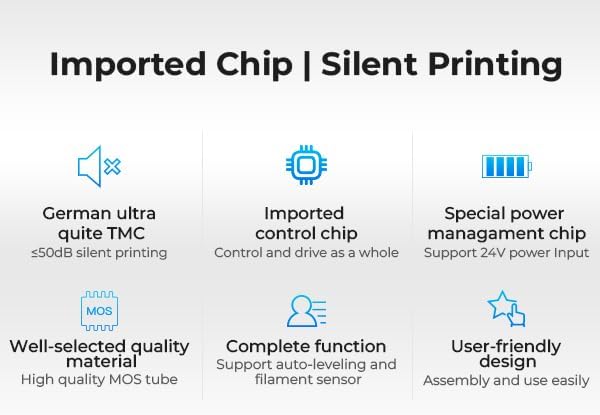
The Creality Ender 3 Silent Motherboard V4.2.7 is a 32-bit control board designed to enhance the performance and reduce the operational noise of compatible 3D printers. It features TMC2225 stepper motor drivers for precise and quiet motion control and supports both Marlin and Klipper firmware.

ചിത്രം 1: മുകളിൽ view of the Creality Ender 3 Silent Motherboard V4.2.7, showing the main components and connection ports.
2. സുരക്ഷാ മുൻകരുതലുകൾ
- Always disconnect the 3D printer from the power supply before installing or removing the motherboard.
- Ensure proper grounding to prevent electrostatic discharge (ESD) which can damage electronic components.
- Double-check that the positive and negative terminals of the power supply are correctly connected to the motherboard before powering on. Incorrect connection can cause severe damage to the board and printer.
- Handle the motherboard by its edges to avoid touching sensitive electronic components.
3. ഇൻസ്റ്റാളേഷൻ ഗൈഡ്
3.1 Compatible Printers
This motherboard is designed for compatibility with Creality Ender-3, Ender-3 Pro, and Ender-5 series 3D printers.
ചിത്രം 2: The V4.2.7 motherboard is compatible with Ender-3, Ender-3 Pro, and Ender-5 models.
3.2 ഇൻസ്റ്റലേഷൻ ഘട്ടങ്ങൾ
- തയ്യാറാക്കൽ: Disconnect the printer from power. Carefully open the control box to access the existing motherboard.
- പ്രമാണ കണക്ഷനുകൾ: Before disconnecting any wires, take clear photos of all existing connections on your old motherboard. This will serve as a crucial reference for connecting the new board.
- പഴയ ബോർഡ് നീക്കം ചെയ്യുക: Carefully disconnect all wires and unscrew the old motherboard from its mounting points.
- പുതിയ ബോർഡ് ഇൻസ്റ്റാൾ ചെയ്യുക: Place the new Creality V4.2.7 Silent Motherboard into position and secure it with screws.
- വയറുകൾ ബന്ധിപ്പിക്കുക: Refer to your photos and the diagram below to connect all wires to their corresponding ports on the new motherboard. Pay close attention to the polarity of power connections and the orientation of stepper motor and endstop cables.

ചിത്രം 3: Connection diagram for the V4.2.7 motherboard, highlighting ports for power, motors, display, auto-leveling, and filament detection.
- Power Connection Safety: Before closing the control box and powering on, perform a final check of the power supply connections to ensure correct polarity.
- പ്രാരംഭ പവർ-അപ്പ്: Power on the printer. The board comes pre-installed with Ender-3 firmware, which should allow for basic functionality. However, firmware updates may be necessary for specific printer configurations or desired features.
4. പ്രവർത്തന നിർദ്ദേശങ്ങൾ
4.1 Firmware Compatibility
The V4.2.7 motherboard supports both Marlin and Klipper firmware. Users can switch between these options by flashing the appropriate firmware.
4.2 ഫേംവെയർ ഫ്ലാഷിംഗ്
ഫേംവെയർ അപ്ഡേറ്റ് ചെയ്യാനോ മാറ്റാനോ:
- Visit the official Creality website and navigate to the 'Downloads' section, then 'Firmware'.
- Select your specific 3D printer model (e.g., Ender-3, Ender-3 Pro, Ender-5) and the V4.2.7 board version.
- ശരിയായ ഫേംവെയർ ഡൗൺലോഡ് ചെയ്യുക file for your printer's configuration (e.g., with or without auto-bed leveling, filament detector).
- Format a microSD card (preferably 8GB or less) to FAT32.
- ഫേംവെയർ പകർത്തുക file (സാധാരണയായി ഒരു .bin file) to the root directory of the microSD card. Ensure it is the only .bin file കാർഡിൽ.
- Insert the microSD card into the motherboard's slot.
- Power on the printer. The motherboard will automatically detect and flash the new firmware. This process usually takes a few seconds.
- Once complete, remove the microSD card. It is recommended to delete the .bin file from the card to prevent accidental re-flashing.
5. പരിപാലനം
- വൃത്തിയാക്കൽ: Periodically clean the motherboard and surrounding area to prevent dust accumulation, which can lead to overheating or short circuits. Use compressed air or a soft brush. Ensure the printer is powered off and disconnected before cleaning.
- പരിസ്ഥിതി വ്യവസ്ഥകൾ: Operate the printer in a stable environment, avoiding extreme temperatures, high humidity, or direct sunlight.
- കണക്ഷൻ സമഗ്രത: Regularly check all cable connections to the motherboard to ensure they are secure and free from damage. Loose connections can cause intermittent issues or component failure.
6. പ്രശ്നപരിഹാരം
6.1 പൊതുവായ പ്രശ്നങ്ങളും പരിഹാരങ്ങളും
- No Power / Board Dead:
- Ensure the power supply is connected correctly and providing the correct voltage.
- Verify the power cable connections to the motherboard are secure and have correct polarity.
- Check the fuse on the motherboard (if present) for continuity. - Display Shows Blue Screen / No Information:
- This often indicates incorrect or corrupted firmware. Re-flash the correct firmware for your specific printer model and board version from the official Creality webസൈറ്റ്.
- Ensure the display cable is securely connected to both the display and the motherboard. - Motors Vibrate / Ignore Endstops / Incorrect Movement:
- This is typically a firmware issue. Re-flash the correct firmware.
- Check all stepper motor and endstop wiring for correct connection and orientation. Refer to your installation photos.
- Ensure the motor drivers (TMC2225) are properly seated and functioning. - Maxtemp Error:
- This error usually indicates a problem with the hotend or heated bed thermistor. Check the thermistor wiring for breaks or loose connections.
- Ensure the thermistor is correctly seated in its hotend/bed block.
- Verify that the firmware is configured for the correct thermistor type. - Unexpected Noise During Operation:
- While this board is designed for silent operation, if you experience unusual noise, check for loose components or wires vibrating against the printer frame.
- Ensure all fans are functioning correctly and not obstructed.
7 സ്പെസിഫിക്കേഷനുകൾ
| ഫീച്ചർ | വിശദാംശങ്ങൾ |
|---|---|
| ബ്രാൻഡ് | ക്രിയാത്മകത |
| മോഡലിൻ്റെ പേര് | Ender 3 Silent Motherboard |
| ഇനം മോഡൽ നമ്പർ | Ender 3 Silent Motherboard |
| ചിപ്സെറ്റ് തരം | ടി.എം.സി 2225 |
| അനുയോജ്യമായ ഉപകരണങ്ങൾ | 3D Printer (Ender-3, Ender-3 Pro, Ender-5 series) |
| ഉൽപ്പന്ന അളവുകൾ | 5.9 x 4.52 x 1.77 ഇഞ്ച് |
| ഇനത്തിൻ്റെ ഭാരം | 4.4 ഔൺസ് |
| പ്രധാന പവർ കണക്റ്റർ തരം | 24-പിൻ |
| ഗ്രാഫിക്സ് കാർഡ് ഇൻ്റർഫേസ് | സംയോജിപ്പിച്ചത് |
| തുറമുഖങ്ങളുടെ എണ്ണം | 1 (referring to main data port, specific port count varies) |
8. വാറൻ്റിയും പിന്തുണയും
For warranty information, technical support, or service inquiries, please contact Creality customer support directly through their official website or the retailer from whom the product was purchased. Keep your proof of purchase for warranty claims.


