ആമുഖം
The Dynojet Power Vision 4 is an advanced engine management device designed to optimize the performance of your motorcycle. This device allows for flashing custom tunes to your motorcycle's Engine Control Unit (ECU) via a smartphone application, providing enhanced throttle response, improved fuel efficiency, and increased horsepower and torque. It is specifically compatible with 2021-2022 Motorcycle Touring and Softail Models.
This manual provides essential information for the proper installation, operation, and maintenance of your Power Vision 4 device. Please read it thoroughly before use to ensure safe and effective operation.
എന്താണ് ഉൾപ്പെടുത്തിയിരിക്കുന്നത്
പാക്കേജ് തുറക്കുമ്പോൾ, എല്ലാ ഘടകങ്ങളും ഉണ്ടെന്നും കേടുപാടുകൾ സംഭവിച്ചിട്ടില്ലെന്നും ഉറപ്പാക്കുക:
- Dynojet Power Vision 4 Device (PV4-15-03)
- Required Connection Cables
- ദ്രുത ആരംഭ ഗൈഡ് (വിശദമായ നിർദ്ദേശങ്ങൾക്ക് ഈ മാനുവൽ കാണുക)

Image: The Dynojet Power Vision 4 device, its connecting cables, and a smartphone screen illustrating the accompanying mobile application.
സജ്ജീകരണവും ഇൻസ്റ്റാളേഷനും
Before beginning the installation, ensure your motorcycle's ignition is off and the battery is fully charged. It is recommended to disconnect the battery's negative terminal before connecting the device.
- Download the Power Vision 4 App: ഇതിനായി തിരയുക "Dynojet Power Vision 4" in your smartphone's app store (iOS or Android) and install the application.
- ഒരു അക്കൗണ്ട് സൃഷ്ടിക്കുക: Open the app and follow the prompts to create a new Dynojet account or log in if you already have one. Account verification via email may be required.
- ഡയഗ്നോസ്റ്റിക് പോർട്ട് കണ്ടെത്തുക: On your motorcycle, locate the diagnostic port. This is typically found near the battery, under the seat, or behind a side cover. Consult your motorcycle's service manual if you cannot locate it.
- ഉപകരണം ബന്ധിപ്പിക്കുക: Connect the Power Vision 4 device to the motorcycle's diagnostic port using the provided cable. Ensure the connection is secure.
- സ്മാർട്ട്ഫോണുമായി ജോടിയാക്കുക: Turn on your motorcycle's ignition (do not start the engine). Open the Power Vision 4 app on your smartphone. The app should detect the Power Vision 4 device via Bluetooth. Follow the in-app instructions to pair the device.
- Read Stock ECU: Before flashing any new tune, it is crucial to read and save your motorcycle's stock ECU calibration. This backup is essential for returning your motorcycle to its original state if needed. The app will guide you through this process.
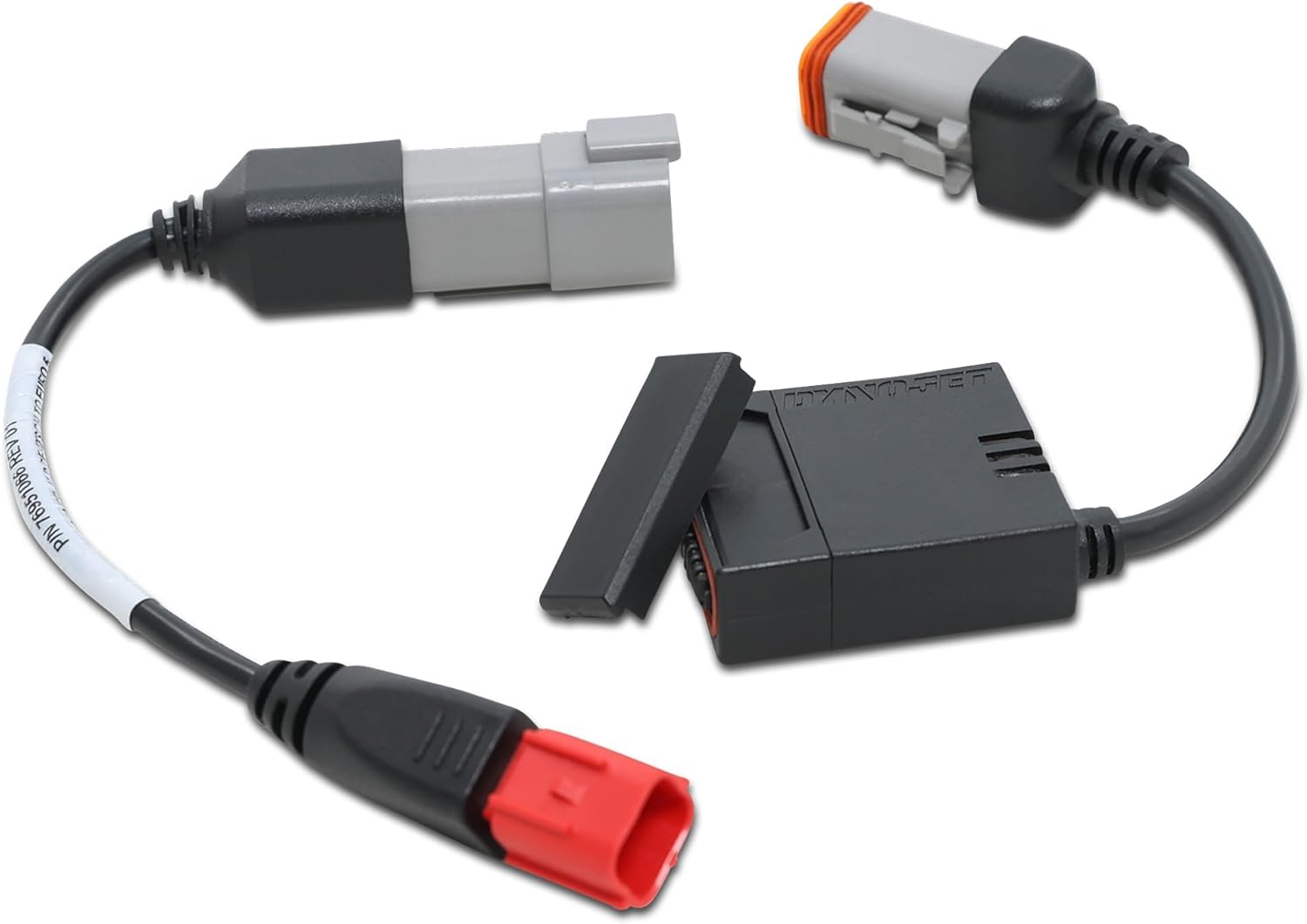
Image: The Dynojet Power Vision 4 module and its associated wiring harnesses, illustrating the components involved in connecting to the motorcycle's diagnostic port.
പ്രവർത്തന നിർദ്ദേശങ്ങൾ
Once the Power Vision 4 device is connected and paired with your smartphone, you can proceed with tuning your motorcycle.
- Select a Tune: Browse the available tunes within the Power Vision 4 app. Dynojet provides a library of pre-configured tunes for various motorcycle setups (e.g., with aftermarket exhausts, air filters). Select the tune that best matches your motorcycle's modifications.
- Flash the ECU: After selecting your desired tune, the app will prompt you to flash the ECU. Confirm your selection. The flashing process will take several minutes. Do not interrupt the process, turn off the ignition, or disconnect the device during flashing, as this can damage the ECU.
- മോണിറ്റർ പാരാമീറ്ററുകൾ: The Power Vision 4 app allows you to monitor various engine parameters in real-time, such as RPM, engine temperature, throttle position, and more. This feature is useful for diagnostics and understanding your motorcycle's performance.
- ഡയഗ്നോസ്റ്റിക് പ്രവർത്തനങ്ങൾ: The app can also read and clear Diagnostic Trouble Codes (DTCs) from your motorcycle's ECU, assisting in troubleshooting potential issues.

ചിത്രം: വിശദമായ ഒരു ചിത്രം view of the Dynojet Power Vision 4 module, highlighting its connection port and compact form factor.
മെയിൻ്റനൻസ്
The Dynojet Power Vision 4 device requires minimal maintenance to ensure its longevity and proper function.
- സംഭരണം: When not in use, store the device and cables in a clean, dry place away from extreme temperatures, direct sunlight, and moisture.
- വൃത്തിയാക്കൽ: Wipe the device and cables with a soft, dry cloth. Do not use harsh chemicals or abrasive cleaners.
- കേബിൾ പരിശോധന: Periodically inspect the connection cables for any signs of wear, fraying, or damage. Replace damaged cables immediately.
- സോഫ്റ്റ്വെയർ അപ്ഡേറ്റുകൾ: Regularly check the Power Vision 4 app for software and firmware updates. Keeping the app and device firmware updated ensures optimal performance and access to the latest features and tunes.
ട്രബിൾഷൂട്ടിംഗ്
If you encounter issues with your Power Vision 4, refer to the following common problems and solutions:
| പ്രശ്നം | സാധ്യമായ കാരണം | പരിഹാരം |
|---|---|---|
| Device not connecting to app. | Bluetooth off, device not powered, app not updated, incorrect pairing. | Ensure Bluetooth is on. Verify device is connected to motorcycle and ignition is on. Update app. Re-pair device in app settings. |
| Error during ECU flash. | Interruption during flash, low battery voltage, incorrect tune selected. | Ensure stable connection and full battery. Do not interrupt. Verify tune compatibility. Contact Dynojet support if persistent. |
| Motorcycle performance issues after flashing. | Incorrect tune for modifications, incomplete flash, underlying mechanical issue. | Ensure correct tune is applied. Re-flash the tune. If issues persist, re-flash the stock tune and consult a qualified mechanic. |
| ആപ്പ് ക്രാഷാകുന്നു അല്ലെങ്കിൽ മരവിക്കുന്നു. | Outdated app version, insufficient phone memory, software bug. | Update the app. Close other applications. Restart your phone. Reinstall the app if necessary. |
For issues not covered here, or for advanced troubleshooting, please contact Dynojet technical support.
സ്പെസിഫിക്കേഷനുകൾ
| ഫീച്ചർ | വിശദാംശങ്ങൾ |
|---|---|
| മോഡൽ നമ്പർ | PV4-15-03 |
| അനുയോജ്യത | 2021-2022 Motorcycle Touring & Softail Models |
| നിർമ്മാതാവ് | ഡൈനോജെറ്റ് |
| ഇനത്തിൻ്റെ ഭാരം | 4.4 ഔൺസ് |
| പാക്കേജ് അളവുകൾ | 7.48 x 3.98 x 2.6 ഇഞ്ച് |
| കണക്റ്റിവിറ്റി | ബ്ലൂടൂത്ത് (സ്മാർട്ട്ഫോൺ ആപ്പിലേക്ക്) |
| പ്രവർത്തനക്ഷമത | ECU Flashing, Real-time Parameter Monitoring, DTC Reading/Clearing |
വാറൻ്റിയും പിന്തുണയും
Dynojet products are manufactured to high standards and are typically backed by a manufacturer's warranty against defects in materials and workmanship. For specific warranty terms and conditions, please refer to the warranty information provided with your product packaging or visit the official Dynojet webസൈറ്റ്.
For technical assistance, product support, or warranty claims, please contact Dynojet customer service directly. Contact information can usually be found on their official webസൈറ്റിലോ ഉൽപ്പന്നത്തിന്റെ ക്വിക്ക് സ്റ്റാർട്ട് ഗൈഡിലോ.
- ഓൺലൈൻ ഉറവിടങ്ങൾ: Visit the Dynojet webപതിവുചോദ്യങ്ങൾ, പിന്തുണാ ലേഖനങ്ങൾ, സോഫ്റ്റ്വെയർ ഡൗൺലോഡുകൾ എന്നിവയ്ക്കുള്ള സൈറ്റ്.
- സാങ്കേതിക സഹായം: Contact Dynojet technical support for personalized assistance with installation, tuning, or troubleshooting.


