1. ആമുഖം
Thank you for choosing the iKF R1 Wireless Bluetooth Headphones. These headphones combine retro aesthetics with modern technology, offering a lightweight design, extended battery life, and dual device connectivity. This manual provides essential information to help you set up, operate, and maintain your headphones for the best possible experience.
ബോക്സിൽ എന്താണുള്ളത്
- iKF R1 Headphones x1
- ഉപയോക്തൃ മാനുവൽ x1
- ചാർജിംഗ് കേബിൾ x1

Image: The iKF R1 Wireless Bluetooth Headphones in brown, showcasing their classic design.
2. ഉൽപ്പന്നം കഴിഞ്ഞുview
Familiarize yourself with the components and controls of your iKF R1 headphones.
ഹെഡ്ഫോൺ സവിശേഷതകൾ
- ക്രമീകരിക്കാവുന്ന ഹെഡ്ബാൻഡ്: സുഖകരവും സുരക്ഷിതവുമായ ഫിറ്റിംഗിനായി.
- Rotatable Ear Cups: Allows for easy storage and portability.
- ഭാരം കുറഞ്ഞ ഡിസൈൻ: Weighing approximately 90g for extended wear comfort.
- നിയന്ത്രണ ബട്ടണുകൾ: Located on the earcups for easy access to playback, calls, and mode switching.
- ബിൽറ്റ്-ഇൻ മൈക്രോഫോൺ: For clear hands-free communication.
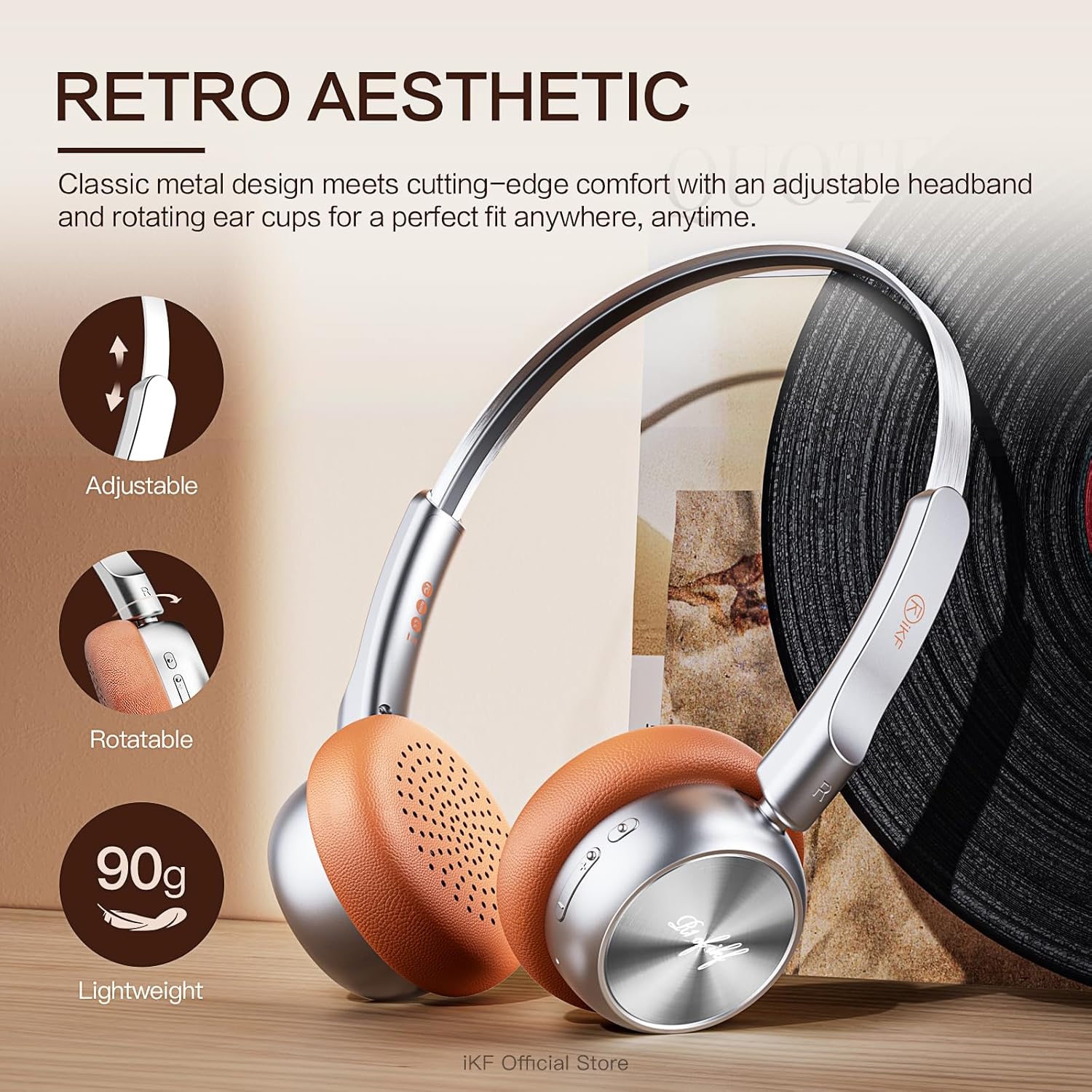
ചിത്രം: വിശദമായത് view of the iKF R1 headphones highlighting their adjustable headband, rotatable earcups, and lightweight nature.

Image: A close-up shot of the control buttons on the iKF R1 headphone earcup, indicating power, volume, and mode controls.
3. സജ്ജീകരണം
ഹെഡ്ഫോണുകൾ ചാർജ് ചെയ്യുന്നു
Before first use, fully charge your iKF R1 headphones. A full charge provides up to 60 hours of playback.
- നൽകിയിരിക്കുന്ന ചാർജിംഗ് കേബിൾ ഹെഡ്ഫോണുകളിലെ ചാർജിംഗ് പോർട്ടുമായി ബന്ധിപ്പിക്കുക.
- കേബിളിന്റെ മറ്റേ അറ്റം ഒരു USB പവർ സ്രോതസ്സുമായി ബന്ധിപ്പിക്കുക (ഉദാ: കമ്പ്യൂട്ടർ USB പോർട്ട്, വാൾ അഡാപ്റ്റർ).
- ഇൻഡിക്കേറ്റർ ലൈറ്റ് ചാർജിംഗ് സ്റ്റാറ്റസ് കാണിക്കുകയും പൂർണ്ണമായി ചാർജ് ചെയ്യുമ്പോൾ അത് ഓഫാക്കുകയോ നിറം മാറ്റുകയോ ചെയ്യും.

Image: The iKF R1 headphones with a visual representation of their 60-hour battery life, emphasizing extended playtime.
ബ്ലൂടൂത്ത് ജോടിയാക്കൽ
Pair your headphones with your device to enjoy wireless audio.
- ഹെഡ്ഫോണുകൾ ചാർജ് ചെയ്തിട്ടുണ്ടെന്നും പവർ ഓഫ് ചെയ്തിട്ടുണ്ടെന്നും ഉറപ്പാക്കുക.
- ജോടിയാക്കൽ മോഡ് സൂചിപ്പിക്കുന്ന ഇൻഡിക്കേറ്റർ ലൈറ്റ് മിന്നുന്നതുവരെ പവർ ബട്ടൺ അമർത്തിപ്പിടിക്കുക.
- നിങ്ങളുടെ ഉപകരണത്തിൽ (സ്മാർട്ട്ഫോൺ, ടാബ്ലെറ്റ്, കമ്പ്യൂട്ടർ), ബ്ലൂടൂത്ത് പ്രവർത്തനക്ഷമമാക്കി ലഭ്യമായ ഉപകരണങ്ങൾക്കായി തിരയുക.
- Select "iKF R1" from the list of found devices.
- Once connected, the indicator light will stop flashing or change to a steady color.
ഡ്യുവൽ ഡിവൈസ് കണക്റ്റിവിറ്റി
The iKF R1 headphones support simultaneous connection to two devices, allowing seamless switching between them.
- മുകളിൽ വിവരിച്ചതുപോലെ ഹെഡ്ഫോണുകൾ ആദ്യത്തെ ഉപകരണവുമായി ജോടിയാക്കുക.
- ആദ്യത്തെ ഉപകരണത്തിന്റെ ബ്ലൂടൂത്ത് ക്രമീകരണങ്ങളിൽ നിന്ന് ഹെഡ്ഫോണുകൾ വിച്ഛേദിക്കുക (പെയർ അൺപെയർ ചെയ്യരുത്).
- Put the headphones back into pairing mode and connect to the second device.
- ബ്ലൂടൂത്ത് ക്രമീകരണങ്ങളിൽ നിന്ന് ആദ്യത്തെ ഉപകരണത്തിലേക്ക് ഹെഡ്ഫോണുകൾ വീണ്ടും ബന്ധിപ്പിക്കുക.
- The headphones are now connected to both devices. Audio will automatically switch to the device playing content.

Image: The iKF R1 headphones positioned between a laptop and a smartphone, illustrating their dual device connectivity feature.
4. പ്രവർത്തന നിർദ്ദേശങ്ങൾ
അടിസ്ഥാന നിയന്ത്രണങ്ങൾ
| ഫംഗ്ഷൻ | ആക്ഷൻ |
|---|---|
| പവർ ഓൺ/ഓഫ് | പവർ ബട്ടൺ അമർത്തിപ്പിടിക്കുക. |
| പ്ലേ/താൽക്കാലികമായി നിർത്തുക | മൾട്ടി-ഫംഗ്ഷൻ ബട്ടൺ ഒരിക്കൽ അമർത്തുക. |
| വോളിയം കൂട്ടുക/താഴ്ത്തുക | Press the Volume + / - buttons. |
| അടുത്ത ട്രാക്ക് | Press and hold Volume + button. |
| മുമ്പത്തെ ട്രാക്ക് | Press and hold Volume - button. |
| ഉത്തരം / കോൾ അവസാനിപ്പിക്കുക | ഒരു കോൾ സമയത്ത് മൾട്ടി-ഫംഗ്ഷൻ ബട്ടൺ ഒരിക്കൽ അമർത്തുക. |
| കോൾ നിരസിക്കുക | മൾട്ടി-ഫംഗ്ഷൻ ബട്ടൺ അമർത്തിപ്പിടിക്കുക. |
| വോയ്സ് അസിസ്റ്റൻ്റ് സജീവമാക്കുക | മൾട്ടി-ഫംഗ്ഷൻ ബട്ടൺ ഇരട്ട-അമർത്തുക. |
സുതാര്യമായ മോഡ്
The transparent mode allows you to hear your surroundings without removing your headphones, enhancing safety and convenience.
- സജീവമാക്കുക: Press the dedicated Transparent Mode button (refer to product diagram for location).
- നിർജ്ജീവമാക്കുക: Press the Transparent Mode button again.

Image: A person wearing the iKF R1 headphones, illustrating the 'Stay Aware, Stay Safe' feature, which allows ambient sounds to be heard.
Professional Gaming Mode
Optimize your gaming experience with ultra-low latency (38ms) for synchronized audio and visuals.
- സജീവമാക്കുക: Refer to the iKF app or specific button combination (usually a triple-press of the Multi-function button or a dedicated button).
- നിർജ്ജീവമാക്കുക: Repeat the activation action.
ആപ്പ് ഇഷ്ടാനുസൃതമാക്കൽ
Download the iKF app to unlock additional features and customize your audio experience.
- സമനില ക്രമീകരണങ്ങൾ ക്രമീകരിക്കുക.
- ഫേംവെയർ അപ്ഡേറ്റ് ചെയ്യുക.
- ഉപകരണ കണക്ഷനുകൾ നിയന്ത്രിക്കുക.

Image: The iKF R1 headphones alongside a smartphone, showcasing the dedicated iKF app for customization and control.
5. പരിപാലനം
വൃത്തിയാക്കൽ
- മൃദുവായതും ഉണങ്ങിയതും ലിന്റ് രഹിതവുമായ തുണി ഉപയോഗിച്ച് ഹെഡ്ഫോണുകൾ തുടയ്ക്കുക.
- അബ്രാസീവ് ക്ലീനറുകൾ, ആൽക്കഹോൾ, കെമിക്കൽ ലായകങ്ങൾ എന്നിവ ഉപയോഗിക്കരുത്.
- ചാർജിംഗ് പോർട്ട് പൊടിയും അവശിഷ്ടങ്ങളും ഇല്ലാതെ സൂക്ഷിക്കുക.
സംഭരണം
- നേരിട്ടുള്ള സൂര്യപ്രകാശത്തിൽ നിന്നും കടുത്ത താപനിലയിൽ നിന്നും മാറി തണുത്തതും വരണ്ടതുമായ സ്ഥലത്ത് ഹെഡ്ഫോണുകൾ സൂക്ഷിക്കുക.
- ദീർഘനേരം ഉപയോഗിക്കാത്തപ്പോൾ, ബാറ്ററിയുടെ ആരോഗ്യം നിലനിർത്താൻ ഹെഡ്ഫോണുകൾ കുറച്ച് മാസത്തിലൊരിക്കൽ ചാർജ് ചെയ്യുക.
6. പ്രശ്നപരിഹാരം
| പ്രശ്നം | സാധ്യമായ പരിഹാരം |
|---|---|
| ഹെഡ്ഫോണുകൾ ഓണാകില്ല. | Ensure the headphones are fully charged. Press and hold the power button for a few seconds. |
| ഉപകരണവുമായി ജോടിയാക്കാൻ കഴിയില്ല. | Ensure headphones are in pairing mode. Turn off and on Bluetooth on your device. Move headphones closer to the device. Clear previous Bluetooth connections on your device. |
| ശബ്ദമില്ല അല്ലെങ്കിൽ കുറഞ്ഞ ശബ്ദമില്ല. | Check volume levels on both headphones and connected device. Ensure headphones are properly paired. Try playing different audio sources. |
| Sound cutting in/out. | Move closer to the connected device. Avoid strong electromagnetic interference. Disconnect and reconnect Bluetooth. |
| മൈക്രോഫോൺ പ്രവർത്തിക്കുന്നില്ല. | Ensure the headphones are selected as the input device in your device's audio settings. Check for any mute functions. |
7 സ്പെസിഫിക്കേഷനുകൾ
| ഫീച്ചർ | വിശദാംശങ്ങൾ |
|---|---|
| മോഡലിൻ്റെ പേര് | iKF R1 |
| കണക്റ്റിവിറ്റി ടെക്നോളജി | വയർലെസ് (ബ്ലൂടൂത്ത്) |
| ബ്ലൂടൂത്ത് പതിപ്പ് | 5.3 |
| ബ്ലൂടൂത്ത് ശ്രേണി | 10 മീറ്റർ |
| ബാറ്ററി ലൈഫ് | 75 മണിക്കൂർ വരെ (പ്ലേബാക്ക്) |
| ഓഡിയോ ലേറ്റൻസി | 38 മില്ലിസെക്കൻഡ് (ഗെയിമിംഗ് മോഡ്) |
| ഓഡിയോ ഡ്രൈവർ വലിപ്പം | 30 മില്ലിമീറ്റർ |
| ഫ്രീക്വൻസി റേഞ്ച് | 20 Hz മുതൽ 20,000 Hz വരെ |
| പ്രതിരോധം | 32 ഓം |
| ശബ്ദ നിയന്ത്രണം | നിഷ്ക്രിയ ശബ്ദം റദ്ദാക്കൽ |
| നിയന്ത്രണ തരം | ബട്ടൺ നിയന്ത്രണം, ആപ്പ് നിയന്ത്രണം |
| ഇനത്തിൻ്റെ ഭാരം | 7.4 ഔൺസ് |
| ഉൽപ്പന്ന അളവുകൾ | 7.09 x 6.1 x 3.15 ഇഞ്ച് |
8. വാറൻ്റിയും പിന്തുണയും
For warranty information and customer support, please refer to the official iKF website or contact the seller directly. Keep your purchase receipt for warranty claims.
ഈ ഉപയോക്തൃ മാനുവലിന്റെ ഡിജിറ്റൽ പതിപ്പ് ഡൗൺലോഡ് ചെയ്യാൻ ലഭ്യമാണ്: ഉപയോക്തൃ മാനുവൽ (PDF)
For further assistance, you may contact the iKF Official Store where the product was purchased.


