1. ആമുഖം
The Tapo T315 Smart Temperature and Humidity Monitor provides accurate, real-time environmental data for your home. This device features a 2.7-inch E-Ink display and a Swiss-made sensor for reliable measurements. It requires a Tapo Hub H100 (sold separately) and connects via a secured 2.4 GHz Wi-Fi network. This manual outlines the product's features, setup, operation, and maintenance to ensure optimal performance.

ചിത്രം: മുൻഭാഗം view of the Tapo T315 Smart Temperature and Humidity Monitor displaying temperature and humidity readings.
2. പാക്കേജ് ഉള്ളടക്കം
നിങ്ങളുടെ പാക്കേജിൽ എല്ലാ ഇനങ്ങളും ഉണ്ടെന്ന് ഉറപ്പാക്കുക:
- Tapo T315 Smart Temperature and Humidity Monitor × 1
- AAA/LR03 Battery × 2
- 3M പശ × 1
- ദ്രുത ആരംഭ ഗൈഡ് × 1

Image: The Tapo T315 product packaging, showing the monitor and listed accessories.
3. ഉൽപ്പന്നം കഴിഞ്ഞുview
The Tapo T315 is designed for efficient environmental monitoring with key features highlighted below:
- 2.7" E-Ink Display: Provides clear, sharp visuals with a wide viewing angle and no screen glare, even in bright sunlight. It displays temperature, humidity, comfort level, battery status, and signal strength.
- High-Accuracy Swiss-Made Sensor: Monitors temperature and humidity with an accuracy of ±0.54°F and ±3% RH, updating data every 2 seconds.
- ദീർഘകാല ബാറ്ററി: Operates on two AAA batteries (included) for up to 2 years under normal use conditions.
- Tapo App Integration: Connects to the Tapo app via a Tapo Hub (H100, sold separately) for real-time notifications, data logging, and smart home automation.

Image: Close-up of the Tapo T315 display highlighting features like reflective, clear, wide view, and glare-free E-Ink technology.

ചിത്രം: ആന്തരികം view of the Tapo T315 circuit board, showing the Swiss-made high-accuracy sensor.
4. സജ്ജീകരണം
To set up your Tapo T315 monitor, follow these steps:
- ബാറ്ററികൾ ഇൻസ്റ്റാൾ ചെയ്യുക: Open the battery compartment on the back of the device and insert the two AAA batteries provided. Ensure correct polarity.
- Download the Tapo App: Download the Tapo app from the App Store (iOS) or Google Play Store (Android). You can also visit tapo.com/app/download-app/.
- Tapo Hub Required: The Tapo T315 requires a Tapo Hub H100 (sold separately) to function. Ensure your Tapo Hub is already set up and connected to your 2.4 GHz Wi-Fi network.
- ആപ്പിൽ ഉപകരണം ചേർക്കുക: Open the Tapo app, tap the '+' icon to add a new device, and select the Tapo T315 from the list. Follow the on-screen instructions to pair the monitor with your Tapo Hub.

Image: The battery compartment of the Tapo T315, showing two AAA batteries inserted.
5. പ്രവർത്തന നിർദ്ദേശങ്ങൾ
5.1 വിവരങ്ങൾ പ്രദർശിപ്പിക്കുക
The 2.7-inch E-Ink display shows the following information:
- താപനില: Current temperature reading in °F or °C.
- ഈർപ്പം: Current relative humidity reading in %.
- കംഫർട്ട് ലെവൽ ഇൻഡിക്കേറ്റർ: A small icon (e.g., smiley face) indicating the comfort level based on temperature and humidity.
- ബാറ്ററി നില: An icon showing the remaining battery life.
- സിഗ്നൽ ശക്തി: An icon indicating the connection strength to the Tapo Hub.
Image: The Tapo T315 display showing temperature, humidity, and a comfort level indicator (smiley face).
5.2 Using the Tapo App
The Tapo app provides advanced functionalities for your monitor:
- തത്സമയ നിരീക്ഷണം: View current temperature and humidity from anywhere.
- അറിയിപ്പുകൾ: Set custom temperature and humidity ranges to receive instant alerts when conditions fall outside your preferred limits.
- Data Logging and Export: Access historical data and visual graphs of temperature and humidity trends. You can export up to 2 years of data for free.
- Smart Actions: Integrate the T315 with other Tapo smart devices to create automated routines (e.g., turn on a heater if temperature drops).
- ഉപകരണം പങ്കിടൽ: Share access to the monitor's data with family members through the app.

Image: A smartphone screen displaying the Tapo app interface, showing real-time temperature and humidity graphs.

Image: A smartphone displaying a Tapo app notification alert for "Too Warm!" conditions.

Image: A smartphone screen showing the Tapo app's data export interface, allowing users to send data via email.
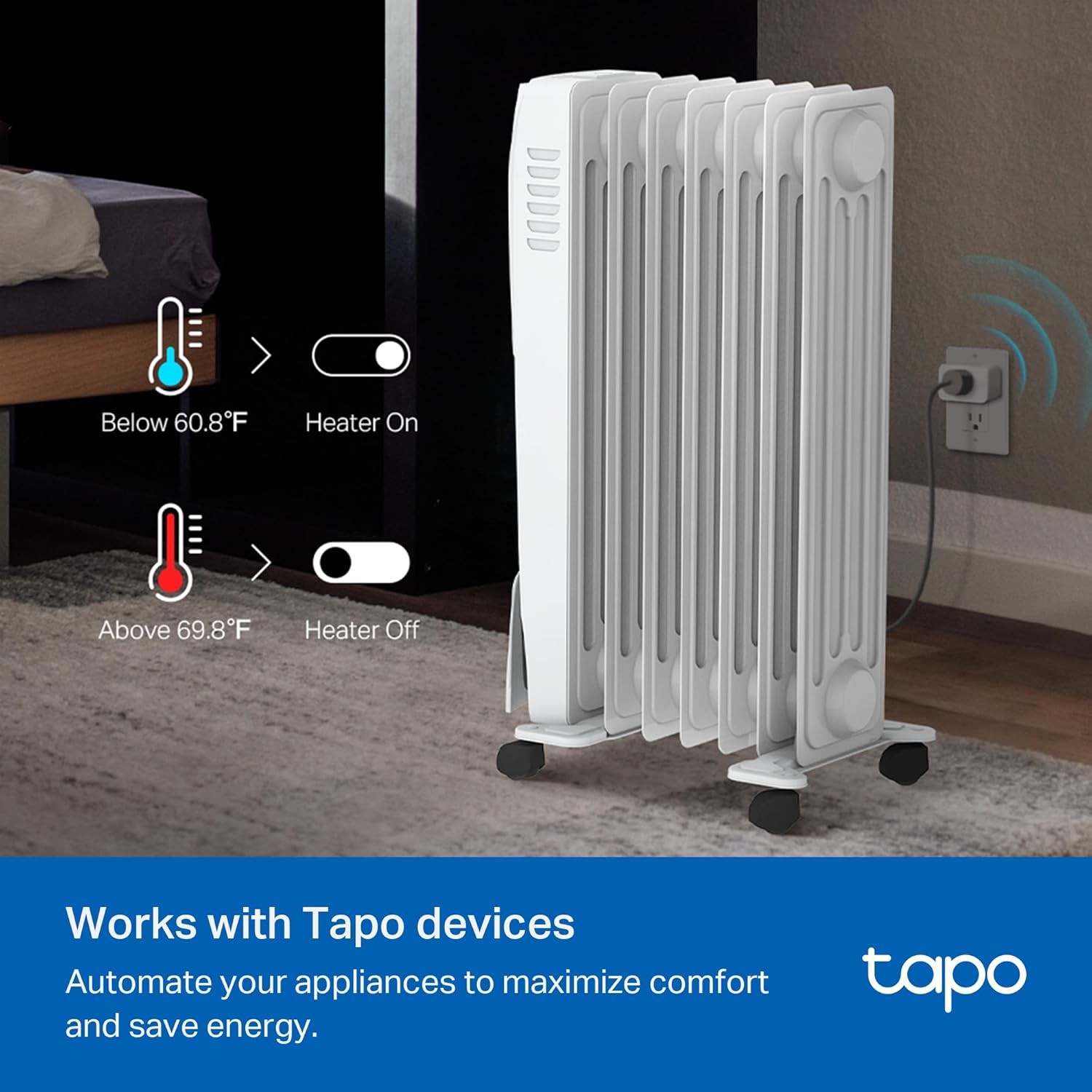
Image: An illustration demonstrating smart automation with Tapo devices, showing a heater turning on/off based on temperature readings from the T315.
6. ഇൻസ്റ്റാളേഷനും പ്ലേസ്മെന്റും
The Tapo T315 offers flexible placement options:
- ഫ്രീസ്റ്റാൻഡിംഗ്: Place the monitor on any flat surface, such as a table, shelf, or desk.
- മതിൽ ഘടിപ്പിച്ചത്: Use the included 3M adhesive to attach the monitor to a wall or other vertical surface. Ensure the surface is clean and dry before application.
- കാന്തിക അറ്റാച്ച്മെൻ്റ്: The device features a magnetic back, allowing it to be attached to metallic surfaces like refrigerators or metal shelves.
For accurate readings, place the monitor away from direct sunlight, heat sources, or drafts.

Image: Multiple placement examples for the Tapo T315, including on a nightstand, mounted on a wall, and attached to a refrigerator.
7. പരിപാലനം
7.1 ബാറ്ററി മാറ്റിസ്ഥാപിക്കൽ
When the battery indicator on the display or in the Tapo app shows low battery, replace the AAA batteries:
- Gently open the battery compartment cover on the back of the device.
- പഴയ AAA ബാറ്ററികൾ നീക്കം ചെയ്യുക.
- ശരിയായ പോളാരിറ്റി (+ ഉം - ഉം) ഉറപ്പാക്കിക്കൊണ്ട് രണ്ട് പുതിയ AAA ബാറ്ററികൾ ഇടുക.
- ബാറ്ററി കമ്പാർട്ട്മെൻ്റ് കവർ സുരക്ഷിതമായി അടയ്ക്കുക.
കുറിപ്പ്: Battery life is approximately 2 years under normal usage conditions. Actual battery life may vary.
7.2 വൃത്തിയാക്കൽ
മൃദുവായതും ഉണങ്ങിയതുമായ തുണി ഉപയോഗിച്ച് ഉപകരണം തുടയ്ക്കുക. ലിക്വിഡ് ക്ലീനറുകളോ ഉരച്ചിലുകളുള്ള വസ്തുക്കളോ ഉപയോഗിക്കരുത്.
8. പ്രശ്നപരിഹാരം
- Device not connecting to Tapo Hub:
- Ensure the Tapo Hub H100 is powered on and connected to your 2.4 GHz Wi-Fi network.
- Make sure the monitor is within range of the Tapo Hub.
- Check the batteries in the T315 monitor.
- Verify that both the Tapo Hub and T315 monitor are from the same regional version (e.g., US devices with US hub).
- കൃത്യമല്ലാത്ത വായനകൾ:
- Ensure the monitor is not placed near direct heat sources, cold drafts, or in direct sunlight.
- Allow the device some time to stabilize after initial setup or relocation.
- Compare readings with another calibrated device if available.
- Display not updating:
- ബാറ്ററി ലെവൽ പരിശോധിക്കുക. കുറവാണെങ്കിൽ ബാറ്ററികൾ മാറ്റി വയ്ക്കുക.
- Ensure the device is connected to the Tapo Hub.
9 സ്പെസിഫിക്കേഷനുകൾ
| മോഡൽ | തപോ T315 |
| അളവുകൾ | 2.53"W x 2.7"H (64.26mm x 68.58mm) |
| ഭാരം | 0.08 കിലോഗ്രാം (2.82 ഔൺസ്) |
| പ്രദർശിപ്പിക്കുക | 2.7" E-Ink |
| താപനില കൃത്യത | ± 0.54 ° F (± 0.3 ° C) |
| ഈർപ്പം കൃത്യത | ±3% RH |
| പവർ ഉറവിടം | 2 × AAA/LR03 Batteries (included) |
| ബാറ്ററി ലൈഫ് | 2 വർഷം വരെ (സാധാരണ ഉപയോഗം) |
| കണക്റ്റിവിറ്റി | Sub-1G Low-Power Wireless (requires Tapo Hub H100) |
| പ്രവർത്തന താപനില | -20°C to 60°C (32°F to 140°F) - Note: E-Ink screen displays temperature from 0 to 50°C (32 to 122°F). |
| പ്രവർത്തന ഹ്യുമിഡിറ്റി | 0% മുതൽ 99% വരെ RH |
| നിർമ്മാതാവ് | ടിപി-ലിങ്ക് |
10. വാറൻ്റിയും പിന്തുണയും
For technical support, warranty information, and further assistance, please contact Tapo customer support:
- ഫോൺ: (866) 225-8139
- Webസൈറ്റ്: myproducts.tp-link.com/us (www.myproducts.tp-link.com) എന്ന വിലാസത്തിൽ നിന്നും നിങ്ങൾക്ക് ഏറ്റവും പുതിയ വിവരങ്ങൾ ലഭിക്കും.
- ഇമെയിൽ: support.USA@tp-link.com
Please have your product model (Tapo T315) and purchase information ready when contacting support.


