1. ആമുഖം
This manual provides instructions for the installation, operation, and maintenance of your STRONG Powerline 600 Kit. This kit allows you to extend your internet connection through your home's electrical wiring, providing high-speed network access in any room without additional cables.

Image 1.1: The STRONG Powerline 600 Kit, showing two CPL adapters. One adapter features an Ethernet port and a pass-through power socket, while the other is a standard CPL adapter with LED indicators.
2. പാക്കേജ് ഉള്ളടക്കം
നിങ്ങളുടെ പാക്കേജിൽ എല്ലാ ഇനങ്ങളും ഉണ്ടെന്ന് ഉറപ്പാക്കുക:
- 1x STRONG Powerline 600 CPL Adapter with pass-through power socket (16A Max) and Ethernet port
- 1x STRONG Powerline 600 CPL Adapter
- 2x Ethernet network cables
- 1x ഉപയോക്തൃ മാനുവൽ (ഈ പ്രമാണം)
- 1x Warranty Card (24 months)

Image 2.1: Retail packaging for the STRONG Powerline 600 Kit, illustrating the contents and key features.
3. സജ്ജീകരണം
The STRONG Powerline 600 Kit is designed for quick and easy installation (Plug & Play).
3.1 പ്രാരംഭ കണക്ഷൻ
- Connect the first CPL adapter: Plug one Powerline adapter into a wall power outlet near your internet router. Connect an Ethernet cable from your router to the Ethernet port on this Powerline adapter.
- Connect the second CPL adapter: Plug the second Powerline adapter into a wall power outlet in the room where you need internet access.
- നിങ്ങളുടെ ഉപകരണം ബന്ധിപ്പിക്കുക: Use the second Ethernet cable to connect your computer, smart TV, gaming console, or other network device to the Ethernet port on the second Powerline adapter.
The adapters should automatically detect each other and establish a secure connection. The Powerline LED indicator on both adapters should turn solid green, indicating a successful connection.

Image 3.1: Visual guide for connecting the Powerline adapters. Step 1 shows connecting an adapter to the internet box, Step 2 shows plugging the second adapter into another room, and Step 3 shows connecting a device to the second adapter.
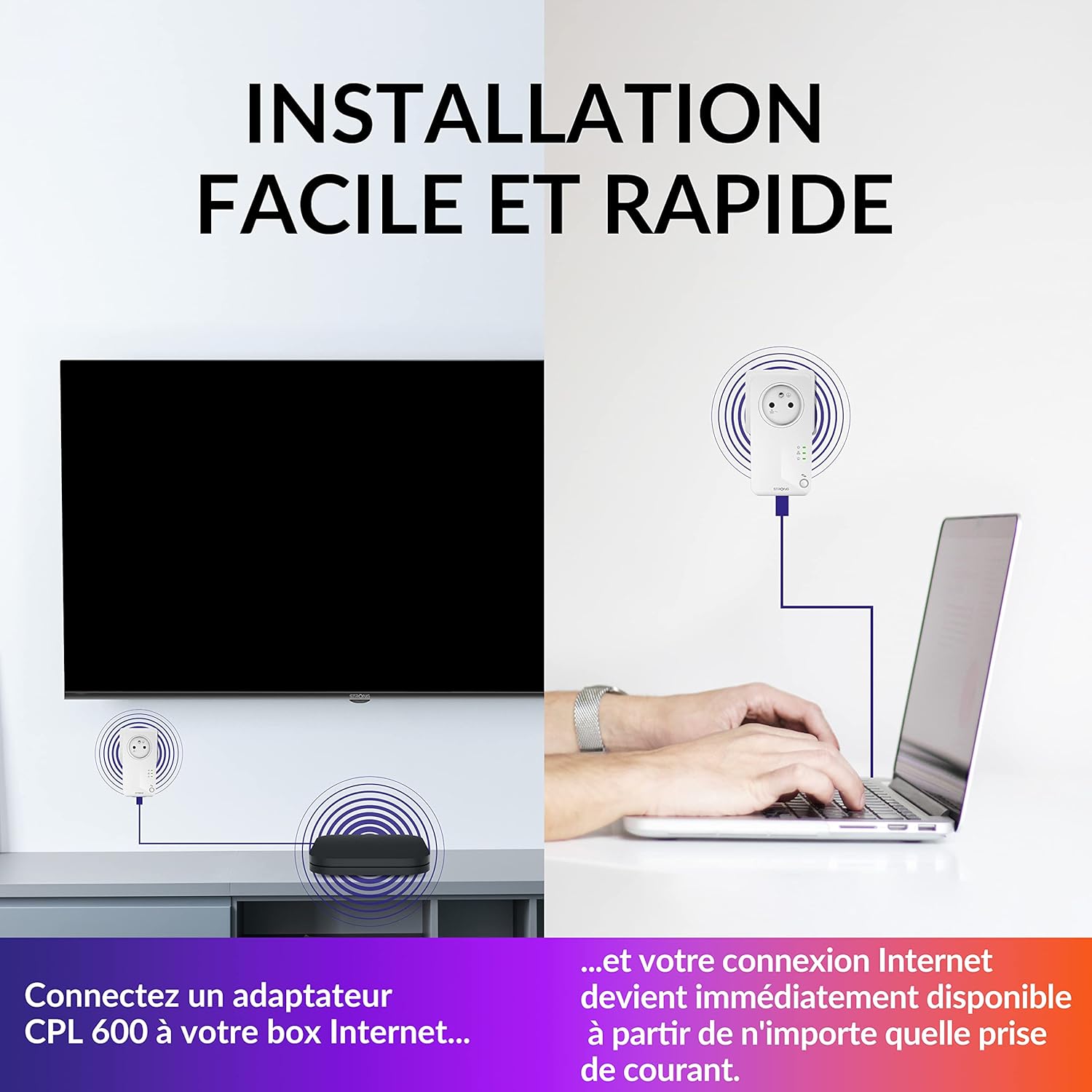
Image 3.2: Illustration of the simple installation process, showing one adapter connected to a router and another connected to a laptop, providing immediate internet access.
3.2 പ്രധാന പരിഗണനകൾ
- For optimal performance, plug the Powerline adapters directly into wall outlets. Avoid using power strips, surge protectors, or extension cords, as these can interfere with the Powerline signal.
- The integrated pass-through power socket on one adapter allows you to connect other electrical devices without losing a power outlet. This socket is filtered to prevent interference with the Powerline signal.

Image 3.3: Diagram showing the Powerline adapter with an integrated pass-through power socket, allowing other devices like a TV, computer, or tablet to be connected without losing the wall outlet.
4. ഓപ്പറേഷൻ
4.1 LED സൂചകങ്ങൾ
Each Powerline adapter has LED indicators to show its status:
- പവർ എൽഇഡി: Indicates if the adapter is powered on.
- Powerline LED: Indicates the status of the Powerline connection.
- Solid Green: Good connection.
- Flashing Green: Data transfer.
- Off: No Powerline connection.
- ഇഥർനെറ്റ് LED: Indicates the status of the Ethernet connection to a device.
- Solid Green: Ethernet link established.
- Flashing Green: Data transfer over Ethernet.
- Off: No Ethernet link.
4.2 Network Security (AES 128-bit Encryption)
The STRONG Powerline 600 Kit utilizes 128-bit AES encryption to secure your network connection, protecting your data from unauthorized access. This encryption is automatically established during the initial pairing process.

Image 4.1: Graphic illustrating the powerful 128-bit AES encryption used by the CPL 600 adapters for optimal network security.
4.3 പവർ സേവിംഗ് മോഡ്
The adapters feature an automatic power-saving mode that reduces power consumption by up to 85% when no data activity is detected for a certain period. This helps conserve energy and reduce operational costs.

Image 4.2: Diagram showing the automatic power-saving function, which can reduce consumption by up to 85% when the device is idle.
4.4 High-Speed Internet Connectivity
The Powerline 600 Kit provides data transfer speeds of up to 600 Mbps, suitable for streaming HD video, online gaming, and general internet browsing across your home network.

Image 4.3: Illustration depicting high-speed internet access (600 Mbps) provided by the Powerline adapter, ideal for activities like gaming.
5. പരിപാലനം
To ensure the longevity and optimal performance of your Powerline adapters, follow these simple maintenance guidelines:
- വൃത്തിയാക്കൽ: Disconnect the adapters from the power outlet before cleaning. Use a soft, dry cloth to wipe the exterior. Do not use liquid cleaners or aerosols.
- വെൻ്റിലേഷൻ: Ensure the adapters are placed in well-ventilated areas and that their ventilation slots are not obstructed.
- പരിസ്ഥിതി: Avoid exposing the adapters to extreme temperatures, humidity, or direct sunlight.
6. പ്രശ്നപരിഹാരം
If you encounter issues with your Powerline 600 Kit, refer to the following common problems and solutions:
6.1 No Powerline Connection (Powerline LED Off)
- പവർ പരിശോധിക്കുക: Ensure both adapters are securely plugged into live wall outlets.
- Avoid Power Strips: If an adapter is plugged into a power strip or extension cord, move it to a direct wall outlet.
- ഇലക്ട്രിക്കൽ സർക്യൂട്ട്: Powerline adapters must be on the same electrical circuit to communicate. If your home has multiple circuits, try plugging the adapters into outlets on the same circuit.
- പുന et സജ്ജമാക്കുക: Unplug both adapters for 10 seconds, then plug them back in.
6.2 കുറഞ്ഞ ഇന്റർനെറ്റ് വേഗത
- നേരിട്ടുള്ള കണക്ഷൻ: Ensure adapters are plugged directly into wall outlets, not power strips.
- വൈദ്യുത ഇടപെടൽ: Large electrical appliances (e.g., washing machines, refrigerators) on the same circuit can cause interference. Try moving the adapters to different outlets.
- കേബിൾ നിലവാരം: Ensure Ethernet cables are in good condition and properly connected.
- ദൂരം: While Powerline works up to 300 meters, longer distances or older/poor quality electrical wiring can reduce speed.
6.3 No Internet Access on Connected Device (Ethernet LED Off)
- Check Ethernet Cable: Ensure the Ethernet cable connecting your device to the Powerline adapter is securely plugged in at both ends.
- ഉപകരണ ക്രമീകരണങ്ങൾ: Verify your device's network settings are configured for an Ethernet connection (usually automatic).
- Powerline Connection: Ensure the Powerline LED on both adapters is solid green, indicating a successful Powerline connection.
7 സ്പെസിഫിക്കേഷനുകൾ
| ഫീച്ചർ | വിശദാംശങ്ങൾ |
|---|---|
| ബ്രാൻഡ് | ശക്തമായ |
| മോഡൽ നമ്പർ | POWERL600DUOFRV2 |
| ഡാറ്റ ട്രാൻസ്ഫർ വേഗത | Up to 600 Megabits per second (Mbps) |
| ഹാർഡ്വെയർ ഇന്റർഫേസ് | ഇഥർനെറ്റ് |
| ഡാറ്റ ലിങ്ക് പ്രോട്ടോക്കോൾ | Ethernet, Gigabit Ethernet |
| അനുയോജ്യമായ ഉപകരണങ്ങൾ | European power outlets |
| സുരക്ഷ | 128- ബിറ്റ് AES എൻക്രിപ്ഷൻ |
| പവർ സേവിംഗ് | Automatic, up to 85% reduction |
| അളവുകൾ (ഓരോ അഡാപ്റ്ററിനും) | Approximately 10l x 10w x 10h millimeters (excluding plug) |
| Weight (total kit) | 580 ഗ്രാം |
8. വാറൻ്റിയും പിന്തുണയും
8.1 വാറൻ്റി വിവരങ്ങൾ
The STRONG Powerline 600 Kit comes with a 24 മാസ വാറൻ്റി വാങ്ങിയ തീയതി മുതൽ. വാറന്റി ക്ലെയിമുകൾക്കായി നിങ്ങളുടെ വാങ്ങിയതിന്റെ തെളിവ് സൂക്ഷിക്കുക. സാധാരണ ഉപയോഗ സാഹചര്യങ്ങളിൽ നിർമ്മാണ വൈകല്യങ്ങളും തകരാറുകളും വാറന്റി ഉൾക്കൊള്ളുന്നു. ദുരുപയോഗം, അപകടങ്ങൾ, അനധികൃത പരിഷ്കാരങ്ങൾ അല്ലെങ്കിൽ അനുചിതമായ ഇൻസ്റ്റാളേഷൻ എന്നിവ മൂലമുണ്ടാകുന്ന നാശനഷ്ടങ്ങൾക്ക് ഇത് പരിരക്ഷ നൽകുന്നില്ല.
8.2 സാങ്കേതിക പിന്തുണ
For technical assistance, troubleshooting beyond this manual, or warranty inquiries, please contact Strong customer support. Refer to the warranty card included in your package or visit the official Strong webബന്ധപ്പെടാനുള്ള വിശദാംശങ്ങൾക്കും കൂടുതൽ പിന്തുണാ ഉറവിടങ്ങൾക്കുമായി സൈറ്റ്.
നിങ്ങൾക്ക് സന്ദർശിക്കാനും കഴിയും Strong Brand Store on Amazon കൂടുതൽ ഉൽപ്പന്ന വിവരങ്ങൾക്ക്.


