1. ഉൽപ്പന്നം കഴിഞ്ഞുview
The Cisco CBS350-8FP-2G 8-Port Gigabit PoE+ Ethernet Managed Switch is designed to provide a robust and reliable network foundation for small and medium-sized businesses. This smart switch offers advanced security features, Layer 2/3 capabilities, and Power over Ethernet Plus (PoE+) to power compatible devices such as IP phones, wireless access points, and IP cameras directly through the network cable.
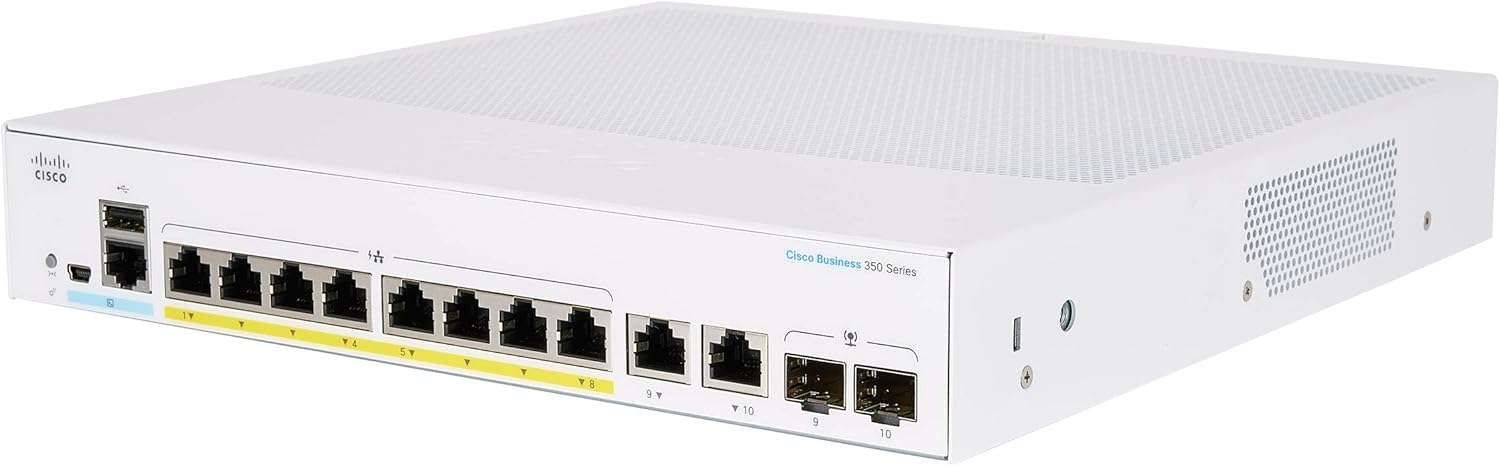
ചിത്രം 1: മുൻഭാഗം view of the Cisco CBS350-8FP-2G Smart Switch, showing the 8 Gigabit Ethernet ports with PoE+ capability and two SFP/RJ45 combo ports.

ചിത്രം 2: പിൻഭാഗം view of the Cisco CBS350-8FP-2G Smart Switch, highlighting the power input and cooling vents.
2. ബോക്സിൽ എന്താണുള്ളത്?
പാക്കേജിൽ എല്ലാ ഘടകങ്ങളും ഉണ്ടെന്ന് ഉറപ്പാക്കുക:
- Cisco CBS350-8FP-2G Smart Switch
- പവർ കോർഡ് അല്ലെങ്കിൽ അഡാപ്റ്റർ
- മൗണ്ടിംഗ് ഹാർഡ്വെയർ (ബാധകമെങ്കിൽ)
- ദ്രുത ആരംഭ ഗൈഡ്
3 സ്പെസിഫിക്കേഷനുകൾ
| ഫീച്ചർ | വിശദാംശങ്ങൾ |
|---|---|
| മോഡൽ നമ്പർ | CBS350-8FP-2G |
| തുറമുഖങ്ങൾ | 8 x 10/100/1000 PoE+ ports, 2 x Gigabit SFP/RJ45 combo ports |
| PoE+ പിന്തുണ | Yes, up to 740W total power budget (model dependent, check specific datasheet) |
| മാനേജ്മെൻ്റ് | മാനേജ് ചെയ്തത് (Web UI, CLI, SNMP) |
| Layer Capabilities | Layer 2 and Layer 3 Static Routing |
| അളവുകൾ (L x W x H) | 10.56 x 10.73 x 1.73 ഇഞ്ച് |
| ഭാരം | 5.71 പൗണ്ട് |
| നിർമ്മാതാവ് | സിസ്കോ |

Figure 3: Comparison of Cisco Business 110, 250, and 350 Series Switches, highlighting features like speed, number of ports, management layer, and PoE support.
4. സജ്ജീകരണ ഗൈഡ്
4.1. ഫിസിക്കൽ ഇൻസ്റ്റലേഷൻ
- സ്വിച്ച് അൺപാക്ക് ചെയ്യുക: പാക്കേജിംഗിൽ നിന്ന് സ്വിച്ചും എല്ലാ അനുബന്ധ ഉപകരണങ്ങളും ശ്രദ്ധാപൂർവ്വം നീക്കം ചെയ്യുക.
- ഒരു ലൊക്കേഷൻ തിരഞ്ഞെടുക്കുക: Select a stable, flat surface or a rack-mount location with adequate ventilation. Ensure the ambient temperature is within the operating range specified in the product datasheet.
- മൗണ്ടിംഗ് (ഓപ്ഷണൽ): If rack-mounting, attach the provided mounting brackets to the sides of the switch using the included screws. Secure the switch into the rack.
- പവർ ബന്ധിപ്പിക്കുക: Connect the power cord to the switch's power input and then to a grounded electrical outlet. Do not power on the switch yet.
4.2. പ്രാരംഭ നെറ്റ്വർക്ക് കണക്ഷൻ
- ഒരു പിസിയിലേക്ക് കണക്റ്റുചെയ്യുക: For initial configuration, connect an Ethernet cable from your computer's network adapter to any of the switch's Gigabit Ethernet ports.
- പവർ ഓൺ: Connect the power cord to a power source. The switch will begin its power-on self-test (POST). Wait for the system LED to indicate readiness (typically solid green).
- ആക്സസ് ചെയ്യുക Web UI: By default, the switch may obtain an IP address via DHCP. If no DHCP server is present, it will use a fallback IP address (e.g., 192.168.1.254). Refer to the Quick Start Guide for the default IP address and login credentials. Open a web മാനേജ്മെന്റ് ഇന്റർഫേസ് ആക്സസ് ചെയ്യുന്നതിന് ബ്രൗസറിൽ പോയി സ്വിച്ചിന്റെ ഐപി വിലാസം നൽകുക.
- Change Default Credentials: For security, immediately change the default username and password upon first login.

Figure 4: Illustration of Power over Ethernet (PoE+) functionality, showing how the switch can power devices like IP phones, access points, and cameras without separate power outlets.
5. സ്വിച്ച് പ്രവർത്തിപ്പിക്കൽ
5.1. Basic Network Connectivity
Once the switch is powered on and configured, connect your network devices (computers, servers, IP phones, access points) to the available Ethernet ports. The switch will automatically detect the connection speed and duplex mode.
5.2. Managing the Switch
The Cisco CBS350-8FP-2G is a managed switch, offering various configuration options through its web-അടിസ്ഥാന ഉപയോക്തൃ ഇന്റർഫേസ് (Web UI) or command-line interface (CLI). Common management tasks include:
- VLAN കോൺഫിഗറേഷൻ: Create and manage Virtual Local Area Networks to segment your network for improved security and performance.
- സേവനത്തിൻ്റെ ഗുണനിലവാരം (QoS): Prioritize network traffic for critical applications like voice and video.
- സുരക്ഷാ സവിശേഷതകൾ: Configure port security, 802.1X authentication, and access control lists (ACLs) to protect your network.
- PoE+ Management: Monitor and control power delivery to connected PoE devices.
- ഫേംവെയർ അപ്ഡേറ്റുകൾ: Regularly update the switch firmware to ensure optimal performance and security.

ചിത്രം 5: ഉദാample of the Cisco Business Dashboard, which can be used to manage your entire Cisco Business network, offering all-in-one discovery, provisioning, reporting, and lifecycle management.
6. പരിപാലനം
Regular maintenance ensures the longevity and optimal performance of your Cisco Smart Switch.
- ഇത് വൃത്തിയായി സൂക്ഷിക്കുക: Periodically clean the exterior of the switch with a soft, dry cloth. Ensure ventilation openings are free from dust and debris to prevent overheating. Do not use liquid cleaners or aerosols.
- ഫേംവെയർ അപ്ഡേറ്റുകൾ: സിസ്കോ പിന്തുണ പരിശോധിക്കുക website regularly for new firmware versions. Updating firmware can provide new features, performance improvements, and security patches.
- പരിസ്ഥിതി നിയന്ത്രണം: Ensure the switch operates within its specified temperature and humidity ranges. Avoid placing it near heat sources or in direct sunlight.
- കേബിൾ മാനേജുമെന്റ്: Keep network cables organized and properly secured to prevent accidental disconnections or damage to ports.
- ബാക്കപ്പ് കോൺഫിഗറേഷൻ: Regularly back up the switch's configuration to an external device. This allows for quick restoration in case of a factory reset or device replacement.
7. പ്രശ്നപരിഹാരം
നിങ്ങൾ നേരിട്ടേക്കാവുന്ന പൊതുവായ പ്രശ്നങ്ങൾക്കുള്ള പരിഹാരങ്ങൾ ഈ വിഭാഗം നൽകുന്നു.
7.1. No Power / System LED Off
- പവർ കോർഡ് പരിശോധിക്കുക: പവർ കോർഡ് സ്വിച്ചും ഇലക്ട്രിക്കൽ ഔട്ട്ലെറ്റുമായി സുരക്ഷിതമായി ബന്ധിപ്പിച്ചിട്ടുണ്ടെന്ന് ഉറപ്പാക്കുക.
- ഔട്ട്ലെറ്റ് പരിശോധിക്കുക: ഇലക്ട്രിക്കൽ ഔട്ട്ലെറ്റ് പ്രവർത്തനക്ഷമമാണെന്ന് ഉറപ്പാക്കാൻ മറ്റൊരു ഉപകരണം ഉപയോഗിച്ച് അത് പരിശോധിക്കുക.
- പവർ സൈക്കിൾ: Disconnect the power cord, wait 10 seconds, and then reconnect it.
7.2. നെറ്റ്വർക്ക് കണക്റ്റിവിറ്റി ഇല്ല
- കേബിൾ കണക്ഷനുകൾ പരിശോധിക്കുക: Ensure Ethernet cables are securely plugged into both the switch port and the connected device. Verify that the link/activity LED on the switch port is illuminated.
- Verify Device Status: Ensure the connected device (PC, server, etc.) is powered on and its network adapter is enabled.
- IP വിലാസ വൈരുദ്ധ്യം: If manually assigning IP addresses, ensure there are no conflicts on the network.
- VLAN കോൺഫിഗറേഷൻ: If VLANs are configured, ensure the device is connected to the correct VLAN or that inter-VLAN routing is properly set up.
7.3. PoE Device Not Receiving Power
- Check PoE Compatibility: Ensure the connected device is PoE or PoE+ compatible.
- Verify Cable: Use a standard Ethernet cable (Cat5e or higher) that supports PoE.
- PoE ബജറ്റ്: Check the switch's PoE power budget. If too many high-power devices are connected, the switch may not be able to power all of them. Disconnect some devices or use an external power source for some.
- പോർട്ട് നില: Log into the switch's Web UI and verify that PoE is enabled on the specific port and that the port is not in an error state.
8. വാറൻ്റിയും പിന്തുണയും
This Cisco product is typically covered by a limited lifetime warranty with next business day advanced replacement for new products. For renewed products, warranty terms may vary. Please refer to your purchase documentation or the Cisco Renewed program details for specific warranty information.
8.1. സാങ്കേതിക പിന്തുണ
For technical assistance, product documentation, and software downloads, visit the official Cisco support website. You will need your product's serial number for support inquiries.
- സിസ്കോ പിന്തുണ Webസൈറ്റ്: www.cisco.com/go/support എന്ന വിലാസത്തിൽ ബന്ധപ്പെടുക.
- Cisco Business Community: community.cisco.com/t5/small-business-support
Before contacting support, have your product model number (CBS350-8FP-2G) and serial number ready. Describing the issue clearly and steps taken to troubleshoot can expedite the support process.


