1. ആമുഖം
This manual provides essential information for the proper use and maintenance of your SUPVAN T50M Series Thermal Label Tape. This product is designed for use with compatible SUPVAN label makers, offering reliable and durable labeling solutions for various applications. Please read this manual thoroughly before use to ensure optimal performance and longevity of the labels.
2. ഉൽപ്പന്ന സവിശേഷതകൾ
- അനുയോജ്യത: Specifically designed for SUPVAN T50M series label makers, ensuring a perfect fit and seamless operation.
- അളവുകൾ: Each roll contains 100 labels, measuring 1.96 inches by 3.14 inches (50 mm x 80 mm).
- Smart RFID Auto-Detection: Equipped with RFID technology for automatic recognition by your label printer, minimizing errors and simplifying the loading process.
- യഥാർത്ഥ ഗുണനിലവാരം: Constructed from multi-layer synthetic material, providing resistance against water, oil, and extreme temperatures. Offers extended durability for up to 5 years.
- High-Tack Adhesive: Features a strong adhesive that resists detachment, suitable for various surfaces including file cabinets, kitchen containers, lab equipment, and classroom storage.
- സുരക്ഷ: BPA-free, complying with safety standards for baby products, making it safe for labeling food, cosmetics, and other consumables.

Image: Label dimensions and key features.

Image: Demonstrating waterproof, oilproof, no-trace, and scratch-resistant properties.
3. Setup: Loading the Label Roll
Follow these steps to correctly load the SUPVAN T50M Series Thermal Label Tape into your compatible label maker:
- Ensure your label maker is powered off or in standby mode.
- Locate the release button on the side of your label maker (often orange or clearly marked). Press this button to open the printer's lid.
- Carefully place the new label roll into the designated compartment. Ensure the labels are facing the correct direction for printing, typically with the print side facing upwards and the leading edge extending towards the print head.
- Feed the leading edge of the label tape through the slot until it is slightly visible past the print head.
- Close the printer's lid firmly until it clicks into place. The label maker should automatically detect the label type and size.

Image: A roll of SUPVAN T50M Series Thermal Label Tape.
4. Operating: Printing Labels
Once the label tape is loaded, you can begin printing using your label maker's companion application:
- Power on your label maker. The indicator light should turn green, signifying it is ready.
- Open the SUPVAN label maker application on your smartphone or tablet. If you haven't installed it, scan the QR code provided with your label maker to download the app.
- Connect your device to the label maker via Bluetooth within the app.
- Within the app, design or select your desired label. You can customize text, fonts, images, and barcodes.
- Once your label is ready, initiate the print command from the application. The label maker will print the label.
- After printing, gently tear the label upwards against the perforated edge on the label maker's output slot.

Image: Label maker in operation, producing various labels.

ചിത്രം: ഉദാamples of printed labels on kitchen items.
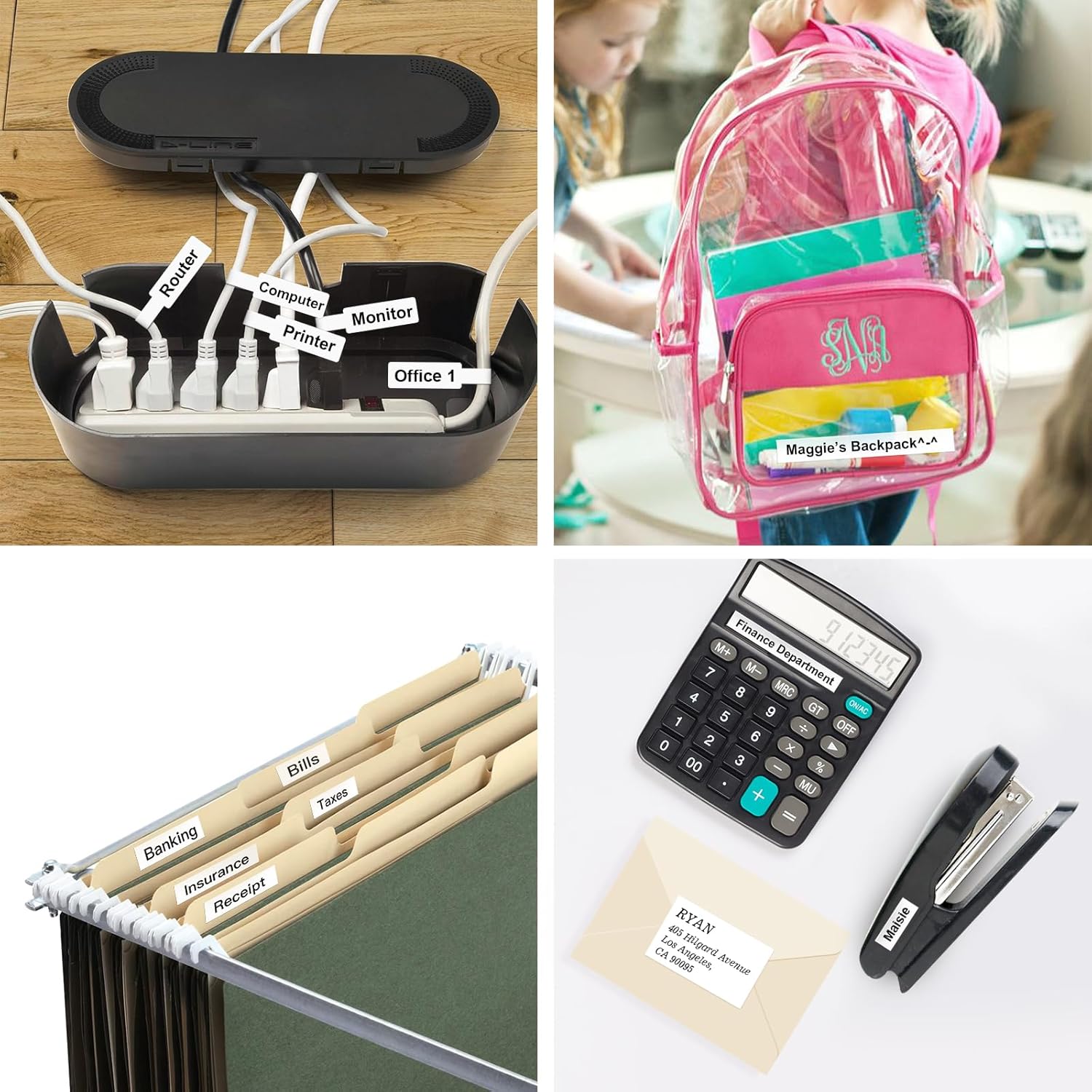
ചിത്രം: ഉദാamples of printed labels for organization.

Image: Business applications for SUPVAN labels.
5. പരിപാലനം
To ensure the best performance and longevity of your SUPVAN T50M Series Thermal Label Tape and your label maker:
- സംഭരണം: Store unused label rolls in a cool, dry place away from direct sunlight and extreme temperatures. This helps preserve the adhesive quality and print sensitivity.
- കൈകാര്യം ചെയ്യൽ: Avoid touching the printing surface of the labels with bare hands to prevent oil or dirt transfer, which can affect print quality.
- പ്രിന്റർ ക്ലീനിംഗ്: Regularly clean the print head of your label maker according to its specific instruction manual. A clean print head ensures clear and consistent print quality.
6. പ്രശ്നപരിഹാരം
If you encounter issues with your SUPVAN T50M Series Thermal Label Tape, consider the following:
- മോശം പ്രിന്റ് നിലവാരം: Ensure the label roll is loaded correctly and the print head of your label maker is clean. Check if the label maker's battery is sufficiently charged.
- ഭക്ഷണം നൽകാത്ത ലേബലുകൾ: Verify that the label roll is properly seated and the leading edge is fed through the print slot. Ensure there are no obstructions.
- Labels Not Detected: Confirm the label roll is a genuine SUPVAN T50M Series tape with RFID for automatic detection. Re-open and close the lid to reset the sensor.
- ആപ്പ് കണക്റ്റിവിറ്റി പ്രശ്നങ്ങൾ: Ensure Bluetooth is enabled on your device and the label maker. Restart both the app and the label maker if connection fails.
7 സ്പെസിഫിക്കേഷനുകൾ
| ബ്രാൻഡ് | SUPVAN |
| മോഡൽ നമ്പർ | T50M Series |
| ലേബൽ വലിപ്പം | 1.96'' x 3.14'' (50 മില്ലീമീറ്റർ x 80 മില്ലീമീറ്റർ) |
| ഓരോ റോളിലുമുള്ള ലേബലുകൾ | 100 |
| നിറം | കറുപ്പിൽ വെള്ള |
| മെറ്റീരിയൽ തരം | സിന്തറ്റിക് |
| ഫിനിഷ് തരം | ലാമിനേറ്റഡ് |
| പ്രത്യേക സവിശേഷതകൾ | Waterproof, Oilproof, Highly Adhesive, Auto-Detect (RFID), BPA-free |
8. വാറൻ്റിയും പിന്തുണയും
For warranty information and customer support regarding your SUPVAN T50M Series Thermal Label Tape, please refer to the documentation included with your label maker or visit the official SUPVAN website. You may also contact SUPVAN customer service directly for assistance with product inquiries, technical support, or replacement parts.
ബന്ധപ്പെടാനുള്ള വിവരങ്ങൾ: Please refer to your product packaging or the official SUPVAN webഏറ്റവും പുതിയ കോൺടാക്റ്റ് വിശദാംശങ്ങൾക്കായി സൈറ്റ്.


