1. ആമുഖം
The Hyperice Normatec 3 Recovery System utilizes dynamic air compression technology to enhance wellness, accelerate recovery, and optimize performance. This system is designed to provide a restorative massage experience for your legs, aiding in circulation and muscle recovery. This manual provides essential information for the proper setup, operation, and maintenance of your Normatec 3 system with standard size leg attachments and the accompanying backpack.

Image 1.1: Hyperice Normatec 3 Legs and Backpack. This image displays the two leg compression attachments connected to the control unit, alongside the dedicated Hyperice backpack for transport and storage.
2 സുരക്ഷാ വിവരങ്ങൾ
Before using the Normatec 3 Recovery System, please read and understand all safety instructions. Improper use can lead to injury or device malfunction.
- ശരീര സ്ഥാനം: Ensure proper body positioning during use. Consult with a healthcare professional if you have any pre-existing medical conditions or contraindications for compression therapy.
- ഇലക്ട്രിക്കൽ സുരക്ഷ: Follow all electrical safety guidelines for powered massagers. Do not use the device near water or in excessively humid environments. Ensure the charging port and cables are dry before connecting.
- മെഡിക്കൽ ഉപദേശം: This device is intended for personal recovery and wellness. It is not a substitute for professional medical treatment. If you experience pain or discomfort, discontinue use immediately and consult a healthcare professional.
- കുട്ടികളും വളർത്തുമൃഗങ്ങളും: കുട്ടികൾക്കും വളർത്തുമൃഗങ്ങൾക്കും ലഭ്യമല്ലാത്തവിധം ഉപകരണം സൂക്ഷിക്കുക.
3. സജ്ജീകരണം
3.1 അൺപാക്കിംഗും പരിശോധനയും
- പാക്കേജിംഗിൽ നിന്ന് എല്ലാ ഘടകങ്ങളും ശ്രദ്ധാപൂർവ്വം നീക്കം ചെയ്യുക.
- Inspect the control unit, leg attachments, and hoses for any signs of damage. If any components are damaged, do not use the system and contact customer support.
3.2 വലുപ്പവും ഫിറ്റും
The Normatec 3 Legs are available in a standard size on Amazon. To ensure proper fit and effectiveness, verify your measurements against the following guidelines:
- സാധാരണ വലുപ്പം: Inseam 31" - 35"
- Maximum Thigh Circumference: 30"
To measure your inseam, measure from just below your crotch to your ankle. For thigh circumference, measure around the fullest part of your mid-thigh.
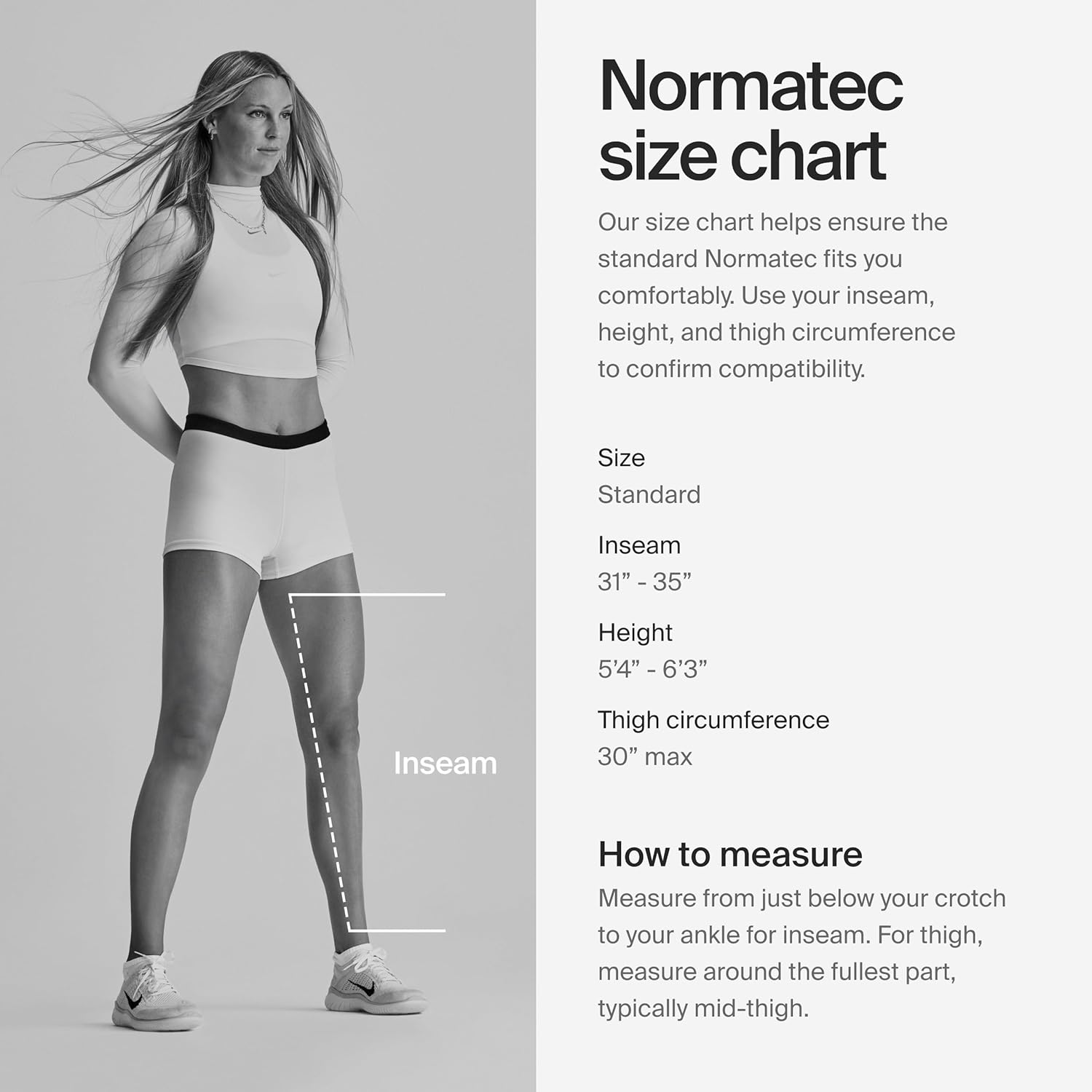
Image 3.1: Normatec Size Chart. This chart illustrates how to measure inseam and thigh circumference to ensure the standard Normatec leg attachments fit comfortably.
3.3 സിസ്റ്റം ബന്ധിപ്പിക്കുന്നു
- Place the control unit on a stable, flat surface.
- Connect the air hoses from the leg attachments to the hose connection port on the control unit. Ensure a secure connection.
- Plug the power adapter into the control unit's charging port and then into a wall outlet to charge the device before first use, or to operate while charging.
4. പ്രവർത്തന നിർദ്ദേശങ്ങൾ
4.1 Control Unit Overview
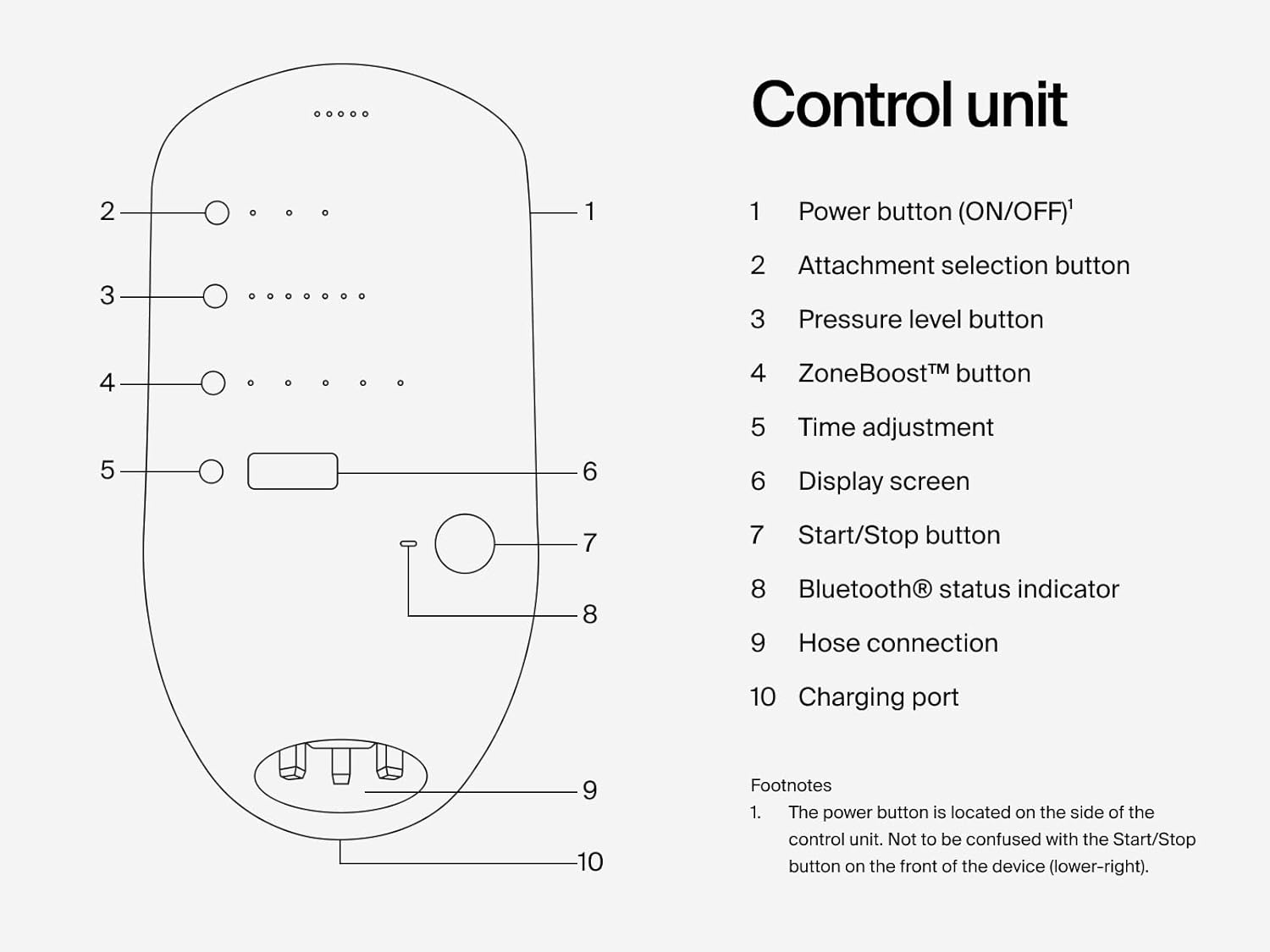
Image 4.1: Normatec 3 Control Unit Diagram. This diagram labels the various buttons and indicators on the control unit, including the power button, attachment selection, pressure level, ZoneBoost, time adjustment, display screen, start/stop button, Bluetooth status indicator, hose connection, and charging port.
- Power Button (ON/OFF): Located on the side of the device. Press and hold to turn on or off.
- Attachment Selection Button: Used to select the type of attachment (e.g., legs, hips, arms).
- Pressure Level Button: Adjusts the compression intensity (7 levels available).
- ZoneBoost™ Button: Activates targeted compression in specific zones.
- സമയ ക്രമീകരണം: Sets the duration of the session.
- ഡിസ്പ്ലേ സ്ക്രീൻ: Shows current settings and session time.
- ആരംഭിക്കുക/നിർത്തുക ബട്ടൺ: Initiates or pauses the compression session.
- Bluetooth® Status Indicator: Shows Bluetooth connectivity status for the Hyperice App.
- ഹോസ് കണക്ഷൻ: Port for connecting the air hoses from the attachments.
- ചാർജിംഗ് പോർട്ട്: പവർ അഡാപ്റ്റർ ബന്ധിപ്പിക്കുന്നതിന്.
4.2 Starting a Session
- Put on the leg attachments. Ensure they are snug but not overly tight before inflation.
- അമർത്തിപ്പിടിക്കുക പവർ ബട്ടൺ (located on the side) to turn on the control unit.
- ഉപയോഗിക്കുക പ്രഷർ ലെവൽ ബട്ടൺ to select your desired compression intensity (levels 1-7).
- Adjust the session time using the സമയ ക്രമീകരണം ബട്ടൺ.
- ഓപ്ഷണലായി, ഉപയോഗിക്കുക ZoneBoost™ Button to apply extra compression to specific areas.
- അമർത്തുക ആരംഭിക്കുക/നിർത്തുക ബട്ടൺ to begin the compression session. The display screen will show the remaining time.
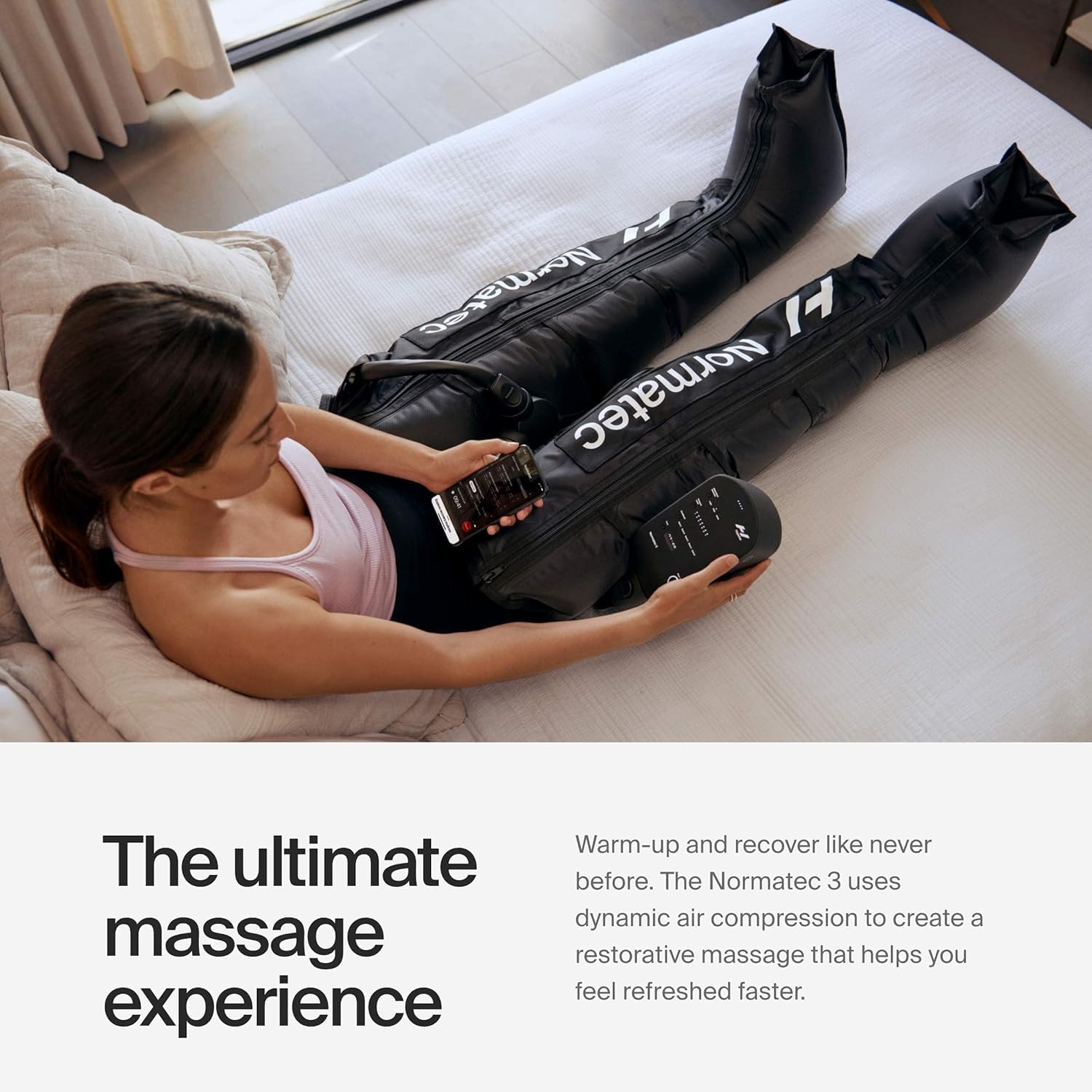
Image 4.2: User operating Normatec 3 Legs. This image shows an individual comfortably seated, using the Normatec 3 leg attachments and interacting with the control unit.
4.3 Using the Hyperice App (Bluetooth Connectivity)
The Normatec 3 features Bluetooth connectivity, allowing you to control and customize your sessions via the Hyperice App.
- Download the Hyperice App from your device's app store.
- നിങ്ങളുടെ മൊബൈൽ ഉപകരണത്തിൽ ബ്ലൂടൂത്ത് പ്രവർത്തനക്ഷമമാക്കിയിട്ടുണ്ടെന്ന് ഉറപ്പാക്കുക.
- Open the Hyperice App and follow the on-screen instructions to pair with your Normatec 3 control unit. The Bluetooth® സ്റ്റാറ്റസ് ഇൻഡിക്കേറ്റർ on the control unit will confirm connection.
- Through the app, you can access additional features, customize settings, and track your recovery sessions.
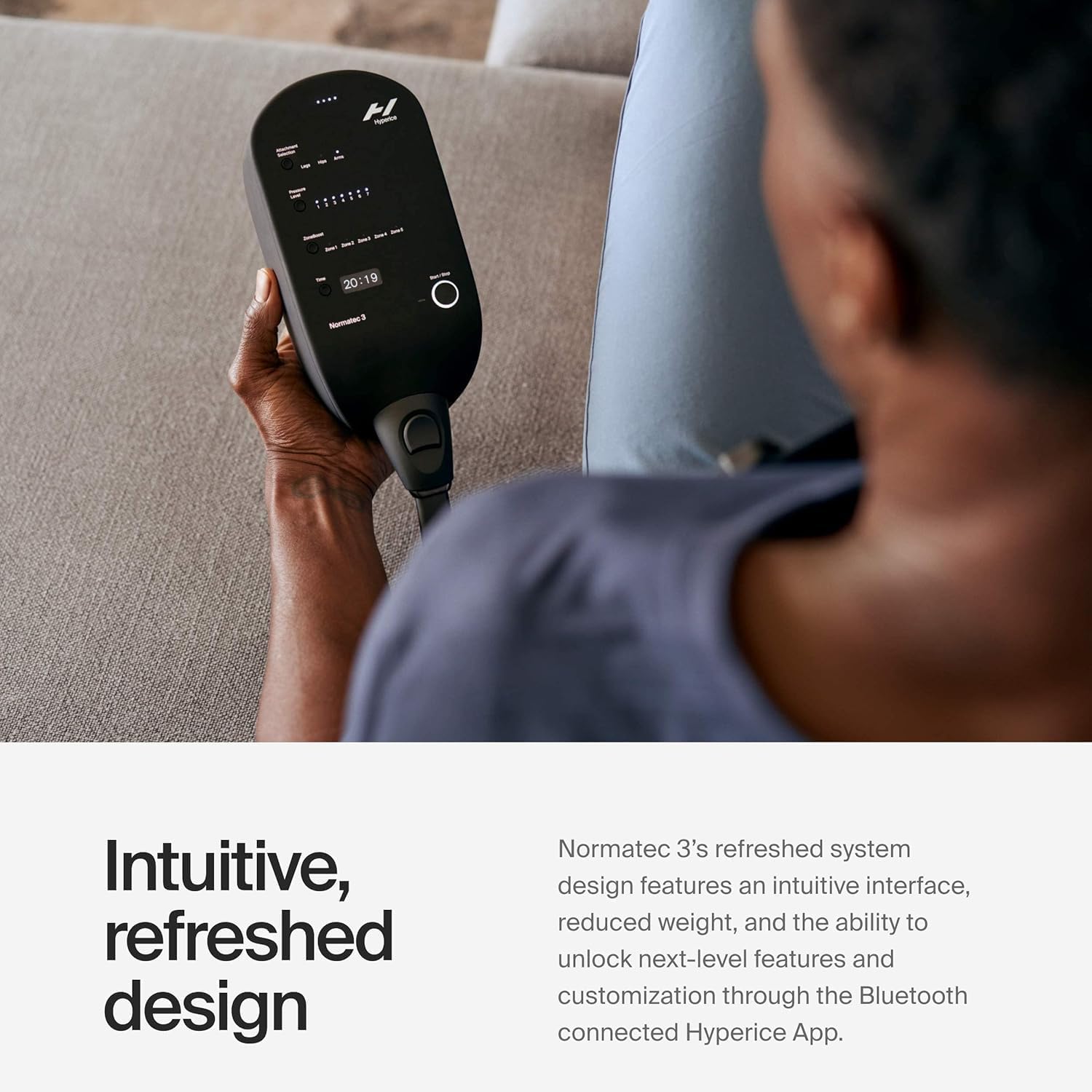
Image 4.3: Hyperice App interface for Normatec 3. This image shows a user interacting with the Hyperice mobile application to control their Normatec 3 session, demonstrating the intuitive, refreshed design.
5. പരിപാലനം
5.1 വൃത്തിയാക്കൽ
- നിയന്ത്രണ യൂണിറ്റ്: Wipe the control unit with a soft, damp തുണി. അബ്രാസീവ് ക്ലീനറുകൾ ഉപയോഗിക്കരുത് അല്ലെങ്കിൽ യൂണിറ്റ് വെള്ളത്തിൽ മുക്കരുത്.
- Leg Attachments: The nylon material of the leg attachments can be wiped clean with a damp cloth and mild soap. Ensure they are completely dry before storage.
- ഹോസുകൾ: Wipe hoses clean with a damp cloth. Ensure no moisture enters the connectors.
5.2 സംഭരണം
When not in use, store the Normatec 3 system in a cool, dry place. The included backpack is designed for convenient and protective storage and transport.
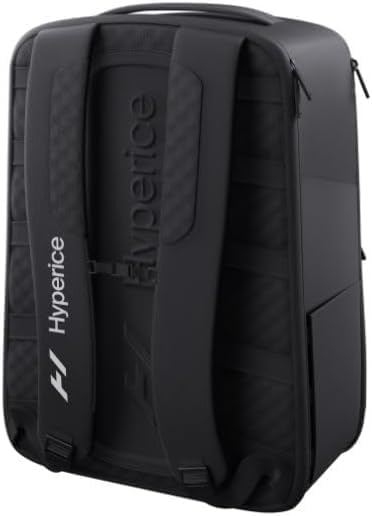
Image 5.1: Hyperice Backpack rear view. This image shows the rear of the Hyperice backpack, highlighting its ventilated shoulder straps and ergonomic design.

Image 5.2: Hyperice Backpack open view. This image displays the interior of the Hyperice backpack, showing its various compartments, including a padded lining, compression-molded sunglass case, elastic side pockets, and a laptop compartment, designed to hold the Normatec 3 system.
6. പ്രശ്നപരിഹാരം
If you encounter issues with your Normatec 3 system, refer to the following common troubleshooting steps. For more detailed assistance, please consult the official Troubleshooting Guide PDF available on the product page or contact Hyperice customer support.
| പ്രശ്നം | സാധ്യമായ കാരണം | പരിഹാരം |
|---|---|---|
| ഉപകരണം പവർ ഓണാക്കുന്നില്ല | Low battery; Power adapter not connected; Device malfunction | Charge the device; Ensure power adapter is securely connected; Contact support if issue persists. |
| No compression or weak compression | Hoses not securely connected; Leak in attachment or hose; Incorrect pressure setting | Check all hose connections; Inspect attachments and hoses for damage; Increase pressure level. |
| ബ്ലൂടൂത്ത് കണക്ഷൻ പ്രശ്നങ്ങൾ | Bluetooth off on mobile device; Device not in pairing mode; Interference | Ensure Bluetooth is on; Restart control unit and app; Move closer to the device. |
| Attachments feel uncomfortable | Incorrect sizing; Too high pressure setting; Improper positioning | Verify sizing (refer to Section 3.2); Reduce pressure; Adjust attachment position. |
7 സ്പെസിഫിക്കേഷനുകൾ
- ഉൽപ്പന്ന അളവുകൾ: 5.71 x 4.43 x 1.34 inches (Control Unit)
- ഇനത്തിൻ്റെ ഭാരം: 12.4 പൗണ്ട് (ആകെ സിസ്റ്റം)
- മോഡൽ നമ്പർ: REJ6 63085 001-00, 67070 001-00, 61020 001
- ബാറ്ററികൾ: 1 ലിഥിയം അയോൺ ബാറ്ററി ആവശ്യമാണ് (ഉൾപ്പെടുത്തിയിരിക്കുന്നു)
- ഊർജ്ജ സ്രോതസ്സ്: ബാറ്ററി പവർ
- മെറ്റീരിയൽ: Nylon (Leg Attachments)
- ഇതിനായി ഉപയോഗിക്കുക: കാലുകൾ
- നിർമ്മാതാവ്: ഹൈപ്പറൈസ്
- ആദ്യം ലഭ്യമായത്: ഡിസംബർ 7, 2022

Image 7.1: Normatec 3 Legs and Backpack with dimensions. This image provides visual representation of the approximate dimensions for the Normatec 3 system components.
8. വാറൻ്റിയും പിന്തുണയും
For information regarding your product's warranty, please refer to the documentation included with your purchase or visit the official Hyperice website. For technical support, replacement parts, or any other inquiries, please contact Hyperice customer service directly.
ഓൺലൈൻ ഉറവിടങ്ങൾ:


