1 സുരക്ഷാ വിവരങ്ങൾ
സവാരി ചെയ്യുമ്പോൾ എപ്പോഴും ഹെൽമറ്റ് ധരിക്കുക.
ഒരു ഇലക്ട്രിക് കിക്ക്സ്കൂട്ടർ പ്രവർത്തിപ്പിക്കുമ്പോൾ നിയന്ത്രണം നഷ്ടപ്പെടൽ, കൂട്ടിയിടികൾ, വീഴ്ചകൾ എന്നിവ ഉൾപ്പെടെയുള്ള അന്തർലീനമായ അപകടസാധ്യതകൾ ഉൾപ്പെടുന്നു. ഈ അപകടസാധ്യതകൾ കുറയ്ക്കുന്നതിന്, ഈ മാനുവലിലെ എല്ലാ നിർദ്ദേശങ്ങളും മുന്നറിയിപ്പുകളും വായിച്ച് പാലിക്കേണ്ടത് വളരെ പ്രധാനമാണ്. നിങ്ങളുടെ ആദ്യ യാത്രയ്ക്ക് മുമ്പ് കിക്ക്സ്കൂട്ടർ എങ്ങനെ സുരക്ഷിതമായി പ്രവർത്തിപ്പിക്കാമെന്ന് നിങ്ങൾ മനസ്സിലാക്കുന്നുവെന്ന് ഉറപ്പാക്കുക.
- ഹെൽമറ്റ്, കാൽമുട്ട് പാഡുകൾ, എൽബോ പാഡുകൾ എന്നിവയുൾപ്പെടെ ഉചിതമായ സുരക്ഷാ ഗിയർ എപ്പോഴും ധരിക്കുക.
- നനഞ്ഞ സാഹചര്യങ്ങളിലോ, വഴുക്കലുള്ള പ്രതലങ്ങളിലോ, അല്ലെങ്കിൽ ദൃശ്യപരത കുറവുള്ള സ്ഥലങ്ങളിലോ വാഹനമോടിക്കരുത്.
- ഇലക്ട്രിക് കിക്ക്സ്കൂട്ടർ ഉപയോഗം സംബന്ധിച്ച പ്രാദേശിക നിയമങ്ങളും ചട്ടങ്ങളും പാലിക്കുക.
- മറ്റ് വാഹനങ്ങളിൽ നിന്നും കാൽനടയാത്രക്കാരിൽ നിന്നും സുരക്ഷിതമായ വേഗതയും അകലവും പാലിക്കുക.
- പെട്ടെന്നുള്ള കുതന്ത്രങ്ങൾ, പെട്ടെന്നുള്ള വളവുകൾ, അമിത വേഗത എന്നിവ ഒഴിവാക്കുക.
- ശുപാർശ ചെയ്യുന്ന പ്രായത്തിന് താഴെയുള്ള കുട്ടികളെയോ ഭാര പരിധി കവിയുന്ന വ്യക്തികളെയോ കിക്ക്സ്കൂട്ടർ പ്രവർത്തിപ്പിക്കാൻ അനുവദിക്കരുത്.
- ഓരോ യാത്രയ്ക്കും മുമ്പ് കിക്ക്സ്കൂട്ടറിൽ എന്തെങ്കിലും കേടുപാടുകൾ സംഭവിച്ചിട്ടുണ്ടോ അല്ലെങ്കിൽ ഭാഗങ്ങൾ അയഞ്ഞിട്ടുണ്ടോ എന്ന് പതിവായി പരിശോധിക്കുക.
2. ഉൽപ്പന്നം കഴിഞ്ഞുview
സെഗ്വേ നയൻബോട്ട് എഫ്2 പ്രോ ഇലക്ട്രിക് കിക്ക്സ്കൂട്ടർ നഗര യാത്രയ്ക്കായി രൂപകൽപ്പന ചെയ്തിരിക്കുന്നതിനാൽ പ്രകടനം, സുരക്ഷ, സൗകര്യം എന്നിവയുടെ സന്തുലിതാവസ്ഥ വാഗ്ദാനം ചെയ്യുന്നു. നൂതന പ്രവർത്തനക്ഷമതകളുള്ള ഒരു കരുത്തുറ്റ രൂപകൽപ്പനയാണ് ഇതിന്റെ സവിശേഷത.
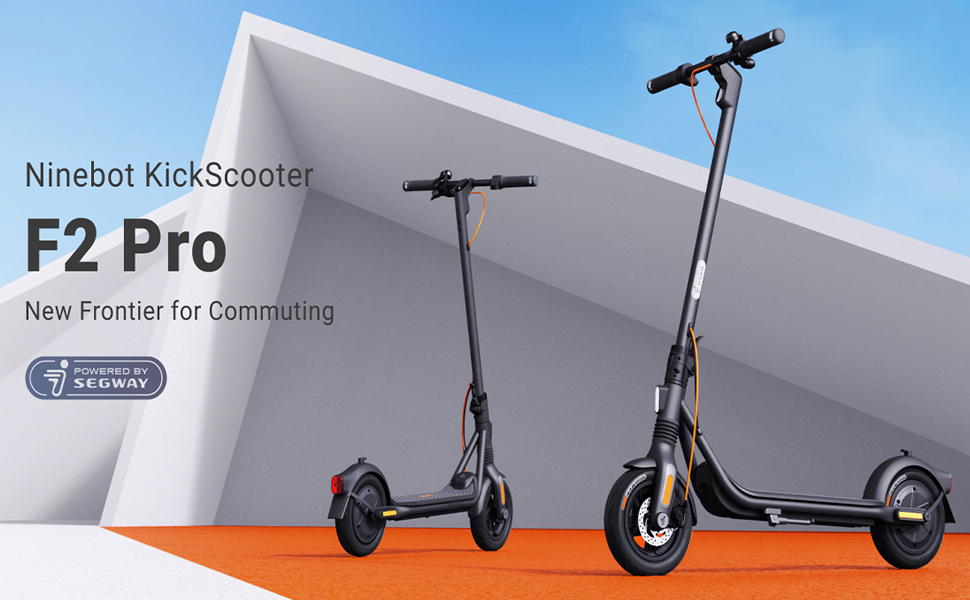
ചിത്രം: സെഗ്വേ നയൻബോട്ട് എഫ്2 പ്രോ ഇലക്ട്രിക് കിക്ക്സ്കൂട്ടർ, ഷോasinനഗര യാത്രയ്ക്കായുള്ള രൂപകൽപ്പന.
പ്രധാന സവിശേഷതകൾ:
- പരമാവധി വേഗത: 32 കിമീ/മണിക്കൂർ (20 മൈൽ)
- പരമാവധി ശ്രേണി: 55 കി.മീ (34 മൈൽ) വരെ
- മോട്ടോർ ഔട്ട്പുട്ട്: പരമാവധി പവർ 800W
- ടയറുകൾ: 10 ഇഞ്ച് സെൽഫ്-സീലിംഗ് ട്യൂബ്ലെസ് ടയറുകൾ
- സസ്പെൻഷൻ: സുഗമമായ യാത്രയ്ക്കായി ഫ്രണ്ട് സ്പ്രിംഗ് സസ്പെൻഷൻ
- ബ്രേക്കിംഗ് സിസ്റ്റം: ഡ്യുവൽ ബ്രേക്കിംഗ് സിസ്റ്റം (ഫ്രണ്ട് ഡിസ്ക് ബ്രേക്ക് + റിയർ ഇ-എബിഎസ്)
- സുരക്ഷാ സവിശേഷതകൾ: ഇന്റഗ്രേറ്റഡ് ടേൺ സിഗ്നലുകൾ, ട്രാക്ഷൻ കൺട്രോൾ സിസ്റ്റം (TCS), ഉയർന്ന ഡെസിബെൽ ഇലക്ട്രിക് ഹോൺ, ബിൽറ്റ്-ഇൻ LED ഹെഡ്ലൈറ്റ്.
- കണക്റ്റിവിറ്റി: ബ്ലൂടൂത്ത് കണക്ഷൻ, ആപ്പിൾ ഫൈൻഡ് മൈ കമ്പാറ്റിബിലിറ്റി.
- പോർട്ടബിലിറ്റി: പോർട്ടബിൾ മടക്കാവുന്ന ഡിസൈൻ.

ചിത്രം: മുൻഭാഗം view സെഗ്വേ നയൻബോട്ട് F2 പ്രോ ഇലക്ട്രിക് കിക്ക്സ്കൂട്ടറിന്റെ.

ചിത്രം: വശം view സെഗ്വേ നയൻബോട്ട് F2 പ്രോ ഇലക്ട്രിക് കിക്ക്സ്കൂട്ടറിന്റെ.

ചിത്രം: പിൻഭാഗം view സെഗ്വേ നയൻബോട്ട് F2 പ്രോ ഇലക്ട്രിക് കിക്ക്സ്കൂട്ടറിന്റെ.
3. സജ്ജീകരണം
3.1 കിക്ക്സ്കൂട്ടർ തുറക്കൽ
- കിക്ക്സ്കൂട്ടർ ഒരു പരന്ന പ്രതലത്തിൽ വയ്ക്കുക.
- തണ്ട് നേരെ സ്ഥാനത്ത് ഉറപ്പിക്കുന്നത് വരെ ഉയർത്തുക. ലോക്കിംഗ് സംവിധാനം സുരക്ഷിതമായി ഘടിപ്പിച്ചിട്ടുണ്ടെന്ന് ഉറപ്പാക്കുക.
- സ്കൂട്ടറിനെ പിന്തുണയ്ക്കാൻ കിക്ക്സ്റ്റാൻഡ് തുറക്കുക.

ചിത്രം: സെഗ്വേ നിനെബോട്ട് F2 പ്രോ കിക്ക്സ്കൂട്ടറിന്റെ അളവുകൾ മടക്കിയതും മടക്കിയതുമായ അവസ്ഥകളിൽ.
3.2 പ്രാരംഭ ചാർജിംഗ്
ആദ്യമായി ഉപയോഗിക്കുന്നതിന് മുമ്പ്, കിക്ക്സ്കൂട്ടറിന്റെ ബാറ്ററി പൂർണ്ണമായും ചാർജ് ചെയ്യുക. ചാർജർ ചാർജിംഗ് പോർട്ടിലേക്കും പിന്നീട് ഒരു പവർ ഔട്ട്ലെറ്റിലേക്കും ബന്ധിപ്പിക്കുക. പൂർണ്ണമായി ചാർജ് ചെയ്യുമ്പോൾ ചാർജറിലെ ചാർജിംഗ് ഇൻഡിക്കേറ്ററിന്റെ നിറം (ഉദാ: ചുവപ്പ് മുതൽ പച്ച വരെ) മാറും.
- ഒരു ഫുൾ ചാർജിന് ഏകദേശം 8 മണിക്കൂറാണ് ചാർജ്ജിംഗ് സമയം.
- കിക്ക്സ്കൂട്ടറിനൊപ്പം നൽകിയിരിക്കുന്ന ഔദ്യോഗിക ചാർജർ മാത്രം ഉപയോഗിക്കുക.

ചിത്രം: ആന്തരികം view കിക്ക്സ്കൂട്ടർ ഡെക്കിനുള്ളിലെ ബാറ്ററി സെല്ലുകളുടെ ഒരു ശ്രേണി, 34 മൈൽ പരമാവധി ചാർജിംഗ് പരിധിയും 8 മണിക്കൂർ ഫാസ്റ്റ് ചാർജിംഗ് ശേഷിയും ചിത്രീകരിക്കുന്നു.
3.3 സ്മാർട്ട് ആപ്പിലേക്ക് കണക്റ്റുചെയ്യുന്നു
നിങ്ങളുടെ സ്മാർട്ട്ഫോണിന്റെ ആപ്പ് സ്റ്റോറിൽ നിന്ന് ഔദ്യോഗിക സെഗ്വേ-നൈൻബോട്ട് ആപ്പ് ഡൗൺലോഡ് ചെയ്യുക. ബ്ലൂടൂത്ത് വഴി നിങ്ങളുടെ F2 പ്രോ കിക്ക്സ്കൂട്ടർ ബന്ധിപ്പിക്കുന്നതിന് ആപ്പിലെ നിർദ്ദേശങ്ങൾ പാലിക്കുക. ഫേംവെയർ അപ്ഡേറ്റുകൾ, റൈഡിംഗ് സ്റ്റാറ്റസ് മോണിറ്ററിംഗ്, സ്കൂട്ടർ ലോക്കിംഗ്/അൺലോക്കിംഗ് എന്നിവ ആപ്പ് അനുവദിക്കുന്നു.

ചിത്രം: ബ്ലൂടൂത്ത് കണക്ഷൻ, ലോക്ക്/അൺലോക്ക്, റൈഡിംഗ് സ്റ്റാറ്റസ്, ക്രൂയിസ് മോഡ്, ഫേംവെയർ അപ്ഡേറ്റുകൾ തുടങ്ങിയ സവിശേഷതകൾ പ്രദർശിപ്പിക്കുന്ന സെഗ്വേ-നൈൻബോട്ട് സ്മാർട്ട് ആപ്പിന്റെ സ്ക്രീൻഷോട്ട്.
4. പ്രവർത്തന നിർദ്ദേശങ്ങൾ
4.1 പവർ ഓൺ/ഓഫ്
- പവർ ഓൺ: ഡിസ്പ്ലേ പാനലിൽ സ്ഥിതിചെയ്യുന്ന പവർ ബട്ടൺ അമർത്തുക.
- പവർ ഓഫ്: കുറച്ച് സെക്കൻഡ് നേരത്തേക്ക് പവർ ബട്ടൺ അമർത്തിപ്പിടിക്കുക.
4.2 കിക്ക്സ്കൂട്ടർ ഓടിക്കൽ
- ഒരു കാൽ ഡെക്കിൽ ഉറപ്പിച്ചു വയ്ക്കുക.
- പ്രാരംഭ ആക്കം ലഭിക്കാൻ നിങ്ങളുടെ മറ്റേ കാൽ ഉപയോഗിച്ച് തള്ളുക.
- ചലിച്ചുകഴിഞ്ഞാൽ, മോട്ടോർ പ്രവർത്തിപ്പിക്കുന്നതിന് ത്രോട്ടിൽ ലിവർ സൌമ്യമായി അമർത്തുക.
- നിങ്ങളുടെ രണ്ടാമത്തെ കാൽ ഡെക്കിൽ വയ്ക്കുക.
- വേഗത കുറയ്ക്കാൻ, ത്രോട്ടിൽ വിടുക. ബ്രേക്ക് ചെയ്യാൻ, ഹാൻഡിൽബാറിലെ ബ്രേക്ക് ലിവർ ഉപയോഗിക്കുക.

ചിത്രം: മുൻ ചക്രത്തിന്റെ വിശദാംശങ്ങൾ, ഡിസ്ക് ബ്രേക്കും മുൻ സസ്പെൻഷൻ സിസ്റ്റവും എടുത്തുകാണിക്കുന്നു.

ചിത്രം: ബമ്പുകൾക്ക് മുകളിലൂടെ സുഗമമായ റൈഡിംഗിനായി രൂപകൽപ്പന ചെയ്തിരിക്കുന്ന ഫ്രണ്ട് സ്പ്രിംഗ് സസ്പെൻഷൻ കാണിക്കുന്ന ഡയഗ്രം.
4.3 ടേൺ സിഗ്നലുകളും ഹോണും ഉപയോഗിക്കുന്നത്
- ടേൺ സിഗ്നലുകൾ: തിരിവുകൾ സൂചിപ്പിക്കുന്നതിനായി ഇന്റഗ്രേറ്റഡ് ടേൺ സിഗ്നലുകൾ സജീവമാക്കാൻ ഹാൻഡിൽബാറിലെ സ്വിച്ച് ഉപയോഗിക്കുക.
- കൊമ്പ്: മറ്റുള്ളവരെ അറിയിക്കാൻ ഹാൻഡിൽബാറിലെ ഹോൺ ബട്ടൺ അമർത്തുക.

ചിത്രം: മെച്ചപ്പെട്ട ദൃശ്യപരതയ്ക്കായി സജീവമാക്കിയ ടേൺ സിഗ്നൽ കാണിക്കുന്ന ഹാൻഡിൽബാറിന്റെ ക്ലോസ്-അപ്പ്.
4.4 ഗതാഗതത്തിനായുള്ള മടക്കൽ
സംഭരണത്തിനോ ഗതാഗതത്തിനോ വേണ്ടി കിക്ക്സ്കൂട്ടർ മടക്കാൻ:
- കിക്ക്സ്കൂട്ടർ ഓഫ് ചെയ്തിട്ടുണ്ടെന്ന് ഉറപ്പാക്കുക.
- തണ്ടിന്റെ ചുവട്ടിൽ മടക്കാനുള്ള സംവിധാനം കണ്ടെത്തുക.
- ലാച്ച് വിടുന്നതിന് ക്വിക്ക് സ്റ്റാർട്ട് ഗൈഡിലെ നിർദ്ദിഷ്ട നിർദ്ദേശങ്ങൾ പാലിക്കുക, സ്റ്റെം അതിന്റെ സ്ഥാനത്ത് ക്ലിക്കായി ക്ലിക്കായി വരുന്നത് വരെ താഴേക്ക് മടക്കുക.

ചിത്രം: മടക്കിവെച്ച സെഗ്വേ നയൻബോട്ട് F2 പ്രോ കിക്ക്സ്കൂട്ടർ വഹിക്കുന്ന ഒരാൾ, അതിന്റെ പോർട്ടബിലിറ്റി പ്രകടമാക്കുന്നു.
5. പരിപാലനം
നിങ്ങളുടെ സെഗ്വേ നിനെബോട്ട് F2 പ്രോ കിക്ക്സ്കൂട്ടറിന്റെ ദീർഘായുസ്സും സുരക്ഷിതമായ പ്രവർത്തനവും പതിവ് അറ്റകുറ്റപ്പണികൾ ഉറപ്പാക്കുന്നു.
5.1 പൊതുവായ ശുചീകരണം
കിക്ക്സ്കൂട്ടർ ഒരു സോഫ്റ്റ്, ഡി ഉപയോഗിച്ച് തുടയ്ക്കുക.amp തുണി. സ്കൂട്ടർ വൃത്തിയാക്കാൻ ആൽക്കഹോൾ, ഗ്യാസോലിൻ, മണ്ണെണ്ണ, അല്ലെങ്കിൽ മറ്റ് നശിപ്പിക്കുന്ന രാസ ലായകങ്ങൾ എന്നിവ ഉപയോഗിക്കരുത്. ഉയർന്ന മർദ്ദത്തിലുള്ള വാട്ടർ ജെറ്റ് ഉപയോഗിച്ച് സ്കൂട്ടർ കഴുകരുത്.
5.2 ടയർ പരിചരണം
F2 Pro-യിൽ 10 ഇഞ്ച് സെൽഫ്-സീലിംഗ് ട്യൂബ്ലെസ് ടയറുകൾ ഉണ്ട്, ഇത് പഞ്ചറുകളുടെ സാധ്യത കുറയ്ക്കുന്നു. എന്നിരുന്നാലും, ഒപ്റ്റിമൽ പ്രകടനത്തിനും സുരക്ഷയ്ക്കും ടയർ മർദ്ദം പതിവായി പരിശോധിക്കുകയും ശുപാർശ ചെയ്യുന്ന PSI-യിലേക്ക് ഉയർത്തുകയും ചെയ്യേണ്ടത് പ്രധാനമാണ്.

ചിത്രം: പഞ്ചറുകൾ തടയാൻ രൂപകൽപ്പന ചെയ്തിരിക്കുന്ന, ടയറിനുള്ളിലെ സെൽഫ്-സീലിംഗ് പാളി കാണിക്കുന്ന ഡയഗ്രം.
5.3 ബാറ്ററി പരിപാലനം
- ബാറ്ററി പൂർണ്ണമായും ഡിസ്ചാർജ് ചെയ്യുന്നത് ഒഴിവാക്കുക. ദീർഘനേരം ഉപയോഗിച്ചില്ലെങ്കിലും പതിവായി ചാർജ് ചെയ്യുക.
- കിക്ക്സ്കൂട്ടർ തണുത്തതും വരണ്ടതുമായ സ്ഥലത്ത് സൂക്ഷിക്കുക, നേരിട്ടുള്ള സൂര്യപ്രകാശത്തിൽ നിന്നും കടുത്ത താപനിലയിൽ നിന്നും അകറ്റി നിർത്തുക.
- ബാറ്ററി പായ്ക്ക് ഡിസ്അസംബ്ലിംഗ് ചെയ്യാനോ പരിഷ്ക്കരിക്കാനോ ശ്രമിക്കരുത്.
5.4 ബ്രേക്ക് സിസ്റ്റം പരിശോധന
മുൻവശത്തെ ഡിസ്ക് ബ്രേക്കിന്റെയും പിൻവശത്തെ E-ABS ബ്രേക്കിന്റെയും പ്രവർത്തനം ഇടയ്ക്കിടെ പരിശോധിക്കുക. ബ്രേക്ക് ലിവറുകൾ സുഗമമായി പ്രവർത്തിക്കുന്നുണ്ടെന്നും ബ്രേക്കിംഗ് പവർ ഫലപ്രദമാണെന്നും ഉറപ്പാക്കുക. എന്തെങ്കിലും പ്രശ്നങ്ങൾ ശ്രദ്ധയിൽപ്പെട്ടാൽ, യോഗ്യതയുള്ള ഒരു ടെക്നീഷ്യനെ സമീപിക്കുക.

ചിത്രം: ഫലപ്രദമായ സ്റ്റോപ്പിംഗ് പവറിനായി ഫ്രണ്ട് ഡിസ്ക് ബ്രേക്കും പിൻ ഇ-എബിഎസും ഉൾപ്പെടുന്ന ഡ്യുവൽ ബ്രേക്കിംഗ് സിസ്റ്റത്തെ വിശദീകരിക്കുന്ന ചിത്രീകരണം.
6. പ്രശ്നപരിഹാരം
നിങ്ങളുടെ F2 Pro കിക്ക്സ്കൂട്ടറിൽ നിങ്ങൾ നേരിട്ടേക്കാവുന്ന പൊതുവായ പ്രശ്നങ്ങൾ ഈ വിഭാഗം അഭിസംബോധന ചെയ്യുന്നു.
6.1 കിക്ക്സ്കൂട്ടർ ഓണാക്കുന്നില്ല
- ബാറ്ററി നില പരിശോധിക്കുക: ബാറ്ററി ആവശ്യത്തിന് ചാർജ് ചെയ്തിട്ടുണ്ടെന്ന് ഉറപ്പാക്കുക. ചാർജർ കണക്റ്റ് ചെയ്ത് ഒരു ചെറിയ ചാർജിന് ശേഷം പവർ ഓൺ ചെയ്യാൻ ശ്രമിക്കുക.
- പവർ ബട്ടൺ: പവർ ബട്ടൺ ശരിയായി അമർത്തി ആവശ്യമായ സമയം അമർത്തിപ്പിടിച്ചിട്ടുണ്ടെന്ന് ഉറപ്പാക്കുക.
6.2 ആപ്പ് കണക്ഷൻ പ്രശ്നങ്ങൾ
- ബ്ലൂടൂത്ത്: നിങ്ങളുടെ സ്മാർട്ട്ഫോണിൽ ബ്ലൂടൂത്ത് പ്രവർത്തനക്ഷമമാക്കിയിട്ടുണ്ടെന്നും കിക്ക്സ്കൂട്ടർ പരിധിക്കുള്ളിലാണെന്നും ഉറപ്പാക്കുക.
- ആപ്പ് റീസ്റ്റാർട്ട് ചെയ്യുക: സെഗ്വേ-നൈൻബോട്ട് ആപ്പ് അടച്ച് വീണ്ടും തുറക്കുക.
- ഫേംവെയർ അപ്ഡേറ്റ്: സാധ്യമെങ്കിൽ, വിജയകരമായ ഒരു കണക്ഷനിൽ ആപ്പ് വഴി തീർപ്പുകൽപ്പിക്കാത്ത ഏതെങ്കിലും ഫേംവെയർ അപ്ഡേറ്റുകൾ പരിശോധിച്ച് ഇൻസ്റ്റാൾ ചെയ്യുക.
6.3 കുറഞ്ഞ പ്രകടനം അല്ലെങ്കിൽ പരിധി
- ടയർ മർദ്ദം: തെറ്റായ ടയർ മർദ്ദം റേഞ്ചിനെയും പ്രകടനത്തെയും സാരമായി ബാധിക്കും. ശുപാർശ ചെയ്യുന്ന ലെവലുകൾ പരിശോധിച്ച് ക്രമീകരിക്കുക.
- റൈഡിംഗ് വ്യവസ്ഥകൾ: കുത്തനെയുള്ള ചരിവുകൾ, കനത്ത ഭാരം, ആക്രമണാത്മകമായ റൈഡിംഗ് (ഉദാഹരണത്തിന്, ഇടയ്ക്കിടെയുള്ള ആക്സിലറേഷൻ/ബ്രേക്കിംഗ്) എന്നിവ ദൂരപരിധി കുറയ്ക്കും.
- ബാറ്ററി ആരോഗ്യം: കാലക്രമേണ, ബാറ്ററി ശേഷി കുറഞ്ഞേക്കാം. ശരിയായ ബാറ്ററി പരിപാലനം ഉറപ്പാക്കുക.
7 സ്പെസിഫിക്കേഷനുകൾ
| ഫീച്ചർ | സ്പെസിഫിക്കേഷൻ |
|---|---|
| മോഡലിൻ്റെ പേര് | F2 പ്രോ |
| ഇനം മോഡൽ നമ്പർ | 051203U |
| ബ്രാൻഡ് | സെഗ്വേ |
| പരമാവധി വേഗത | 32 കിമീ/മണിക്കൂർ (20 മൈൽ) |
| പരമാവധി ശ്രേണി | 55 കി.മീ (34 മൈൽ) വരെ |
| മോട്ടോർ put ട്ട്പുട്ട് | 900W (പീക്ക്) |
| ഹിൽ ഗ്രേഡ് | 22% വരെ |
| ടയർ വലിപ്പം | 10 ഇഞ്ച് (സെൽഫ്-സീലിംഗ് ട്യൂബ്ലെസ്) |
| ബ്രേക്ക് തരം | ഫ്രണ്ട് ഡിസ്ക് ബ്രേക്ക്, റിയർ ഇ-എബിഎസ് |
| സസ്പെൻഷൻ | ഫ്രണ്ട് സ്പ്രിംഗ് സസ്പെൻഷൻ |
| ബാറ്ററി തരം | ലിഥിയം അയോൺ (1 ആവശ്യമാണ്, ഉൾപ്പെടെ) |
| ചാർജിംഗ് സമയം | ഏകദേശം 8 മണിക്കൂർ |
| ഉൽപ്പന്ന അളവുകൾ (അൺഫോൾഡ്) | 56.9 x 125.22 x 115.82 സെ.മീ |
| ഇനത്തിൻ്റെ ഭാരം | 18.5 കിലോഗ്രാം (ഏകദേശം 39 പൗണ്ട്) |
| പരമാവധി ഭാരം ശേഷി | 265 പൗണ്ട് |
| പ്രായപരിധി | മുതിർന്നവർ |
| മെറ്റീരിയൽ | അലൂമിനിയം (ഫ്രെയിം: അലോയ് സ്റ്റീൽ) |
| ജല പ്രതിരോധം | IPX5 പ്രതിരോധശേഷിയുള്ളത് |
| ഉൾപ്പെടുത്തിയ ഘടകങ്ങൾ | ചാർജർ |

ചിത്രം: ശ്രേണി, വേഗത, പവർ, ക്ലൈംബിംഗ് സ്ലോപ്പ്, ടിസിഎസ്, ഡ്യുവൽ ബ്രേക്കിംഗ്, ഫ്രണ്ട് സസ്പെൻഷൻ, ഇലക്ട്രിക് ഹോൺ, സെൽഫ് സീലിംഗ് ടയറുകൾ, ആപ്പിൾ ഫൈൻഡ് മൈ കോംപാറ്റിബിലിറ്റി തുടങ്ങിയ പ്രധാന സവിശേഷതകളും സവിശേഷതകളും വിശദീകരിക്കുന്ന ഇൻഫോഗ്രാഫിക്.
8. വാറൻ്റിയും പിന്തുണയും
നിർദ്ദിഷ്ട വാറന്റി വിശദാംശങ്ങളും പിന്തുണാ കോൺടാക്റ്റ് വിവരങ്ങളും സാധാരണയായി ഉൽപ്പന്ന പാക്കേജിംഗിനൊപ്പം നൽകിയിട്ടുണ്ട് അല്ലെങ്കിൽ നിർമ്മാതാവിന്റെ ഔദ്യോഗിക വെബ്സൈറ്റിൽ ലഭ്യമാണ്. webസൈറ്റ്. നിങ്ങളുടെ വാങ്ങലിനൊപ്പം ഉൾപ്പെടുത്തിയിരിക്കുന്ന ഡോക്യുമെന്റേഷൻ പരിശോധിക്കുക അല്ലെങ്കിൽ ഔദ്യോഗിക സെഗ്വേ സന്ദർശിക്കുക. webവാറന്റി കവറേജും ഉപഭോക്തൃ പിന്തുണയും സംബന്ധിച്ച ഏറ്റവും കാലികമായ വിവരങ്ങൾക്കായി സൈറ്റ് സന്ദർശിക്കുക.
9. ഉൽപ്പന്ന വീഡിയോകൾ
ഈ മാനുവലിൽ ഉൾച്ചേർക്കുന്നതിനായി ലഭ്യമായ ഡാറ്റയിൽ വിൽപ്പനക്കാരന്റെ ഔദ്യോഗിക ഉൽപ്പന്ന വീഡിയോകളൊന്നും നൽകിയിട്ടില്ല.


