ആമുഖം
This manual provides essential information and instructions for the safe and efficient use of your OPPO A98 5G smartphone. Please read this manual thoroughly before using your device to ensure optimal performance and longevity. Keep this manual for future reference.
പാക്കേജ് ഉള്ളടക്കം
Upon opening your OPPO A98 5G package, please verify that all the following items are included:
- OPPO A98 5G സ്മാർട്ട്ഫോൺ
- യുഎസ്ബി ടൈപ്പ്-സി കേബിൾ
- പവർ അഡാപ്റ്റർ (67W SuperVOOC)
- സിം എജക്ടർ ഉപകരണം
- ദ്രുത ആരംഭ ഗൈഡ്
- സുരക്ഷാ ഗൈഡ്
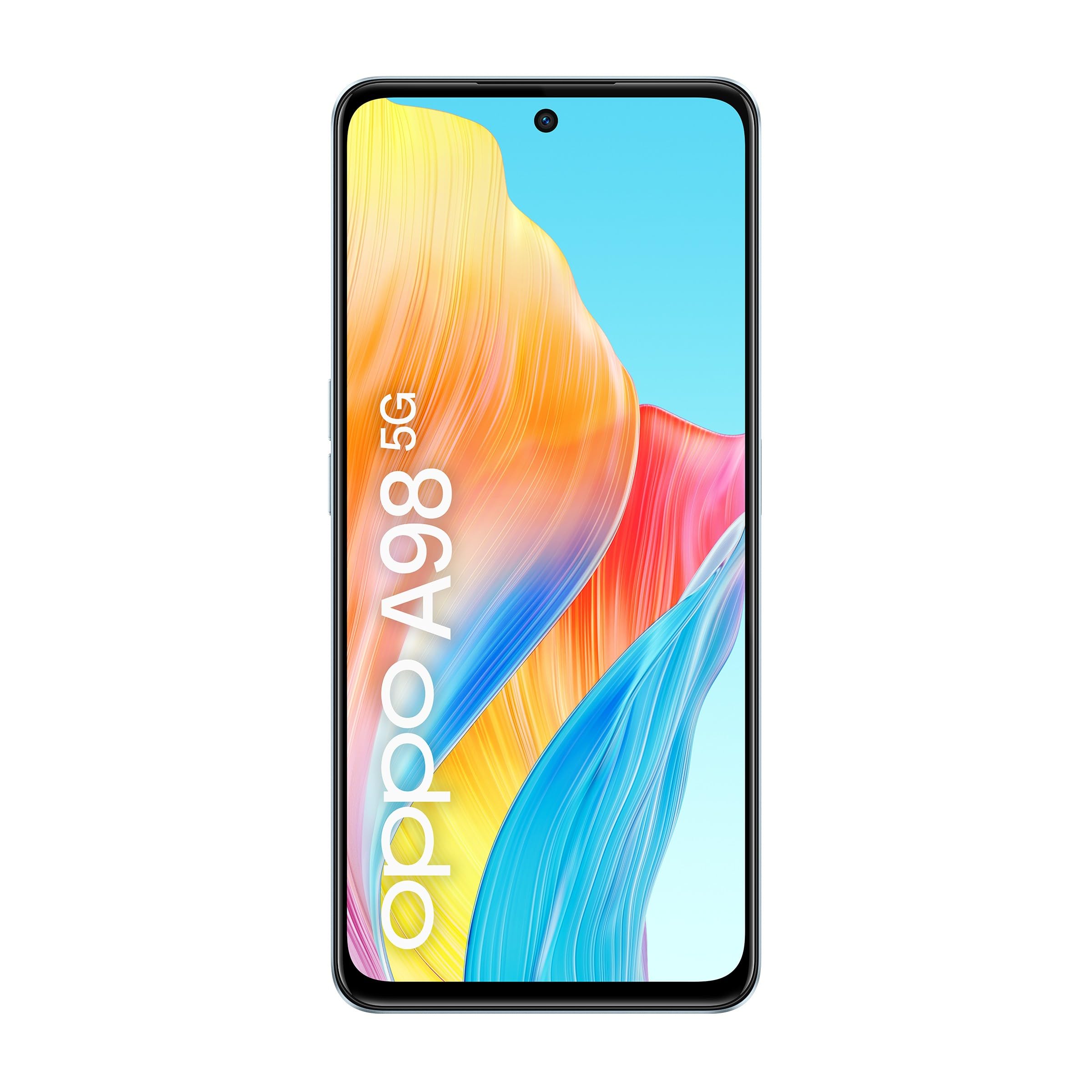
This image displays the OPPO A98 5G smartphone, highlighting its rear camera module and the vibrant display. A magnetic car mount accessory is also shown.
ഉപകരണം കഴിഞ്ഞുview
Familiarize yourself with the physical components of your OPPO A98 5G.
ഫ്രണ്ട് View
- ഡിസ്പ്ലേ: 6.72-inch screen with 2400 x 1080 resolution and 120 Hz refresh rate.
- മുൻ ക്യാമറ: സെൽഫികൾക്കും വീഡിയോ കോളുകൾക്കും.
- ഇയർപീസ്: കോളുകൾക്കിടയിൽ ഓഡിയോയ്ക്കായി.
പിൻഭാഗം View
- പിൻ ക്യാമറ മൊഡ്യൂൾ: Main camera and auxiliary lenses.
- ഫ്ലാഷ്: For low-light photography.
Sides and Ports
- പവർ ബട്ടൺ: വശത്ത് സ്ഥിതിചെയ്യുന്നു, ഉപകരണം ഓൺ/ഓഫ് ചെയ്യുന്നതിനോ സ്ക്രീൻ ഉണർത്തുന്നതിനോ ഉറങ്ങുന്നതിനോ ഉപയോഗിക്കുന്നു.
- വോളിയം ബട്ടണുകൾ: മീഡിയയും കോൾ വോളിയവും ക്രമീകരിക്കുക.
- യുഎസ്ബി ടൈപ്പ്-സി പോർട്ട്: ചാർജിംഗിനും ഡാറ്റ കൈമാറ്റത്തിനും.
- സിം കാർഡ് ട്രേ: For inserting SIM cards.
- സ്പീക്കർ: ഓഡിയോ ഔട്ട്പുട്ടിനായി.
സജ്ജമാക്കുക
1. സിം കാർഡ് ഇൻസ്റ്റാളേഷൻ
- നിങ്ങളുടെ ഉപകരണത്തിന്റെ വശത്ത് സിം കാർഡ് ട്രേ കണ്ടെത്തുക.
- ട്രേയുടെ അടുത്തുള്ള ചെറിയ ദ്വാരത്തിലേക്ക് സിം എജക്റ്റർ ഉപകരണം തിരുകുക, ട്രേ പുറത്തേക്ക് വരുന്നത് വരെ സൌമ്യമായി അമർത്തുക.
- സ്വർണ്ണ കോൺടാക്റ്റുകൾ താഴേക്ക് അഭിമുഖീകരിക്കുന്ന തരത്തിൽ നിങ്ങളുടെ നാനോ-സിം കാർഡ്(കൾ) ട്രേയിൽ വയ്ക്കുക. ശരിയായ ഓറിയന്റേഷൻ ഉറപ്പാക്കുക.
- ഉപകരണത്തിൽ ട്രേ ക്ലിക്കുചെയ്യുന്നതുവരെ ശ്രദ്ധാപൂർവ്വം വീണ്ടും തിരുകുക.
2. പ്രാരംഭ പവർ ഓൺ
- OPPO ലോഗോ സ്ക്രീനിൽ ദൃശ്യമാകുന്നതുവരെ പവർ ബട്ടൺ അമർത്തിപ്പിടിക്കുക.
- Follow the on-screen prompts to complete the initial setup, including language selection, Wi-Fi connection, and Google account sign-in.
പ്രവർത്തന നിർദ്ദേശങ്ങൾ
ഉപകരണം ചാർജ് ചെയ്യുന്നു
Connect the USB Type-C cable to the phone's charging port and the other end to the 67W SuperVOOC power adapter. Plug the adapter into a power outlet. The device supports fast charging, reaching 50% charge in approximately 18 minutes and a full charge in about 44 minutes.
ഡിസ്പ്ലേയും നാവിഗേഷനും
- സ്പർശന ആംഗ്യങ്ങൾ: നാവിഗേഷനും ഇടപെടലിനും സ്വൈപ്പ് ചെയ്യുക, ടാപ്പ് ചെയ്യുക, പിഞ്ച്-ടു-സൂം ചെയ്യുക.
- ഹോം സ്ക്രീൻ: വിജറ്റുകളും ആപ്പ് കുറുക്കുവഴികളും ഉപയോഗിച്ച് ഇഷ്ടാനുസൃതമാക്കുക.
- അറിയിപ്പുകൾ: അറിയിപ്പുകളും ദ്രുത ക്രമീകരണങ്ങളും ആക്സസ് ചെയ്യാൻ സ്ക്രീനിന്റെ മുകളിൽ നിന്ന് താഴേക്ക് സ്വൈപ്പ് ചെയ്യുക.
ക്യാമറ ഉപയോഗം
Open the Camera app to capture photos and videos. Tap the shutter button to take a picture. Swipe left or right to switch between modes like Photo, Video, Portrait, and Night. Adjust settings such as flash, timer, and aspect ratio from the camera interface.
കണക്റ്റിവിറ്റി
- 5G നെറ്റ്വർക്ക്: The device supports 5G connectivity for faster mobile data speeds. Ensure your SIM card and plan support 5G.
- വൈഫൈ: പോകുക ക്രമീകരണങ്ങൾ > Wi-Fi ലഭ്യമായ വയർലെസ് നെറ്റ്വർക്കുകളിലേക്ക് കണക്റ്റുചെയ്യാൻ.
- ബ്ലൂടൂത്ത്: പോകുക ക്രമീകരണങ്ങൾ > ബ്ലൂടൂത്ത് ഹെഡ്ഫോണുകൾ അല്ലെങ്കിൽ സ്പീക്കറുകൾ പോലുള്ള ബ്ലൂടൂത്ത് ഉപകരണങ്ങളുമായി ജോടിയാക്കാൻ.
സ്റ്റോറേജ് മാനേജ്മെൻ്റ്
The OPPO A98 5G comes with 256GB of internal storage. You can manage your storage by going to ക്രമീകരണങ്ങൾ > സംഭരണം. അനാവശ്യമായവ പതിവായി നീക്കം ചെയ്യുക files and cache to maintain optimal performance. The device also supports RAM Expansion, utilizing storage as virtual RAM for smoother multitasking.
മെയിൻ്റനൻസ്
സോഫ്റ്റ്വെയർ അപ്ഡേറ്റുകൾ
നിങ്ങളുടെ ഉപകരണത്തിൽ ഏറ്റവും പുതിയ ഫീച്ചറുകൾ, സുരക്ഷാ പാച്ചുകൾ, പ്രകടന മെച്ചപ്പെടുത്തലുകൾ എന്നിവ ഉണ്ടെന്ന് ഉറപ്പാക്കാൻ സോഫ്റ്റ്വെയർ അപ്ഡേറ്റുകൾ പതിവായി പരിശോധിച്ച് ഇൻസ്റ്റാൾ ചെയ്യുക. ഇതിലേക്ക് പോകുക ക്രമീകരണങ്ങൾ > ഉപകരണത്തെക്കുറിച്ച് > കാലികമാണ് അപ്ഡേറ്റുകൾ പരിശോധിക്കാൻ.
വൃത്തിയാക്കൽ
Use a soft, lint-free cloth to clean the screen and body of your phone. Avoid using harsh chemicals or abrasive materials. For stubborn smudges, slightly dampഇലക്ട്രോണിക് ഉപകരണങ്ങൾക്കായി രൂപകൽപ്പന ചെയ്ത വെള്ളമുള്ള തുണി അല്ലെങ്കിൽ സ്ക്രീൻ ക്ലീനർ.
ബാറ്ററി കെയർ
The OPPO A98 5G features a 5000 mAh battery with OPPO's patented Battery Health Engine, designed to double the battery's lifespan to four years or more. To maximize battery life, avoid extreme temperatures, use the original charger, and avoid fully discharging the battery frequently.
ട്രബിൾഷൂട്ടിംഗ്
ഉപകരണം ഓണാക്കുന്നില്ല
- ബാറ്ററി ചാർജ്ജ് ചെയ്തിട്ടുണ്ടെന്ന് ഉറപ്പാക്കുക. പവർ ഓൺ ചെയ്യാൻ ശ്രമിക്കുന്നതിന് മുമ്പ് കുറഞ്ഞത് 10 മിനിറ്റെങ്കിലും ഉപകരണം ചാർജറുമായി ബന്ധിപ്പിക്കുക.
- നിർബന്ധിതമായി റീബൂട്ട് ചെയ്യാൻ പവർ ബട്ടൺ 10-15 സെക്കൻഡ് അമർത്തിപ്പിടിക്കുക.
ചാർജിംഗ് പ്രശ്നങ്ങൾ
- ചാർജിംഗ് കേബിളും അഡാപ്റ്ററും സുരക്ഷിതമായി ബന്ധിപ്പിച്ചിട്ടുണ്ടെന്നും കേടുപാടുകൾ സംഭവിച്ചിട്ടില്ലെന്നും ഉറപ്പാക്കുക.
- മറ്റൊരു പവർ ഔട്ട്ലെറ്റ് ഉപയോഗിക്കാൻ ശ്രമിക്കുക.
- Clean the USB Type-C port on your phone gently with a soft brush to remove any debris.
നെറ്റ്വർക്ക് കണക്റ്റിവിറ്റി പ്രശ്നങ്ങൾ
- സിഗ്നൽ ഇല്ല/ദുർബലമായ സിഗ്നൽ: Check if your SIM card is properly inserted. Try restarting the device. Ensure you are in an area with network coverage.
- Wi-Fi കണക്ഷൻ പ്രശ്നങ്ങൾ: നിങ്ങളുടെ വൈഫൈ റൂട്ടർ പുനരാരംഭിക്കുക. നിങ്ങളുടെ ഫോണിലെ നെറ്റ്വർക്ക് മറന്ന് വീണ്ടും കണക്റ്റുചെയ്യുക.
സ്പെസിഫിക്കേഷനുകൾ
| മോഡലിൻ്റെ പേര് | ഓപ്പോ A98 5G |
| ഓപ്പറേറ്റിംഗ് സിസ്റ്റം | ആൻഡ്രോയിഡ് 13.0 |
| ഡിസ്പ്ലേ വലിപ്പം | 17.1 സെ.മീ (6.72 ഇഞ്ച്) |
| ഡിസ്പ്ലേ റെസല്യൂഷൻ | 2400 x 1080 |
| പുതുക്കിയ നിരക്ക് | 120 Hz |
| പ്രോസസ്സർ | Qualcomm Snapdragon 5G SoC |
| റാം | 8 GB (expandable up to 16 GB with RAM Expansion) |
| ആന്തരിക സംഭരണം | 256 ജിബി |
| ബാറ്ററി ശേഷി | 5000 mAh |
| ചാർജിംഗ് | 67W സൂപ്പർവൂക് ഫാസ്റ്റ് ചാർജിംഗ് |
| പിൻ ക്യാമറ | 16 MP effective resolution (main camera) |
| കണക്റ്റിവിറ്റി | 5G, USB Type-C, Wi-Fi, Bluetooth |
| സിം തരം | ഡ്യുവൽ സിം |
വാറൻ്റിയും പിന്തുണയും
വാറൻ്റി വിവരങ്ങൾ
Your OPPO A98 5G smartphone comes with a 3 വർഷത്തെ വാറൻ്റി against factory defects. Please retain your proof of purchase for warranty claims. This warranty covers manufacturing defects and does not cover damage caused by misuse, accidents, unauthorized modifications, or normal wear and tear.
ഉപഭോക്തൃ പിന്തുണ
For further assistance, technical support, or warranty inquiries, please visit the official OPPO website or contact their customer service. Refer to the packaging or the official OPPO webനിങ്ങളുടെ പ്രദേശത്തെ നിർദ്ദിഷ്ട കോൺടാക്റ്റ് വിശദാംശങ്ങൾക്കായി സൈറ്റ് സന്ദർശിക്കുക.