1. ആമുഖം
Welcome to the user manual for your Optoma HD30LV 1080p Full HD Home Projector. This document provides essential information for the safe and efficient operation of your device. Please read these instructions carefully before using the projector and retain them for future reference.
2. ഉൽപ്പന്നം കഴിഞ്ഞുview
The Optoma HD30LV is designed to deliver a high-quality visual experience for home theater and gaming. It features 1080p Full HD resolution, 4K HDR input compatibility, and a compact design for versatile placement.
പ്രധാന സവിശേഷതകൾ:
- 4,500 ല്യൂമെൻസ്: Provides bright images suitable for various lighting conditions.
- 4K UHD and HDR Compatible: Supports high-resolution and high dynamic range content for enhanced detail and color.
- കൊണ്ടുപോകാവുന്നതും ഭാരം കുറഞ്ഞതും: Designed for easy transport and flexible installation.
- മെച്ചപ്പെടുത്തിയ ഗെയിമിംഗ് മോഡ്: Offers lightning-fast response times for a smooth gaming experience.
- Dual HDMI Connectors: Allows connection to multiple devices simultaneously.
ബോക്സിൽ എന്താണുള്ളത്:
- Optoma HD30LV Projector
- പവർ കേബിൾ
- റിമോട്ട് കൺട്രോൾ
- ഉപയോക്തൃ മാനുവൽ (ഈ പ്രമാണം)
ഉൽപ്പന്ന ദൃശ്യങ്ങൾ:

ഫ്രണ്ട് view of the Optoma HD30LV projector, showcasing the lens and ventilation.

മുകളിൽ view of the Optoma HD30LV projector, showing the control panel and focus/zoom adjustments.
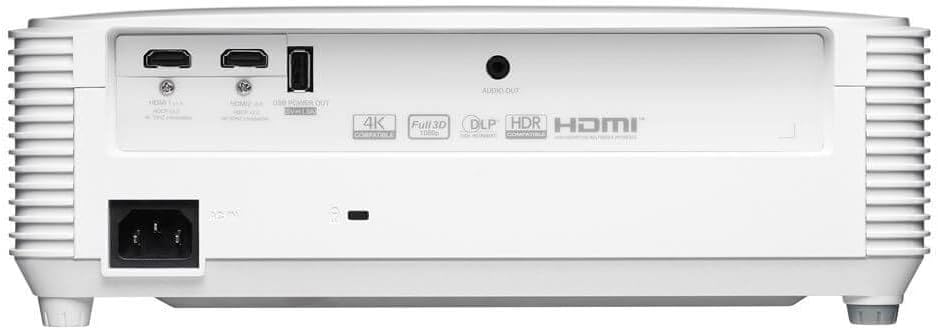
പിൻഭാഗം view of the Optoma HD30LV projector, detailing the input and output ports.
ഉൽപ്പന്ന വീഡിയോ:
ഒരു ഔദ്യോഗിക ഉൽപ്പന്നം കഴിഞ്ഞുview video demonstrating the features and design of the Optoma HD30LV projector.
3. സജ്ജീകരണം
3.1 അൺപാക്കിംഗും പ്ലേസ്മെന്റും
- പാക്കേജിംഗിൽ നിന്ന് പ്രൊജക്ടറും എല്ലാ അനുബന്ധ ഉപകരണങ്ങളും ശ്രദ്ധാപൂർവ്വം നീക്കം ചെയ്യുക.
- Place the projector on a stable, flat surface or mount it securely according to the manufacturer's guidelines. Ensure adequate ventilation around the unit.
- Consider the throw distance for your desired screen size. The HD30LV can project a 120-inch image from approximately 13 feet 10 inches (4.22 meters) away.

Diagram illustrating recommended throw distances for 100-inch and 120-inch screen sizes for the HD30LV projector.
3.2 ഉപകരണങ്ങൾ ബന്ധിപ്പിക്കുന്നു
The HD30LV features multiple connectivity options. Refer to the diagram below for port locations.

വിശദമായി view of the Optoma HD30LV projector's dimensions and labeled connectivity ports, including HDMI and USB.
- ശക്തി: Connect the power cable to the projector and a suitable power outlet.
- എച്ച്ഡിഎംഐ: Use an HDMI cable to connect your video source (e.g., Blu-ray player, gaming console, streaming device) to one of the two HDMI 2.0 ports.
- USB പവർ ഔട്ട്: A USB port (5V/1.5A) is available for powering compatible devices.
- ഓഡിയോ Outട്ട്: Connect external audio systems via the 3.5mm stereo audio jack if desired.
- കെൻസിംഗ്ടൺ ലോക്ക്: For security, a Kensington lock slot is provided.
4. പ്രവർത്തന നിർദ്ദേശങ്ങൾ
4.1 പവർ ഓൺ/ഓഫ്
- Press the power button on the projector or the remote control to turn the unit on.
- പവർ ഓഫ് ചെയ്യാൻ, വീണ്ടും പവർ ബട്ടൺ അമർത്തുക. ആവശ്യപ്പെടുകയാണെങ്കിൽ ഷട്ട്ഡൗൺ സ്ഥിരീകരിക്കുക.
4.2 ചിത്രം ക്രമീകരിക്കൽ
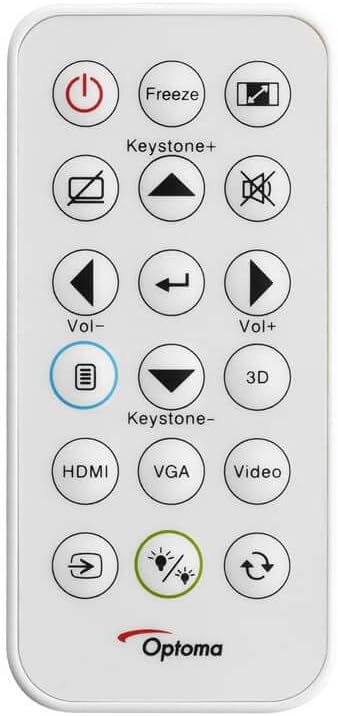
The remote control for the Optoma HD30LV projector, showing buttons for power, input, keystone, volume, and 3D functions.
- ഫോക്കസ്: ചിത്രം വ്യക്തവും വ്യക്തവുമാകുന്നതുവരെ ലെൻസിലെ ഫോക്കസ് റിംഗ് തിരിക്കുക.
- സൂം: പ്രൊജക്ടർ നീക്കാതെ തന്നെ ചിത്രത്തിന്റെ വലുപ്പം മാറ്റാൻ ലെൻസിലെ സൂം റിംഗ് ക്രമീകരിക്കുക.
- കീസ്റ്റോൺ തിരുത്തൽ: Use the 'Keystone+' and 'Keystone-' buttons on the remote control or the projector's control panel to correct trapezoidal image distortion.
- ഇൻപുട്ട് ഉറവിടം: Press the 'HDMI' button on the remote or the 'Source' button on the projector to cycle through available input sources.
4.3 Enhanced Features
- 4K HDR Input: The projector is compatible with 4K HDR signals, providing enhanced contrast and color. Ensure your source device is configured to output HDR.
- മെച്ചപ്പെടുത്തിയ ഗെയിമിംഗ് മോഡ്: Activate this mode through the projector's menu for reduced input lag, optimizing your gaming experience.
- Full 3D: The projector supports Full 3D content from compatible sources. Active DLP Link 3D glasses (sold separately) are required for 3D viewing.

Visual comparison of different resolutions (SD, HD, Full HD 1080p) to demonstrate the clarity of the HD30LV's native 1080p output.
5. പരിപാലനം
പതിവ് അറ്റകുറ്റപ്പണികൾ മികച്ച പ്രകടനം ഉറപ്പാക്കുകയും നിങ്ങളുടെ പ്രൊജക്ടറിന്റെ ആയുസ്സ് വർദ്ധിപ്പിക്കുകയും ചെയ്യുന്നു.
- ലെൻസ് വൃത്തിയാക്കൽ: ഒപ്റ്റിക്കൽ ലെൻസുകൾക്കായി പ്രത്യേകം രൂപകൽപ്പന ചെയ്ത മൃദുവായ, ലിന്റ് രഹിത തുണി ഉപയോഗിക്കുക. ഉരച്ചിലുകളുള്ള വസ്തുക്കളോ കഠിനമായ രാസവസ്തുക്കളോ ഒഴിവാക്കുക.
- പ്രൊജക്ടർ വൃത്തിയാക്കൽ സിasing: ഒരു സോഫ്റ്റ്, ഡി ഉപയോഗിച്ച് പുറംഭാഗം തുടയ്ക്കുകamp തുണി. ഉരച്ചിലുകളുള്ള ക്ലീനറുകളോ ലായകങ്ങളോ ഉപയോഗിക്കരുത്.
- വെൻ്റിലേഷൻ: Ensure the projector's ventilation openings are clear and unobstructed to prevent overheating. Do not block air vents.
- സംഭരണം: ദീർഘനേരം ഉപയോഗിക്കാത്തപ്പോൾ, പൊടിയിൽ നിന്നും കടുത്ത താപനിലയിൽ നിന്നും സംരക്ഷിച്ചിരിക്കുന്ന തണുത്തതും വരണ്ടതുമായ സ്ഥലത്ത് പ്രൊജക്ടർ സൂക്ഷിക്കുക.
6. പ്രശ്നപരിഹാരം
If you encounter issues with your Optoma HD30LV projector, refer to the following common problems and solutions:
| പ്രശ്നം | സാധ്യമായ പരിഹാരം |
|---|---|
| ചിത്രമൊന്നും പ്രദർശിപ്പിച്ചിട്ടില്ല | Check power connections. Ensure the correct input source is selected. Verify the video cable is securely connected. |
| ചിത്രം മങ്ങിയതാണ് | ലെൻസിലെ ഫോക്കസ് റിംഗ് ക്രമീകരിക്കുക. പ്രൊജക്ഷൻ പ്രതലം പരന്നതാണെന്നും പ്രൊജക്ടർ സ്ഥിരതയുള്ളതാണെന്നും ഉറപ്പാക്കുക. |
| ചിത്രം ട്രപസോയിഡൽ ആണ് | Use the keystone correction function on the remote or projector control panel. Position the projector perpendicular to the screen if possible. |
| ശബ്ദമില്ല | Check volume settings on the projector and source device. Ensure external audio systems are correctly connected and powered on. |
| പ്രൊജക്ടർ അമിതമായി ചൂടാകുകയോ ഓഫാകുകയോ ചെയ്യുന്നു | Ensure ventilation openings are clear. Operate the projector in a well-ventilated area. |
For more detailed troubleshooting or issues not listed here, please refer to the comprehensive support section on the Optoma webസൈറ്റ് അല്ലെങ്കിൽ ഉപഭോക്തൃ പിന്തുണയുമായി ബന്ധപ്പെടുക.
7 സ്പെസിഫിക്കേഷനുകൾ
| ഫീച്ചർ | വിശദാംശങ്ങൾ |
|---|---|
| മോഡൽ നമ്പർ | HD30LV |
| ഡിസ്പ്ലേ റെസല്യൂഷൻ | 1920 x 1080 (1080p ഫുൾ എച്ച്ഡി) |
| തെളിച്ചം | 4,500 ല്യൂമെൻസ് |
| കണക്റ്റിവിറ്റി ടെക്നോളജി | HDMI, USB |
| പ്രത്യേക സവിശേഷതകൾ | 4K HDR Input, Compact Size, Full 3D, High Brightness, Low Input Lag |
| ഉൽപ്പന്ന അളവുകൾ | 9.61 x 12.44 x 4.25 ഇഞ്ച് (244 x 316 x 108 മിമി) |
| ഇനത്തിൻ്റെ ഭാരം | 6.35 പൗണ്ട് (2.88 കി.ഗ്രാം) |
| നിർമ്മാതാവ് | Optoma Technology Inc |
| ബാറ്ററികൾ | 1 Lithium Metal battery required (included for remote) |
8. വാറൻ്റിയും പിന്തുണയും
For information regarding your product's warranty, please refer to the warranty card included with your projector or visit the official Optoma website. Optoma provides customer support for technical assistance, service, and parts.
ഓൺലൈൻ പിന്തുണ: സന്ദർശിക്കുക Optoma Support Page for FAQs, downloads, and contact information.
ബന്ധപ്പെടാനുള്ള വിവരങ്ങൾ: Refer to your product packaging or the Optoma webഏറ്റവും പുതിയ ഉപഭോക്തൃ സേവന കോൺടാക്റ്റ് വിശദാംശങ്ങൾക്കായുള്ള സൈറ്റ്.


