1. ആമുഖം
This manual provides essential information for the proper installation, operation, and maintenance of your ENDORFY Arx 500 ARGB ATX Computer Case. Please read this manual thoroughly before beginning installation to ensure optimal performance and safety.
The ENDORFY Arx 500 ARGB is a high-performance ATX computer case designed for efficient cooling and spacious component compatibility. Key features include:
- Tempered glass side panel for showcasing ആന്തരിക ഘടകങ്ങൾ.
- Spacious interior for easy component installation and cable management.
- Compatibility with various radiator sizes for advanced cooling solutions.
- Airy and easily accessible front panel for optimal airflow.
- Efficient cooling design to maintain low component temperatures.
- Convenient cable management features for a clean build.
2 സുരക്ഷാ വിവരങ്ങൾ
Please observe the following safety precautions to prevent damage to the product or injury to yourself.
- വൈദ്യുതി വിച്ഛേദിക്കൽ: Always disconnect the power supply from the wall outlet before installing or removing any components inside the computer case.
- സ്റ്റാറ്റിക് ഇലക്ട്രിസിറ്റി: Wear an anti-static wrist strap or frequently touch a grounded metal object to discharge static electricity before handling internal components.
- മൂർച്ചയുള്ള അഗ്രങ്ങൾ: Be cautious of sharp edges inside the case during installation.
- ടെമ്പർഡ് ഗ്ലാസ്: Handle the tempered glass side panel with care. It is fragile and can break if dropped or subjected to impact. Place it on a soft, flat surface when removed.
- വെൻ്റിലേഷൻ: Ensure adequate ventilation around the case to prevent overheating. Do not block air vents.
- ലിക്വിഡ് കോൺടാക്റ്റ്: Keep the computer case away from liquids and moisture.
3. പാക്കേജ് ഉള്ളടക്കം
നിങ്ങളുടെ പാക്കേജിൽ എല്ലാ ഇനങ്ങളും ഉണ്ടെന്ന് ഉറപ്പാക്കുക. ഏതെങ്കിലും ഇനങ്ങൾ നഷ്ടപ്പെട്ടിട്ടുണ്ടെങ്കിലോ കേടായിട്ടുണ്ടെങ്കിലോ, നിങ്ങളുടെ റീട്ടെയിലറെ ബന്ധപ്പെടുക.
- ENDORFY Arx 500 ARGB ATX Computer Case
- 4 x 140 mm ARGB Fans (pre-installed)
- Accessory Box (containing screws, cable ties, and other mounting hardware)
- ഉപയോക്തൃ മാനുവൽ (ഈ പ്രമാണം)

ചിത്രം 3.1: പൊട്ടിത്തെറിച്ചു view showing the computer case, fans, and various panels.
4. സജ്ജീകരണവും ഇൻസ്റ്റാളേഷനും
Follow these steps to install your components into the ENDORFY Arx 500 ARGB case.
4.1 കേസ് തയ്യാറാക്കൽ
- സൈഡ് പാനലുകൾ നീക്കം ചെയ്യുക: Carefully remove the tempered glass side panel and the solid metal side panel. Place them on a soft, non-abrasive surface to prevent scratches.
- ആക്സസറി ബോക്സ്: Locate the accessory box inside the case, which contains all necessary screws and mounting hardware.
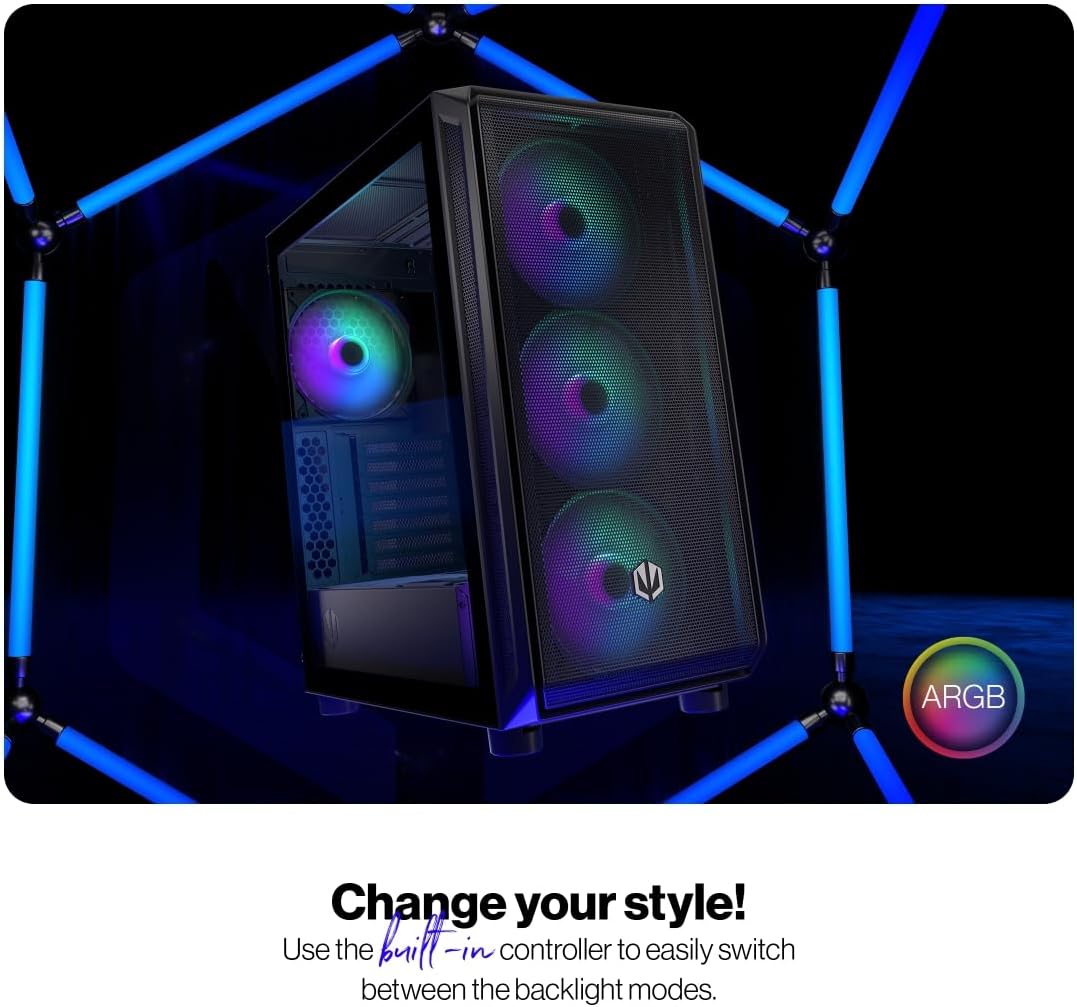
Figure 4.1: The tempered glass side panel allows for a clear view ആന്തരിക ഘടകങ്ങളുടെ.
4.2 മദർബോർഡ് ഇൻസ്റ്റാളേഷൻ
- സ്റ്റാൻഡ്ഓഫുകൾ ഇൻസ്റ്റാൾ ചെയ്യുക: Ensure the correct standoffs are installed for your ATX motherboard. The case supports ATX motherboards.
- മദർബോർഡ് മൗണ്ട് ചെയ്യുക: Carefully place your motherboard onto the standoffs and secure it with the provided screws.

ചിത്രം 4.2: വിശാലമായ ഇന്റീരിയർ നൽകുന്നത് ample room for motherboard and other component installation.
4.3 പവർ സപ്ലൈ ആൻഡ് സ്റ്റോറേജ് ഇൻസ്റ്റാളേഷൻ
- വൈദ്യുതി വിതരണം: Install your power supply unit (PSU) into the dedicated bottom mount area. Secure it with screws from the rear of the case.
- സ്റ്റോറേജ് ഡ്രൈവുകൾ: Install your 2.5" SSDs or 3.5" HDDs into the designated drive bays. Refer to the case's internal structure for specific mounting points.
4.4 ഗ്രാഫിക്സ് കാർഡും എക്സ്പാൻഷൻ കാർഡുകളും
- സ്ലോട്ട് കവറുകൾ നീക്കം ചെയ്യുക: കേസിന്റെ പിൻഭാഗത്ത് നിന്ന് ആവശ്യമായ PCI-E സ്ലോട്ട് കവറുകൾ നീക്കം ചെയ്യുക.
- കാർഡുകൾ ഇൻസ്റ്റാൾ ചെയ്യുക: Insert your graphics card and other expansion cards into the motherboard's PCI-E slots and secure them with screws.
4.5 Cooling System (Fans and Radiators)
The case comes with 4 pre-installed 140mm ARGB fans. Additional fans or radiators can be installed for enhanced cooling.
- Fan Capacity: The case accommodates up to 7 fans.
- റേഡിയേറ്റർ അനുയോജ്യത: The design supports various radiator sizes for liquid cooling solutions.

Figure 4.3: The case features pre-installed 140mm ARGB fans for optimal airflow.

Figure 4.4: Perforated front and top panels ensure maximum airflow and dust protection.
4.6 കേബിൾ മാനേജ്മെന്റ്
Utilize the dedicated cable management space and tie-down points behind the motherboard tray to route and secure cables for a clean build and improved airflow.
4.7 ഫ്രണ്ട് I/O പാനൽ കണക്ഷനുകൾ
Connect the front panel cables (USB, audio, power, reset, LEDs) to the corresponding headers on your motherboard. Refer to your motherboard manual for header locations.

Figure 4.5: Front I/O panel with USB-C, USB-A, headphone, microphone, reset, and power buttons/LEDs.
- യുഎസ്ബി-സി പോർട്ട്: Connects to a USB 3.x Type-C header on your motherboard.
- USB-A പോർട്ടുകൾ: Connects to USB 3.x and USB 2.0 headers on your motherboard.
- Headphones Port: Connects to the audio header on your motherboard.
- മൈക്രോഫോൺ പോർട്ട്: Connects to the audio header on your motherboard.
- റീസെറ്റ് ബട്ടൺ: Connects to the reset header on your motherboard.
- പവർ എൽഇഡി: Connects to the power LED header on your motherboard.
- Storage Activity LED: Connects to the HDD LED header on your motherboard.
- പവർ ബട്ടൺ: Connects to the power switch header on your motherboard.
5. പ്രവർത്തന നിർദ്ദേശങ്ങൾ
എല്ലാ ഘടകങ്ങളും ഇൻസ്റ്റാൾ ചെയ്ത് ബന്ധിപ്പിച്ചുകഴിഞ്ഞാൽ, നിങ്ങളുടെ സിസ്റ്റം ഓൺ ചെയ്യാൻ കഴിയും.
- പവർ ഓൺ: Press the Power Button on the front I/O panel to turn on your computer. The Power LED will illuminate.
- ARGB Fan Control: The pre-installed ARGB fans can be controlled via a built-in controller or synchronized with compatible motherboard software. Use the built-in controller to switch between various backlight modes.

Figure 5.1: The ARGB fans offer customizable lighting effects, controlled via the built-in controller.
6. പരിപാലനം
Regular maintenance helps ensure optimal performance and longevity of your computer case and components.
- പൊടി ഫിൽട്ടറുകൾ: Periodically remove and clean the dust filters located on the front, top, and bottom of the case. Use compressed air or a soft brush to remove accumulated dust.
- ബാഹ്യ ശുചീകരണം: കേസിന്റെ പുറം പ്രതലങ്ങൾ മൃദുവായ, d തുണി ഉപയോഗിച്ച് തുടയ്ക്കുക.amp തുണി. ഉരച്ചിലുകൾ ഉണ്ടാക്കുന്ന ക്ലീനറുകളോ ലായകങ്ങളോ ഒഴിവാക്കുക.
- ഇന്റീരിയർ ക്ലീനിംഗ്: സിസ്റ്റം ഓഫ് ചെയ്ത് പ്ലഗ് ചെയ്ത ശേഷം, ആന്തരിക ഘടകങ്ങളിൽ നിന്നും ഫാൻ ബ്ലേഡുകളിൽ നിന്നും സൌമ്യമായി പൊടി നീക്കം ചെയ്യാൻ കംപ്രസ് ചെയ്ത വായു ഉപയോഗിക്കുക.
- ടെമ്പർഡ് ഗ്ലാസ്: ടെമ്പർഡ് ഗ്ലാസ് പാനൽ ഒരു മൈക്രോഫൈബർ തുണിയും ഇലക്ട്രോണിക് ഉപകരണങ്ങൾക്കായി രൂപകൽപ്പന ചെയ്ത ഒരു ഗ്ലാസ് ക്ലീനറും ഉപയോഗിച്ച് വൃത്തിയാക്കുക.
7. പ്രശ്നപരിഹാരം
If you encounter issues with your computer case, refer to the following common troubleshooting steps.
- സിസ്റ്റം ഓണാക്കുന്നില്ല:
- പവർ സപ്ലൈ വാൾ ഔട്ട്ലെറ്റുമായി ശരിയായി ബന്ധിപ്പിച്ചിട്ടുണ്ടെന്നും സ്വിച്ച് ഓൺ ചെയ്തിട്ടുണ്ടെന്നും ഉറപ്പാക്കുക.
- പൊതുമേഖലാ സ്ഥാപനത്തിൽ നിന്നുള്ള എല്ലാ പവർ കേബിളുകളും മദർബോർഡിലേക്കും ഘടകങ്ങളിലേക്കും ശരിയായി ബന്ധിപ്പിച്ചിട്ടുണ്ടെന്ന് ഉറപ്പാക്കുക.
- മദർബോർഡിന്റെ പവർ ഹെഡറുമായി ഫ്രണ്ട് പാനൽ പവർ ബട്ടൺ കേബിൾ ശരിയായി ബന്ധിപ്പിച്ചിട്ടുണ്ടോയെന്ന് പരിശോധിക്കുക.
- ഫാനുകൾ കറങ്ങുന്നില്ല/ARGB പ്രകാശിക്കുന്നില്ല:
- Ensure fan power cables are securely connected to the fan hub or motherboard headers.
- Verify ARGB cables are connected to the built-in controller or motherboard ARGB header.
- Check the built-in controller or motherboard software for fan speed and lighting settings.
- Front USB/Audio Ports Not Working:
- Confirm that the front panel USB and audio cables are correctly connected to the corresponding headers on your motherboard.
- Ensure motherboard drivers for USB and audio are installed.
If problems persist, consult your motherboard manual or contact ENDORFY customer support.
8 സ്പെസിഫിക്കേഷനുകൾ
| ഫീച്ചർ | വിശദാംശങ്ങൾ |
|---|---|
| ബ്രാൻഡ് | എൻഡോർഫി |
| പരമ്പര | Arx 500 ARGB |
| മോഡൽ നമ്പർ | EY2A011 |
| കേസ് തരം | മിഡി ടവർ |
| മദർബോർഡ് അനുയോജ്യത | ATX |
| അളവുകൾ (LxWxH) | 16.89 x 8.98 x 19.13 ഇഞ്ച് (429 x 228 x 486 മിമി) |
| ഇനത്തിൻ്റെ ഭാരം | 16.5 പൗണ്ട് |
| മെറ്റീരിയൽ | Tempered Glass (side panel) |
| തണുപ്പിക്കൽ രീതി | വായു |
| ഉൾപ്പെടുത്തിയ ആരാധകർ | 4 x 140 mm ARGB fans |
| ഫാൻ വലിപ്പം | 140 മില്ലിമീറ്റർ |
| പവർ സപ്ലൈ മൗണ്ടിംഗ് തരം | താഴെയുള്ള മൗണ്ട് |
| ഫ്രണ്ട് ഐ / ഒ പോർട്ടുകൾ | 2x USB 2.0, 1x USB-C, 1x Headphone, 1x Microphone, Reset Button, Power Button |

Figure 8.1: Front dimensions (228 mm width).

Figure 8.2: Side dimensions (429 mm depth, 486 mm height).
9. വാറൻ്റിയും പിന്തുണയും
For warranty information, technical support, or further assistance, please visit the official ENDORFY webസൈറ്റ് ചെയ്യുക അല്ലെങ്കിൽ നിങ്ങളുടെ പ്രാദേശിക റീട്ടെയിലറെ ബന്ധപ്പെടുക.


