ആമുഖം
This manual provides detailed instructions for the assembly, operation, and maintenance of your EagleStone Kids Basketball Hoop Arcade Game. Please read this manual thoroughly before use to ensure proper setup and safe enjoyment of the product.
സുരക്ഷാ വിവരങ്ങൾ
WARNING: KEEP AWAY from open flames or excessive heat sources. This product is intended for recreational use and should be used under adult supervision.
- ഉപയോഗിക്കുന്നതിന് മുമ്പ് എല്ലാ ഭാഗങ്ങളും സുരക്ഷിതമായി ഉറപ്പിച്ചിട്ടുണ്ടെന്ന് ഉറപ്പാക്കുക.
- Do not climb on the structure.
- ശ്വാസംമുട്ടൽ അപകടങ്ങൾ തടയാൻ ചെറിയ ഭാഗങ്ങൾ കൊച്ചുകുട്ടികളിൽ നിന്ന് അകറ്റി നിർത്തുക.
- Regularly inspect the product for wear and tear. Discontinue use if any damage is found.
പാക്കേജ് ഉള്ളടക്കം
അസംബ്ലി ചെയ്യുന്നതിനുമുമ്പ്, താഴെ പട്ടികപ്പെടുത്തിയിരിക്കുന്ന എല്ലാ ഘടകങ്ങളും നിങ്ങളുടെ പാക്കേജിൽ ഉണ്ടെന്ന് ദയവായി പരിശോധിക്കുക:
- Backboard with Hoop and Net (x1)
- Electronic Scoreboard (integrated into backboard)
- Basketballs (x4)
- Air Pump (x1)
- Support Tubes (various lengths and colors, e.g., blue and red)
- Connectors (yellow, various shapes)
- Ball Return Netting (x1)

A detailed diagram showing the complete parts list and step-by-step assembly instructions for the basketball hoop arcade game, including battery installation for the scoreboard.
അസംബ്ലി നിർദ്ദേശങ്ങൾ
Follow these steps for proper assembly. It is recommended to assemble the unit on a flat, clear surface.
- Prepare the Backboard: Insert 3x 1.5V AAA batteries (not included) into the electronic scoreboard compartment on the back of the backboard, ensuring correct polarity.
- നെറ്റ് ഘടിപ്പിക്കുക: Securely attach the basketball net to the hoop on the backboard.
- ഫ്രെയിം കൂട്ടിച്ചേർക്കുക: Connect the support tubes using the yellow connectors according to the diagram provided in the parts list image. Ensure all connections are firm and stable. The upgraded reinforced tubes are designed for durability.
- Install the Ball Return Netting: Pass the connecting rods through the grid ends of the ball return netting and fasten them to the frame using the provided hooks and loops.
- Attach Backboard to Frame: Securely attach the assembled backboard and hoop to the top of the frame.
- ബാസ്കറ്റ്ബോൾ ഉയർത്തുക: Use the included air pump to inflate the four rubber basketballs to the desired firmness.
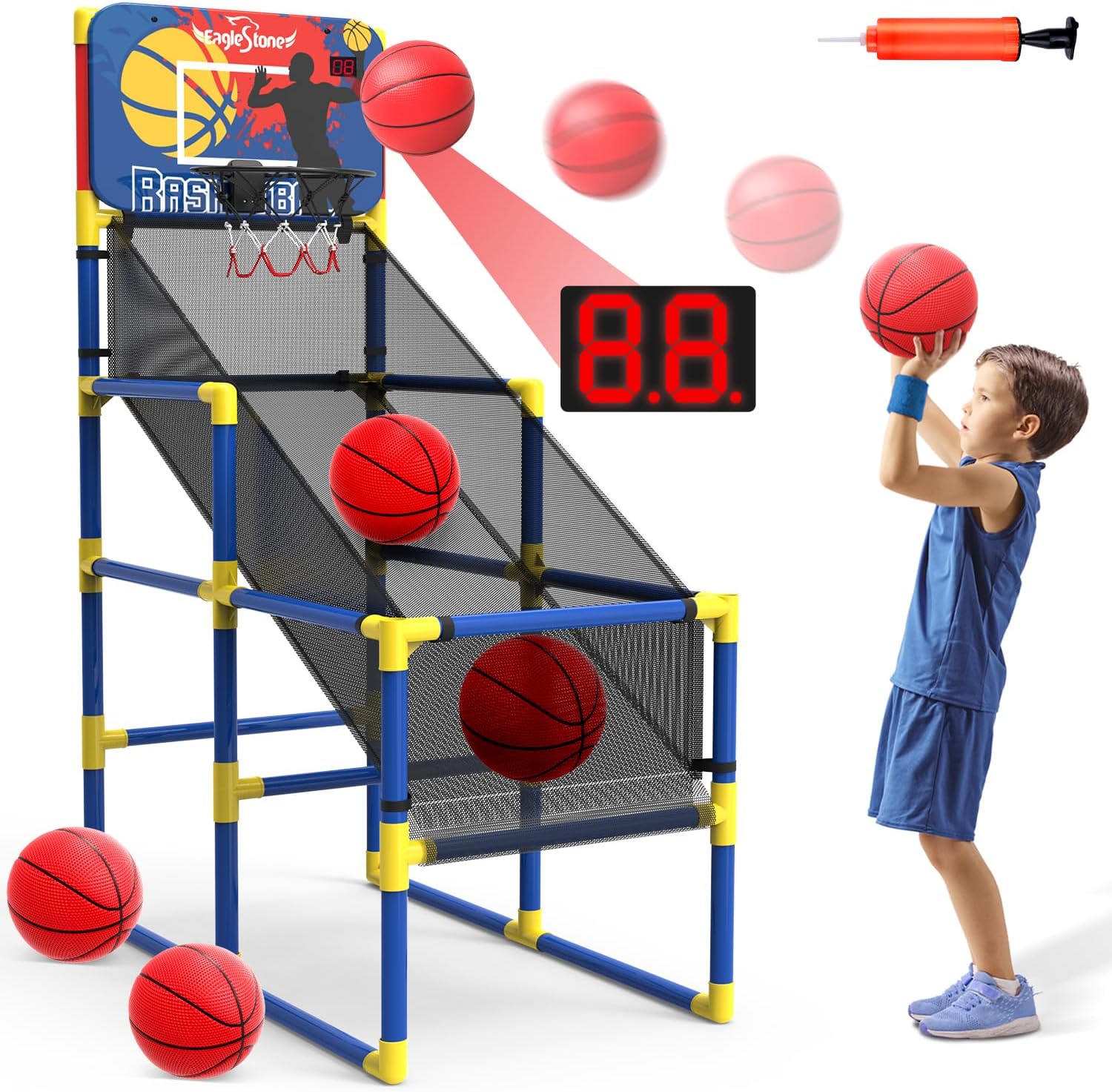
An assembled EagleStone Kids Basketball Hoop Arcade Game, showing its structure, electronic scoreboard, and included basketballs. A child is depicted shooting a basketball.

Diagram illustrating the dimensions of the basketball hoop arcade game (63 inches H x 38 inches L x 20 inches W) and highlighting the 1.44mm thick, reinforced tubes for stability.
പ്രവർത്തന നിർദ്ദേശങ്ങൾ
The EagleStone Kids Basketball Hoop Arcade Game is designed for engaging play with an electronic scoring system.
- പവർ ഓൺ: Once batteries are installed, the electronic scoreboard will activate automatically or via a power button if present (refer to scoreboard for specific controls).
- ഗെയിം കളിക്കുന്നു: Shoot the basketballs into the hoop. The infrared sensing system will detect successful shots and display the score on the LCD screen.
- ശബ്ദ ഇഫക്റ്റുകൾ: The arcade game features cheer sounds to enhance the playing experience.
- Ball Return: The integrated ball return netting guides the basketballs back to the player for continuous play.
- ക്രമീകരിക്കാവുന്ന ഉയരം: The basketball stand height can be adjusted to suit different ages and heights of players. Refer to the assembly diagram for adjustment points.

Detail of the electronic scoreboard with an infrared sensing system, which accurately displays scores and provides cheer sounds during play.

Two scenes depicting the basketball hoop arcade game being used both indoors in a living room and outdoors in a backyard, showcasing അതിന്റെ വൈവിധ്യം.

An image showing an adult and a child engaging in the basketball arcade game, demonstrating its suitability for parent-child interaction.
മെയിൻ്റനൻസ്
To ensure the longevity and optimal performance of your basketball hoop arcade game, follow these maintenance guidelines:
- വൃത്തിയാക്കൽ: Wipe down the frame, backboard, and balls with a damp തുണി. ഉരച്ചിലുകൾ ഉണ്ടാക്കുന്ന ക്ലീനറുകളോ ലായകങ്ങളോ ഒഴിവാക്കുക.
- സംഭരണം: When not in use, store the game in a cool, dry place away from direct sunlight and extreme temperatures.
- ബാറ്ററി മാറ്റിസ്ഥാപിക്കൽ: Replace batteries in the electronic scoreboard when the display dims or stops functioning. Ensure to use new AAA batteries and dispose of old batteries responsibly.
- Net and Hoop Inspection: Periodically check the net for tears and the hoop for any bending or damage. Replace if necessary.
- Tube and Connector Check: Ensure all tubes and connectors remain securely fitted. Re-tighten if any looseness is detected.
ട്രബിൾഷൂട്ടിംഗ്
If you encounter issues with your basketball hoop arcade game, refer to the following common problems and solutions:
| പ്രശ്നം | സാധ്യമായ കാരണം | പരിഹാരം |
|---|---|---|
| Electronic scoreboard not working or dim. | ഡെഡ് അല്ലെങ്കിൽ തെറ്റായി ഇൻസ്റ്റാൾ ചെയ്ത ബാറ്ററികൾ. | ശരിയായ പോളാരിറ്റി ഉറപ്പാക്കിക്കൊണ്ട് ബാറ്ററികൾ പുതിയ 1.5V AAA ബാറ്ററികൾ ഉപയോഗിച്ച് മാറ്റിസ്ഥാപിക്കുക. |
| Score not registering. | Infrared sensor obstructed or dirty. | Clean the sensor area on the backboard. Ensure nothing is blocking the sensor's path. |
| Game feels unstable. | അയഞ്ഞ ട്യൂബ് കണക്ഷനുകൾ. | Check all tube and connector joints and push them firmly into place. Ensure the game is on a flat surface. |
| Basketballs losing air. | Under-inflated or small puncture. | Re-inflate with the provided pump. If air loss persists, inspect for punctures. |
സ്പെസിഫിക്കേഷനുകൾ
- മോഡൽ നമ്പർ: ES57
- ഉൽപ്പന്ന അളവുകൾ: Approximately 38" L x 20" W x 63" H (assembled)
- ഇനത്തിൻ്റെ ഭാരം: 6.21 പൗണ്ട്
- ശുപാർശ ചെയ്യുന്ന പ്രായം: 3 വർഷവും അതിൽ കൂടുതലും
- മെറ്റീരിയൽ: Durable plastic tubes, high-density polyester net, PU basketballs
- Power Source (Scoreboard): 3 x 1.5V AAA ബാറ്ററികൾ (ഉൾപ്പെടുത്തിയിട്ടില്ല)

ക്ലോസ് അപ്പ് view of the eco-friendly stretch PU basketballs, high-density polyester net, and the upgraded reinforced hoop, emphasizing material quality.
വാറൻ്റിയും പിന്തുണയും
EagleStone products are manufactured with quality and care. For any questions, concerns, or support needs regarding your Kids Basketball Hoop Arcade Game (Model ES57), please contact EagleStone customer service. Please retain your proof of purchase for warranty claims.
For more information, visit the official EagleStone store: EagleStone Store on Amazon


