1. ആമുഖം
This manual provides detailed instructions for the AUSDOM Airkey84 Wireless Mechanical Keyboard. Please read this guide thoroughly to ensure proper setup, operation, and maintenance of your device. The Airkey84 is a compact 75% layout keyboard featuring multiple connection modes, white backlighting, and low-profile brown switches, designed for various computing environments.

Image 1.1: The AUSDOM Airkey84 Wireless Mechanical Keyboard, showcasing its compact 75% layout and white keycaps with gray accents. A USB-C cable is connected, and a Bluetooth dongle is visible, indicating its wireless capabilities.
2. പാക്കേജ് ഉള്ളടക്കം
നിങ്ങളുടെ പാക്കേജിൽ എല്ലാ ഇനങ്ങളും ഉണ്ടെന്ന് ദയവായി പരിശോധിക്കുക:
- AUSDOM Airkey84 Wireless Mechanical Keyboard
- യുഎസ്ബി-സി കേബിൾ
- 2.4GHz USB Receiver (typically stored in the keyboard's battery compartment or a dedicated slot)
- Extra Keycaps for Windows (3 pieces)
- ഉപയോക്തൃ മാനുവൽ (ഈ പ്രമാണം)
3. ഉൽപ്പന്നം കഴിഞ്ഞുview
The AUSDOM Airkey84 keyboard offers a versatile and efficient typing experience with its key features:
- 75% കോംപാക്റ്റ് ലേഔട്ട്: 84 keys, including dedicated arrow keys and function keys, optimizing desktop space.
- Triple Connection Modes: Supports Bluetooth 5.0, 2.4GHz wireless via USB receiver, and USB-C wired connection.
- മൾട്ടി-ഡിവൈസ് കണക്റ്റിവിറ്റി: Connects to up to 4 devices and allows seamless switching.
- കുറഞ്ഞ പ്രോfile ബ്രൗൺ സ്വിച്ചുകൾ: Designed for comfortable and efficient typing.
- വെളുത്ത ബാക്ക്ലൈറ്റ്: Features 14 distinct lighting options for visibility in various environments.
- റീചാർജ് ചെയ്യാവുന്ന ബാറ്ററി: Integrated 2000 mAh battery provides extended usage.
- വിശാലമായ അനുയോജ്യത: Compatible with Mac OS and Windows operating systems.
- എർഗണോമിക് ഡിസൈൻ: Features an ultra-slim aluminum frame and adjustable feet for comfortable typing angles.

Image 3.1: Illustration of the keyboard's triple connection modes: Bluetooth 5.0, 2.4G Wireless, and Wired Mode. The image shows the keyboard connected to a laptop, smartphone, and tablet, demonstrating its multi-device capability.

ചിത്രം 3.2: മുന്നിലും പിന്നിലും views of the AUSDOM Airkey84 keyboard. The back view displays product information and regulatory markings, along with the adjustable feet.
4. സജ്ജീകരണ നിർദ്ദേശങ്ങൾ
4.1 കീബോർഡ് ചാർജ് ചെയ്യുന്നു
Before first use, fully charge the keyboard using the provided USB-C cable. Connect one end to the keyboard's USB-C port and the other end to a USB power source (e.g., computer, wall adapter).

Image 4.1: The AUSDOM Airkey84 keyboard connected via its USB-C port to a charging cable, with a smartphone nearby. This illustrates the USB-C charging capability.
4.2 ബ്ലൂടൂത്ത് മോഡ് വഴി ബന്ധിപ്പിക്കുന്നു
- Ensure the keyboard's power switch is in the ON സ്ഥാനം.
- അമർത്തിപ്പിടിക്കുക എഫ്എൻ + ബിടി1 keycaps for 3-5 seconds. The keyboard will enter pairing mode, and the backlight indicator will flash rapidly.
- On your device (computer, tablet, smartphone), enable Bluetooth and search for available devices.
- Select "AUSDOM Airkey84" from the list to complete the pairing process.
- To connect to other Bluetooth devices, repeat steps 2-4 using എഫ്എൻ + ബിടി2 or എഫ്എൻ + ബിടി3.
4.3 2.4GHz വയർലെസ് മോഡ് വഴി ബന്ധിപ്പിക്കുന്നു
- Ensure the keyboard's power switch is in the ON സ്ഥാനം.
- അമർത്തുക Fn + 3# once to switch to 2.4GHz USB connection mode.
- Plug the 2.4GHz USB receiver into an available USB port on your device. The keyboard should connect automatically.
4.4 Connecting via USB-C Wired Mode
- Connect the provided USB-C cable to the keyboard's USB-C port and the other end to your device's USB port.
- കീബോർഡ് യാന്ത്രികമായി വയേർഡ് മോഡിലേക്ക് മാറും.

Image 4.2: A visual guide on how to use 2.4GHz and Bluetooth modes. The image highlights the 'esc' key (power button) and 'fn+BT1' keys for Bluetooth pairing, and 'fn+3#' for 2.4G wireless mode.
5. പ്രവർത്തന നിർദ്ദേശങ്ങൾ
5.1 ബന്ധിപ്പിച്ച ഉപകരണങ്ങൾക്കിടയിൽ മാറൽ
Once multiple devices are paired (via Bluetooth or 2.4GHz), you can switch between them:
- അമർത്തുക എഫ്എൻ + ബിടി1/ബിടി2/ബിടി3 to switch to the corresponding Bluetooth device.
- അമർത്തുക Fn + 3# to switch to the 2.4GHz wireless connection.
- Connecting the USB-C cable will automatically switch to wired mode.
5.2 ബാക്ക്ലൈറ്റ് നിയന്ത്രണം
The keyboard features a white backlight with 14 lighting options:
- അമർത്തുക Fn + \| to cycle through the 14 different backlight effects.
- ഉപയോഗിക്കുക Fn + ↑ ഒപ്പം Fn + ↓ ബാക്ക്ലൈറ്റ് തെളിച്ചം ക്രമീകരിക്കുന്നതിന്.
- ഉപയോഗിക്കുക Fn + ← ഒപ്പം Fn + → to adjust backlight speed (for dynamic effects).

Image 5.1: The AUSDOM Airkey84 keyboard illuminated with its white backlight, demonstrating one of the 14 lighting options. The image shows the keyboard in a desktop setup with a monitor displaying a user interface.
5.3 Compatibility and Keycap Replacement
The keyboard is compatible with both Mac OS and Windows. Extra keycaps for Windows are included in the package to replace Mac-specific keys if desired.

Image 5.2: The AUSDOM Airkey84 keyboard shown in a desktop environment, highlighting its compatibility with both Mac and Windows operating systems. The image also mentions the inclusion of extra keycaps for Windows users.
5.4 Ergonomic Adjustment
The keyboard features adjustable feet on the underside. Flip these feet out to achieve a more angled typing position (approximately 4° or 7°) for improved comfort.
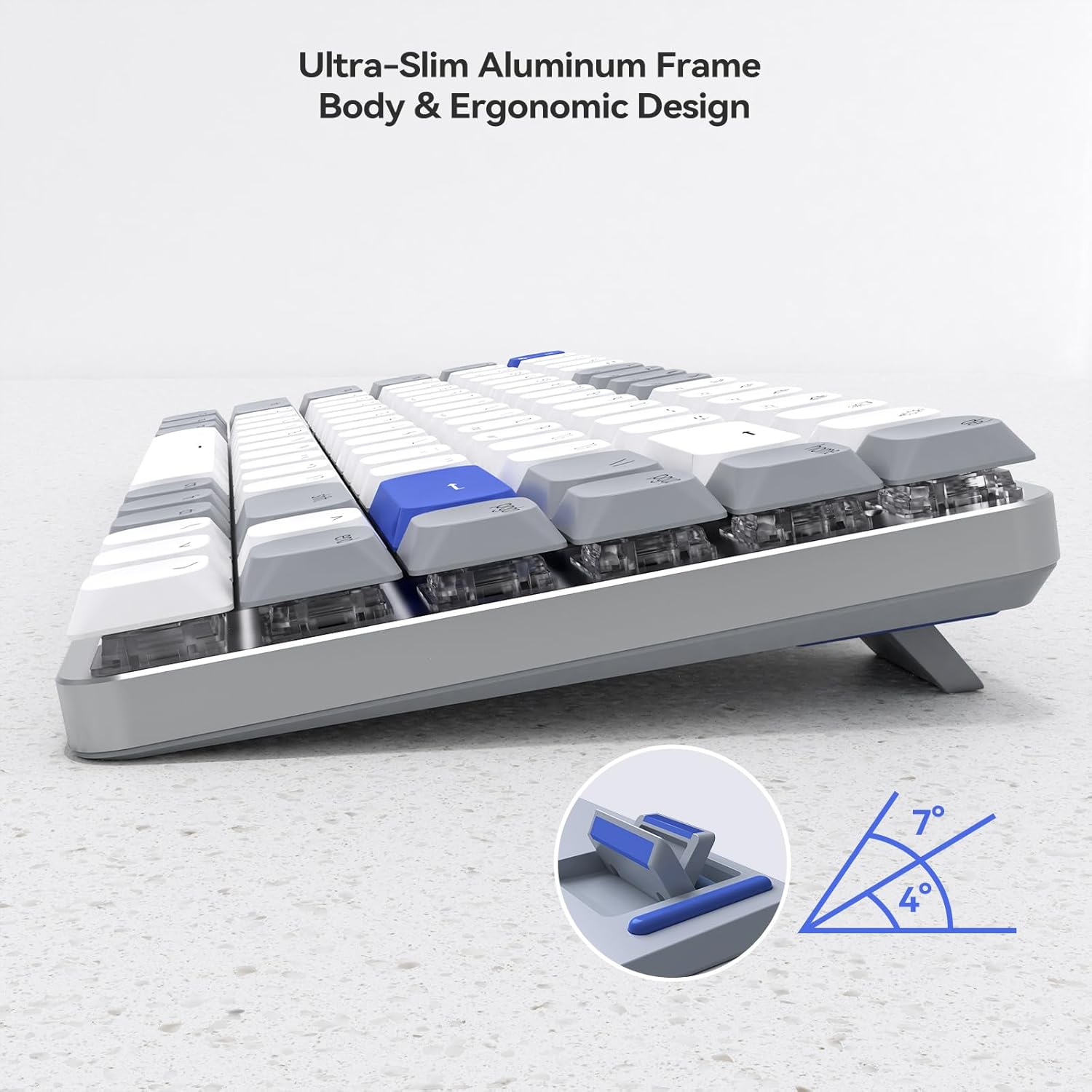
ചിത്രം 5.3: ഒരു വശം view of the AUSDOM Airkey84 keyboard, illustrating its ultra-slim aluminum frame and adjustable feet that allow for 4° and 7° ergonomic typing angles.
6. പരിപാലനം
To ensure the longevity and optimal performance of your AUSDOM Airkey84 keyboard, follow these maintenance guidelines:
- വൃത്തിയാക്കൽ: കീബോർഡിന്റെ ഉപരിതലം തുടയ്ക്കാൻ മൃദുവായതും ഉണങ്ങിയതുമായ തുണി ഉപയോഗിക്കുക. കൂടുതൽ ആഴത്തിൽ വൃത്തിയാക്കാൻ, കീക്യാപ്പുകൾക്കിടയിൽ നിന്ന് പൊടിയും അവശിഷ്ടങ്ങളും നീക്കം ചെയ്യാൻ കംപ്രസ് ചെയ്ത വായു ഉപയോഗിക്കുക. കഠിനമായ രാസവസ്തുക്കളോ ഉരച്ചിലുകളോ ഉള്ള വസ്തുക്കൾ ഉപയോഗിക്കുന്നത് ഒഴിവാക്കുക.
- സംഭരണം: ദീർഘനേരം ഉപയോഗിക്കാത്തപ്പോൾ, കീബോർഡ് നേരിട്ട് സൂര്യപ്രകാശം ഏൽക്കാത്തതും ഉയർന്ന താപനില ഏൽക്കാത്തതുമായ തണുത്തതും വരണ്ടതുമായ സ്ഥലത്ത് സൂക്ഷിക്കുക.
- ബാറ്ററി കെയർ: To preserve battery life, avoid fully discharging the keyboard frequently. Charge it when the battery indicator is low.
- ദ്രാവക എക്സ്പോഷർ: Avoid spilling liquids on the keyboard. If a spill occurs, immediately disconnect the keyboard, power it off, and allow it to dry completely before attempting to use it again.
7. പ്രശ്നപരിഹാരം
If you encounter issues with your AUSDOM Airkey84 keyboard, refer to the following troubleshooting steps:
| പ്രശ്നം | സാധ്യമായ കാരണം | പരിഹാരം |
|---|---|---|
| കീബോർഡ് ഓണാക്കുന്നില്ല | ബാറ്ററി കുറവാണ്; പവർ സ്വിച്ച് ഓഫ് | Charge the keyboard; Ensure power switch is ON. |
| ബ്ലൂടൂത്ത് വഴി ബന്ധിപ്പിക്കാൻ കഴിയില്ല | Keyboard not in pairing mode; Device Bluetooth off; Interference | Put keyboard in pairing mode (Fn+BTx); Enable Bluetooth on device; Move closer to device; Restart device. |
| 2.4GHz wireless not working | USB receiver not plugged in; Keyboard not in 2.4GHz mode; Driver issue | Ensure receiver is securely plugged in; Press Fn+3# to switch to 2.4GHz mode; Try a different USB port; Reinstall drivers if necessary. |
| Keys are unresponsive or intermittent | Low battery; Connectivity issue; Debris under keycap | Charge keyboard; Re-establish connection; Clean under keycaps with compressed air. |
| ബാക്ക്ലൈറ്റ് പ്രവർത്തിക്കുന്നില്ല അല്ലെങ്കിൽ സ്തംഭിച്ചു | ബാക്ക്ലൈറ്റ് ഓഫായി; സോഫ്റ്റ്വെയർ തകരാർ | Press Fn+\| to cycle modes; Restart keyboard. |
If the problem persists after attempting these solutions, please contact AUSDOM customer support for further assistance.
8 സ്പെസിഫിക്കേഷനുകൾ
| ഫീച്ചർ | വിശദാംശങ്ങൾ |
|---|---|
| മോഡൽ | Airkey84 |
| കണക്റ്റിവിറ്റി ടെക്നോളജി | ബ്ലൂടൂത്ത് 5.0, 2.4GHz വയർലെസ്, USB-C വയേർഡ് |
| കീ ലേഔട്ട് | 75% (84-Key) |
| സ്വിച്ച് തരം | കുറഞ്ഞ പ്രോfile ബ്രൗൺ മെക്കാനിക്കൽ സ്വിച്ചുകൾ |
| ബാക്ക്ലൈറ്റ് | White Backlight, 14 Lighting Options |
| ബാറ്ററി ശേഷി | 2000 mAh ലിഥിയം പോളിമർ (ഉൾപ്പെടുത്തിയത്) |
| ബാറ്ററി ലൈഫ് | Up to 20 hours (backlight on), approx. 3 months (backlight off) |
| അനുയോജ്യത | Mac OS, Windows |
| മെറ്റീരിയൽ | അക്രിലോണിട്രൈൽ ബ്യൂട്ടാഡീൻ സ്റ്റൈറൈൻ (എബിഎസ്) |
| ഇനത്തിൻ്റെ ഭാരം | 2.21 പൗണ്ട് |
| പാക്കേജ് അളവുകൾ | 15.43 x 5.94 x 1.57 ഇഞ്ച് |
9. വാറൻ്റിയും പിന്തുണയും
AUSDOM products are manufactured with quality and reliability in mind. For warranty information and customer support, please refer to the warranty card included with your product or visit the official AUSDOM website. When contacting support, please have your product model (Airkey84) and purchase details available.
For direct inquiries, you may visit the AUSDOM store on Amazon: AUSDOM Store


