1. ആമുഖം
Thank you for choosing the Yaheetech Under Desk Vertical File Cabinet. This versatile and stylish cabinet is designed to enhance your home or office organization with its thoughtful storage solutions, including two drawers (one lockable) and an open compartment. Its mobile design with lockable wheels offers flexibility and stability. Please read this manual carefully before assembly and use to ensure proper setup and safe operation.
2 സുരക്ഷാ വിവരങ്ങൾ
- കാബിനറ്റ് ഓവർലോഡ് ചെയ്യരുത്.
- Be cautious of pinch points when using the lockable wheels.
- Always follow the weight capacity guidelines to prevent injuries or damage.
- അസംബ്ലി സമയത്ത് എല്ലാ സ്ക്രൂകളും ഫാസ്റ്റനറുകളും സുരക്ഷിതമായി മുറുക്കിയിട്ടുണ്ടെന്ന് ഉറപ്പാക്കുക, ഇടയ്ക്കിടെ അയവ് ഉണ്ടോ എന്ന് പരിശോധിക്കുക.
- ശ്വാസംമുട്ടൽ ഉണ്ടാകുന്നത് തടയാൻ ചെറിയ ഭാഗങ്ങളും പാക്കേജിംഗ് സാമഗ്രികളും കുട്ടികളിൽ നിന്ന് അകറ്റി നിർത്തുക.
3. പാക്കേജ് ഉള്ളടക്കം
Before beginning assembly, please ensure all parts listed below are present and undamaged. If any parts are missing or damaged, please contact Yaheetech customer support.
| ഘടകം | വിവരണം |
|---|---|
| കാബിനറ്റ് പാനലുകൾ | MDF and particle board panels for the main frame, drawers, and shelves. |
| ഡ്രോയറുകൾ | Components for one small drawer and one large file ഡ്രോയർ. |
| ഹാർഡ്വെയർ കിറ്റ് | Includes screws, dowels, cam locks, drawer slides, and other fasteners. |
| ചക്രങ്ങൾ | Four smooth-rolling casters, two with built-in brakes. |
| കൈകാര്യം ചെയ്യുന്നു | Two metal handles for the drawers. |
| Lock & Keys | Locking mechanism and two keys for the top drawer. |
| File തണ്ടുകൾ | Adjustable rods for hanging A4 or letter-size file folders in the bottom drawer. |
4. അസംബ്ലി നിർദ്ദേശങ്ങൾ
Assembly of the Yaheetech File Cabinet requires patience and attention to detail. While detailed diagrams are provided in the physical instruction manual, the general steps involve:
- അൺപാക്ക് ചെയ്ത് തിരിച്ചറിയുക: Carefully unpack all components and lay them out. Identify each panel and hardware piece using the provided labels and diagrams.
- ഡ്രോയറുകൾ കൂട്ടിച്ചേർക്കുക: Construct the small and large drawers by connecting the side, front, and back panels. Install the drawer bottoms and handles. Ensure the locking mechanism is correctly installed on the top drawer.
- ഡ്രോയർ സ്ലൈഡുകൾ ഇൻസ്റ്റാൾ ചെയ്യുക: Attach the drawer slides to both the drawers and the main cabinet panels according to the instructions.
- പ്രധാന ഫ്രെയിം നിർമ്മിക്കുക: Assemble the main cabinet frame, including the top, bottom, side panels, and the open compartment shelf.
- ചക്രങ്ങൾ അറ്റാച്ചുചെയ്യുക: Securely attach the four smooth-rolling wheels to the bottom of the cabinet. Remember to install the two lockable wheels at the front for easy access to the brakes.
- ഡ്രോയറുകൾ തിരുകുക: Carefully slide the assembled drawers into their respective compartments.
- അന്തിമ പരിശോധനകൾ: Ensure all connections are tight and the cabinet is stable. Test the drawer slides, lock, and wheel brakes for smooth operation.
ഒരു വിഷ്വൽ ഓവറിനായിview of the assembled product and its features, please refer to the official product video below:
Official Product Video: Yaheetech Vertical File Cabinet with Lockable Drawer. This video demonstrates the key features and functionality of the file cabinet, including its storage compartments, lockable drawer, and mobile wheels.
5. Operating the Cabinet (Features)
- വിശാലമായ ടാബ്ലെറ്റ്: The top surface of the cabinet (16" L × 16" W) can support up to 55 lbs, ideal for a small printer, decor, or other office essentials.
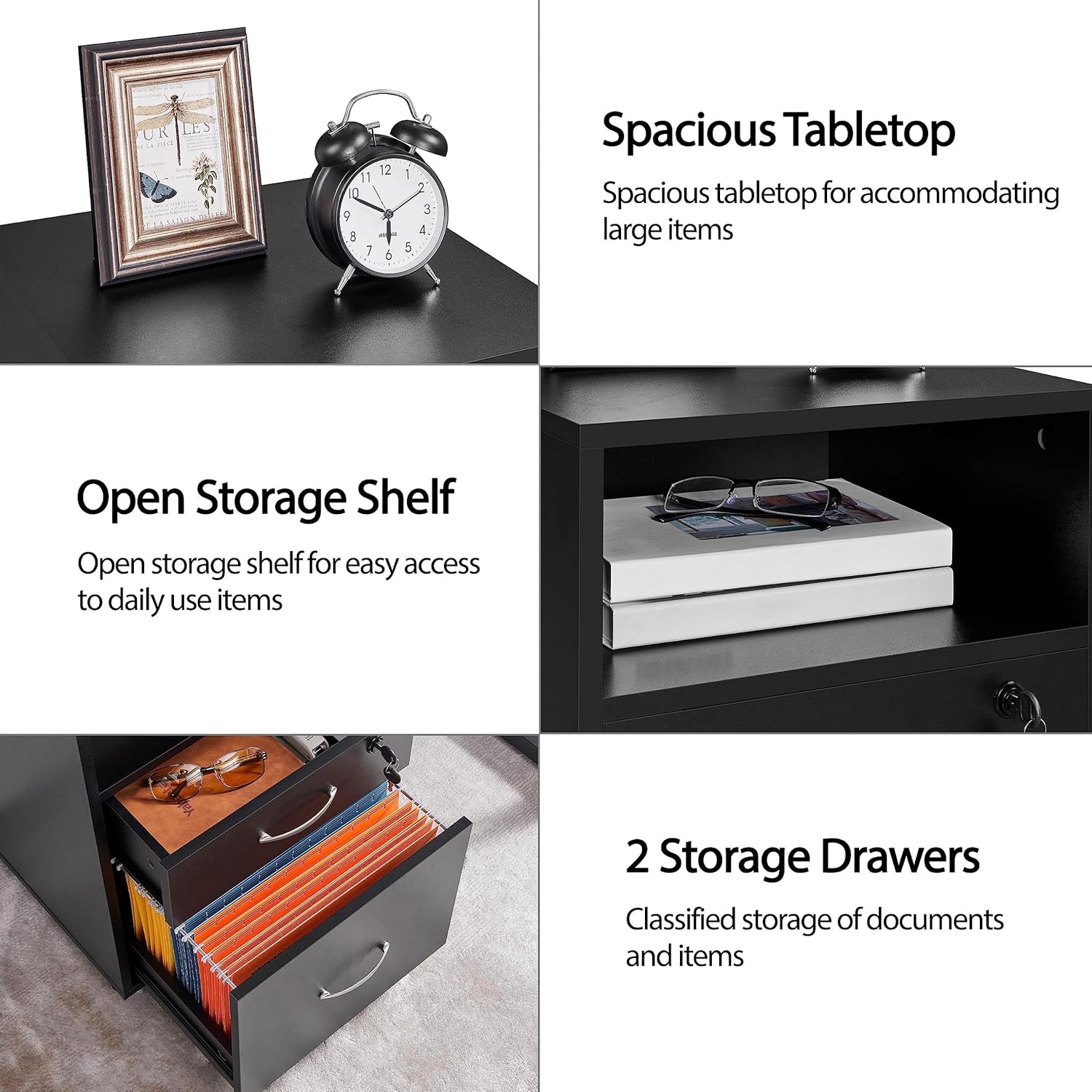
Image: Illustrates the spacious tabletop and open storage shelf.
- സ്റ്റോറേജ് ഷെൽഫ് തുറക്കുക: A convenient open compartment (15" W x 6" H) is located below the tabletop, perfect for frequently accessed items like books, notebooks, or small office supplies.
- Lockable Top Drawer: The upper drawer features a lock and comes with two keys, providing a secure space for valuables or confidential documents. This drawer has a weight capacity of 11 lbs.

ചിത്രം: വിശദമായത് view of the lockable drawer and other hardware.
- വലിയ File ഡ്രോയർ: The bottom drawer is designed for letter-size or A4 suspension filing, allowing for 100% drawer extension for easy access. It can hold up to 22 lbs.

Image: Demonstrates the adjustable file rods for different folder sizes.
- Smooth & Lockable Wheels: Equipped with four 360-degree industrial casters, the cabinet offers quiet and flexible mobility. Two front wheels include built-in brakes to keep the cabinet securely in place.

Image: Shows the lockable wheels for stability.
6. പരിപാലനം
- വൃത്തിയാക്കൽ: കാബിനറ്റ് പ്രതലങ്ങൾ മൃദുവായ, ഡി ക്ലീനർ ഉപയോഗിച്ച് തുടയ്ക്കുക.amp തുണി. ഫിനിഷിന് കേടുവരുത്തുന്ന കഠിനമായ രാസവസ്തുക്കളോ അബ്രാസീവ് ക്ലീനറുകളോ ഒഴിവാക്കുക.
- ഹാർഡ്വെയർ പരിശോധന: Periodically check all screws, bolts, and connections to ensure they remain tight. Re-tighten if necessary to maintain stability.
- ഡ്രോയർ സ്ലൈഡുകൾ: If drawers become stiff, apply a small amount of silicone lubricant to the drawer slides.
- വീൽ കെയർ: സുഗമമായ ചലനം ഉറപ്പാക്കാൻ ചക്രങ്ങളിൽ അവശിഷ്ടങ്ങൾ വീഴാതെ സൂക്ഷിക്കുക.
7. പ്രശ്നപരിഹാരം
- ഡ്രോയറുകൾ സുഗമമായി സ്ലൈഡുചെയ്യുന്നില്ല: Check that the drawer slides are correctly installed and aligned. Ensure no debris is obstructing the slides. Lubricate if needed.
- Cabinet wobbles: Verify that all assembly hardware is securely tightened. Ensure the cabinet is placed on a flat, level surface. Use the wheel locks if on an uneven surface.
- Lock not working: Ensure the key is fully inserted and turned correctly. Check for any obstructions preventing the lock mechanism from engaging.
8 സ്പെസിഫിക്കേഷനുകൾ
| ആട്രിബ്യൂട്ട് | വിശദാംശങ്ങൾ |
|---|---|
| നിറം | കറുപ്പ് |
| മെറ്റീരിയലുകൾ | MDF, Particle Board |
| മൊത്തത്തിലുള്ള അളവുകൾ | 16″ L × 16″ W × 26″ H |
| Max Weight Capacity (Total) | 110 പൗണ്ട് |
| Max Weight Capacity (Top Board) | 55 പൗണ്ട് |
| Max Weight Capacity (Open Shelf) | 22 പൗണ്ട് |
| Max Weight Capacity (Top Drawer) | 11 പൗണ്ട് |
| Max Weight Capacity (Bottom Drawer) | 22 പൗണ്ട് |
| മൊത്തം ഭാരം | 35 പൗണ്ട് |
| പ്രത്യേക സവിശേഷതകൾ | ലോക്ക് ചെയ്യാവുന്നത്, വീൽഡ് |

Image: Detailed dimensions and weight capacities.

ചിത്രം: മുൻഭാഗം view of the Yaheetech File കാബിനറ്റ്.
9. വാറൻ്റിയും പിന്തുണയും
For warranty information and customer support, please refer to the documentation included with your purchase or visit the official Yaheetech webസൈറ്റ്. നിങ്ങൾ ഉൽപ്പന്നം വാങ്ങിയ പ്ലാറ്റ്ഫോം വഴി വിൽപ്പനക്കാരനെ നേരിട്ട് ബന്ധപ്പെടാനും കഴിയും.
കൂടുതൽ ഉൽപ്പന്നങ്ങൾക്കും വിവരങ്ങൾക്കും, സന്ദർശിക്കുക യാഹീടെക് സ്ടോര്.


