ആമുഖം
Thank you for choosing the Lecoo MCS30 Wireless Portable Speaker. This device is designed to provide high-quality audio and voice amplification with versatile connectivity options. Please read this manual carefully before using the product to ensure proper operation and to maximize its lifespan.
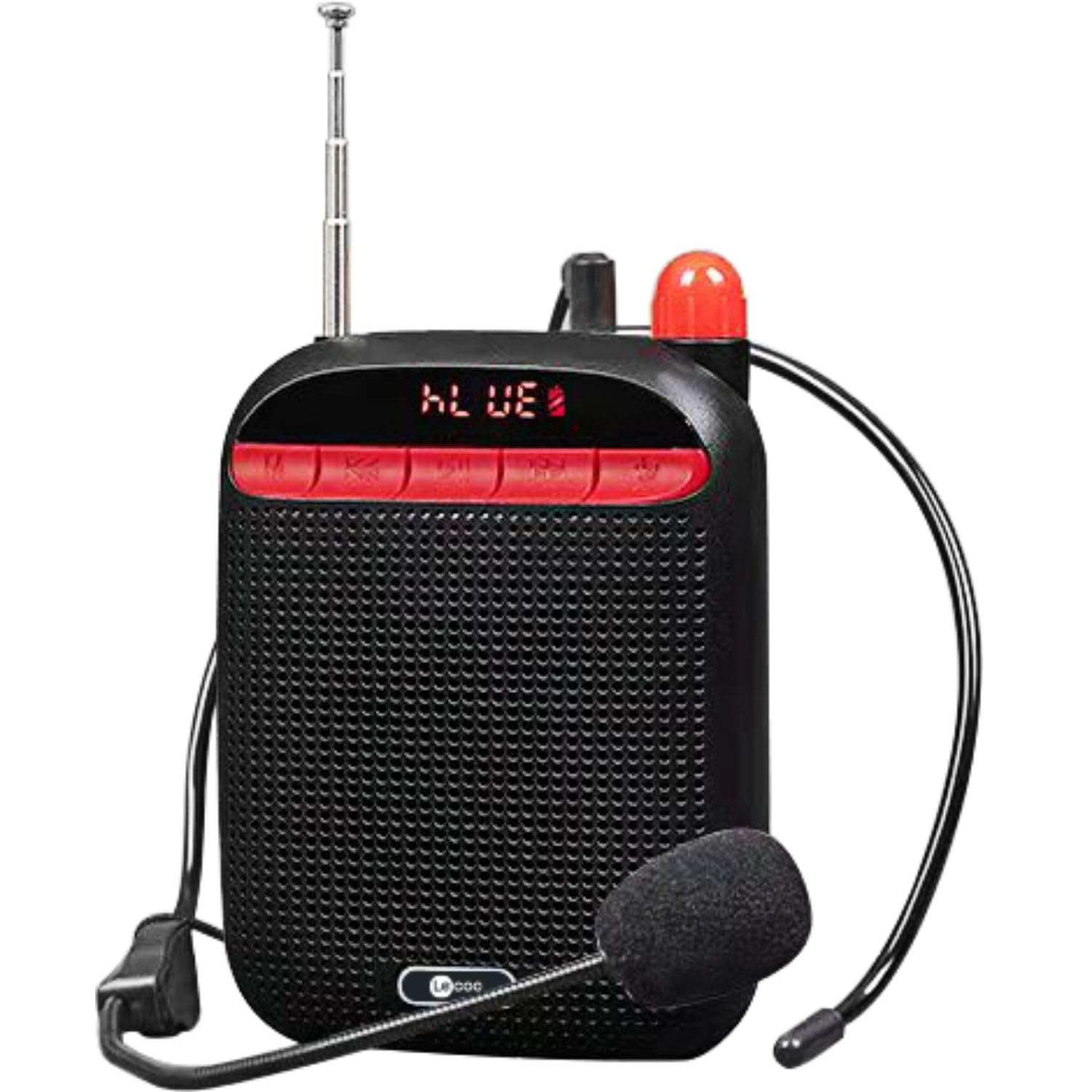
Image: Two Lecoo MCS30 portable speakers, one white and one black, shown with their respective wired headset microphones. Both speakers feature an extendable antenna and front-facing controls.
ഉൽപ്പന്നം കഴിഞ്ഞുview
The Lecoo MCS30 is a compact and powerful portable speaker featuring multiple input options and dual microphone support for amplification and recording. Familiarize yourself with the device's components and controls.
ഫ്രണ്ട് പാനൽ നിയന്ത്രണങ്ങളും ഡിസ്പ്ലേയും

ചിത്രം: ക്ലോസ്-അപ്പ് ഫ്രണ്ട് view of the black Lecoo MCS30 speaker, highlighting the digital display and the red control buttons for mode selection, track navigation, and microphone functions.
- ഡിസ്പ്ലേ സ്ക്രീൻ: നിലവിലെ മോഡ്, ട്രാക്ക് വിവരങ്ങൾ, ബാറ്ററി നില എന്നിവ കാണിക്കുന്നു.
- മോഡ് (എം) ബട്ടൺ: Switches between Bluetooth, USB, AUX, and SD card modes.
- മുൻഭാഗം/ശബ്ദം കുറയ്ക്കൽ ബട്ടൺ: മുമ്പത്തെ ട്രാക്കിനായി ഹ്രസ്വമായി അമർത്തുക, ശബ്ദം കുറയ്ക്കാൻ ദീർഘനേരം അമർത്തുക.
- പ്ലേ/താൽക്കാലികമായി നിർത്തുക ബട്ടൺ: ഓഡിയോ പ്ലേ ചെയ്യുകയോ താൽക്കാലികമായി നിർത്തുകയോ ചെയ്യുന്നു.
- അടുത്തത്/വോളിയം അപ്പ് ബട്ടൺ: അടുത്ത ട്രാക്കിനായി ഷോർട്ട് പ്രസ്സ് ചെയ്യുക, വോളിയം കൂട്ടാൻ ദീർഘനേരം അമർത്തുക.
- മൈക്രോഫോൺ ബട്ടൺ: Activates/deactivates microphone functions.
Side and Rear Connections

ചിത്രം: മുകളിൽ നിന്ന് താഴേക്ക് view of the Lecoo MCS30 speaker, revealing the USB port, TF (SD card) slot, AUX input, and microphone input ports.
- MIC ഇൻപുട്ട്: For connecting external microphones (headset or lapel).
- USB പോർട്ട്: യുഎസ്ബി ഫ്ലാഷ് ഡ്രൈവ് പ്ലേബാക്കിനായി.
- ടിഎഫ് കാർഡ് സ്ലോട്ട്: SD കാർഡ് പ്ലേബാക്കിനായി.
- AUX ഇൻപുട്ട്: 3.5mm കേബിൾ വഴി ബാഹ്യ ഓഡിയോ ഉപകരണങ്ങൾ ബന്ധിപ്പിക്കുന്നതിന്.
- DC 5V ചാർജിംഗ് പോർട്ട്: ഉപകരണം ചാർജ് ചെയ്യുന്നതിനായി.
- വൈദ്യുതി സ്വിച്ച്: ഓൺ/ഓഫ് ടോഗിൾ ചെയ്യുക.
- ആൻ്റിന: Extendable antenna for improved signal reception (if applicable for radio functions).
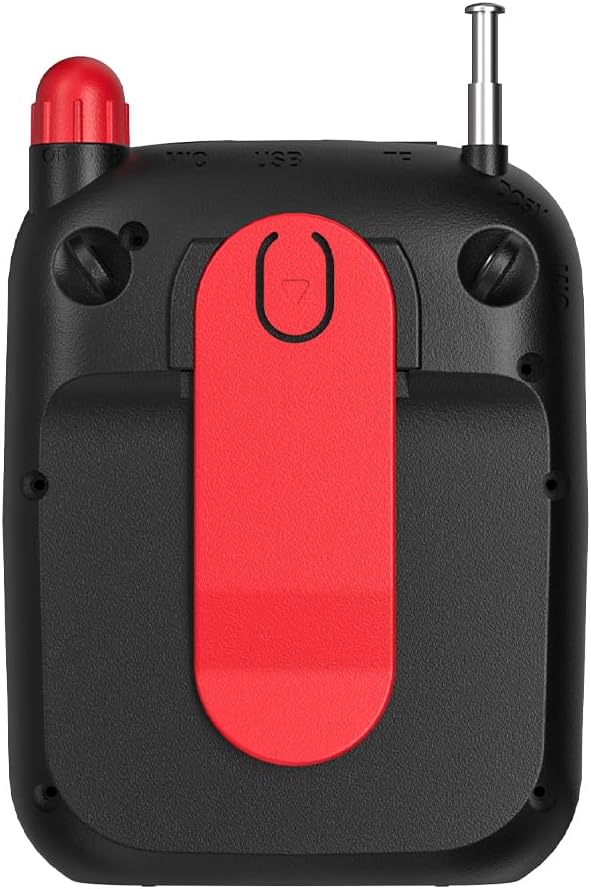
ചിത്രം: പിൻഭാഗം view of the Lecoo MCS30 speaker, clearly showing the integrated red belt clip for portable use.
- ബെൽറ്റ് ക്ലിപ്പ്: For attaching the speaker to clothing or a belt for hands-free use.
സജ്ജമാക്കുക
1. സ്പീക്കറിൽ നിന്ന് നിരക്ക് ഈടാക്കുന്നു
- Connect the charging cable to the DC 5V port on the speaker.
- കേബിളിന്റെ മറ്റേ അറ്റം ഒരു USB പവർ അഡാപ്റ്ററുമായി (ഉൾപ്പെടുത്തിയിട്ടില്ല) അല്ലെങ്കിൽ ഒരു കമ്പ്യൂട്ടറിന്റെ USB പോർട്ടുമായി ബന്ധിപ്പിക്കുക.
- The display will indicate charging status. A full charge typically takes 3-4 hours.
- Disconnect the charger once fully charged to preserve battery life.
2. പവർ ഓൺ/ഓഫ്
- To power on, slide the power switch to the 'ON' position. The display will light up.
- പവർ ഓഫ് ചെയ്യാൻ, പവർ സ്വിച്ച് 'ഓഫ്' സ്ഥാനത്തേക്ക് സ്ലൈഡ് ചെയ്യുക.
3. പ്രാരംഭ ബ്ലൂടൂത്ത് ജോടിയാക്കൽ
- Ensure the speaker is powered on and in Bluetooth mode (the display will show 'BLUE' or a Bluetooth icon). If not, press the 'M' (Mode) button to switch.
- നിങ്ങളുടെ മൊബൈൽ ഉപകരണത്തിൽ (സ്മാർട്ട്ഫോൺ, ടാബ്ലെറ്റ്, ലാപ്ടോപ്പ്), ബ്ലൂടൂത്ത് പ്രവർത്തനക്ഷമമാക്കി ലഭ്യമായ ഉപകരണങ്ങൾക്കായി തിരയുക.
- Select 'Lecoo MCS30' from the list of found devices.
- Once paired, the speaker will emit a confirmation sound, and the display will indicate a successful connection.
പ്രവർത്തന നിർദ്ദേശങ്ങൾ
1. ബ്ലൂടൂത്ത് പ്ലേബാക്ക്
- After successful pairing, open your music player on your connected device and start playback.
- Use the speaker's 'Previous/Volume Down' and 'Next/Volume Up' buttons for track navigation (short press) and volume adjustment (long press).
- Use the 'Play/Pause' button to control playback.
2. യുഎസ്ബി/എസ്ഡി കാർഡ് പ്ലേബാക്ക്
- USB പോർട്ടിലേക്ക് ഒരു USB ഫ്ലാഷ് ഡ്രൈവ് അല്ലെങ്കിൽ TF കാർഡ് സ്ലോട്ടിലേക്ക് ഒരു SD കാർഡ് ചേർക്കുക.
- The speaker will automatically switch to USB or SD card mode and begin playing MP3 files. If not, press the 'M' (Mode) button to select the correct mode.
- Use the speaker's control buttons for track navigation and volume adjustment.
3. AUX Input Playback
- 3.5mm ഓഡിയോ കേബിളിന്റെ ഒരു അറ്റം (ഉൾപ്പെടുത്തിയിട്ടില്ല) സ്പീക്കറിലെ AUX ഇൻപുട്ട് പോർട്ടുമായി ബന്ധിപ്പിക്കുക.
- നിങ്ങളുടെ ഓഡിയോ ഉപകരണത്തിന്റെ ഹെഡ്ഫോൺ ജാക്കിലേക്ക് മറ്റേ അറ്റം ബന്ധിപ്പിക്കുക.
- Press the 'M' (Mode) button until the speaker enters AUX mode.
- Start playback from your audio device. Volume can be controlled via both the speaker and the connected device.
4. Microphone Usage and Voice Recording
- Connect the headset microphone or a lapel microphone to the MIC input port.
- Press the 'Microphone' button to activate the amplification function. Your voice will be ampസ്പീക്കറിലൂടെ പറഞ്ഞു.
- To record your voice, ensure a USB flash drive or SD card is inserted. Press and hold the 'Microphone' button (or follow specific instructions if a dedicated record button exists, otherwise assume long press). The speaker will indicate recording has started.
- Press the 'Microphone' button again to stop recording. Recorded files are saved to the USB drive or SD card.
5. വോളിയം നിയന്ത്രണം
- Long press the 'Next/Volume Up' button to increase the volume.
- Long press the 'Previous/Volume Down' button to decrease the volume.
മെയിൻ്റനൻസ്
വൃത്തിയാക്കൽ
- Wipe the speaker's surface with a soft, dry cloth.
- അബ്രാസീവ് ക്ലീനറുകൾ, ആൽക്കഹോൾ, കെമിക്കൽ ലായകങ്ങൾ എന്നിവ ഉപയോഗിക്കരുത്, കാരണം ഇവ ഫിനിഷിന് കേടുവരുത്തും.
- ഏതെങ്കിലും ദ്വാരങ്ങളിലോ ദ്വാരങ്ങളിലോ ഈർപ്പം കയറുന്നത് ഒഴിവാക്കുക.
സംഭരണം
- നേരിട്ടുള്ള സൂര്യപ്രകാശത്തിൽ നിന്നും കടുത്ത താപനിലയിൽ നിന്നും മാറി തണുത്തതും വരണ്ടതുമായ സ്ഥലത്ത് സ്പീക്കർ സൂക്ഷിക്കുക.
- ദീർഘനേരം സൂക്ഷിക്കുകയാണെങ്കിൽ, ബാറ്ററിയുടെ ആരോഗ്യം നിലനിർത്താൻ ഇടയ്ക്കിടെ (ഉദാഹരണത്തിന്, ഓരോ 3 മാസത്തിലും) ബാറ്ററി ചാർജ് ചെയ്യുക.
ട്രബിൾഷൂട്ടിംഗ്
- ശക്തിയില്ല:
Ensure the speaker is fully charged. Check the power switch is in the 'ON' position. - ശബ്ദമില്ല:
Check the volume level on both the speaker and the connected device. Ensure the correct input mode (Bluetooth, USB, AUX, SD) is selected. Verify cables are securely connected for AUX input. - ബ്ലൂടൂത്ത് കണക്റ്റുചെയ്യുന്നില്ല:
Ensure the speaker is in Bluetooth pairing mode. Turn off and on Bluetooth on your device. Move the speaker closer to your device. Clear previous Bluetooth connections on your device and try pairing again. - മൈക്രോഫോൺ പ്രവർത്തിക്കുന്നില്ല:
Ensure the microphone is securely plugged into the MIC input. Press the 'Microphone' button to activate it. Check the microphone's own power source if it has one. - Recording Not Working:
Ensure a compatible USB flash drive or SD card is inserted and has sufficient free space. Check if the recording function is properly activated (refer to 'Microphone Usage and Voice Recording' section).
സ്പെസിഫിക്കേഷനുകൾ
| ഫീച്ചർ | വിവരണം |
|---|---|
| ബ്രാൻഡ് | ലെക്കൂ |
| മോഡൽ | MCS30 |
| കണക്റ്റിവിറ്റി ടെക്നോളജി | Bluetooth 5.3, USB, AUX, SD Card |
| ഔട്ട്പുട്ട് പവർ | 5W |
| ഫ്രീക്വൻസി റേഞ്ച് | 100Hz-20KHz |
| അനുയോജ്യമായ ഉപകരണങ്ങൾ | Smartphone, Laptop, Karaoke Machine, MP3 Player, Tablet |
| മൈക്രോഫോൺ പിന്തുണ | Dual Microphone (Headset/Lapel) with Amplification and Recording |
| ഓഡിയോ ഫോർമാറ്റ് പിന്തുണ | MP3 |
| നിറം | കറുപ്പ് |
വാറൻ്റിയും പിന്തുണയും
The Lecoo MCS30 Portable Speaker comes with a Lecoo Turkey Warranty. For warranty claims or technical support, please refer to the warranty card included with your product or visit the official Lecoo webസൈറ്റ്.
സന്ദർശിക്കുന്നതിലൂടെ നിങ്ങൾക്ക് കൂടുതൽ വിവരങ്ങളും പിന്തുണയും കണ്ടെത്താൻ കഴിയും Lecoo Store on Amazon.


