ഉൽപ്പന്നം കഴിഞ്ഞുview
The CHERRY MX Black Clear TOP Switch Kit provides 23 mechanical keyboard switches designed for DIY, hot-swap, or gaming keyboards. These switches are linear, offering a direct and powerful keystroke without an audible click. Manufactured with high-quality German engineering, they are built for durability and precise performance.

Image: The CHERRY MX Black Clear TOP Switch Kit, showing the packaging and the 23 individual switches.
പ്രധാന സവിശേഷതകളിൽ ഇവ ഉൾപ്പെടുന്നു:
- Linear Switching: Provides a smooth, consistent keystroke without a tactile bump or audible click.
- Optimal Operating Force: Features a 63.5 cN operating force for a balanced feel.
- നീണ്ടുനിൽക്കുന്ന നിർമ്മാണം: Equipped with CHERRY gold crosspoint contacts, ensuring resistance to dirt and dust, and a lifespan of over 50 million keystrokes.
- ജർമ്മൻ എഞ്ചിനീയറിംഗ്: Developed and manufactured in Germany, guaranteeing high quality and precision.
- സൗകര്യപ്രദമായ പാക്കേജിംഗ്: Switches are securely packaged in a pure cardboard box to prevent pin bending and reduce waste.
സജ്ജീകരണവും ഇൻസ്റ്റാളേഷനും
This kit is designed for users who wish to customize or repair mechanical keyboards, particularly those with hot-swappable sockets. Ensure your keyboard is compatible with 3-pin or 5-pin MX-style switches before proceeding.
ഇൻസ്റ്റലേഷൻ ഘട്ടങ്ങൾ:
- തയ്യാറാക്കൽ: Power off your keyboard and disconnect it from your computer. If replacing existing switches, carefully remove the keycaps using a keycap puller.
- Switch Removal (for replacement): For hot-swappable keyboards, use a switch puller tool to gently unclip and remove the old switches. For soldered keyboards, desoldering will be required (professional installation recommended).
- Inspect New Switches: Before installation, carefully inspect each CHERRY MX Black Clear TOP switch for any bent pins. If a pin is slightly bent, you can gently straighten it with fine-nose pliers.
- പുതിയ സ്വിച്ചുകൾ ചേർക്കുക: Align the pins of the new switch with the holes on the keyboard's PCB (Printed Circuit Board). Apply gentle, even pressure until the switch clicks into place. Ensure the switch is fully seated and flush with the plate.
- ടെസ്റ്റ് പ്രവർത്തനം: Reconnect your keyboard and test each newly installed switch to ensure it registers correctly.
- Reattach Keycaps: Once all switches are installed and tested, reattach the keycaps.

Image: A CHERRY MX switch being inserted into a mechanical keyboard, demonstrating the installation process for hot-swappable keyboards.

ചിത്രം: ഒരു ക്ലോസ്-അപ്പ് view of a hand pressing a CHERRY MX switch into a keyboard plate, illustrating the final step of switch installation.
പ്രവർത്തന സവിശേഷതകൾ
The CHERRY MX Black Clear TOP switches are characterized by their linear actuation, meaning the force required to press the key remains consistent throughout the keystroke. There is no tactile bump or audible click, providing a smooth and quiet typing or gaming experience.
- സ്വിച്ച് തരം: ലീനിയർ
- പ്രവർത്തന സേന: 63.5 cN (centinewtons)
- Pre Travel: 2.0 mm (distance to actuation point)
- ആകെ യാത്ര: 4.0 mm (total distance key can be pressed)
- സൗണ്ട് പ്രോfile: Silent (no click)

Image: A user's hand typing on a mechanical keyboard, demonstrating typical use of the switches.
These characteristics make the MX Black Clear TOP switches suitable for users who prefer a direct and consistent feel, often favored in gaming for rapid, repeated key presses, or for typing environments where quiet operation is desired.
പരിപാലനവും പരിചരണവും
CHERRY MX switches are designed for long-term durability. With proper care, your switches will maintain their performance over millions of keystrokes.
പൊതുവായ പരിപാലന നുറുങ്ങുകൾ:
- പൊടിയും അവശിഷ്ടങ്ങളും: Regularly clean your keyboard to prevent dust and debris from accumulating around and inside the switches. Use compressed air to blow out particles.
- കീക്യാപ്പ് ക്ലീനിംഗ്: Periodically remove keycaps and clean them with a mild soap solution and water. Ensure they are completely dry before reattaching.
- Switch Longevity: The CHERRY gold crosspoint contacts are resistant to dirt and dust, contributing to the switches' impressive lifespan of over 50 million keystrokes without loss of quality.
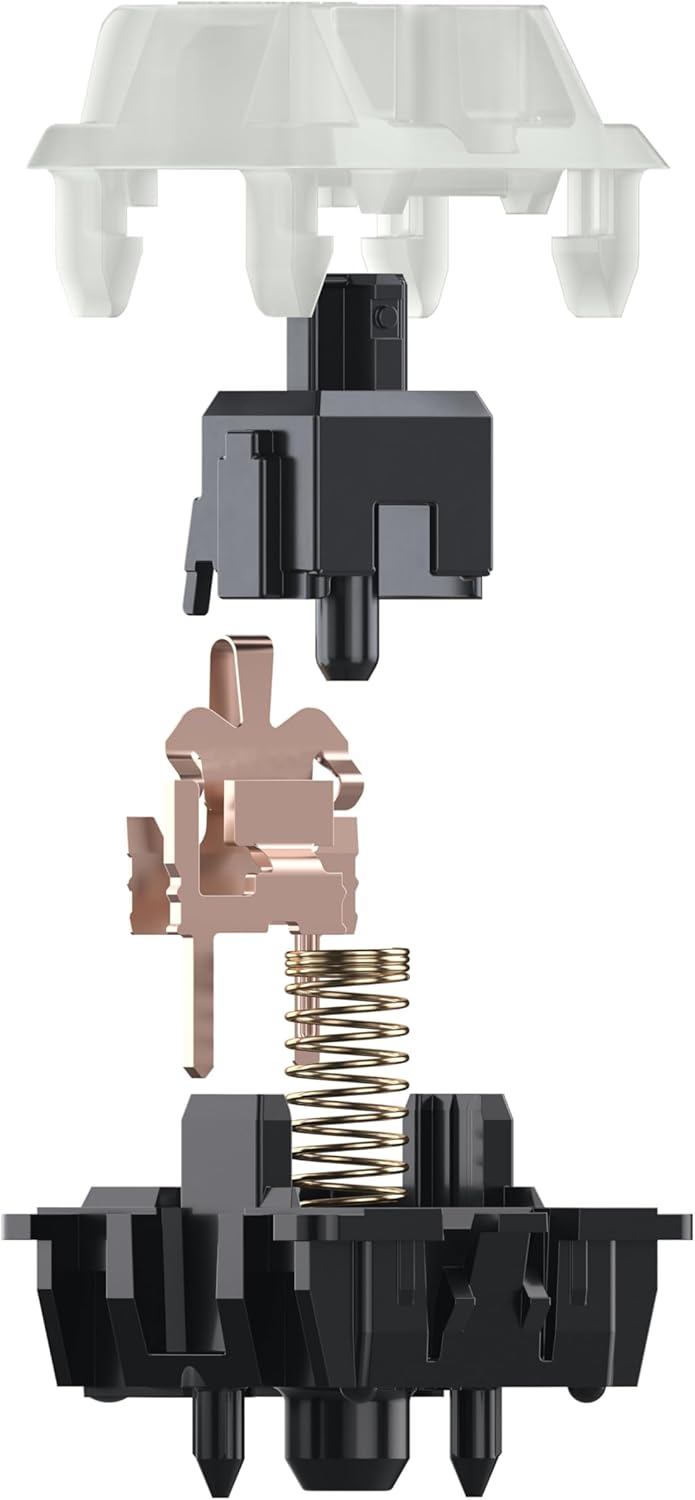
Image: An exploded diagram of a CHERRY MX switch, highlighting the durable internal components like the gold crosspoint contacts and spring.
ട്രബിൾഷൂട്ടിംഗ്
While CHERRY MX switches are highly reliable, occasional issues may arise. Here are some common troubleshooting steps:
- സ്വിച്ച് രജിസ്റ്റർ ചെയ്യുന്നില്ല:
- Ensure the switch is fully seated in its socket. Gently press down on the switch to confirm it's flush with the keyboard plate.
- If using a hot-swappable keyboard, carefully remove the switch and inspect its pins for any bends or damage. Straighten bent pins if possible, or replace the switch if damaged.
- Clean the switch socket and the switch pins with compressed air to remove any debris.
- Bent Pins Upon Arrival:
Although switches are securely packaged, minor pin bends can sometimes occur during shipping. If you receive switches with bent pins, gently straighten them using fine-nose pliers. Be careful not to apply excessive force, as this can break the pin.
- Inconsistent Keystrokes:
- This could indicate dust or debris inside the switch. Try cleaning the switch with compressed air.
- Ensure the keycap is properly seated and not interfering with the switch stem.
If issues persist after attempting these steps, please refer to the manufacturer's support resources or consult a qualified technician.
സ്പെസിഫിക്കേഷനുകൾ
| ഫീച്ചർ | വിശദാംശങ്ങൾ |
|---|---|
| ബ്രാൻഡ് | ചെറി |
| മോഡൽ നമ്പർ | CHERRY MX BLACK CLEAR TOP SWITCH KIT |
| സ്വിച്ച് തരം | ലീനിയർ |
| ഓപ്പറേറ്റിംഗ് ഫോഴ്സ് | 63.5 സിഎൻ |
| യാത്രയ്ക്ക് മുമ്പുള്ള യാത്ര | 2.0 മി.മീ |
| മൊത്തം യാത്ര | 4.0 മി.മീ |
| സൗണ്ട് പ്രോfile | Silent (no click) |
| ഈട് | >50 million keystrokes |
| ബന്ധങ്ങൾ | CHERRY gold crosspoint |
| നിറം | MX BLACK CLEAR TOP |
| ഇനത്തിൻ്റെ ഭാരം | 3.17 ഔൺസ് |
| പാക്കേജ് അളവുകൾ | 8.39 x 4.65 x 1.42 ഇഞ്ച് |
| മാതൃരാജ്യം | ജർമ്മനി |
| അനുയോജ്യമായ ഉപകരണങ്ങൾ | Laptop (and other compatible mechanical keyboards) |
| കണക്റ്റിവിറ്റി ടെക്നോളജി | USB-C (for compatible keyboards) |
| പ്രത്യേക ഫീച്ചർ | Hot-Swappable (for compatible keyboards) |

Image: Detailed dimensions of a single CHERRY MX mechanical switch, showing its height and width.
വാറൻ്റിയും പിന്തുണയും
CHERRY products are manufactured to high standards of quality and reliability. For specific warranty information and support, please refer to the official CHERRY webസൈറ്റ് അല്ലെങ്കിൽ അവരുടെ ഉപഭോക്തൃ സേവനവുമായി നേരിട്ട് ബന്ധപ്പെടുക.
While a specific warranty period for the switches is not detailed here, the product is designed for over 50 million keystrokes, indicating exceptional durability.
For further assistance, you may visit the official Cherry store or support page:
Visit the Official CHERRY Store on Amazon
നിർമ്മാതാവ്: ചെറി യൂറോപ്പ് GmbH
മാതൃരാജ്യം: ജർമ്മനി
ഔദ്യോഗിക ഉൽപ്പന്ന വീഡിയോകൾ
ഈ മാനുവലിൽ ഉൾപ്പെടുത്തുന്നതിന് വിൽപ്പനക്കാരനിൽ നിന്നുള്ള ഔദ്യോഗിക ഉൽപ്പന്ന വീഡിയോകളൊന്നും ലഭ്യമല്ല.


