1. ആമുഖവും അവസാനവുംview
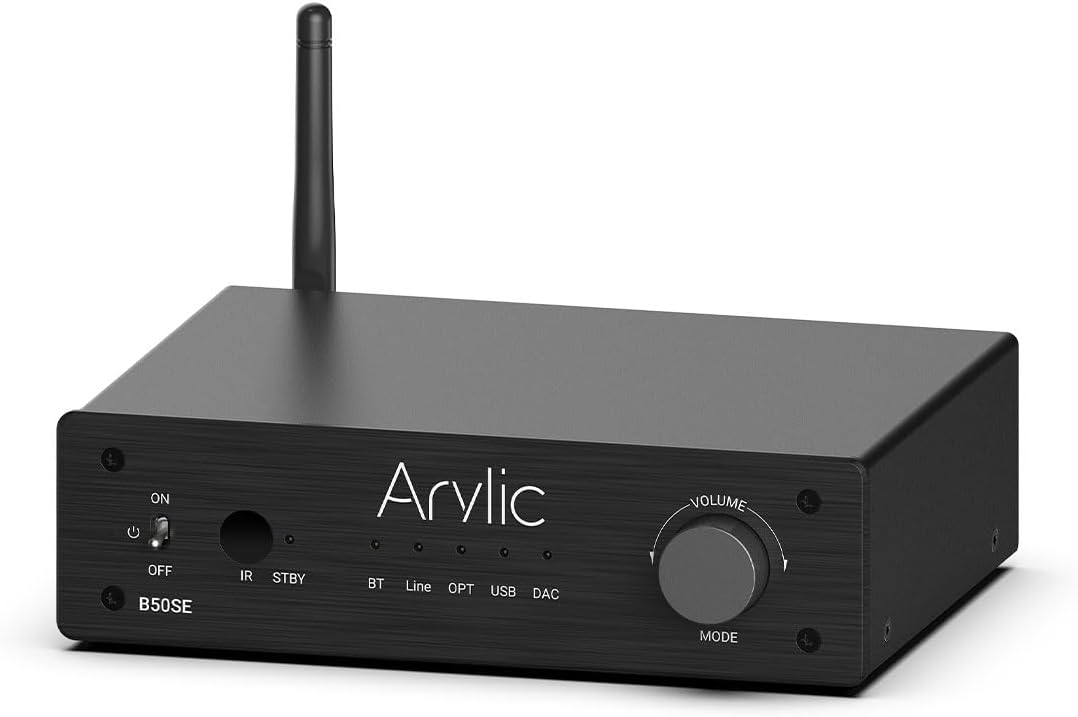
The Arylic B50 SE is a versatile Bluetooth 5.1 stereo audio amplifier designed for home audio systems. It delivers 50W x 2 powerful output, supporting 2.1 channel configurations with a dedicated subwoofer output. Featuring the TPA3116D2 chip, it ensures stable and high-quality audio transmission with long-range Bluetooth connectivity. Control is made easy through the intuitive Go Control APP and integrated EQ settings, providing an enhanced listening experience for various audio sources.
2. ഉൽപ്പന്ന സവിശേഷതകൾ
- ശക്തമായ ഔട്ട്പുട്ട്: Delivers 50W x 2 stereo output, suitable for various home speakers.
- 2.1 Channel Support: Includes a dedicated subwoofer output for building a 2.1 home cinema system.
- അഡ്വാൻസ്ഡ് ബ്ലൂടൂത്ത് 5.1: Ensures stable, long-range (up to 10 meters) wireless audio streaming with low latency.
- TPA3116D2 Chip: Utilizes the TPA3116D2 amplifier chip for high efficiency, stable performance, and built-in overheat, overcurrent, and short-circuit protection.
- ഒന്നിലധികം ഓഡിയോ ഇൻപുട്ടുകൾ: Supports Bluetooth, Line-in (RCA), Optical, and USB DAC inputs for versatile connectivity.
- Go Control APP: Intuitive mobile application for comprehensive control, including input selection, volume adjustment, EQ customization, and USB song list management.
- Easy Control EQ: Offers preset and customizable equalizer settings via the app or remote control for optimized sound.

3. പാക്കേജ് ഉള്ളടക്കം
എല്ലാ ഇനങ്ങളും ഉണ്ടെന്നും നല്ല നിലയിലാണെന്നും ഉറപ്പാക്കാൻ ദയവായി പാക്കേജ് ശ്രദ്ധാപൂർവ്വം പരിശോധിക്കുക:
- Arylic B50 SE Bluetooth Ampജീവപര്യന്തം
- പവർ അഡാപ്റ്റർ
- റിമോട്ട് കൺട്രോൾ
- ബ്ലൂടൂത്ത് ആൻ്റിന
- ഉപയോക്തൃ മാനുവൽ (ഈ പ്രമാണം)
4. ഉൽപ്പന്ന ലേഔട്ടും നിയന്ത്രണങ്ങളും
4.1 ഫ്രണ്ട് പാനൽ
- ഓൺ/ഓഫ് സ്വിച്ച്: ടോഗിൾ ചെയ്യുന്നു ampലൈഫയർ ശക്തി.
- IR: റിമോട്ട് കൺട്രോളിനുള്ള ഇൻഫ്രാറെഡ് റിസീവർ.
- STBY: Standby indicator light.
- BT/Line/OPT/USB/DAC Indicators: Lights indicating the currently selected input mode.
- Volume/MODE Knob: Rotates to adjust volume; press to cycle through input modes.
4.2 പിൻ പാനൽ
- DC ഇൻപുട്ട്: Power connection port.
- Speaker (L/R): Terminals for connecting passive left and right speakers.
- SW ഔട്ട്: ഒരു സജീവ സബ് വൂഫർ ബന്ധിപ്പിക്കുന്നതിനുള്ള RCA ഔട്ട്പുട്ട്.
- ലൈൻ ഇൻ (ആർസിഎ): RCA input for connecting analog audio sources.
- ഒപ്റ്റിക്കൽ: Optical (Toslink) input for connecting digital audio sources.
- USB: USB-A port for connecting USB storage devices for music playback.
- DAC: USB-B port for connecting to a computer as a USB DAC.
- പുന et സജ്ജമാക്കുക: Button to reset the device. Press twice in Bluetooth Receiver mode to disconnect all Bluetooth connections. Press and hold to perform a factory reset.
- ബിടി: Antenna connector for Bluetooth.

5. സജ്ജീകരണവും കണക്ഷനുകളും
Follow these steps to set up your Arylic B50 SE ampജീവപര്യന്തം:
- സ്പീക്കറുകൾ ബന്ധിപ്പിക്കുക: Connect your passive stereo speakers to the L (Left) and R (Right) speaker terminals on the rear panel. Ensure correct polarity (+ to + and - to -).
- സബ്വൂഫർ ബന്ധിപ്പിക്കുക (ഓപ്ഷണൽ): If using an active subwoofer, connect its input to the 'SW Out' RCA port on the ampജീവൻ.
- ഓഡിയോ ഉറവിടങ്ങൾ ബന്ധിപ്പിക്കുക:
- ലൈൻ-ഇൻ: Use an RCA cable to connect your analog audio source (e.g., CD player, turntable with pre-amp) to the 'Line In' RCA ports.
- ഒപ്റ്റിക്കൽ: Use an optical (Toslink) cable to connect digital audio sources (e.g., TV, game console) to the 'Optical In' port.
- USB DAC: Connect your computer to the 'DAC' USB-B port using a USB cable.
- യുഎസ്ബി ഡിസ്ക്: Insert a USB storage device (flash drive) into the 'USB' USB-A port for direct music playback.
- Connect Bluetooth Antenna: Screw the provided Bluetooth antenna into the 'BT' connector on the rear panel.
- പവർ ബന്ധിപ്പിക്കുക: Plug the power adapter into the 'DC Input' port on the amplifier, then plug the adapter into a wall outlet.
- പവർ ഓൺ: Flip the ON/OFF switch on the front panel to the 'ON' position.


6. പ്രവർത്തന നിർദ്ദേശങ്ങൾ
6.1 ഇൻപുട്ട് തിരഞ്ഞെടുക്കൽ
അമർത്തുക Volume/MODE knob on the front panel to cycle through the available input modes: Bluetooth (BT), Line-in (Line), Optical (OPT), USB, and DAC. The corresponding indicator light will illuminate.
6.2 വോളിയം നിയന്ത്രണം
തിരിക്കുക Volume/MODE knob clockwise to increase volume and counter-clockwise to decrease volume. Volume can also be controlled via the remote control or the Go Control APP.
6.3 വിദൂര നിയന്ത്രണ പ്രവർത്തനങ്ങൾ
ഉൾപ്പെടുത്തിയിരിക്കുന്ന റിമോട്ട് കൺട്രോൾ വിവിധ ഫംഗ്ഷനുകളിലേക്ക് സൗകര്യപ്രദമായ ആക്സസ് നൽകുന്നു:
- പവർ ഓൺ/ഓഫ്
- ഇൻപുട്ട് തിരഞ്ഞെടുക്കൽ: Dedicated buttons for Phono In, Line In, Optical In, ARC, BT RX.
- Basic Playback Controls: Play/Pause, Next/Previous Track.
- വോളിയം കൂട്ടുക/താഴ്ത്തുക
- EQ പ്രീസെറ്റുകൾ: Buttons for Flat, Classic, Pop, Jazz, Rock, Vocal.
- ട്രെബിൾ/ബാസ് നിയന്ത്രണം: Adjust treble and bass levels.

7. ബ്ലൂടൂത്ത് ജോടിയാക്കൽ
To connect your Bluetooth device to the Arylic B50 SE:
- ഉറപ്പാക്കുക amplifier is powered on and the input mode is set to ബ്ലൂടൂത്ത് (ബിടി). The BT indicator light will blink, indicating it's in pairing mode.
- On your mobile device (smartphone, tablet, laptop), go to Bluetooth settings and search for available devices.
- തിരഞ്ഞെടുക്കുക "Arylic B50 SE" ഉപകരണങ്ങളുടെ പട്ടികയിൽ നിന്ന്.
- Once connected, the BT indicator light on the amplifier will become solid. You can now stream audio wirelessly.
The Arylic B50 SE features Bluetooth 5.1 for a stable connection and supports long-distance transmission, typically over 10 meters (33 feet), allowing for flexible placement within your home.

8. Go Control APP
The Go Control APP provides advanced control and customization options for your Arylic B50 SE ampജീവൻ.
8.1 ആപ്പ് ഡൗൺലോഡ് ചെയ്യുന്നു
Download the "Go Control" app from your device's app store (Google Play Store for Android, Apple App Store for iOS).
8.2 ആപ്പ് ഫീച്ചറുകൾ
- ബ്ലൂടൂത്ത് നിയന്ത്രണം: Manage Bluetooth connections and playback directly from the app.
- Customize Theme: Personalize the app's appearance with different color schemes.
- EQ ഇഷ്ടാനുസൃതമാക്കുക: Adjust sound settings with a graphic equalizer or select from preset EQ modes (Flat, Classical, Pop, Jazz, Rock).
- USB Stick Song List: Browse and select songs directly from a connected USB storage device.
- ഫേംവെയർ അപ്ഡേറ്റുകൾ: Check for and install the latest firmware for your ampജീവൻ.

9. USB പ്ലേബാക്ക്
The Arylic B50 SE supports direct music playback from a USB storage device.
- Insert a USB flash drive containing your music files into the 'USB' port on the rear panel.
- മാറുക amplifier's input mode to USB.
- Use the Go Control APP to browse your music library and select tracks for playback. The app allows you to filter and manage playlists.

10. ഒപ്റ്റിക്കൽ ഇൻപുട്ട്
For high-fidelity digital audio, connect your source device using the optical input.
- Connect an optical (Toslink) cable from your source device (e.g., TV, Blu-ray player, game console) to the 'Optical In' port on the ampജീവൻ.
- മാറുക amplifier's input mode to OPT.
- Ensure your source device's audio output is set to PCM/Stereo, as the amplifier may not support Dolby Digital or DTS formats.

11. പ്രശ്നപരിഹാരം
| പ്രശ്നം | സാധ്യമായ കാരണം | പരിഹാരം |
|---|---|---|
| ശക്തിയില്ല | പവർ അഡാപ്റ്റർ ബന്ധിപ്പിച്ചിട്ടില്ല അല്ലെങ്കിൽ തകരാറുണ്ട്. | Ensure power adapter is securely connected to the amplifier and a working power outlet. Check the power switch. |
| ശബ്ദമില്ല | Incorrect input selected; volume too low; speaker connections loose; faulty audio cable. | Verify the correct input mode is selected. Increase volume. Check all speaker and audio cable connections. Test with a different audio source or cable. |
| Bluetooth connection unstable or drops | ഉപകരണം വളരെ അകലെയാണ് amplifier; interference; multiple devices trying to connect. | Move Bluetooth device closer to the amplifier. Avoid placing amplifier near other wireless devices. Disconnect other Bluetooth devices. Try resetting Bluetooth on both devices. |
| Go Control APP cannot connect | Bluetooth not enabled on phone; app permissions; amplifier not in Bluetooth mode. | Ensure Bluetooth is enabled on your phone and the amplifier is in BT mode. Grant necessary permissions to the app. Restart the app and ampജീവൻ. |
| റിമോട്ട് കൺട്രോൾ പ്രവർത്തിക്കുന്നില്ല | Batteries low/dead; IR receiver blocked; remote not pointed correctly. | Replace batteries. Ensure no obstructions between remote and amplifier's IR receiver. Point remote directly at the ampജീവൻ. |
12 സ്പെസിഫിക്കേഷനുകൾ
| ഫീച്ചർ | സ്പെസിഫിക്കേഷൻ |
|---|---|
| ഔട്ട്പുട്ട് പവർ | 50W 2 |
| ചാനലുകൾ | 2.1 ചാനൽ |
| ബ്ലൂടൂത്ത് പതിപ്പ് | 5.1 |
| ഇൻപുട്ടുകൾ | Bluetooth, Line-in (RCA), Optical, USB DAC, USB Disk |
| ഔട്ട്പുട്ടുകൾ | Speaker L/R, Subwoofer Out |
| Ampലൈഫയർ ചിപ്പ് | TPA3116D2 |
| അളവുകൾ (L x W x H) | 14.53 x 9.13 x 2.64 ഇഞ്ച് |
| ഇനത്തിൻ്റെ ഭാരം | 3.61 പൗണ്ട് |
| നിയന്ത്രണ രീതികൾ | Front Panel Knob, Remote Control, Go Control APP (Android, iOS) |
13 സുരക്ഷാ വിവരങ്ങൾ
Please read and follow these safety guidelines to ensure safe operation and prolong the life of your device:
- ഈ ഉപകരണം മഴയിലോ ഈർപ്പത്തിലോ തുറന്നുകാട്ടരുത്.
- പാത്രങ്ങൾ പോലുള്ള ദ്രാവകങ്ങൾ നിറച്ച വസ്തുക്കൾ ഉപകരണത്തിൽ വയ്ക്കരുത്.
- ശരിയായ വായുസഞ്ചാരം ഉറപ്പാക്കുക. വായുസഞ്ചാര ദ്വാരങ്ങളൊന്നും തടയരുത്.
- റേഡിയറുകൾ, ഹീറ്റ് രജിസ്റ്ററുകൾ, സ്റ്റൗകൾ, അല്ലെങ്കിൽ മറ്റ് ഉപകരണങ്ങൾ (ഉൾപ്പെടെ) പോലെയുള്ള താപ സ്രോതസ്സുകൾക്ക് സമീപം ഇൻസ്റ്റാൾ ചെയ്യരുത്. ampലൈഫയറുകൾ) ചൂട് ഉത്പാദിപ്പിക്കുന്നത്.
- നിർമ്മാതാവ് വ്യക്തമാക്കിയ അറ്റാച്ച്മെൻ്റുകൾ/ആക്സസറികൾ മാത്രം ഉപയോഗിക്കുക.
- മിന്നൽ കൊടുങ്കാറ്റുകളുടെ സമയത്തോ ദീർഘനേരം ഉപയോഗിക്കാത്ത സമയത്തോ ഈ ഉപകരണം അൺപ്ലഗ് ചെയ്യുക.
- എല്ലാ സേവനങ്ങളും യോഗ്യതയുള്ള സേവന ഉദ്യോഗസ്ഥർക്ക് റഫർ ചെയ്യുക. പവർ സപ്ലൈ കോർഡ് അല്ലെങ്കിൽ പ്ലഗ് കേടാകുക, ദ്രാവകം ഒഴുകുകയോ ഉപകരണങ്ങൾ ഉപകരണത്തിലേക്ക് വീഴുകയോ ചെയ്യുക, ഉപകരണം മഴയോ ഈർപ്പമോ സമ്പർക്കം പുലർത്തുക, സാധാരണയായി പ്രവർത്തിക്കാത്തത് എന്നിങ്ങനെയുള്ള ഏതെങ്കിലും വിധത്തിൽ ഉപകരണത്തിന് കേടുപാടുകൾ സംഭവിക്കുമ്പോൾ സേവനം ആവശ്യമാണ്. , അല്ലെങ്കിൽ ഉപേക്ഷിച്ചു.
14. വാറൻ്റിയും പിന്തുണയും
Arylic products are designed and manufactured to the highest quality standards. This product is covered by a limited warranty from the date of purchase. For detailed warranty terms and conditions, please refer to the warranty card included with your product or visit the official Arylic webസൈറ്റ്.
For technical support, troubleshooting assistance, or service inquiries, please contact Arylic customer support through their official website or the contact information provided in your product packaging. You may also find additional resources and FAQs on the Arylic support page.
A comprehensive Instructions for Use (IFU) document is also available in PDF format for further details: PDF ഉപയോക്തൃ ഗൈഡ് ഡൗൺലോഡ് ചെയ്യുക


