ആമുഖം
This manual provides essential information for the safe and efficient operation of your TECNO Pova 5 Pro 5G smartphone. Please read it thoroughly before using your device to ensure optimal performance and longevity.

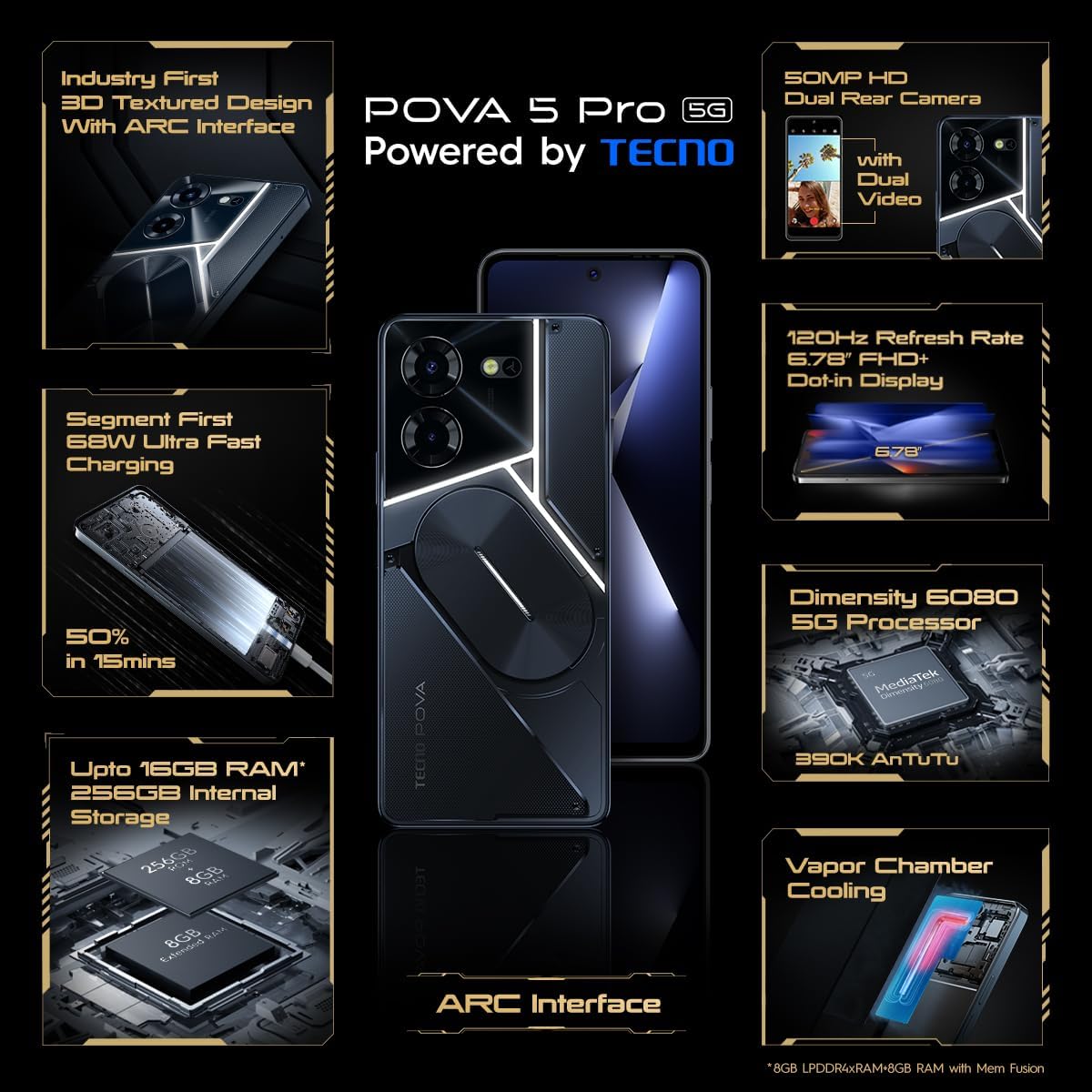
Image: The TECNO Pova 5 Pro 5G smartphone, showcasing its design and key feature of 68W Ultra Fast Charging.
ബോക്സിൽ എന്താണുള്ളത്
പാക്കേജിംഗിൽ എല്ലാ ഇനങ്ങളും ഉണ്ടെന്ന് ഉറപ്പാക്കുക:
- സ്മാർട്ട്ഫോൺ
- 68 W പവർ അഡാപ്റ്റർ
- ടൈപ്പ്-സി കേബിൾ
- TPU Cover
- സിം എജക്ടർ ഉപകരണം

Image: A flat lay of the TECNO Pova 5 Pro 5G packaging contents, showing the smartphone, 68W power adapter, USB-C cable, TPU protective cover, and the SIM ejector tool.
സജ്ജമാക്കുക
പ്രാരംഭ സജ്ജീകരണം
- Insert SIM/SD Card: Locate the SIM tray on the side of the device. Use the provided SIM ejector tool to open the tray. Insert your Nano-SIM card(s) and/or microSD card into the designated slots. Ensure the tray is fully reinserted.
- പവർ ഓൺ: Press and hold the Power button (located on the right side) until the TECNO logo appears.
- ഓൺ-സ്ക്രീൻ നിർദ്ദേശങ്ങൾ പിന്തുടരുക: The device will guide you through initial setup, including language selection, Wi-Fi connection, Google account setup, and security settings.
ഉപകരണം ചാർജ് ചെയ്യുന്നു
The TECNO Pova 5 Pro 5G supports 68W Ultra Fast Charging.
- Connect the Type-C cable to the charging port at the bottom of the phone.
- കേബിളിന്റെ മറ്റേ അറ്റം 68W പവർ അഡാപ്റ്ററുമായി ബന്ധിപ്പിക്കുക.
- ഒരു മതിൽ ഔട്ട്ലെറ്റിലേക്ക് പവർ അഡാപ്റ്റർ പ്ലഗ് ചെയ്യുക.
- A full charge typically takes approximately 45 minutes, with 50% charge achievable in about 15 minutes.
ചിത്രം: വ്യക്തമായ ഒരു മുൻഭാഗം view of the TECNO Pova 5 Pro 5G smartphone, highlighting its display and front camera.
ഉപകരണം പ്രവർത്തിപ്പിക്കുന്നു
അടിസ്ഥാന നാവിഗേഷൻ
- ടച്ച് സ്ക്രീൻ: തിരഞ്ഞെടുക്കാൻ ടാപ്പ് ചെയ്യുക, സ്ക്രോൾ ചെയ്യാൻ സ്വൈപ്പ് ചെയ്യുക, സൂം ചെയ്യാൻ പിഞ്ച് ചെയ്യുക.
- പവർ ബട്ടൺ: സ്ക്രീൻ ഉണർത്താൻ/നിദ്രയിലാക്കാൻ അമർത്തുക. പവർ ഓഫ് ചെയ്യാനോ പുനരാരംഭിക്കാനോ അമർത്തിപ്പിടിക്കുക.
- വോളിയം ബട്ടണുകൾ: Adjust media volume, call volume, or ringtone volume.
ക്യാമറ ഉപയോഗം
The device features a 50MP AI Dual Rear Camera and a 16MP Selfie Camera.
- ഹോം സ്ക്രീനിൽ നിന്നോ ആപ്പ് ഡ്രോയറിൽ നിന്നോ ക്യാമറ ആപ്പ് തുറക്കുക.
- ആവശ്യമുള്ള മോഡ് തിരഞ്ഞെടുക്കുക (ഫോട്ടോ, വീഡിയോ, പോർട്രെയ്റ്റ്, മുതലായവ).
- ഫോട്ടോകൾ എടുക്കാൻ ഷട്ടർ ബട്ടൺ ടാപ്പ് ചെയ്യുക അല്ലെങ്കിൽ വീഡിയോ റെക്കോർഡിംഗ് ആരംഭിക്കുക/നിർത്തുക.
- Utilize AI enhancements for optimized scene recognition and image quality.
ARC Interface and Notifications
The TECNO Pova 5 Pro 5G features a unique multi-color ARC interface with backlighting.
- The ARC interface provides customizable light effects for notifications, incoming calls, gaming, and music playback.
- Access settings to personalize the light patterns and colors for different alerts.

ചിത്രം: പിൻഭാഗം view of the TECNO Pova 5 Pro 5G, showcasing its distinctive 3D textured design and the illuminated ARC interface.

ചിത്രം: വിശദമായ ഒരു ചിത്രം view of the TECNO Pova 5 Pro 5G's ARC interface, illustrating the multi-color backlighting feature.
മെയിൻ്റനൻസ്
- ബാറ്ററി കെയർ: To prolong battery life, avoid exposing the device to extreme temperatures. Do not fully discharge the battery regularly.
- വൃത്തിയാക്കൽ: സ്ക്രീനും ബോഡിയും വൃത്തിയാക്കാൻ മൃദുവായ, ലിന്റ് രഹിത തുണി ഉപയോഗിക്കുക. കഠിനമായ രാസവസ്തുക്കളോ ഉരച്ചിലുകളോ ഉള്ള വസ്തുക്കൾ ഉപയോഗിക്കുന്നത് ഒഴിവാക്കുക.
- സോഫ്റ്റ്വെയർ അപ്ഡേറ്റുകൾ: Regularly check for and install system updates to ensure optimal performance, security, and access to new features. Navigate to Settings > System > System update.
- സ്റ്റോറേജ് മാനേജ്മെന്റ്: അനാവശ്യമായത് ഇടയ്ക്കിടെ നീക്കം ചെയ്യുക fileമതിയായ സംഭരണ സ്ഥലവും ഉപകരണ വേഗതയും നിലനിർത്താൻ.
ട്രബിൾഷൂട്ടിംഗ്
- ഉപകരണം പവർ ചെയ്യുന്നില്ല: Ensure the battery is charged. Connect the device to the charger for at least 15 minutes before attempting to power on again. If the issue persists, perform a forced restart by holding the Power button for 10-15 seconds.
- ചാർജിംഗ് പ്രശ്നങ്ങൾ: Verify that the charging cable and adapter are securely connected and undamaged. Try using a different outlet.
- ആപ്പ് ക്രാഷിംഗ്/ഫ്രീസിംഗ്: പ്രശ്നമുള്ള ആപ്പ് അടച്ച് വീണ്ടും തുറക്കുക. പ്രശ്നം തുടരുകയാണെങ്കിൽ, ക്രമീകരണങ്ങൾ > ആപ്പുകൾ എന്നതിൽ ആപ്പിന്റെ കാഷെയും ഡാറ്റയും മായ്ക്കുക. അവസാന ആശ്രയമെന്ന നിലയിൽ, ആപ്പ് അൺഇൻസ്റ്റാൾ ചെയ്ത് വീണ്ടും ഇൻസ്റ്റാൾ ചെയ്യുക.
- മോശം നെറ്റ്വർക്ക് കണക്റ്റിവിറ്റി: Check if Airplane Mode is off. Restart the device. If using mobile data, ensure your SIM card is properly inserted and your data plan is active.
- അമിത ചൂടാക്കൽ: Avoid using the device in direct sunlight or during intensive tasks for extended periods. Close background applications.
സ്പെസിഫിക്കേഷനുകൾ
| ഫീച്ചർ | സ്പെസിഫിക്കേഷൻ |
|---|---|
| മോഡലിൻ്റെ പേര് | Pova 5 Pro 5G |
| ഓപ്പറേറ്റിംഗ് സിസ്റ്റം | ആൻഡ്രോയിഡ് 13.0 |
| പ്രോസസ്സർ | Dimensity 6080 (2.4 GHz Octa-Core) |
| റാം | 8 GB (expandable up to 16 GB with Memory Fusion) |
| ആന്തരിക സംഭരണം | 256 GB (UMCP) |
| പ്രദർശിപ്പിക്കുക | 6.78-inch FHD+ Dot-in Display |
| പുതുക്കിയ നിരക്ക് | 120 Hz |
| പിൻ ക്യാമറ | 50 MP AI Dual Camera |
| മുൻ ക്യാമറ | 16 MP Selfie Camera |
| ബാറ്ററി | 5000 mAh ലിഥിയം-പോളിമർ |
| ചാർജിംഗ് | 68W Ultra Fast Charging |
| അളവുകൾ | 16.9 x 7.7 x 16.9 സെ.മീ |
| ഭാരം | 214 ഗ്രാം |
| കണക്റ്റിവിറ്റി | 5G (10 bands supported), NFC, Bluetooth 5.1 |

Image: An internal diagram or view of the TECNO Pova 5 Pro 5G, illustrating its vapor chamber cooling system for efficient heat dissipation.
വാറൻ്റിയും പിന്തുണയും
Your TECNO Pova 5 Pro 5G comes with a manufacturer's warranty. Please refer to the warranty card included in your product packaging for specific terms and conditions.
For technical support, service, or warranty claims, please contact TECNO customer service. TECNO maintains a large service network with over 1200 service centers in India.
You can find more information and support resources by visiting the official Tecno store on Amazon: Tecno Store


